
A customer places an order, reaches the confirmation screen, and then notices the missing piece. They want a phone case with the device they just bought, a different size, or a shipping address corrected before the parcel leaves the warehouse. Your support team sees the message, your fulfillment team checks the order state, and a simple request starts moving between departments.
That moment is where a Shopify post-purchase upsell can do more than add a product. It can help the customer finish the order correctly, avoid a cancellation, and resolve a common service request without a new checkout. The best setup treats selling and support as connected workflows.
This guide starts with the basic Shopify checkout sequence, then moves through offer types, targeting, customer-account editing, operational safeguards, and measurement. You'll learn how instant offers work, when the order status page matters, and how a merchant can build a controlled path for additions, corrections, and cancellation deflection. For a plain-language introduction to the core concept, see this guide to what a post-purchase upsell is.
Success doesn't mean showing every buyer another product. It means presenting a relevant option at a safe moment, keeping the original order intact, and giving customers a self-serve way to fix details before those details become tickets, returns, or reshipments.
Table of Contents
- Introduction to Shopify Post Purchase Upsell
- What Shopify Post Purchase Upsell Means and How It Works
- Comparing Ways to Offer Post Purchase Upsells on Shopify
- Targeting and Experience Principles That Drive Acceptance
- How to Implement Post Purchase Upsells Without Breaking Operations
- Measuring Performance and Business Outcomes
- Common Pitfalls and Your Next Steps to Launch
Introduction to Shopify Post Purchase Upsell
The valuable moment after payment
The customer has already made the difficult decision. They've chosen your product, entered payment details, and accepted the order. A relevant follow-up offer can feel less like another sales pitch and more like a final checklist item, especially when it complements what they've just purchased.
For example, someone buys a coffee machine and immediately sees an offer for compatible filters. Someone orders a jacket and realizes they need a different size before dispatch. Someone notices an old address and wants to correct it while the order is still editable. These requests share a timing advantage: the customer is engaged, but the original purchase has already been completed.
A traditional upsell appears before payment and can interrupt the path to conversion. A post-purchase offer appears after payment confirmation, so declining it doesn't put the original order at risk. Accepting it can add an item to the existing order without asking the customer to rebuild a cart.
Operational principle: The post-purchase screen should help the buyer complete the order they intended, not pressure them into a second buying journey.
From popup to account workflow
The familiar version is a one-click offer between payment and the Thank you page. That placement remains useful for immediate, product-specific recommendations. Shopify's current checkout architecture also supports a broader model, with contextual actions on the Order status page and in customer accounts.
That distinction matters for operations teams. Customers may return to tracking information, update an address, correct a variant, or ask to add something after the first offer is gone. An account-based experience gives them a place to act without starting a new order or sending an email to support.
The rest of the process should answer four practical questions:
- What should you offer? Choose an item that makes sense with the purchased product or the customer's requested change.
- Who should see it? Apply rules based on products, collections, customer details, destination, order value, and fulfillment state.
- How can the order change safely? Use Shopify-compatible extensions, permission controls, edit windows, approval rules, and fulfillment protection.
- What counts as success? Track added revenue alongside corrected orders, avoided tickets, recovered cancellations, and prevented returns.
A strong implementation joins growth and service. The customer gets a more complete order, the warehouse receives accurate information, and your team spends less time handling changes that could have been self-serve.
What Shopify Post Purchase Upsell Means and How It Works
A post-purchase upsell sits in a specific place in the Shopify timeline. The customer pays, Shopify confirms the payment, the post-purchase page can appear, and the Thank you page follows. Shopify documents this as a native post-purchase extension surface, rather than a product block inserted into a theme.
The flow is easier to understand in four steps:
- Payment is confirmed. The original order exists, so the customer doesn't need to decide whether to complete the first purchase.
- The offer appears. The message might recommend an accessory, a compatible product, a bundle, or another relevant add-on.
- The customer accepts or declines. Acceptance can use the payment information already associated with the order, subject to Shopify's eligibility and payment requirements.
- The order moves forward. If the customer accepts, the additional item is associated with the existing purchase. If they decline, the original order continues.
Shopify explains that fulfillment is held while a post-purchase cross-sell flow is active, then released when the customer reaches the Order status page or the timeout expires. Think of the order as a package sitting at a shipping dock. The warehouse has the label, but the dock worker waits briefly because the customer may add a small item to the same shipment. Once the offer ends, the warehouse can proceed with the final order state.
The two surfaces merchants should understand
The post-purchase page is immediate and time-sensitive. It's ideal when the offer depends directly on the product just purchased, such as a compatible accessory or a useful consumable.
The Order status page is more durable. Shopify's customer account documentation describes contextual extensions on account and order surfaces, allowing merchants to support actions after the immediate confirmation moment. A customer can return through an account or tracking link and see an offer connected to the order's current state.
That creates a difference between a one-time prompt and an ongoing service surface. The first asks, “Would you like this now?” The second can ask, “Is there anything you need to correct or add before fulfillment?”
For merchants testing the immediate experience, Otter A/B ecommerce testing provides useful context on experimenting with the post-purchase journey. The testing question shouldn't only be which headline wins. It should also be whether the offer improves the order without creating downstream work.
Comparing Ways to Offer Post Purchase Upsells on Shopify
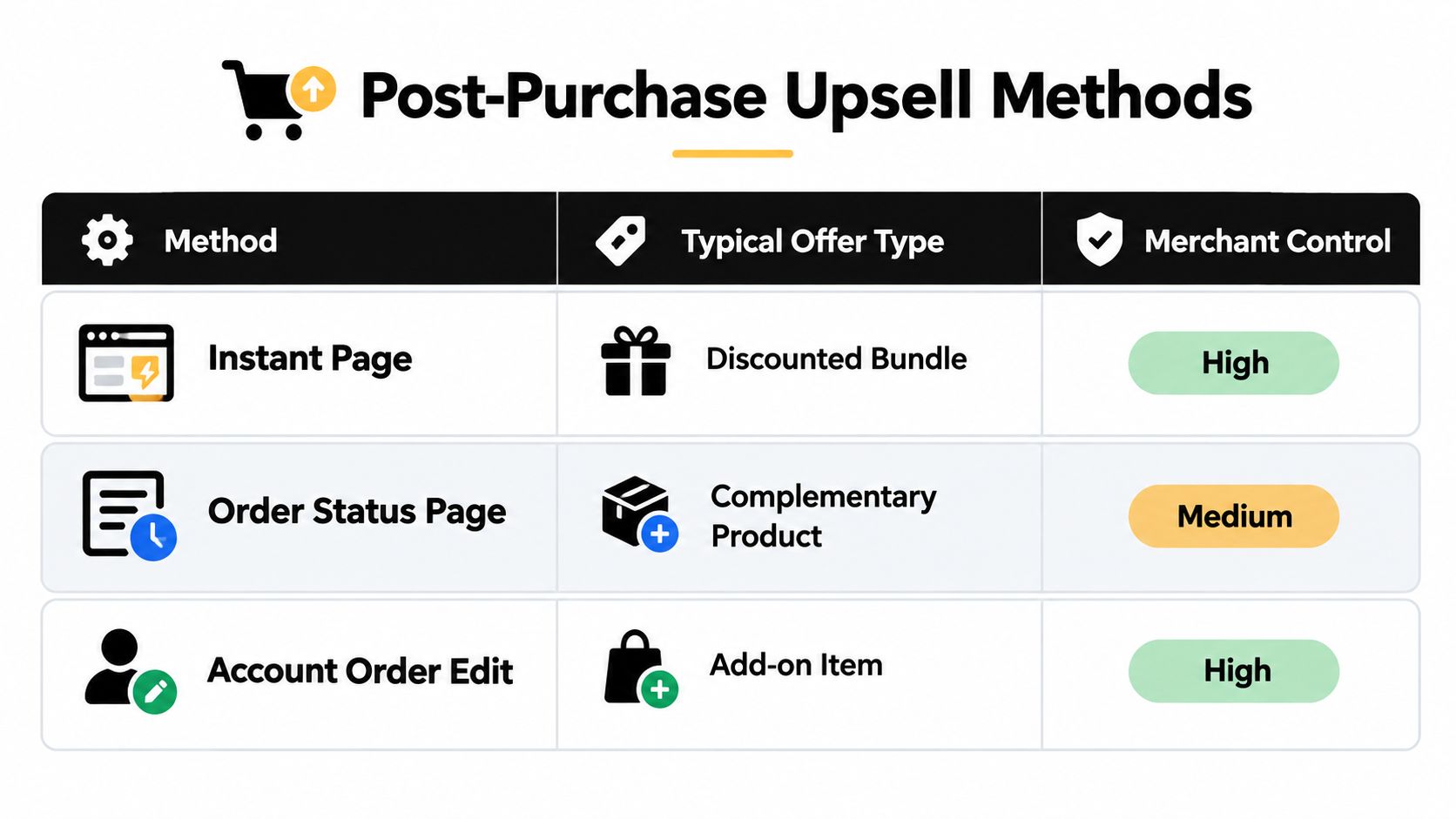
Shopify merchants generally choose among three surfaces. Each serves a different operational purpose, and treating them as interchangeable creates poor expectations.
The instant post-purchase page reaches the customer at the strongest moment of attention. It offers high control over the message and can support a focused, one-click recommendation. Its limitation is timing. Once the customer leaves the flow, that particular prompt is gone.
The Order status page and customer account provide a reusable location. Customers already visit these surfaces to check tracking, review order details, or manage account information. An offer there can remain relevant beyond the first confirmation, provided eligibility rules prevent it from appearing after fulfillment or another state where changes are unsafe.
The in-account order edit connects the offer to a customer action. A buyer changing a shirt variant might see a related item. A buyer correcting a delivery address might be reminded about an accessory that can still ship with the order. This approach feels service-led because the recommendation appears while the customer is already solving a real problem.
Choosing the surface by business goal
| Surface | Best For | Revisitability | Fulfillment Handling |
|---|---|---|---|
| Instant post-purchase page | Immediate complementary offer | Limited to the active flow | Shopify can hold fulfillment during the offer flow |
| Order status page | Contextual recommendations and post-purchase actions | Customers can return through account or tracking access | Rules should account for fulfillment state |
| Account order edit | Add-ons connected to changes, corrections, or cancellation intent | Available within the configured edit window | Edit permissions and fulfillment holds protect the order |
Shopify's current model favors extension-based implementation. Shopify documents that legacy checkout.liquid and additional scripts were sunset for the Thank you and Order status pages on August 28, 2025 for Plus stores and August 26, 2026 for non-Plus stores. That makes a theme rewrite a fragile foundation for post-purchase functionality. A native extension is more appropriate because it works with Shopify's checkout and account surfaces instead of trying to manipulate them from outside.
Apps can reduce implementation effort, while a custom build may provide deeper control for unusual workflows. Either way, the important question is whether changes write back to the original Shopify order and respect fulfillment state. If the offer creates a disconnected order, the customer may pay twice for shipping and your team may need to merge records manually.
Use an immediate page when the goal is pure AOV growth. Use the Order status page when customers need a place to return. Use account editing when service actions and commercial recommendations belong in the same interaction. For the mechanics of a focused one-click offer, review this explanation of a one-click upsell on Shopify.
Targeting and Experience Principles That Drive Acceptance
A relevant offer usually beats a larger discount. The buyer already knows what they purchased, so the recommendation should explain how the added product completes, protects, extends, or improves that purchase.
A phone case for a newly purchased phone is easy to understand. A random high-margin product shown to every customer is not. If the connection takes a paragraph to explain, the offer probably belongs in a broader merchandising campaign rather than a one-click post-purchase prompt.
Build eligibility before creative
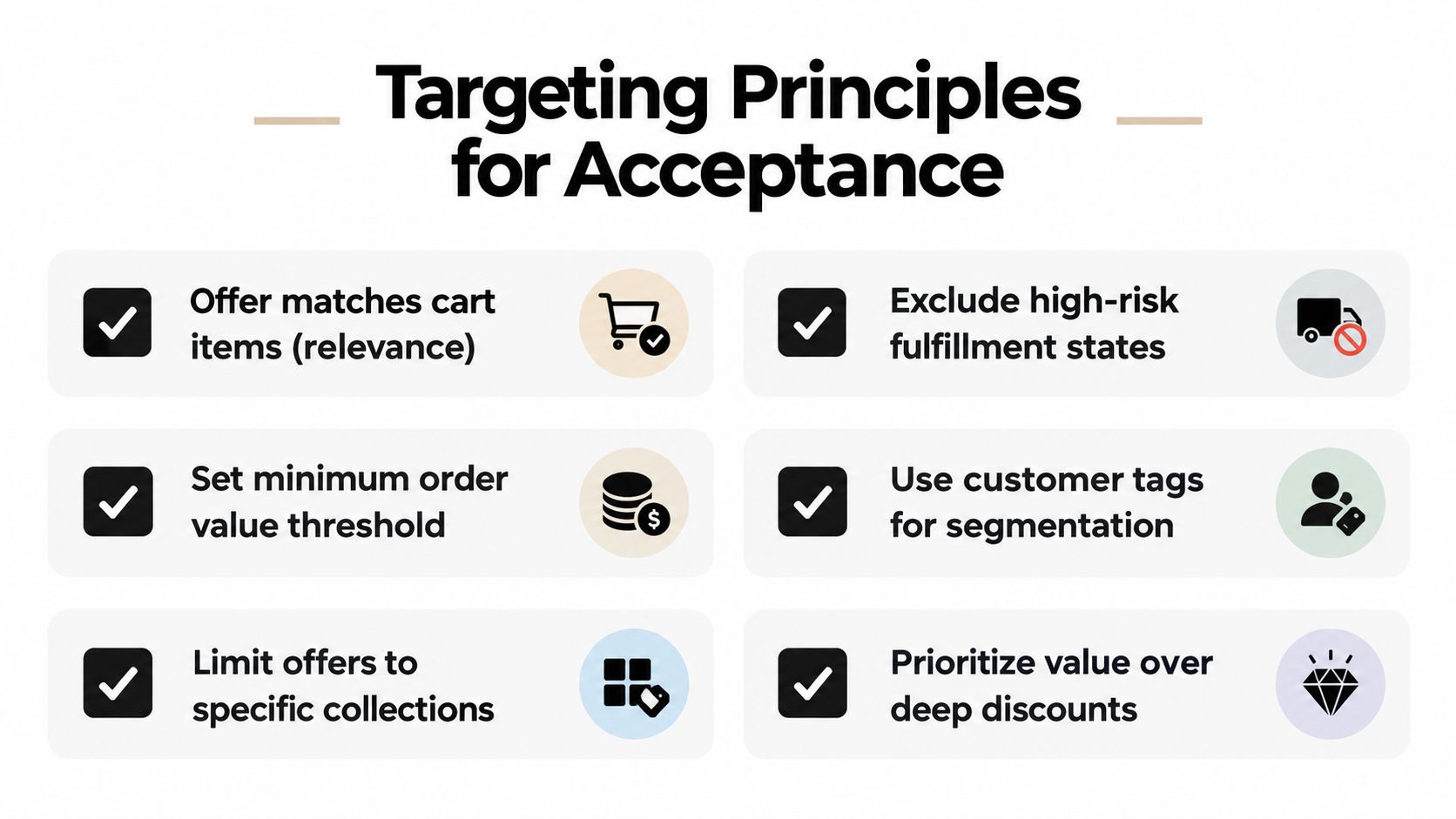
Start with rules, not copy. A merchant should be able to answer why a customer qualifies and why another customer is excluded.
- Product and collection rules: Match accessories to the trigger product or collection.
- Customer tags: Use tags to separate new buyers, repeat customers, wholesale accounts, or customers with specific preferences.
- Order value conditions: Set a minimum or maximum threshold when the offer only makes commercial sense for certain orders.
- Destination controls: Exclude countries or regions where the add-on creates tax, shipping, or regulatory complications.
- Fulfillment state: Stop offering edits or additions once picking, packing, or shipment activity makes a change risky.
- Capability settings: Decide whether customers can change quantities, swap variants, update addresses, add items, remove items, or cancel.
These rules protect more than conversion. They keep a compelling offer from becoming a warehouse exception.
Design for one clear decision
The customer should immediately see the product, price, relationship to the original order, and action required. Make the acceptance button specific, such as “Add filters to my order,” rather than a vague “Continue.” Show the resulting charge or refund clearly, and explain whether the item will ship with the existing order.
On mobile, concise copy matters even more. Keep the offer focused, avoid competing recommendations, and make the decline path visible. A customer shouldn't feel trapped into accepting a product to reach their order details.
Turn edits into helpful triggers
The strongest account-based offers appear because the customer is already taking an action. A variant swap can reveal a matching accessory. An address correction can confirm that the order is still editable and suggest an add-on that can travel with the shipment. A cancellation request can capture the reason and present a store-credit option when that solution fits.
Shopify's customer account and Order status surfaces can support contextual extensions, and recent guidance emphasizes that customers revisit order status information through tracking links and logged-in accounts. That makes the page a continuing service window, not merely a confirmation screen.
Experience test: If the recommendation disappeared and the customer still completed the requested edit smoothly, the offer is probably supporting the workflow rather than obstructing it.
How to Implement Post Purchase Upsells Without Breaking Operations
Implementation should begin in Shopify Admin, with the original order remaining the system of record. Avoid building a parallel order database that forces support and fulfillment teams to reconcile two versions of the same purchase.
A controlled launch sequence
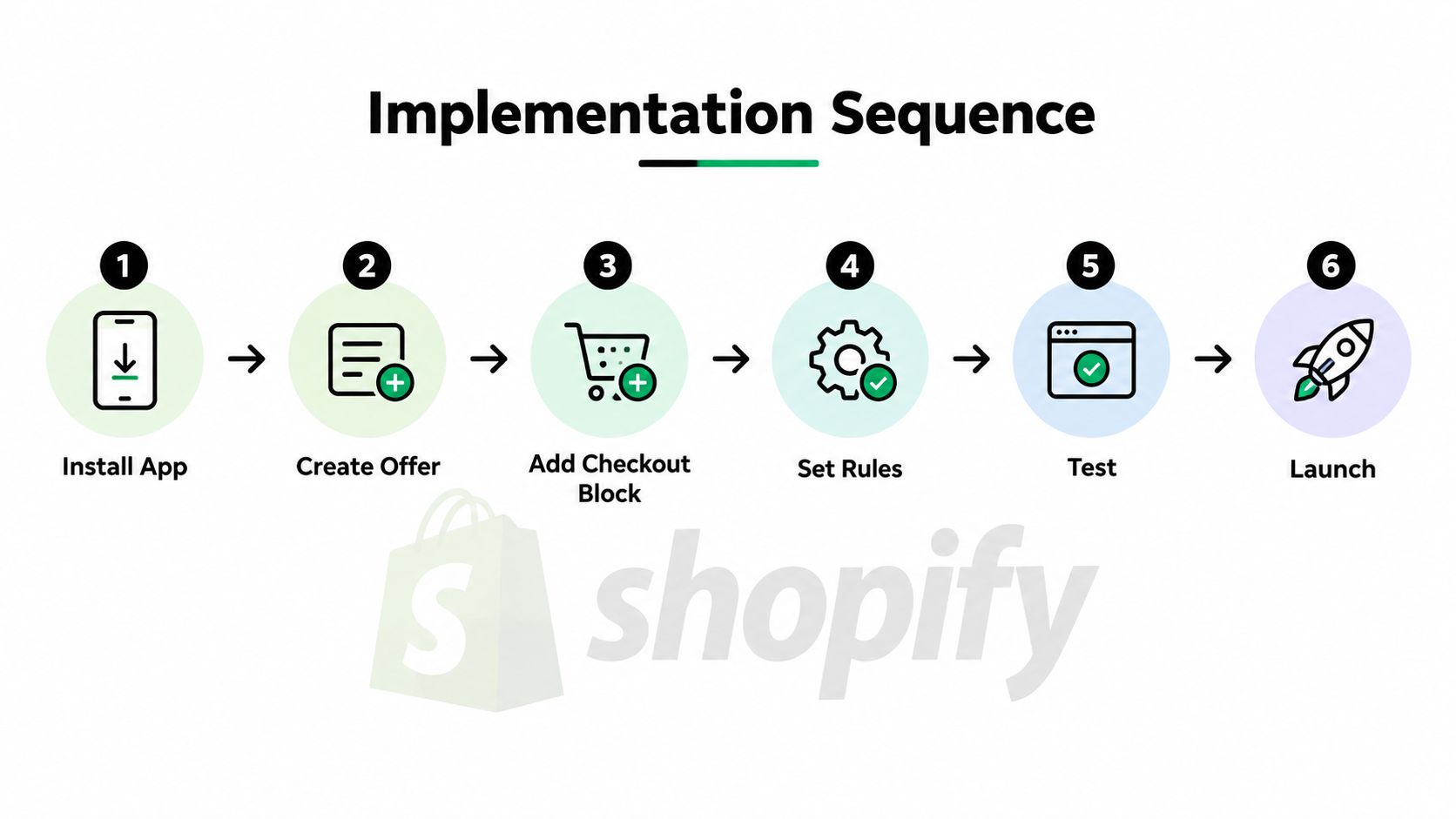
- Install a compatible app from Shopify. Confirm that it uses checkout and customer-account extension architecture rather than relying on deprecated theme or checkout scripts.
- Place the experience. Add the relevant block to the post-purchase page, Order status page, and new customer account surface where supported.
- Define the edit window. Decide how long customers can make changes and which fulfillment states close that window.
- Choose capabilities. Turn on only the actions your team can fulfill safely, such as quantity changes, variant swaps, address updates, additions, removals, or cancellation options.
- Set approvals. Route unusual order values, restricted products, destination changes, or refunds above a chosen threshold for review.
- Test order behavior. Place test orders, accept and decline offers, edit quantities, change variants, update addresses, and confirm how charges, refunds, fulfillment, and notifications behave.
The financial path deserves close attention. An added item may require an invoice through Shopify, while a reduction can trigger an automatic refund or an approval step. Customers should see the outcome before confirming, and the updated line items should appear on the original order rather than in a separate replacement order.
Mayra Apps provides one example of this native approach through Shopify order management. Mayra Order Edit and Upsell App supports customer-account and Order status page editing, contextual one-click additions, merchant-defined permissions, approval rules, fulfillment holds during active edits, and settlement workflows that write changes back to the original order.
Protect the warehouse
Create a test matrix that mirrors real exceptions. Test an order before fulfillment, an order already moving through fulfillment, a restricted destination, a high-value change, and a customer who declines the offer. Check what the customer sees, what the warehouse sees, and what the support team can audit.
Release rule: Don't launch until an accepted add-on, a declined offer, a refund, and a blocked edit all produce an understandable result in Shopify Admin.
A small first launch is safer than a broad rollout. Start with one product family, one complementary offer, and conservative eligibility rules. Expand only after your team can explain every order-state transition.
Measuring Performance and Business Outcomes
A post-purchase program has two ledgers. The first records commercial results, such as accepted offers and added order value. The second records operational outcomes, such as orders corrected without a ticket, cancellations saved, and returns avoided.
Upsell conversion is calculated as accepted offers divided by primary purchasers. Shopify-style ecommerce benchmarks commonly cluster around 3% to 8% average acceptance, while better-optimized offers are often reported in the 10% to 15% range. One industry benchmark covering more than 40,000 merchants reported a 4.7% average take rate, a 5.6% average AOV uplift, and a 28.3% conversion rate among the top 5% of offers, as summarized by Shopify upsell conversion benchmarks.
A separate 2025 report measured post-purchase upsell conversion at 14.6% for physical-goods stores, defining conversion as accepted offers divided by primary purchasers. That figure is a reference point, not a promise. Product fit, audience, payment eligibility, price, copy, and fulfillment rules all affect the result.
A practical benchmark table
| Metric | Typical Range | Top Performers |
|---|---|---|
| Average acceptance | 3% to 8% | 10% to 15% |
| Merchant benchmark take rate | 4.7% | 28.3% among the top 5% of offers |
| AOV uplift benchmark | 5.6% average | Varies by offer and store |
These figures come from different benchmark sets, so don't combine them into a single forecast. Use them to calibrate expectations, then compare offers against your own eligible purchasers.
Track the service value separately
A dashboard should include:
- Acceptance rate: Accepted offers divided by primary purchasers, with eligibility documented.
- Incremental revenue: Added product revenue after refunds, cancellations, and failed charges.
- AOV uplift: Compare original order value with the final value of orders that accepted an addition.
- Orders edited: Count successful changes by type, such as address, quantity, variant, or added item.
- Revenue recovered: Measure retained value from saved cancellations or corrected orders.
- Orders saved: Record cancellations avoided through an appropriate alternative, such as store credit.
- Modeled ticket avoidance: Label estimates clearly and base them on your own support data.
The operational benefit can exceed the immediate upsell value. Independent benchmark summaries place many acceptance rates in the low single digits to high single digits, with a median take rate near 2.4% in one dataset, as discussed in Shopify upsell benchmarks. That variation is why merchants should measure whether self-serve editing prevents tickets, reships, and avoidable refunds, rather than judging the program only by accepted offers.
For a broader set of actionable Shopify Plus tactics, compare upsells with other AOV initiatives and report commercial and operational outcomes side by side.
Common Pitfalls and Your Next Steps to Launch
The first mistake is offering a product that doesn't belong with the original purchase. The second is leaving the offer active after fulfillment has made the order difficult to change. The third is sending the buyer into a fresh checkout, which adds friction and can split shipping, payment, and customer records.
A service-led approach avoids these failures by giving each action a clear boundary:
- Relevant products only: Connect the recommendation to the purchased item, requested edit, or customer context.
- Closed fulfillment states: Block additions and changes when the warehouse can't safely apply them.
- Short, deliberate edit windows: Let customers act while the order is still operationally flexible.
- Transparent settlement: Show extra charges, refunds, invoices, and approval requirements before confirmation.
- Single-order integrity: Write accepted additions and approved edits back to the original Shopify order.
- Useful fallback paths: Let customers decline, cancel, or contact support when self-service isn't appropriate.
Use this launch checklist before publishing:
- Confirm product, collection, customer, destination, order-value, and fulfillment eligibility rules.
- Set permissions for quantities, variants, addresses, additions, removals, and cancellations.
- Define approval thresholds for unusual edits and refunds.
- Verify fulfillment holds during active changes.
- Test accepted, declined, blocked, refunded, and canceled scenarios.
- Configure analytics for acceptance, final order value, edited orders, saved orders, and modeled ticket avoidance.
- Verify the post-purchase, Order status page, and customer-account placements on mobile and desktop.
Start with one dependable offer and one controlled edit workflow. Once customers can add a useful item or correct an order without contacting support, you'll have a stronger foundation for broader AOV experimentation.
Mayra Apps gives Shopify merchants a customer-account and Order status page workflow for self-serve order edits, contextual one-click upsells, cancellation deflection, fulfillment holds, and Shopify-based settlement. Visit Mayra Apps to see how you can connect post-purchase revenue opportunities with safer order management.