
A customer emails five minutes after checkout: the wrong size was selected, and the shipping address still shows the old apartment. At the same moment, a warehouse operator is printing labels and moving the order into a pick queue. If your systems don't coordinate, the customer gets a reshipment problem instead of a simple correction.
That situation is why Shopify fulfillment apps deserve more scrutiny than a quick App Store comparison. The right app can connect inventory, order changes, fulfillment holds, warehouse execution, and carrier workflows. The wrong one can add another integration that doesn't understand edited orders, split shipments, or the difference between an order that is ready to ship and one that is still changing.
Table of Contents
- Why Shopify Fulfillment Apps Matter More Than You Think
- What Shopify Fulfillment Apps Actually Do
- Core Features Explained From Inventory Sync to Carrier Integrations
- Benefits and Tradeoffs of Fulfillment Apps
- How Order Edits and Fulfillment Holds Work Together
- How to Choose the Right Fulfillment App for Your Store
- Preparing for Shopify's 2026 and 2027 Fulfillment Changes
Why Shopify Fulfillment Apps Matter More Than You Think
Fulfillment apps aren't just convenience tools for printing labels or forwarding orders to a 3PL. They sit at the operational seam between what the customer sees after checkout and what the warehouse acts on next. That seam is where address changes, variant swaps, cancellations, add-ons, inventory reservations, and shipping decisions collide.
Shopify already provides an important audit trail. Merchants can view cancellations, address edits, fulfillment changes, shipping changes, and other actions in an order's Timeline, while the current order payload reflects the state at the time of the request or delivery rather than exposing historical snapshots by default, as described in Shopify's order modification guidance. An app that preserves edit history or coordinates a fulfillment hold therefore fills a structural visibility gap, not merely a cosmetic one.
Operational rule: An order isn't ready for warehouse execution just because it exists in Shopify.
The category is broad. Print-on-demand apps connect orders to production partners. 3PL integrations send orders to warehouse systems and bring tracking information back. Routing tools decide which location or carrier should handle an order. Post-purchase tools manage edits, upsells, cancellations, and address corrections before fulfillment begins.
The useful question isn't, “Which app has the longest feature list?” It's, “What happens when the customer changes the order after checkout, and which system prevents the warehouse from acting on stale information?” The rest of this guide focuses on that question, including the features that matter, the tradeoffs that vendors often minimize, and the platform changes that will make older app roundups less reliable.
What Shopify Fulfillment Apps Actually Do
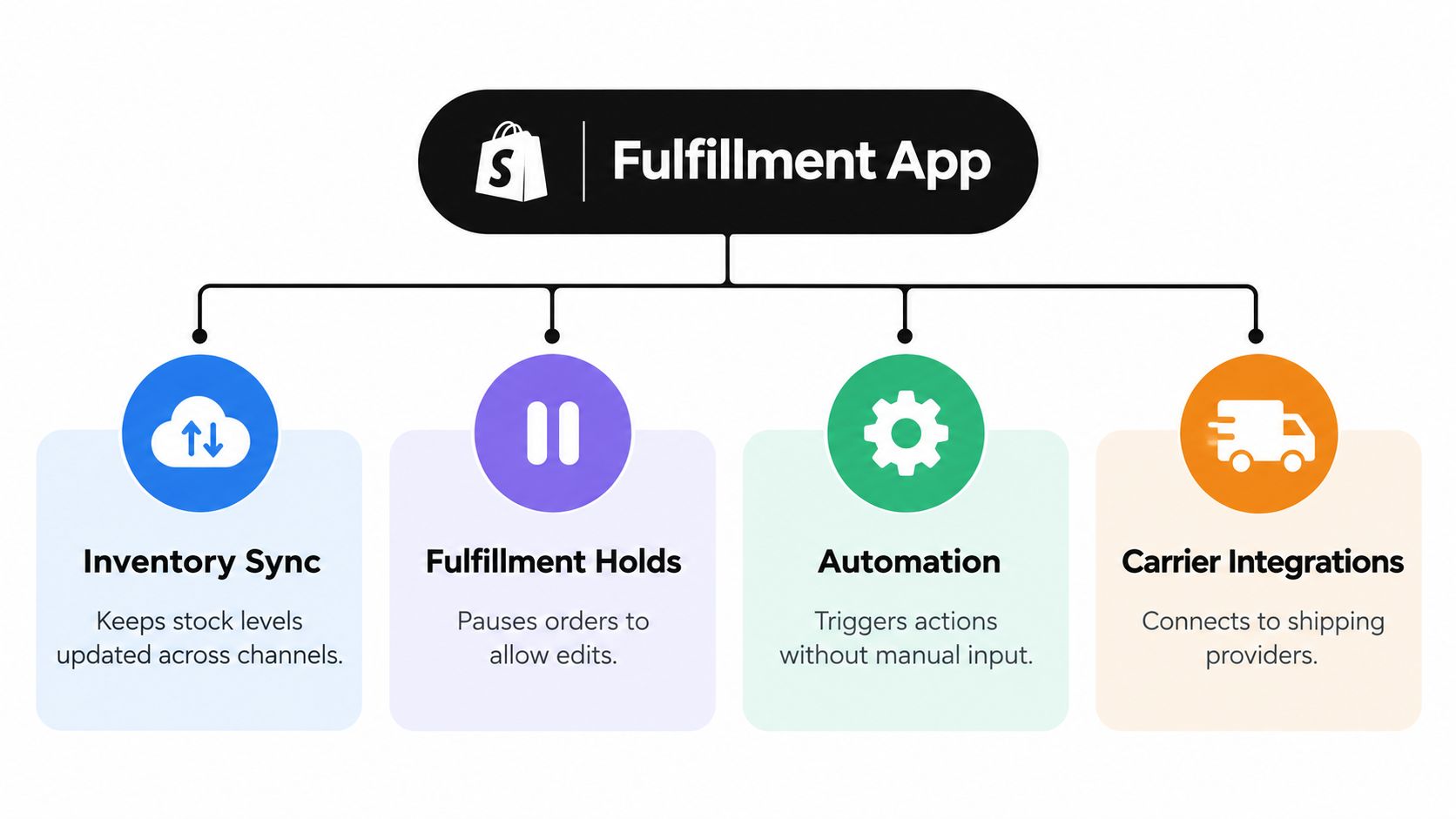
Think of Shopify admin as the store's record book and a fulfillment app as the control tower. Shopify records the commercial event, including what the customer bought and what was charged. The fulfillment app coordinates the operational response across inventory systems, warehouses, production partners, carriers, and customer-facing workflows.
The category usually falls into several practical groups:
- Print-on-demand connections: These send eligible products to a production partner after purchase and return production or shipping updates.
- 3PL and warehouse integrations: These transfer orders, inventory, fulfillment statuses, tracking data, and sometimes return information between Shopify and a warehouse management system.
- Routing and delivery tools: These assign fulfillment locations, shipping methods, pickup options, or local delivery services according to business rules.
- Post-purchase workflow apps: These manage order edits, cancellations, upsells, address changes, and the hold or release logic needed before warehouse execution.
The visibility gap after checkout
Shopify's native order Timeline gives teams a place to inspect changes, but the core API doesn't automatically preserve every prior version of an order. That distinction matters during fulfillment. A warehouse may receive the latest state, while a support agent needs to know what changed, when it changed, and whether the downstream system acknowledged the change.
A fulfillment app can add that missing operational layer by preserving event history, applying rules, and controlling when an order moves forward. It may also synchronize inventory across sales channels, attach fulfillment metadata, or translate Shopify's order state into instructions a warehouse or carrier can execute.
Matching the app to the failure you need to prevent
A print-on-demand merchant may care most about production routing and inventory availability. A merchant using a 3PL may care more about edit compatibility, fulfillment-order synchronization, and exception handling. A local retailer may need pickup, delivery windows, and capacity controls rather than a complex multi-warehouse architecture.
The app type should follow the failure mode. If the recurring problem is overselling, prioritize inventory synchronization. If customers frequently request address or variant changes, prioritize edit controls and holds. If your warehouse misses updates, investigate the integration's event handling before adding another dashboard.
Core Features Explained From Inventory Sync to Carrier Integrations
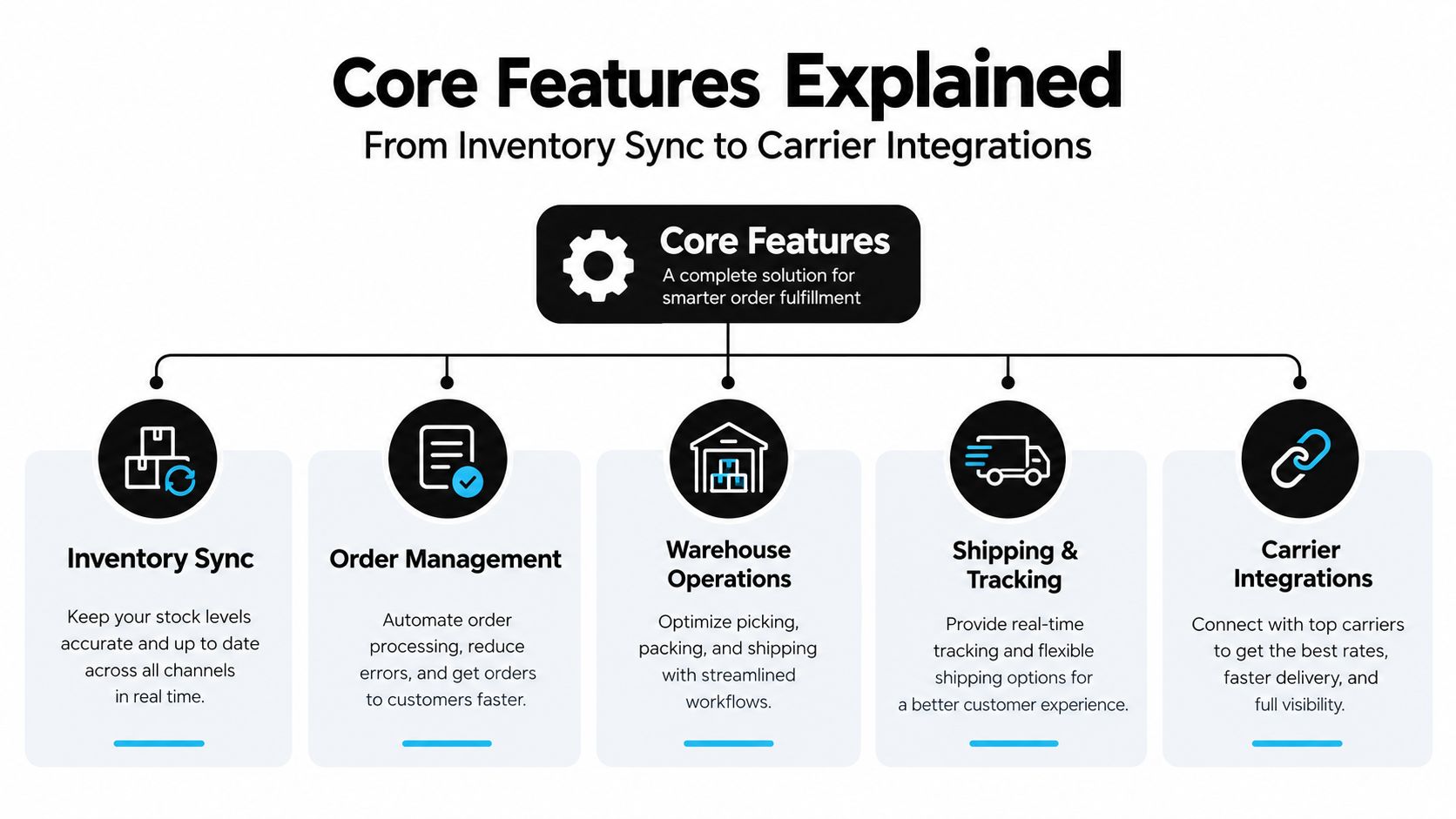
A feature label only becomes useful when you connect it to a warehouse decision. Inventory sync keeps available stock aligned between Shopify and external systems. When it works, a product's availability reflects what the warehouse or production partner can fulfill. When it fails, the storefront can accept an order that a warehouse can't pick, or the app can reserve stock in one location while another system still treats it as available.
Fulfillment holds pause an order before it reaches the next execution step. Shopify supports manual and automated holds, allows up to 10 manual holds per fulfillment, and lets apps override or release holds, according to Shopify's fulfillment hold documentation. That gives merchants a control point for payment review, address verification, customer edits, or inventory allocation.
Automation turns a policy into an action. For example, an app might route a temperature-sensitive order to a suitable location, hold an order with an address change, or send a fulfilled order's tracking information back to Shopify. Automation saves labor only when the trigger and exception path are explicit. A rule that fails without warning is worse than a manual queue that an operator can see.
Carrier integrations connect the fulfillment decision to label creation, service selection, tracking, and delivery updates. They can help choose a service that matches the promised method, but they don't solve upstream data problems. A perfectly valid label still sends the wrong item or address if the order changed after the label data was generated.
Practical rule: Inventory tells you what can ship, holds determine when it may ship, automation decides what happens next, and carrier integrations execute the delivery choice.
A warehouse example makes the distinction clear. Suppose a customer swaps a blue variant for a red one while the order is waiting for fulfillment. Inventory sync needs to reflect the red unit, the hold needs to prevent picking the blue unit, automation needs to update the downstream workflow, and the carrier connection should create a label only after the final address and package information are ready. The ecommerce fulfillment automation guide covers the broader value of connecting those actions instead of treating them as isolated features.
The strongest apps expose these states clearly. Operators should be able to see whether an order is waiting for an edit, held for review, released to a fulfillment service, partially fulfilled, or blocked by an integration error. A feature list that doesn't explain those transitions leaves the hardest work to the merchant.
Benefits and Tradeoffs of Fulfillment Apps
A customer changes an address after the order has already reached the warehouse. Shopify shows the new address, while the 3PL still has the old label queued for printing. A fulfillment app can prevent that mismatch, but only if its hold, edit, and release states remain aligned with the downstream system.
Automation reduces repetitive work without removing operational responsibility. Each connection can delay, transform, reject, or interpret order data differently. Evaluate the time saved against the failure mode the app creates or must control.
Shopify ecosystem data shows that fulfillment is a substantial app category, with 2,830 fulfillment apps representing about 16% of the Shopify App Store category mix in a 2026 market report from Craftberry's Shopify App Store statistics. That range reflects different operating models rather than one standard solution. A print-on-demand connector and a 3PL orchestration tool may both be fulfillment apps while solving completely different warehouse problems.
| Benefit | Operational Risk to Manage |
|---|---|
| Fewer support tickets from self-service address, variant, or quantity changes | Customers may make changes that the warehouse or fulfillment service cannot process safely |
| Fewer misorders and reshipments when changes reach the source order before picking | A downstream service may retain removed items or old quantities if it is not edit-compatible |
| Faster shipping decisions through routing, automation, and carrier connections | Incorrect rules can route orders to the wrong location or service |
| Better post-purchase revenue capture through additions and upsells | Added items can create payment, inventory, tax, or packing exceptions |
| More consistent inventory visibility across Shopify and external systems | Delayed or conflicting stock updates can create overselling or false availability |
| Centralized operational status for teams and support agents | Another dashboard and integration must be monitored, documented, and maintained |
Where the upside is real
The clearest gains come from removing repeated manual handoffs. If support agents email a warehouse to change an address, the app can turn that request into a controlled workflow. If operators repeatedly check whether a customer edit is complete, an explicit hold and release state can replace manual checking.
Shopify should remain the authoritative order record. Edits that create disconnected replacement orders can complicate reporting, payment reconciliation, customer history, and warehouse instructions. Writing the change back to the original order gives support, finance, and operations one record to follow.
Where implementations fail
Shopify warns that order edits can affect fulfillment apps. Removed items or changed quantities may not reach a downstream fulfillment service that does not support edits, as explained in Shopify's single-fulfillment guidance. A polished customer interface does not guarantee that the WMS, 3PL, or production partner will stop acting on the previous order state.
Ask for a failure demonstration before installation, not only a feature tour. Have the vendor show what happens when a line is removed after routing, an address changes after the order reaches a 3PL, or the integration becomes unavailable during peak processing. Check whether the order stays held, whether the warehouse receives the corrected state, and how the team is alerted. Those answers reveal more than a list of supported carriers.
How Order Edits and Fulfillment Holds Work Together
An order can change while the warehouse is already preparing it. If Shopify shows a new quantity or address but the 3PL is still working from the original instructions, the customer sees one order state and the warehouse executes another. A fulfillment hold closes that gap by stopping picking and label creation until the final order state is known.
Post-purchase edits usually happen soon after checkout, during the handoff from storefront to warehouse. Independent research covering 7.6 million orders across 1,139 merchants found that 2.1% of orders were edited after checkout, 80.6% of edits happened within one hour, and 90.4% happened within 24 hours. The same research found that 92.2% of edits were completed by customers without an agent, as described in Craftberry's summary of Shopify order-edit research. The operating implication is clear: self-service changes can reduce support work, but the fulfillment boundary still needs protection while an edit is active.
The two-step control loop
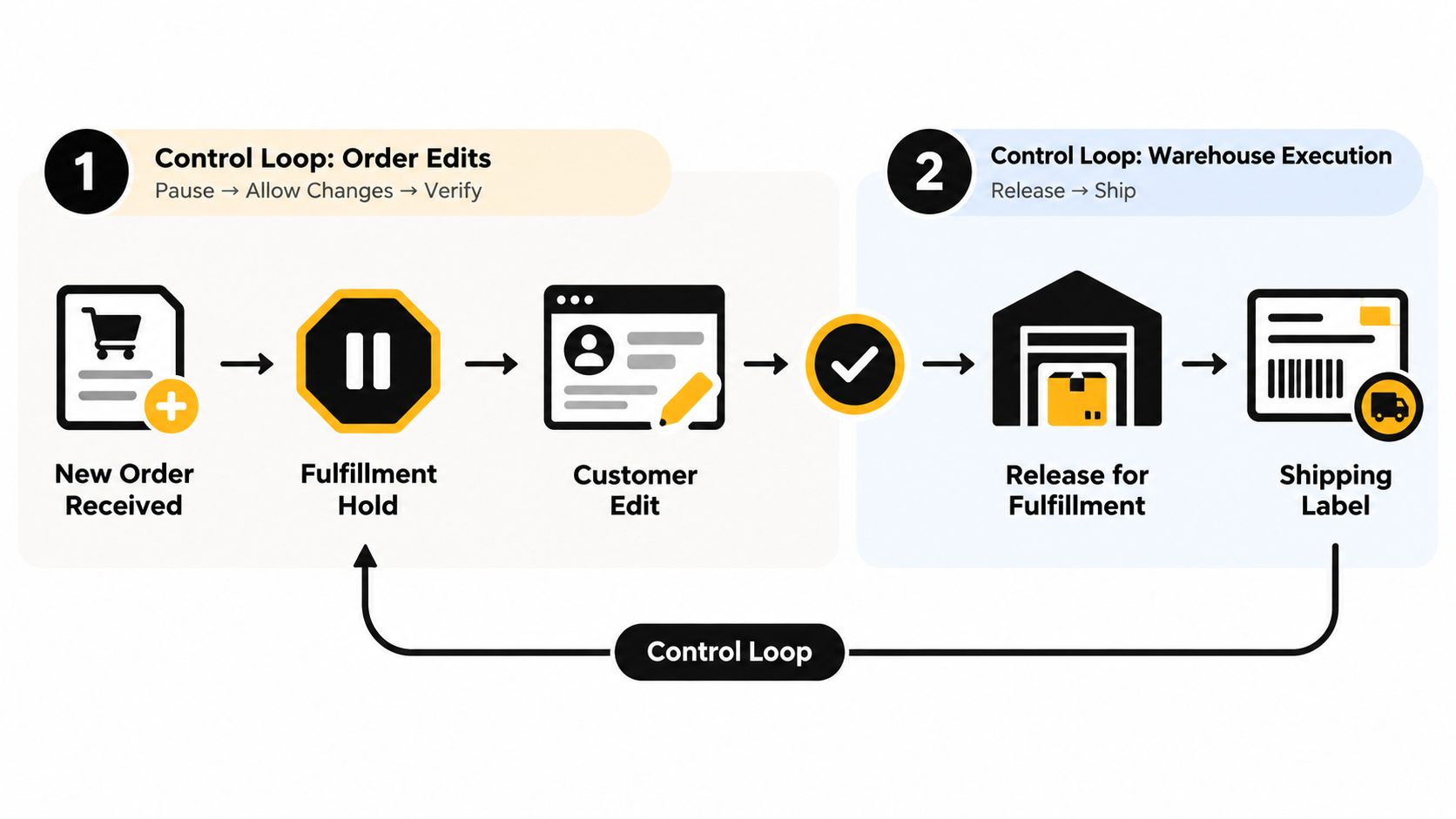
A reliable workflow uses two gates, with the order state recorded in Shopify throughout:
- Receive and hold the order. Shopify receives the order, and the fulfillment workflow pauses it before picking or shipping-label creation.
- Open the edit window. The customer changes permitted fields, such as quantities, variants, shipping address, additions, or removals.
- Reconcile the change. Shopify processes any additional charge or refund under the merchant's rules. The app writes the updated result to the original order.
- Release the order. After the edit is completed or abandoned, the hold is removed only when the final state is known and ready for warehouse execution.
Mayra Order Edit and Upsell App illustrates this approach. It supports customer edits in accounts and on the order status page, applies automatic fulfillment holds during active edits, writes changes to the original Shopify order, and provides configurable edit windows and eligibility rules. That design treats an edit as part of fulfillment control, rather than as a customer-service note that an operator must relay manually. The Shopify order workflow guide adds context on structuring the order lifecycle.
Shopify's own post-purchase hold
Shopify also applies a platform-level fulfillment hold during a post-purchase cross-sell flow. According to Shopify's product offers documentation, Shopify releases the hold when the customer reaches the order status page or one hour after checkout if the flow is abandoned. The hold uses the FulfillmentOrder resource, so it affects warehouse execution, not just what the customer sees.
Account for that fallback when setting service expectations. A post-purchase offer or edit that runs longer than expected can leave inventory reserved while shipping waits. If a warehouse relies on tags instead of Shopify's native hold state, the integration may need mirrored metadata or filters. Otherwise, the app and warehouse can disagree about whether the order is ready.
Warehouse rule: Never release a fulfillment hold merely because the customer-facing workflow looks finished. Confirm the final order state, payment outcome, and downstream acknowledgment first.
How to Choose the Right Fulfillment App for Your Store
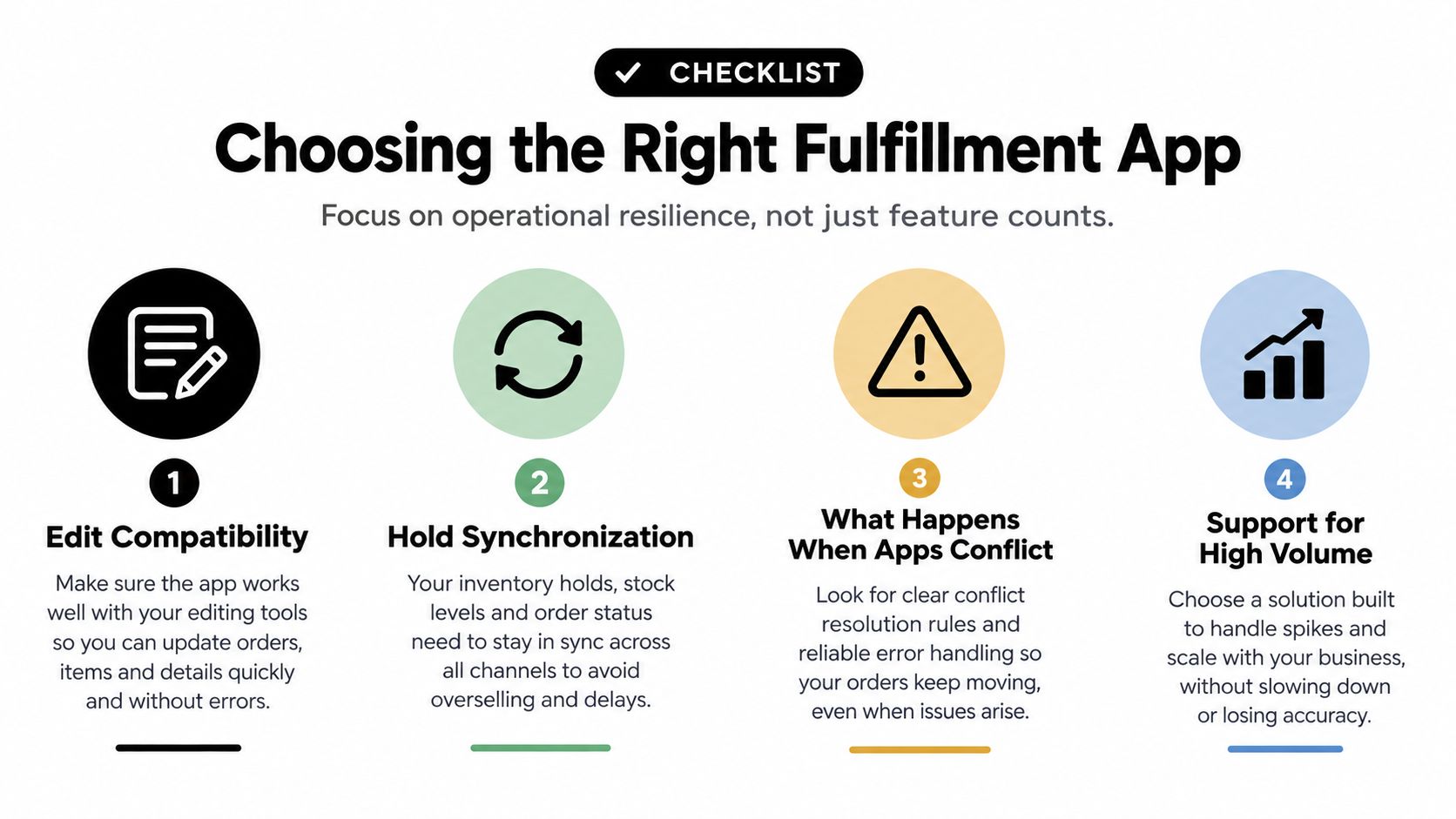
Choose a fulfillment app by testing the handoffs that can create customer-facing failures. A feature count won't tell you whether an address change reaches the 3PL before picking, whether a split shipment stays visible in Shopify, or whether an operator can recover an order when two apps issue conflicting instructions.
Start with edit compatibility
Ask the vendor to demonstrate each supported edit against your actual fulfillment service:
- Variant swaps: Does the warehouse receive the new SKU and stop work on the old one?
- Quantity changes: Does inventory reserve and release correctly?
- Address changes: Does the carrier label use the updated destination?
- Line removals: Does the downstream service remove the item, or does it require manual intervention?
- Additions: Are payment, inventory, packing, and fulfillment instructions updated together?
Don't accept “Shopify compatible” as the answer. Compatibility needs to be defined at the level of your WMS, 3PL, production partner, and carrier workflow.
Test the hold boundary
The app should show exactly when a hold is created, which system owns it, what can release it, and what happens if a customer abandons an edit. Test both a successful edit and a failed one. Then test an operator releasing the hold manually, because emergency procedures matter when a customer contacts support after the normal window closes.
A useful vendor conversation also covers:
- Peak-volume behavior: What queues, retries, alerts, and support paths exist when processing backs up?
- Split shipments: Can one order be divided by location, market, or delivery method without losing order-level visibility?
- No-code controls: Can operations teams change routing or eligibility rules without developer work?
- Rollback: Can you disable a workflow and return to the previous process without orphaning orders?
- Auditability: Can support and warehouse teams see the event history and the final source-of-truth state?
Put governance around flexibility
A powerful app can create risk if every order is eligible for every action. Set rules around fulfillment state, product, collection, tag, destination, and order value. You may allow address changes before warehouse acceptance, block edits after a shipment is partially fulfilled, exclude made-to-order products, and require approval for high-value refunds or additions.
The ecommerce order management software guide is useful background for evaluating how these rules fit into the wider order lifecycle. The central test is operational ownership. Customer support should know what it can approve, warehouse staff should know which state is authoritative, and finance should know when Shopify will invoice or refund automatically.
Preparing for Shopify's 2026 and 2027 Fulfillment Changes
A warehouse can release the wrong parcel after a customer changes an address, removes a line, or switches delivery methods. Shopify's fulfillment roadmap is designed for more complex orders, including market-driven shipping, ship-and-pickup in one order, and default split shipping. Shopify says incompatible apps may begin showing warnings to new installs on October 1, 2026. The new experience is currently planned to become the default on July 1, 2027, according to Shopify's next-generation fulfillment update, subject to change. Treat these as preparation deadlines, not as current universal behavior.
The operational impact is greater than a new routing screen. One order may produce several fulfillment orders across locations, markets, or delivery methods. A later edit may affect one assignment without changing the others. Apps built around the assumption that one order equals one warehouse instruction can leave partial work unreconciled, miss an edit, or release inventory before the warehouse is ready.
Shopify also identifies the Fulfillment Orders API as the foundation for fulfillment services and apps. That makes edit handling a practical compatibility test. Before a cutover, confirm whether the app can reconcile changed quantities, removed items, added items, split assignments, and holds across all fulfillment orders linked to the same customer order.
Prepare before the platform change
- Audit current apps: List every app that reads orders, changes fulfillment status, routes inventory, creates labels, or responds to tags.
- Map the source of truth: Document which system owns the customer order, inventory availability, fulfillment assignment, tracking state, and refund result.
- Test edited orders: Run address changes, variant swaps, removals, additions, and partially fulfilled orders in a non-production workflow.
- Verify hold behavior: Confirm that Shopify holds, app-created holds, warehouse filters, and manual release steps produce the same outcome.
- Test split execution: Check how the app displays and updates orders shipping from different locations or combining shipping with pickup.
- Confirm the vendor roadmap: Request written details on compatibility, migration steps, monitoring, and rollback procedures.
Run these tests before a 3PL cutover, not after the first exception reaches the packing queue. The right app must preserve order integrity as Shopify adds fulfillment states. App selection is therefore an operations architecture decision, not only an App Store comparison.
Mayra Apps provides post-purchase workflows for Shopify, including customer self-service order edits, configurable eligibility and approval rules, automatic fulfillment holds during active edits, and changes written back to the original order. Merchants can compare that approach with their warehouse controls at Mayra Apps.