
5.2% of Shopify orders were edited after checkout, and 80.6% of those edits happened within the first hour, with half arriving in 4.6 minutes or less, according to 2026 research across 10 million plus orders. That timing changes how you should think about the Shopify order workflow. The operational battle isn't after fulfillment, it's in the short window after purchase, before a picker touches the box and before a support inbox fills up.
If you run Shopify stores long enough, you see the same pattern. A customer catches the wrong size, notices a bad shipping address, or wants one last item added, and they do it almost immediately after checkout. If your workflow can't absorb that change fast, the error doesn't stay small. It turns into a reprint, a mis-ship, a reshipment, or a ticket your team has to unwind later.
Table of Contents
- Why the First Hour After Checkout Defines Your Workflow
- The Standard Shopify Order Lifecycle Explained
- When and Why Customers Edit Orders Post-Checkout
- How Fulfillment Holds Protect Your Operations
- Self-Serve Editing Versus Support Ticket Workflows
- Merchant Controls That Keep Self-Serve Safe
- Building Your Post-Purchase Workflow Blueprint
Why the First Hour After Checkout Defines Your Workflow
The first hour after checkout is where the Shopify order workflow either stays clean or starts to leak. In the 2026 order-edit dataset, 80.6% of edits happened within the first hour after checkout, and 90.4% landed within 24 hours Revize research on Shopify order editing. That's not a vague post-purchase trend, it's a narrow operational burst, and it's where mistakes are cheapest to fix.
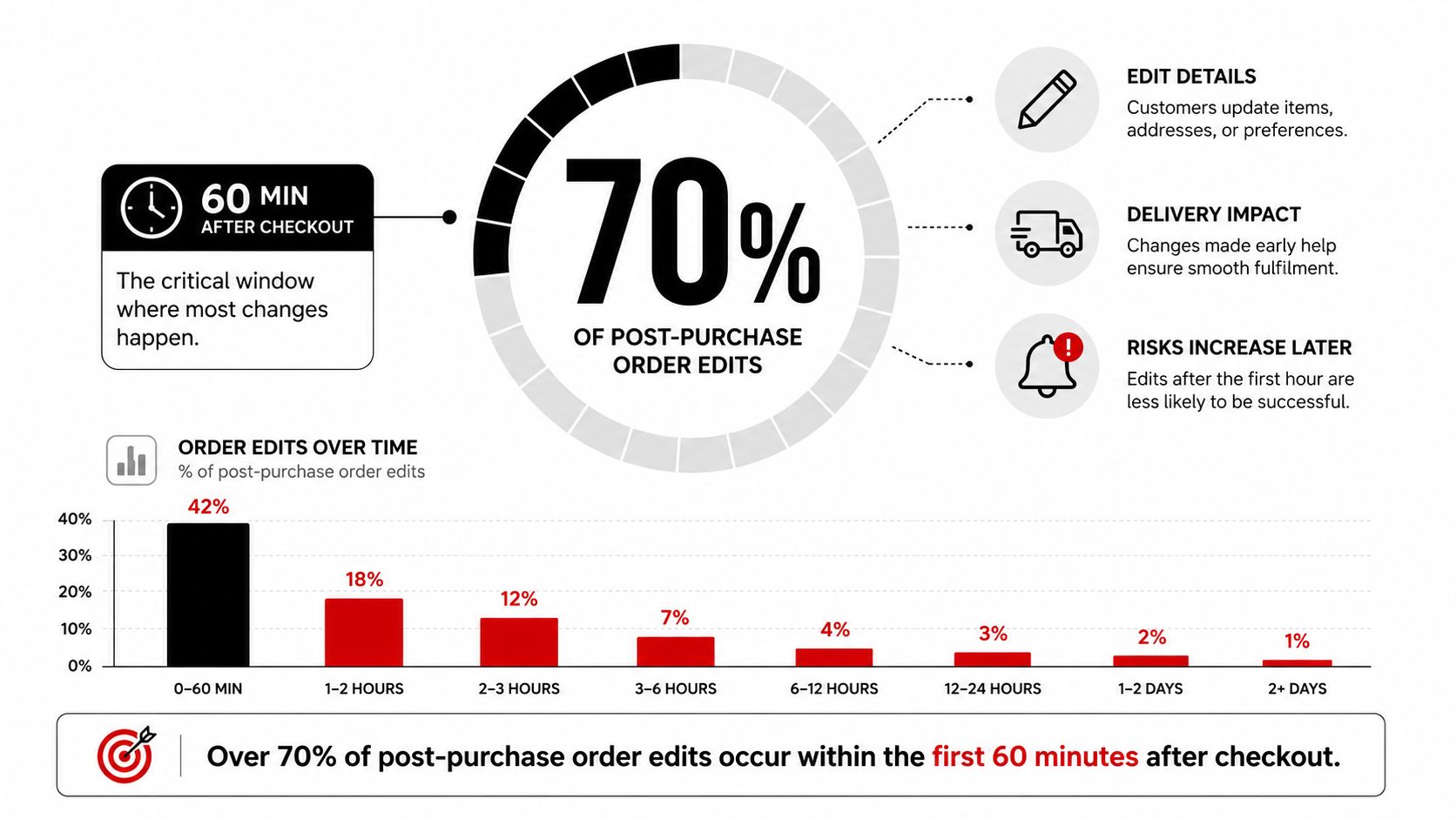
A customer usually isn't trying to create chaos. They're fixing something they noticed after the confirmation screen, a shipping address typo, the wrong variant, or a forgotten add-on. Those requests hit hardest when your warehouse is already warming up the order, because the clock between payment and packing is short and unforgiving.
What the workflow actually needs to protect
A working Shopify order workflow has a few essential stages, checkout, payment capture, fulfillment hold, picking, shipping, delivery, and sometimes refund or exchange handling. Shopify's own documentation makes clear that the order status page is part of a customer-facing account experience, not just a tracking screen, and that merchants using new customer accounts can let customers view order history, check statuses, and take order-related actions from that account surface Shopify order status page documentation.
That matters because the first hour is where self-serve tools earn their keep. If a customer can update details before fulfillment starts, the warehouse doesn't have to reverse work already in motion. If they can't, the same request gets routed into support, then into fulfillment, then into a carrier exception.
Practical rule: treat the first hour as a recovery window, not a convenience feature. The purpose is to intercept errors before picking starts, not to give customers endless control.
The stores that handle this well are usually boring in the best way. They make the change path obvious, they pause fulfillment while edits are open, and they keep the original order as the record of truth. The stores that struggle tend to rely on manual inbox triage, which is too slow for a window that closes in minutes.
The Standard Shopify Order Lifecycle Explained
A clean Shopify order workflow starts at checkout, where the customer submits the order and the system creates the order record. From there, the order moves into confirmation, then into processing, and eventually into fulfillment and delivery. Shopify's customer-account documentation also notes that merchants can customize the order status page with the checkout and accounts editor, which means the post-purchase experience can carry brand context and useful order information instead of feeling like a generic tracker Shopify order status page documentation.
From checkout to fulfillment
At checkout, payment is authorized or captured depending on store settings. The order then sits in an unfulfilled state until a warehouse, 3PL, or fulfillment app begins work. That's the point where inventory gets allocated, the pick list is created, and the packing queue begins to move.
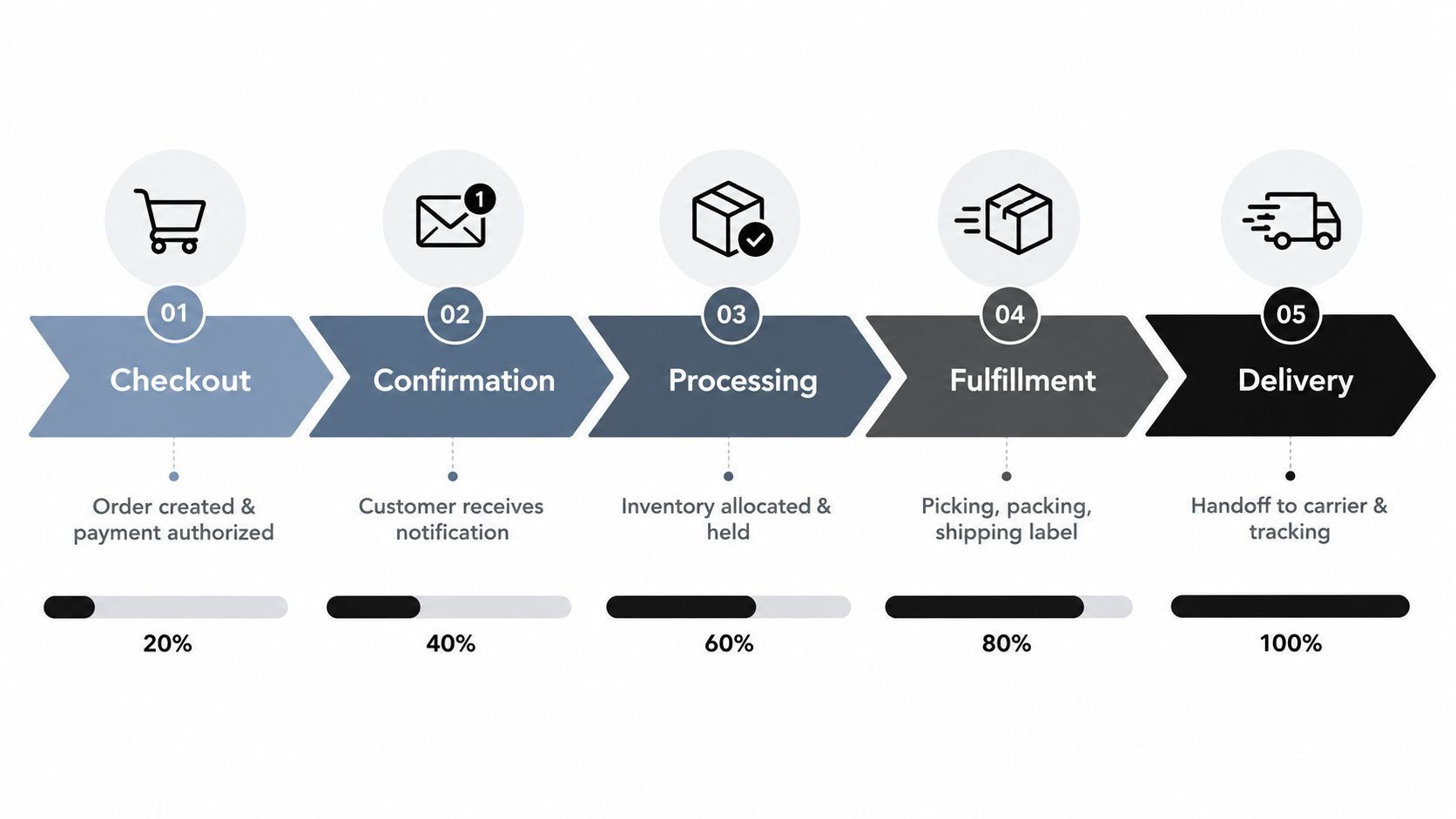
Picking, packing, and label creation are the fragile steps. Once a label is printed, the order becomes much harder to edit without creating downstream waste. Tracking then activates, the status advances to fulfilled, and the shipment hands off to the carrier.
Where systems have to talk to each other
In real stores, Shopify is rarely the only system involved. Order data often flows into a WMS, a 3PL portal, shipping software, and sometimes a helpdesk. The error-prone handoff is the gap between payment and fulfillment initiation, because that's where a customer edit can collide with warehouse execution.
The cleanest setups don't create a second order record for every change. They update the original order and keep Shopify as the system of record.
Refunds and returns usually enter later, after delivery, if the customer receives the wrong item, changes their mind, or needs a replacement. That's why the first movement in the workflow matters so much. A good start prevents a lot of expensive cleanup at the end.
When and Why Customers Edit Orders Post-Checkout
Customers edit orders because they notice a mistake at the exact moment the purchase pressure drops. They slow down, reread the confirmation, and catch the problem they missed during checkout. In operational terms, that means your edit flow has to catch human delay, not just technical error.
The most common change requests
Shipping address corrections are the most common post-purchase edit type in the available research, representing 30.2% of all edited orders, with 48,742 address corrections before shipment in the dataset Revize research on Shopify order editing. That lines up with what support teams see every day, because address mistakes are easy to make and expensive to ignore.
For the other edit types, merchants usually see a predictable mix of variant swaps, line-item changes, and post-checkout add-ons or message updates. The exact split varies by store, but the pattern is stable, customers want to correct delivery details first, then product selection, then cart contents.
| Post-Checkout Edit Types and Frequency | |||
|---|---|---|---|
| Edit Type | Frequency | Avg. Time After Checkout | Operational Risk |
| Shipping address corrections | 30.2% of edited orders, per the dataset | Usually minutes after checkout | Failed delivery or reshipment |
| Product variant swaps | Qualitative pattern in store operations | Usually early post-checkout | Wrong size or color fulfillment |
| Add or remove line items | Qualitative pattern in store operations | Usually early post-checkout | Inventory and pricing adjustments |
| Discount code or gift message changes | Qualitative pattern in store operations | Usually early post-checkout | Support load and order inconsistency |
Why support tickets are the slow path
Without self-serve editing, every change becomes a ticket. That creates transcription risk, slows resolution, and forces an agent to manually update the order while the warehouse may already be moving. In peak periods, that's where small mistakes become backlog.
A better model is simple, let customers fix what they can safely fix, and route the risky cases to staff. That keeps the support queue for exceptions instead of routine correction work. It also helps merchants absorb the short burst of edits that happens right after checkout, which is where the operational pressure is highest.
How Fulfillment Holds Protect Your Operations
Fulfillment holds are the buffer that keeps a live edit from colliding with a live warehouse. Shopify documents that an order can be marked On hold by an app or merchant, and that the hold temporarily blocks fulfillment while preserving inventory reservation Shopify editing orders documentation. That's the right control point when customers are still changing shipping details or swapping items.
The cause and effect chain
The sequence should be straightforward. Edit initiated, fulfillment hold applied, order details updated, hold released, fulfillment resumes. That prevents race conditions, because the warehouse doesn't keep processing while the customer is still changing the order.
When this control is missing, the failure mode is predictable. A support agent updates an address after the label has already printed, or a 3PL picks the original variant while the customer is still asking for a swap. The result is a partial shipment, a rework task, or a carrier issue that costs more time than the original edit ever would.
Native holds versus app-driven pauses
Shopify's native hold mechanism is useful, but many merchants need an app layer to automate timing and eligibility. That's where a tool like Mayra Apps can fit, because it manages post-purchase edits inside the customer account and order status page while writing changes back to the original order. It also keeps fulfillment paused during an active edit, which is exactly what operations teams need when speed and accuracy both matter.
The main trade-off is control versus convenience. Long holds give customers more time to self-correct, but they can push against shipping SLAs. Short holds keep the warehouse moving, but they can close the edit window too early. The best setup matches the hold window to the store's actual picking speed, not to a generic best practice.
If your warehouse starts picking fast, your hold needs to be fast too. If your support team is still manually checking edits, the hold is already too late.
The operational goal isn't to stop all movement. It's to stop irreversible movement until the order is stable.
Self-Serve Editing Versus Support Ticket Workflows
A self-serve post-purchase flow and a ticket-based flow solve the same problem in very different ways. Ticket-based handling depends on agent availability, manual entry, and back-and-forth confirmation. Self-serve editing removes the handoff, which is why it usually feels faster and cleaner for customers.
The operational trade-offs
| Metric | Support Ticket Workflow | Self-Serve Editing |
|---|---|---|
| Resolution speed | Depends on queue and agent availability | Immediate when the edit is allowed |
| Error rate | Higher because humans rekey details | Lower because customers edit their own data |
| Support workload | Adds routine correction tickets | Deflects routine changes from the queue |
| Customer satisfaction | Often delayed and fragmented | Usually smoother and more direct |
| Cost per interaction | Higher due to manual handling | Lower for common edits |
The practical difference is obvious in the inbox. Tickets create transcription mistakes, especially for address corrections and variant swaps. Self-serve editing reduces those handoffs, but only if the rules are tight enough to keep risky changes out of circulation.
When self-serve wins, and when it doesn't
Self-serve works best for standard changes that don't need human judgment, things like quantity updates, address fixes inside a safe window, or line-item swaps before picking starts. It does not work well for edge cases, high-value orders, restricted products, or anything that depends on manual review.
That's why the configuration matters more than the interface. If the portal is too open, operations inherit new risk. If it's too restrictive, customers fall back to support, and the workflow gets slow again.
The reason merchants adopt self-serve in the first place is simple. Customers want to fix orders without waiting, and teams want fewer tickets tied to routine edits. The challenge is building the rules so those two goals don't conflict.
Merchant Controls That Keep Self-Serve Safe
Self-serve editing only works when the merchant defines the boundaries. Without controls, customers can create problems as easily as they solve them. A safe Shopify order workflow uses rules to decide who can edit, what they can edit, and how far the order can move before the window closes.
The controls that matter most
- Time-window restrictions: limit edits to the short period after checkout, before processing begins.
- Product-level eligibility: exclude fragile, custom, limited-stock, or high-value items from editing.
- Price-delta thresholds: block changes that would swing the order value too far in either direction.
- Fulfillment-stage gates: freeze edits once picking or packing has started.
- Shipping method restrictions: prevent last-minute changes that would break delivery promises.
- Discount and audit logic: recalculate promotions correctly and log every change for review.
Each control blocks a specific failure mode. Time windows stop late edits from landing after the label is printed. Product exclusions protect items that can't be safely swapped. Price thresholds reduce the chance that a small edit becomes a major order rewrite. Audit logs help operations teams see what changed and when, which matters when customer service and warehouse actions overlap.
How to think about eligibility
The right settings depend on the store's catalog and packing speed. A fast-moving apparel store can usually allow more editing than a made-to-order brand or a business with fragile inventory. High-value orders also deserve tighter review, because the operational cost of a bad edit is much higher.
Safe rule: if a change can disrupt inventory, shipping rate, or product integrity, make it conditional instead of automatic.
The point isn't to block customers from fixing mistakes. It's to keep a safe path open while closing off the kinds of edits that create chargebacks, mis-ships, and support escalations. In practice, that means the rules should feel invisible to the customer and very visible to the operations team.
Building Your Post-Purchase Workflow Blueprint
A solid blueprint starts with three phases, pre-fulfillment, active processing, and post-shipment. The first phase is where self-serve edits and holds belong. The second phase is where changes should narrow sharply. The third phase is where refunds, returns, and exchanges take over.
A simple operating model
Use the pre-fulfillment window for safe edits, address corrections, and add-ons. Use active processing for read-only order status and exception handling. Use post-shipment for delivery issues, returns, and refund workflows.
The decision matrix should follow order risk, not just customer convenience. Lower-risk orders can get broader edit access. Higher-risk orders need tighter windows, stricter eligibility, and more manual review.
A practical implementation checklist
- Map your fulfillment speed. Know how fast orders move from checkout to picking, because that sets the edit window.
- Define edit eligibility. Decide which products, destinations, and order values can be changed safely.
- Apply a hold during edits. Stop fulfillment while the order is still mutable.
- Keep the original order as record of truth. Avoid creating fragmented order histories.
- Log every edit. Track what changed, when it changed, and who approved it if review was required.
A few teams also build the post-purchase experience directly into the customer account and order status page, so customers can find the change path without opening a ticket. That is where tools like customer self-service portal workflows fit naturally, because they reduce friction without handing over unrestricted control.
The common mistakes are predictable. Too much freedom creates shipping delays. Too little freedom drives tickets back into the queue. The best configuration is the one that mirrors your actual warehouse pace, not the one that sounds easiest on paper.
Track edit interception rate, support ticket deflection, and fulfillment error reduction over time. If those numbers improve together, the workflow is getting healthier. If one improves while another slips, the rules need another pass.
If you want a cleaner post-purchase flow, Mayra Apps gives Shopify merchants self-serve order edits, fulfillment holds, and merchant-controlled rules inside the customer account and order status page. It's a practical fit for stores that want to cut avoidable tickets and keep the original order as the system of record. Visit Mayra Apps to review how it handles edits, holds, and post-purchase changes in Shopify.