
A customer places an order, then emails six minutes later. Wrong size. Wrong address. They also want to add the matching item they forgot at checkout.
That tiny gap between checkout and fulfillment is where most ecommerce teams learn whether their order stack is under control.
If your warehouse releases orders too fast, support races the pick ticket and loses. If your system allows edits but doesn't pause fulfillment, you create duplicate work and shipping mistakes. If your team handles every change manually, your inbox becomes your real OMS, which is a bad place to run operations from.
A lot of ecommerce order management software buying advice still starts with channels, inventory, and routing. Those matter. But for Shopify brands, I'd argue the sharper question is simpler: what happens after the customer pays, but before the order ships? That's where address fixes, variant swaps, quantity changes, removals, add-ons, cancellations, invoices, refunds, and approval rules either run cleanly or turn into operational drag.
Table of Contents
- Introduction Why Post Purchase Control Defines OMS Success
- What Ecommerce Order Management Software Actually Does Today
- Detailed Comparison of OMS Approaches and Feature Matrix
- Shopify Specific Considerations for Edits Holds and Settlement
- How to Choose the Right Ecommerce Order Management Software
- Use Cases and Situational Recommendations by Store Profile
- Implementation Guidance for Shopify Stores From Install to Verification
Introduction Why Post Purchase Control Defines OMS Success
Teams don't start shopping for ecommerce order management software because they love systems architecture. They start because post-purchase change requests are breaking the operation.
Support is tagging fulfillment in Slack. Fulfillment is asking whether an order is safe to pack. Finance is cleaning up partial refunds. The customer doesn't care which team owns the problem. They only see that they asked for a simple change and got a confusing answer.
That's why I don't evaluate OMS options as “can it capture and route orders?” Nearly everything in the category can do that. I evaluate them on post-purchase control.
The real stress test happens after checkout
The hard part isn't recording an order. Shopify already does that well. The hard part is governing what can change after purchase without causing fulfillment race conditions.
You need answers to very practical questions:
- Edit window: How long can a customer change an order before the request becomes risky?
- Fulfillment hold logic: Does the system pause shipment while an edit is in progress?
- Permission rules: Can customers change address, variant, quantity, or line items?
- Financial settlement: If the new order total changes, who invoices or refunds, and when?
- Approval thresholds: Which edits can run automatically, and which need review?
If your current setup can't answer those questions clearly, your OMS isn't doing enough.
Most Shopify merchants don't need more dashboards. They need tighter control over the period between payment and pick.
The customer experience side matters too. A clean post-purchase flow reduces friction in a moment when buyers are still engaged with the order. That's one reason post-purchase experience design deserves the same attention as checkout design, especially for teams improving post-purchase customer experience.
What this decision actually comes down to
For Shopify operations, the choice is usually one of three paths:
- Stay mostly native in Shopify
- Adopt an enterprise OMS suite
- Add a post-purchase control layer on top of Shopify
Each path can work. The wrong one usually fails for predictable reasons. Native setups can be too thin on governance. Enterprise suites can be too heavy for brands that mainly need edit control. Post-purchase layers can solve the exact issue if routing complexity isn't the main bottleneck.
That's the lens I'd use. Not “which OMS has the longest feature list,” but which setup gives you clean post-purchase control without breaking your source of truth.
What Ecommerce Order Management Software Actually Does Today
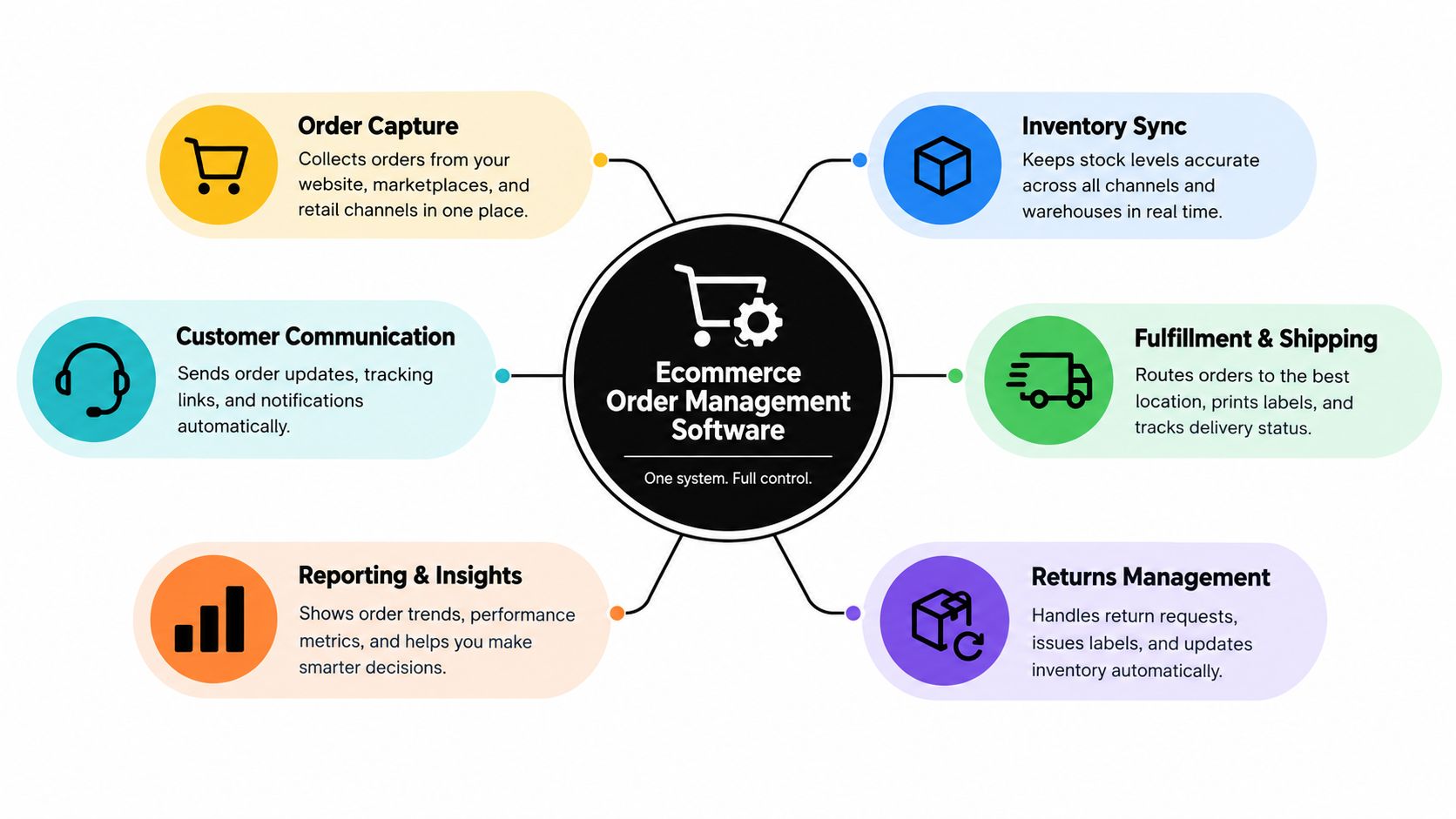
Modern ecommerce order management software sits between storefront demand and operational execution. It doesn't just record orders. It coordinates order state, inventory visibility, fulfillment decisions, and the handoff to support and finance.
The market has grown into a real software category, not a niche add-on. One forecast puts the ecommerce order management software market at about $1.0 billion in 2021 rising to $1.9 billion by 2026, a 12.3% CAGR projection over that period, according to Verified Market Reports on ecommerce order management software. That growth tracks with a clear shift away from basic tracking and toward software that coordinates inventory, fulfillment, service, and post-purchase workflows.
OMS is now an orchestration layer
An OMS today usually handles some mix of these responsibilities:
- Order intake across channels: Pulling orders from storefronts, marketplaces, and sometimes wholesale systems into one operating layer.
- Inventory visibility: Exposing available stock across locations so teams don't sell blind.
- Fulfillment routing: Deciding where an order should ship from when you have multiple nodes or partners.
- State management: Tracking whether an order is new, on hold, approved, in edit, allocated, fulfilled, canceled, or refunded.
- Service coordination: Giving support enough visibility to answer “Can I still change this?” without pinging ops every time.
That last point gets ignored too often. A lot of buyer conversations still focus on logistics depth. In reality, the strongest systems reduce the amount of operational interpretation humans have to do.
Cloud won because order data has to move fast
The category is also moving hard toward cloud delivery. A separate market estimate places worldwide order management software spend at $2.2 billion in 2024, rising to $4.3 billion by 2029, while SaaS and cloud software grows from $1.4 billion to $4.0 billion and on-premise falls from $416 million to $180 million, based on Verified Market Reports coverage of the order management system market.
For Shopify brands, that matters for one reason. Your order data has to stay live. If a customer changes an address, removes an item, or accepts an add-on, the system can't rely on batch-style logic and slow sync behavior. Cloud-first tools fit better when Shopify remains the admin your team works from.
A useful OMS doesn't just know where an order is. It makes that state legible to everyone touching the order.
OMS is not your ERP, WMS, or helpdesk
Teams get into trouble when they buy an OMS expecting it to replace everything around it.
Use a simple separation:
- ERP: Owns broader business records, purchasing, accounting structure, and planning.
- WMS: Owns warehouse execution, picking, packing, bins, and floor-level movement.
- Helpdesk: Owns conversation handling and agent workflows.
- OMS: Owns the order lifecycle logic across systems.
That distinction matters when you're tightening post-purchase workflows. In many Shopify stacks, the smart move isn't replacing every system. It's improving order governance where it breaks most often. If you're mapping that stack more broadly, this guide on ecommerce operations management is a useful companion.
And if fulfillment itself is your bottleneck, not just order governance, this overview on how brands unlock growth with fulfillment is worth reading alongside your OMS evaluation.
Detailed Comparison of OMS Approaches and Feature Matrix
Most Shopify teams I talk to don't need a generic list of OMS features. They need a blunt comparison of what each approach solves.
Here's the practical view.
| Evaluation Criteria | Shopify Native | Enterprise OMS Suite | Post-Purchase Edit Layer |
|---|---|---|---|
| Core fit | Best for simpler operations that mostly need standard order handling inside Shopify | Best for complex omnichannel and multi-node orchestration | Best for Shopify brands that need tighter post-purchase control without replacing Shopify as the working admin |
| Order routing depth | Limited compared with dedicated OMS platforms | Strong. Built for orchestration across channels, nodes, and service rules | Light to moderate. Not the right tool if routing is your main problem |
| Inventory visibility | Good within Shopify's native context | Strongest when inventory exists across multiple systems and locations | Depends on Shopify data and connected workflows rather than replacing inventory orchestration |
| Address edits | Possible, but governance can be limited depending on workflow | Usually possible with broader process control | Strong fit when self-serve address correction is a priority |
| Variant swaps and quantity changes | Often manual or support-led | Usually possible, but may require heavier implementation | Strong fit for customer self-serve changes within merchant-defined rules |
| Add or remove line items | Usually not elegant in native operational flow | Possible in sophisticated implementations | Strong fit when you want same-order changes after checkout |
| Fulfillment holds during edits | Needs careful process design | Usually supported through workflow orchestration | Often central to the product design because edit safety depends on it |
| Invoicing and refund handling | Basic native capabilities | Broad financial workflow options, often more complex | Useful when edits need automatic Shopify invoicing or refund logic |
| Approval rules | Limited compared with specialized workflow layers | Strong policy depth | Strong for merchant-defined thresholds and exceptions |
| Cancellation deflection | Weak as a structured workflow | Possible, but not always a product focus | Strong when save offers and reason capture matter |
| Implementation effort | Lowest | Highest | Moderate |
| Time to value | Fast if needs are simple | Slowest because process design and integrations are heavier | Fast when the problem is specifically post-purchase control |
| Best source of truth model | Shopify remains primary | Can shift source-of-truth complexity into the OMS layer | Shopify stays source of truth while the layer governs changes |
Shopify Native works until exceptions dominate
If your store has a simple fulfillment setup, modest SKU complexity, and a manageable volume of order change requests, Shopify Native can be enough.
It breaks down when support spends too much time manually mediating edits and cancellations. Native works best when your order flow is stable and the number of exceptions is low.
Decision rule: If your pain is mostly “customers want to change orders after checkout,” native tools alone usually won't give you enough governance.
Enterprise OMS suites solve bigger orchestration problems
Large OMS platforms are being judged less on basic order capture and more on orchestration depth. Industry comparison coverage repeatedly surfaces vendors like Manhattan, Blue Yonder, Aptos, Kibo Commerce, Fluent Commerce, IBM, and Salesforce, while benchmark-style comparisons cluster top systems around 8.0 to 9.5 out of 10 on weighted feature depth, usability, and value, according to Manhattan's OMS comparison summary.
That's the right category when your business has serious multi-node fulfillment logic, omnichannel coordination, and nontrivial exception handling across systems.
The trade-off is obvious. You gain orchestration power, but you also take on implementation complexity, integration dependency, and a longer path to stable operating behavior.
A post-purchase layer is the sharpest answer for a specific Shopify problem
If Shopify is already your operational center and the issue is what customers can change after checkout, a post-purchase layer often makes more sense than a full OMS replacement.
One example is Mayra Order Edit and Upsell App, which lets Shopify merchants manage self-serve edits, cancellation deflection, and settlement rules from the order status page and customer accounts while keeping Shopify admin as the system of record.
That approach is narrower than enterprise OMS. That's the point.
Don't buy enterprise orchestration to solve a post-purchase governance problem unless you also need enterprise orchestration.
Shopify Specific Considerations for Edits Holds and Settlement
Generic OMS advice tends to stop at “support edits the order.” That's not enough for Shopify operations. You need explicit rules.
When a customer changes an order, the question isn't whether the platform technically allows change. The question is whether you can allow that change safely, consistently, and without creating accounting or fulfillment cleanup.
Decide what customers can change
Start with the four most common requests:
- Address updates: Usually safe before fulfillment starts, but often risky for certain destinations or fraud-sensitive orders.
- Variant swaps: Useful for size and color corrections. Higher risk when inventory is thin or substitutions involve excluded products.
- Quantity changes: Simple in theory, messy if inventory allocation is already underway.
- Line item additions or removals: Valuable for upsell and cleanup, but they require solid settlement logic.
The category gap here is real. Most OMS discussion still centers on staff-led orchestration, while post-purchase self-service documentation focuses on customers changing shipping addresses, swapping items, adjusting quantities, and canceling orders directly from the thank-you or order-status flow. At the same time, the multichannel order management market is still projected to grow from USD 4.68 billion in 2026 to USD 7.46 billion by 2031, according to Gartner market review context for distributed order management systems. Complexity is rising, not shrinking. So customer-controlled edits matter more, not less.
Fulfillment holds are not optional
If an edit can happen while a warehouse or 3PL is free to ship, you don't have control. You have a race.
I strongly recommend a hold during active edits for any store with fast release-to-fulfillment behavior. Without it, you end up with the worst version of flexibility. Customers can request changes, but your team still has to manually verify whether the order moved mid-edit.
If your tool allows edits but doesn't govern fulfillment timing, the feature is incomplete.
Build settlement rules before launch
Post-purchase edits touch money. That means your workflow must answer three things clearly:
- When extra payment is required
- When refunds can run automatically
- When a threshold should force manual approval
Many teams get stuck. They launch edit capabilities, then discover finance doesn't like uncontrolled refund behavior or support isn't sure when to approve an exception.
A cleaner setup usually includes:
- Automatic invoicing for added value: If the customer adds products or increases quantity, invoice through Shopify.
- Refund thresholds: Small changes can often settle automatically. Larger ones may need review.
- Exclusions: Block edits by product, collection, tag, destination country, or fulfillment status where needed.
If you're tightening the payment side of post-purchase changes, this guide to automated invoicing is especially relevant.
Approval rules should match operational risk
Not every edit deserves the same treatment.
A low-risk address typo before allocation can be automated. A destination change on a restricted order shouldn't be. A simple size swap might be fine. A removal that changes margin on a high-value order might need review.
The mistake is making all edits either fully open or fully manual. Good Shopify governance lives in the middle. Set rules that reflect actual operational risk, not internal convenience.
How to Choose the Right Ecommerce Order Management Software
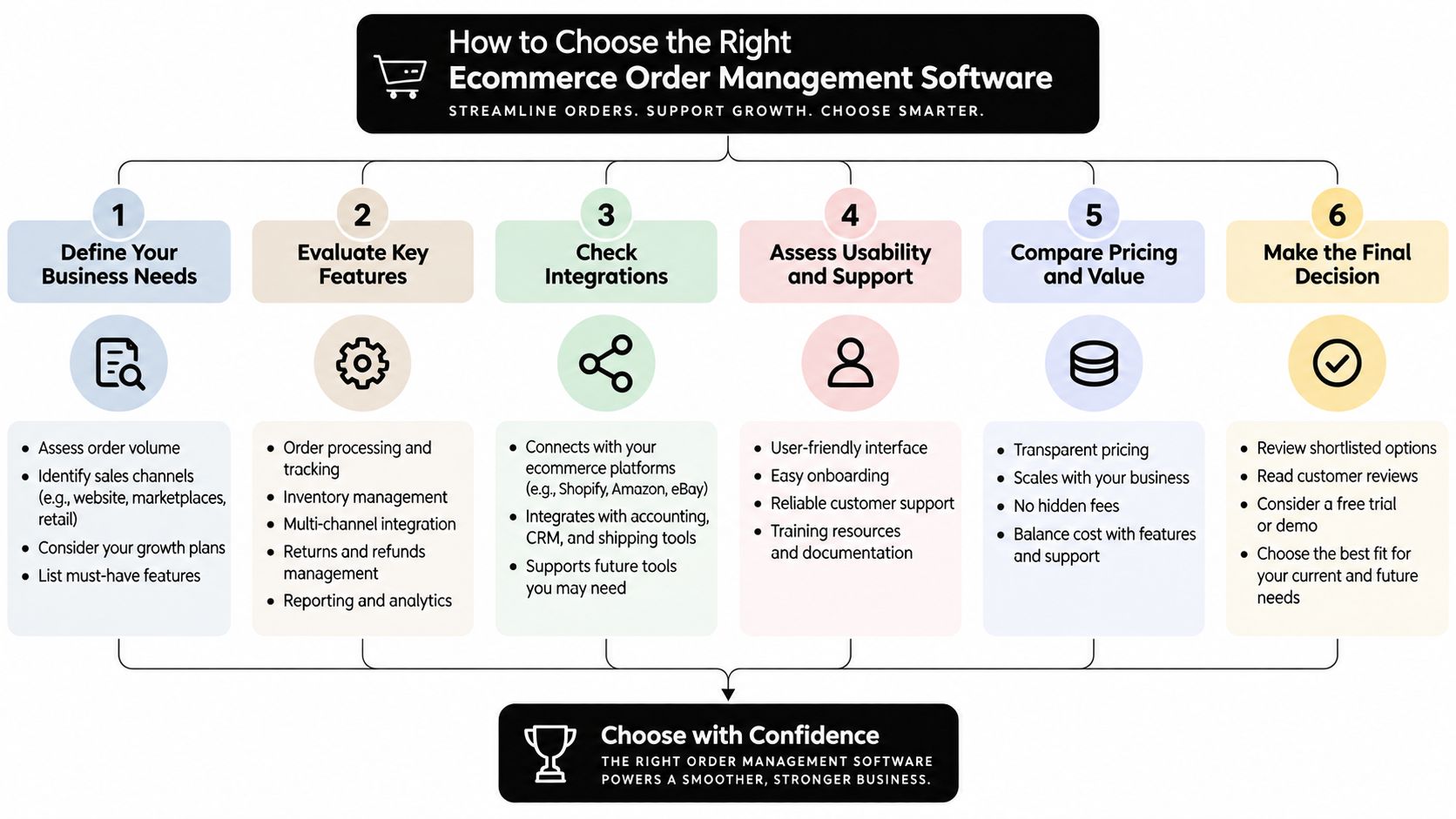
Teams often choose ecommerce order management software backward. They start with vendor demos, then try to fit their operation into the demo script.
Start with your operating constraints instead.
Score your operation before you score vendors
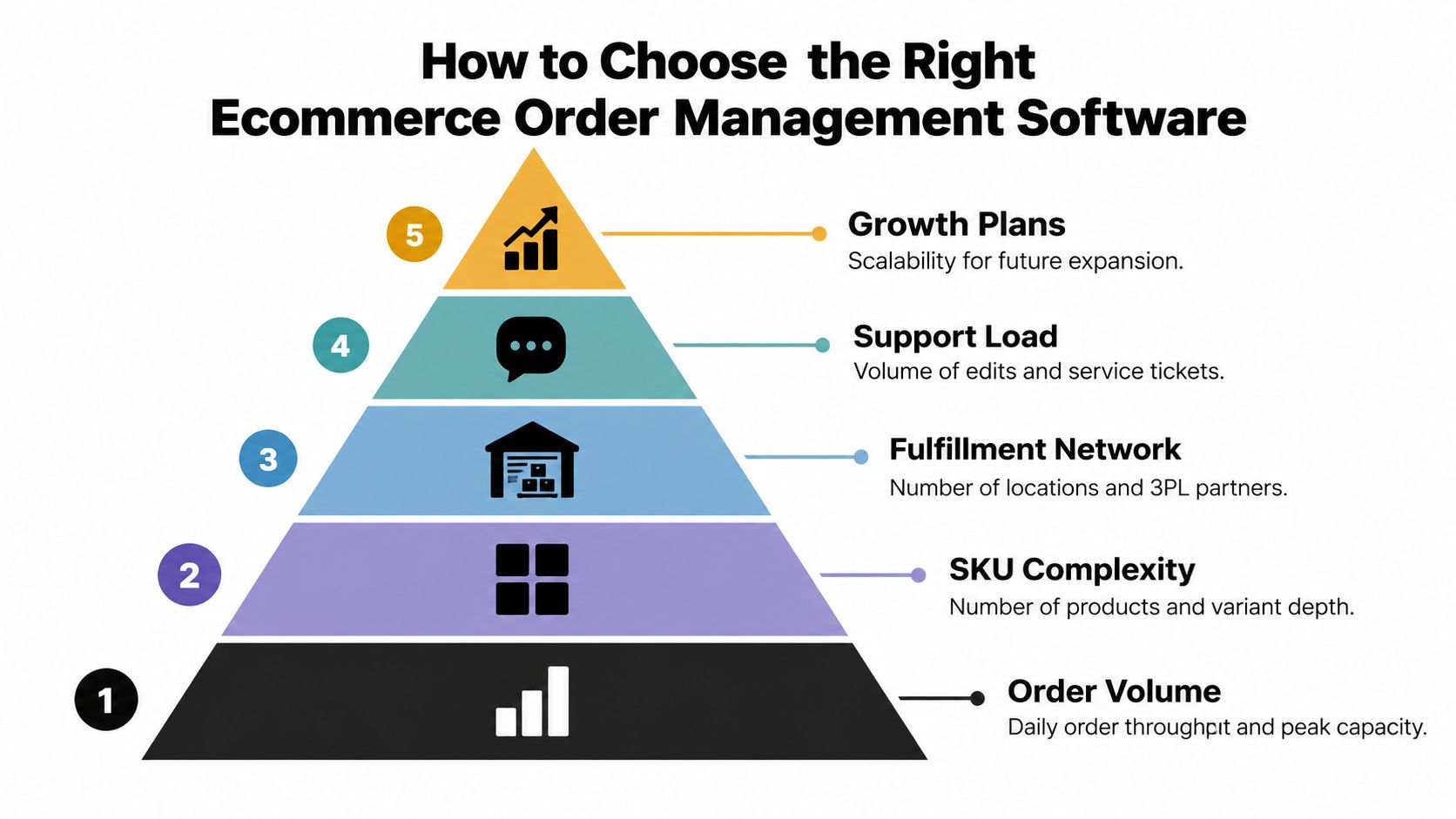
Weight these factors first:
- Order volume: Not just average days. Think about peak periods and release timing.
- SKU complexity: More variants usually mean more post-purchase correction requests.
- Fulfillment network: One warehouse is different from several nodes plus 3PLs.
- Support load: If your team spends all day changing addresses and sizes, that should drive the decision.
- Growth plans: Expansion into new channels changes what “enough” looks like.
A small but messy operation can need better OMS logic sooner than a larger but simpler one.
Ask for throughput and latency, not feature theater
A useful 2026 comparison framework recommends evaluating throughput as orders processed per minute and updates processed per minute, and latency as p95 time from event submission to updated customer-facing state, based on Axiobench's ecommerce OMS comparison framework.
That's the right lens. If a customer changes an address or item, the system needs to propagate that update fast enough that support, fulfillment, and the customer all see the same truth.
Here's the shortlist I'd use in a buying process:
- Can Shopify remain the system of record? If not, make sure you want that complexity.
- Can the tool govern edit windows and permissions?
- Can it place and release holds reliably?
- Can it handle invoices, refunds, and approvals cleanly?
- Can it expose a clear audit trail of who changed what and when?
Don't ignore cancellation deflection
This is one of the most underbought capabilities in the category.
A lot of OMS guidance still treats cancellation as a support endpoint, not an operational save opportunity. That misses real value. Coverage on the multichannel order management market also highlights that buyer questions around cancellation deflection, store-credit save offers, and when not to save a cancellation remain underexplained, as discussed in Mordor Intelligence context on multichannel order management.
If your store sees meaningful cancellation intent before fulfillment, include these questions in vendor evaluation:
- Reason capture: Can you structure why customers want to cancel?
- Save offers: Can you present store credit when it makes sense?
- Fallback logic: Can customers still fully cancel when saving isn't appropriate?
The best software choice is the one that fits your exception profile, not the one with the largest architecture diagram.
Use Cases and Situational Recommendations by Store Profile
Different stores need different levels of control. I wouldn't give the same OMS recommendation to a fashion brand with constant size swaps and a brand managing distributed inventory across several fulfillment nodes.

High-SKU DTC brand with frequent variant swaps
Apparel, beauty bundles, and configurable products often get hammered with “I picked the wrong one” requests.
Recommendation: Use Shopify as the base and add a post-purchase control layer if the main issue is self-serve corrections. Go enterprise only if routing and multi-node logic are also painful.
The winning move here is usually not deeper routing. It's safer customer edits with strong exclusions and approval rules.
Watch for products that shouldn't be editable because of low stock, special handling, or margin sensitivity.
High-volume store with constant address fixes
If customers routinely enter the wrong apartment number, typo a street, or contact support right after checkout, manual handling becomes expensive fast.
Recommendation: Prioritize a setup with fulfillment holds during active edits and strict timing rules. Native Shopify can work for very basic flows, but once support is chasing fulfillment, you need stronger governance.
The critical trade-off is speed versus safety. Too wide an edit window slows operations. Too narrow a window pushes volume back into support.
Brand that wants post-purchase upsell on the same order
Some teams don't have deep orchestration issues at all. They want customers to add items after checkout without sending them through a second purchase path.
Recommendation: Use a post-purchase edit layer that supports item additions to the existing order with settlement inside Shopify. A large OMS suite is overkill if same-order add-ons are the core use case.
This only works if invoicing and fulfillment timing are tightly controlled. Otherwise, ops inherits the mess.
Brand struggling with cancellations and refund leakage
If cancellation requests arrive before shipment, there's often a chance to save the order, but only with structure.
Recommendation: Choose a setup that supports cancellation reason capture, store-credit offers, and clear fallback to full cancel. If your broader fulfillment network is simple, you probably don't need enterprise OMS just to handle this well.
Saving an order is useful. Saving the wrong order creates more work later. Your rules should reflect that.
For example, don't force save offers on damaged trust situations, fraud concerns, or orders already too far into fulfillment.
Implementation Guidance for Shopify Stores From Install to Verification
Implementation is where good strategy usually gets ruined by loose rules.
Keep the rollout narrow first. Install the app from Shopify, place the block on the order status page and customer accounts, and avoid theme rewrite projects unless you have a very specific storefront requirement. That keeps adoption cleaner and rollback easier.
Roll out in controlled phases
Start with one or two edit types, not all of them at once.
A practical launch sequence looks like this:
- Turn on a short edit window first. Address changes and variant swaps are usually easier to validate than full line-item additions.
- Enable fulfillment holds during active edits. This prevents mid-change shipment issues.
- Set exclusions early. Block products, collections, tags, destinations, and fulfillment states that shouldn't allow edits.
- Define approval thresholds. Decide which refunds or order-value changes need review.
- Test settlement paths. Run both invoice and refund scenarios through Shopify before exposing the feature broadly.
Verify behavior before scaling access
Don't just test whether the edit appears. Test whether the order behaves correctly after the change.
Check these points:
- Order record integrity: Confirm the original order stays accurate in Shopify admin.
- Fulfillment release logic: Make sure holds are applied and removed at the right times.
- Financial outcomes: Verify invoices, refunds, and approvals follow the intended rules.
- Customer-facing visibility: Make sure the updated state appears clearly where the customer expects it.
- Operational reporting: Track edited orders, saved orders, and support-impact estimates in a way your team can review.
The most common mistake is opening the window too wide. The second most common mistake is forgetting exclusions for products or destinations that your ops team already knows are risky.
Mayra Apps offers Shopify tools built for this exact post-purchase layer: self-serve edits, cancellation deflection, one-click upsells, fulfillment holds, and settlement workflows that write back to the original order in Shopify. If your main OMS problem is what happens after checkout but before shipment, visit Mayra Apps and evaluate whether a post-purchase control layer fits better than a heavier OMS rollout.