
A customer places an order, then spots the mistake almost immediately. The hoodie is the wrong size. The delivery address has an old apartment number. A matching cap would have made the order more useful, but the customer doesn't want to start a second checkout. Within minutes, your support inbox, fulfillment queue, payment system, and customer account are all handling the same order.
That gap between checkout and delivery is where many Shopify merchants lose time, margin, and repeat business. A strong post purchase customer experience isn't just a sequence of shipping emails or a generous return policy. It's a merchant-controlled workflow that lets customers make appropriate changes, gives agents the right exceptions to handle, and protects revenue before an order becomes a refund.
Table of Contents
- What the Post Purchase Customer Experience Looks Like in 2026
- Defining the Post Purchase Customer Experience Beyond Shipping and Returns
- The Four Post Purchase Events That Drive Most Support Tickets
- Communication Touchpoints That Reduce Friction Instead of Creating It
- Self Serve Edits Versus Assisted Workflows
- Cancel Deflection and One Click Upsells as Revenue Protection
- Measuring Post Purchase Performance the Right Way
- Building a Post Purchase Strategy That Compounds
What the Post Purchase Customer Experience Looks Like in 2026
It's Tuesday afternoon at a Shopify apparel store. A customer orders a hoodie in size L, then emails support to switch to XL. Minutes later, they send a new shipping address and use Instagram direct messages to ask whether a matching cap can be added before the order ships.
One order has become several conversations. The team must verify the customer, check whether picking has started, change the variant, confirm the address, calculate the add-on charge, and ensure fulfillment does not ship outdated details. A merchant-controlled workflow can route safe changes to self-serve tools, reserve exceptions for agents, and keep the order moving. Without that coordination, the customer may cancel while waiting.
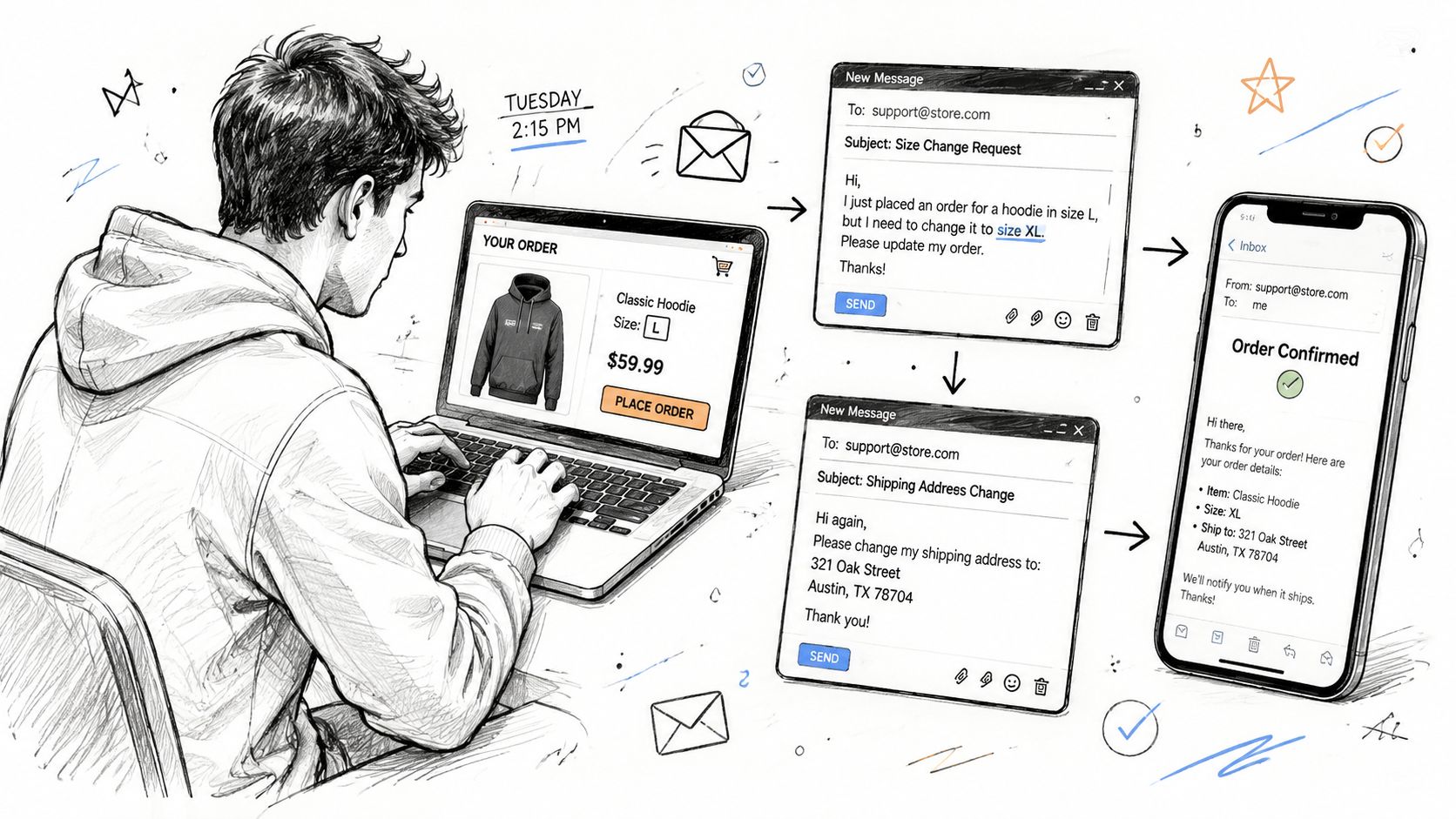
The operational layer most stores leave unmanaged
Post-purchase CX is the workflow layer between payment and delivery. During this period, the order may still change, the customer may still be uncertain, and the merchant can still protect the sale.
A typical request can involve:
- An order edit: Change a size, color, quantity, or line item before fulfillment.
- An address correction: Fix a typo or redirect a gift before the shipping label is finalized.
- A cancellation attempt: Address buyer's remorse, price concerns, or financial pressure without forcing an immediate refund.
- An add-on request: Attach gift wrap, a matching product, or another accessory to the original order.
Manual handling creates different costs for each request. Agents gather information, fulfillment staff may rebuild a pick list, and finance teams may process partial refunds or additional charges. Customers experience those internal handoffs as delay and uncertainty.
Practical rule: If a customer can safely resolve a common request from the order status page, don't make them open a support ticket first.
The commercial case is clear. A Retail Dive analysis of the post-purchase experience reported that 52% of connected consumers said post-purchase factors such as service efficiency and ease of support determine brand loyalty. About 40% said installation, technical issues, and returns were the most memorable part of the brand experience. The same source reported that U.S. retailers estimated 15.8% of total annual sales would be returned in 2025, totaling nearly $850 billion.
Merchants can configure this window as revenue protection. Self-serve edits reduce avoidable tickets, cancellation deflection gives customers a path short of a refund, and one-click add-ons can increase an order before fulfillment. Treating post-purchase as reactive support leaves those options unused until the customer requests a cancellation, opens a dispute, or decides not to return.
Defining the Post Purchase Customer Experience Beyond Shipping and Returns
A customer selects the wrong size five minutes after checkout, then notices the mistake while the confirmation email is still open. Whether that customer can fix the order without contacting support depends on the workflow configured behind the storefront. The post-purchase customer experience begins at checkout and extends through confirmation, fulfillment, delivery, product use, support, returns, and the early relationship after delivery. For a Shopify merchant, it is a governed layer that determines what customers can change, what systems can automate, and where human judgment must remain.
Shipping updates and returns cover only part of the work. Tracking can show movement without resolving a wrong variant. A return policy can explain the remedy without preventing an address error from becoming a failed delivery. The editable order is the central record, so every post-purchase action should connect to its current status, payment state, fulfillment stage, and customer request.
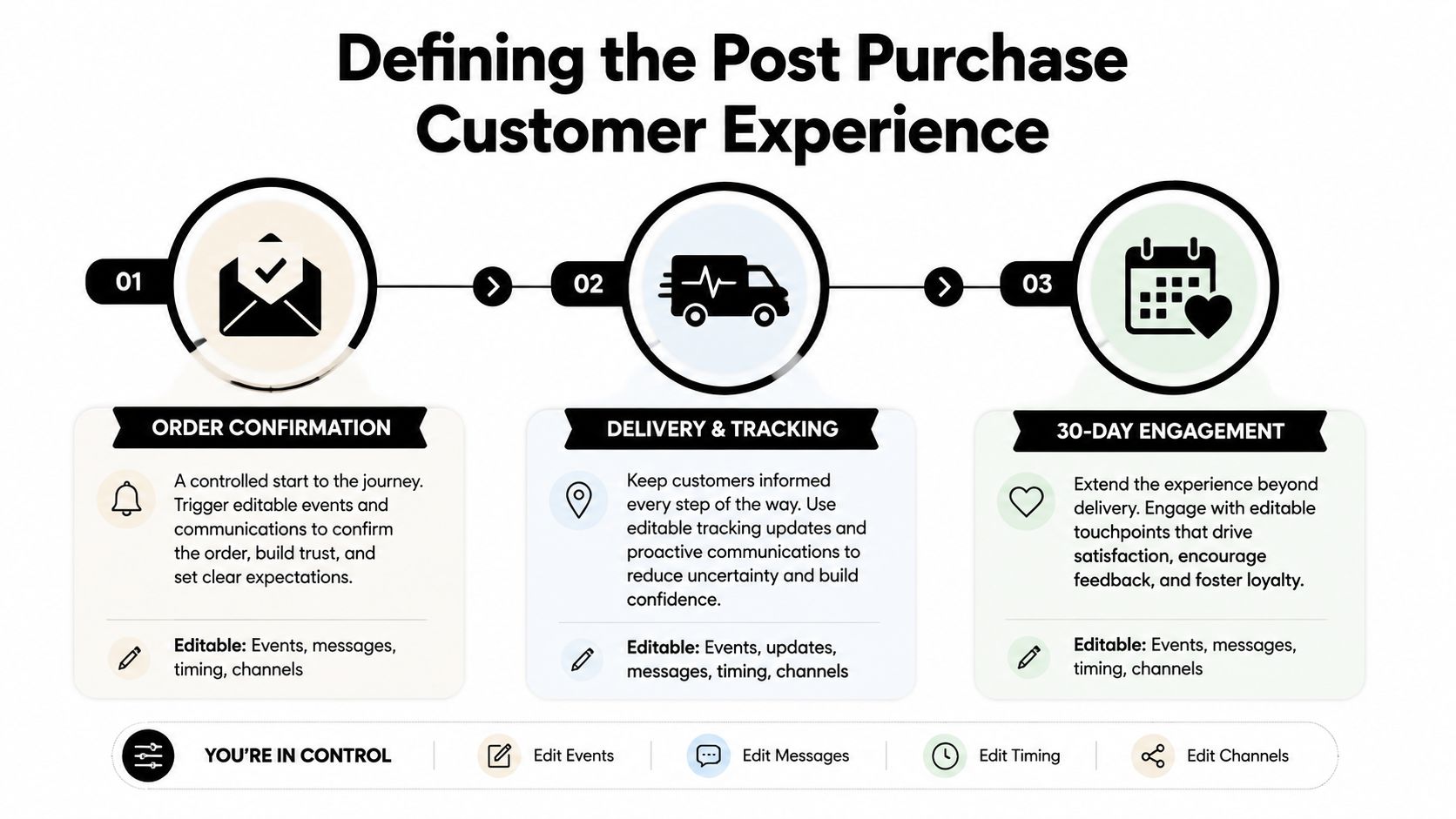
Three stages, three types of control
Order confirmation sets the customer's immediate options. The confirmation page and email should show order contents, payment details, fulfillment expectations, support access, and the period during which edits or cancellations remain available.
Delivery and tracking reduces uncertainty through status information that matches the fulfillment state. A carrier link alone may remain unchanged during an exception. Until the warehouse ships, the merchant should retain control over permitted edits, address corrections, and eligible additions.
Thirty-day engagement turns a transaction into an ongoing relationship. Product guidance, care instructions, replenishment prompts, review requests, and relevant recommendations belong here when they help customers use or extend the purchase.
These stages are governed states with rules, rather than passive communication windows.
- Editable: The customer makes an approved change without contacting support.
- Automated: The system confirms the request, updates the order, and communicates the outcome.
- Human-led: An agent reviews risk, margin, tax, fraud, or fulfillment exceptions.
Returns show the commercial effect of this design. Research reported that 97% of shoppers said a favorable return experience increases the likelihood of shopping again, while 82% said simple return processes influence whether they will try a new brand, according to return-experience research reported by Yahoo Finance. A clear workflow protects the current order, limits avoidable support work, and improves the chance of a future purchase. Self-serve edits, cancellation alternatives, and relevant one-click additions give merchants practical controls over revenue during the period after checkout.
The Four Post Purchase Events That Drive Most Support Tickets
Most post-purchase demand falls into four operational categories. They look similar in an inbox, but they require different controls in Shopify, fulfillment, payments, and customer communication.
| Event Type | Typical Volume | Avg Handling Cost | Automation Difficulty |
|---|---|---|---|
| Order edits | Store-specific and often concentrated in variant-heavy catalogs | Agent time, fulfillment rework, and possible refund or charge adjustment | Moderate |
| Address changes | Store-specific, especially before label creation or gifting periods | Reshipment risk, carrier intervention, and support time | Moderate to high |
| Cancellation requests | Variable by product, timing, and customer intent | Lost revenue, payment handling, and recovery effort | Moderate |
| Post-purchase add-ons | Usually driven by product relevance and fulfillment timing | New checkout friction or manual order consolidation | Moderate |
Order edits
Size, color, quantity, and line-item changes are usually the cleanest automation target. The system should display only the capabilities that are safe for the order, then write the accepted change back to the original order record. A fulfillment hold is essential, because an edit that doesn't pause picking can create a customer-facing confirmation for an order the warehouse can no longer assemble.
Address changes
An address request needs more than a text field. The workflow should validate whether fulfillment has started, apply country and destination rules, and route higher-risk changes for review. A simple apartment correction may be safe to automate, while a change that affects tax, shipping eligibility, or fraud controls deserves a human decision.
Cancellation requests
Cancellation isn't one customer intent. Some buyers found a cheaper product, some selected the wrong variant, and others need to delay the shipment. Capturing the reason gives merchandising and support teams usable feedback, while the immediate workflow should offer an appropriate save path before presenting the full cancellation option.
Add-ons
An accessory request is a revenue opportunity only if it doesn't create a second operational problem. The merchant needs to confirm inventory, payment settlement, fulfillment status, and whether the added item can travel with the original shipment. Stores reviewing their inbox should start with practical methods to reduce Shopify support tickets, then map which of these four requests can be completed without an agent.
The right starting point is not a generic automation audit. Export recent tickets, group them by event, and trace each event from customer request to order record, payment, fulfillment, and notification. The highest gap is the event that repeatedly requires an agent even though the decision rules are straightforward.
Communication Touchpoints That Reduce Friction Instead of Creating It
Transactional messages should answer the question the customer is likely to ask next, such as whether an order can still be changed, where the tracking link leads, or what to do if delivery is delayed. Each message should give the customer a clear action and keep the merchant in control of the available workflow.
| Touchpoint | Primary Purpose | Ticket Risk If Misconfigured | Post-Purchase Lever |
|---|---|---|---|
| Order confirmation | Confirm payment, contents, and available actions | Customers ask whether edits or cancellations are still possible | Show the edit window and link directly to the order |
| Shipping notification | Explain shipment status and tracking | Broken or generic links create “where is my order?” tickets | Use carrier-aware tracking and clear exception language |
| Out-for-delivery message | Set expectations for the final delivery stage | Overpromised timing creates complaints when routes change | Present the carrier status without adding unsupported promises |
| Post-delivery follow-up | Help with usage, support, feedback, or next purchase | A premature promotion feels irrelevant or hides help options | Lead with product guidance and a clear support path |
Confirmation is an operational control
The confirmation email is often the first opportunity to show customers what they can change. A short statement such as “Review your order and make eligible changes before fulfillment begins” gives them a usable next step. Link it to the customer account or order status page, and display the actual cutoff. That prevents customers from contacting support to learn whether an edit or cancellation remains possible.
The order page should also reflect the workflow state. If fulfillment has not started, show the available edit or cancellation action. If the order is locked, explain that status and provide the support route. Clear state information reduces avoidable tickets without promising an outcome the operations team cannot deliver.
The shipping notification needs to distinguish label creation, carrier possession, and actual delivery movement. Hard-coded tracking links that ignore carrier exceptions create more work when the merchant's message conflicts with the carrier page. Use carrier-aware tracking, name the current status plainly, and explain what the customer should do when movement pauses.
Keep transactional and promotional jobs separate
Order confirmations, receipts, shipment updates, and refund notices belong in the transactional layer. Promotional sequences, product education, and broader retention campaigns can run through tools such as Klaviyo or Attentive, provided each message has the right trigger and does not bury order information.
A transactional email can include a controlled merchandising element, but the customer should find order status, edit options, the cancellation route, and support contact without scanning an advertisement. Put the operational actions first. Treat any product recommendation as secondary.
Post-delivery follow-up should support product use before asking for another purchase. Usage guidance can prevent confusion, while a visible support path gives customers a place to resolve problems. Structured after-sales touchpoints can also influence return behavior by improving product understanding and trust, as described in the empirical study of post-purchase engagement and return behavior. Once these messages expose the right actions, workflow design determines which requests customers can complete without an agent.
Self Serve Edits Versus Assisted Workflows
Self-serve editing works when the rules are predictable and the system can protect fulfillment. Assisted workflows work when a change affects tax, fraud exposure, margin, inventory allocation, or an order that has already entered a complex warehouse process. Most growing Shopify stores need a hybrid, not a philosophical commitment to one side.
| Dimension | Self-Serve | Assisted | Hybrid |
|---|---|---|---|
| Customer action | Immediate change inside the account or order page | Request submitted for agent review | Safe changes are instant, exceptions enter a queue |
| Fulfillment control | Automatic hold while the edit is active | Agent coordinates the hold and approval | Rules trigger holds, agents resolve edge cases |
| Financial settlement | System handles eligible charges or refunds | Agent verifies the adjustment | Thresholds decide which settlement path applies |
| Best fit | Repetitive, low-risk edits | High-value or policy-sensitive changes | Stores with varied products and fulfillment states |
| Main trade-off | Less human oversight | More ticket volume and slower resolution | More configuration work upfront |
Choose the workflow by risk, not preference
For lower-risk orders, a customer changing one variant or removing a line item can usually follow a self-serve path. The workflow should check order status, inventory, eligibility, and the edit window before confirming the change.
Assisted review is appropriate when the customer changes destination details with tax implications, swaps into a product with different margin characteristics, or increases quantity beyond the store's approved threshold. The agent shouldn't manually recreate the order if the platform can preserve the original order record. Their role is to approve the exception, not become a human integration layer.
A fulfillment hold must begin before the warehouse generates or acts on the pick list. If the customer can submit an edit after picking starts but the system doesn't pause fulfillment, the store has created a false promise. The order page says one thing, while the warehouse ships another.
Scale changes the design
A store processing fewer than 500 orders per month may manage exceptions with a small assisted queue, but it should still automate the obvious edits. From 500 to 5,000 monthly orders, hybrid rules become more valuable because support volume and fulfillment timing start to compete. Above 5,000 monthly orders, merchant-defined eligibility, automatic holds, and audit-friendly order updates become foundational infrastructure.
Payment handling deserves equal attention. A quantity increase may require an additional charge, while a removal or variant difference may trigger a partial refund. The workflow should make the settlement status visible to the customer and keep Shopify as the source of truth. Stores evaluating this model can compare the operational requirements in a customer self-service portal workflow.
Cancel Deflection and One Click Upsells as Revenue Protection
A cancellation request is a workflow decision, not merely a refund event. The system should identify the customer's reason, present a proportionate alternative, and keep a clear cancellation path available when saving the order is inappropriate. Hiding the cancellation option damages trust, while offering only a refund misses the opportunity to resolve an underlying problem.
Reason tagging connects post-purchase behavior to merchandising decisions. Repeated cancellations caused by delivery timing may indicate unclear delivery copy. Variant-related cancellations can point to a product page or size guide that creates avoidable uncertainty. If price is the dominant reason, store credit may fit better than a discount that teaches customers to wait for a lower price.
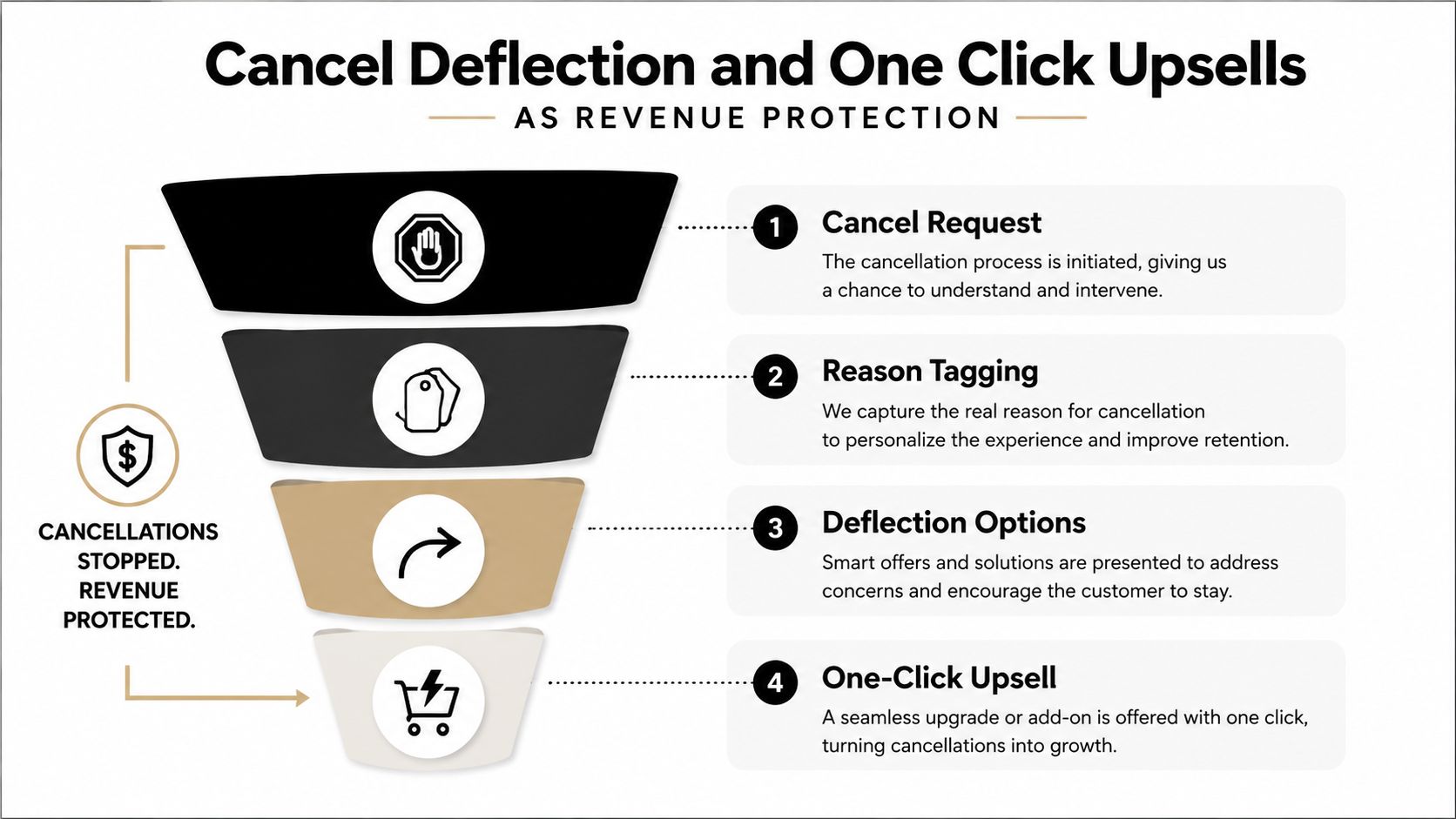
Save the order without coercion
A save offer might provide store credit, a shipping-delay option, or a variant correction. Each option needs a clear economic boundary. Store credit can preserve the relationship, but it creates a future liability and should not replace a refund automatically.
Configure the workflow in this order:
- Capture the reason: Present a short, understandable list with an optional explanation.
- Match the response: Offer a correction, delay, credit, or support route based on the selected reason.
- Show the outcome: State what will happen to the order, payment, and fulfillment status.
- Keep cancellation available: Process the refund when the customer rejects the alternative.
The retention logic has support from research on returns and post-sale service. A Frontiers in Psychology study of online post-sale services found that return, exchange, and maintenance services predict satisfaction, which affects customer trust. A favorable return experience can also influence whether shoppers buy again, as noted earlier. Deflection works only when the customer remains in control.
Use upsells where the order already lives
A one-click upsell fits after the customer commits to the order and before fulfillment closes the opportunity. Recommendations should relate directly to the original purchase, such as a cap with a hoodie, replacement filters with a device, or gift wrap with a giftable product. See this guide to one-click upsells on Shopify for the storefront workflow.
The added item should join the original order when the operational system supports that path, rather than forcing a second checkout. Inventory, settlement, eligibility, and fulfillment must update together. Mayra Apps provides Shopify workflows for self-serve edits, cancellation reason capture with store-credit offers, and one-click additions from the customer account and order status page.
Measure retained original revenue separately from incremental add-on revenue. That distinction shows whether the workflow saved a cancellation, increased order value, or shifted a purchase that would have happened anyway. The merchant governs the rules, while automation handles eligible cases and leaves exceptions for human review.
Measuring Post Purchase Performance the Right Way
Customer satisfaction arrives after the interaction. Operational metrics show where the workflow loses revenue, creates avoidable work, or needs a rule change.
Track these measures at the order level:
- Orders edited per 100 shipments: Shows how often customers request changes and which products or variants create uncertainty.
- Revenue recovered through edits and add-ons: Separates preserved order value from incremental items accepted after checkout.
- Orders saved from cancellation: Counts accepted alternatives, such as corrections, delays, or store credit, instead of recording every cancellation request as a lost order.
- Support tickets avoided per 100 orders: Compares eligible self-serve events with completed actions to estimate how much work stays out of the queue.
A merchant processing 5,000 monthly orders should expect 8% to 12% to request post-purchase changes, with self-serve workflows capturing 60% to 70% of those requests without ticket creation, according to the planning benchmarks supplied for this guide. Treat these figures as operating targets, not universal outcomes. Product mix, fulfillment cutoff, customer account adoption, and policy rules will determine the result.
| KPI | What It Measures | Target Range | Revenue Impact |
|---|---|---|---|
| Orders edited per 100 shipments | Demand for post-purchase changes | Store baseline first, then improve by category | Fewer avoidable refunds and reships |
| Revenue recovered through edits and add-ons | Value preserved or added after checkout | Track by event and product group | Protects realized order value |
| Orders saved from cancellation | Effectiveness of deflection | Compare by cancellation reason | Retains orders that might otherwise be refunded |
| Support tickets avoided per 100 orders | Reduction in manual service demand | Compare self-serve eligibility with completion | Frees agents for complex cases |
Return rate alone can mislead. A store may reduce returns by making the process difficult, while trust and repeat purchase behavior decline. Pair return data with save rate, refund timing, edit completion, and customer contact volume. Industry returns analysis has found that 71% of consumers say a poor returns experience makes them less likely to shop again, so efficiency must be measured alongside customer control and transparency.
Review the metrics by product, cancellation reason, destination, fulfillment status, and workflow path. That breakdown shows whether a policy change reduced tickets or merely moved customers into another support channel. It also separates a genuine cancellation save from an order that was already likely to remain active.
Tracking these metrics side by side reveals which workflow changes produce the largest impact.
Building a Post Purchase Strategy That Compounds
Post-purchase revenue protection works best as a sequence of controlled improvements, not as a collection of disconnected apps. Start with the request that creates the most tickets, define the safe decision rules, and connect the customer action to the original Shopify order.
- Save edits first: Enable self-serve variant, quantity, address, and line-item changes where fulfillment and payment rules are clear.
- Add cancellation deflection: Capture reasons, test appropriate save paths, and retain a full cancellation route for customers who need it.
- Introduce relevant upsells: Recommend accessories or replenishment items on the account and order status page while the order remains operationally eligible.
- Tighten governance: Use the KPI data to adjust edit windows, approval thresholds, product exclusions, destination rules, and fulfillment holds.
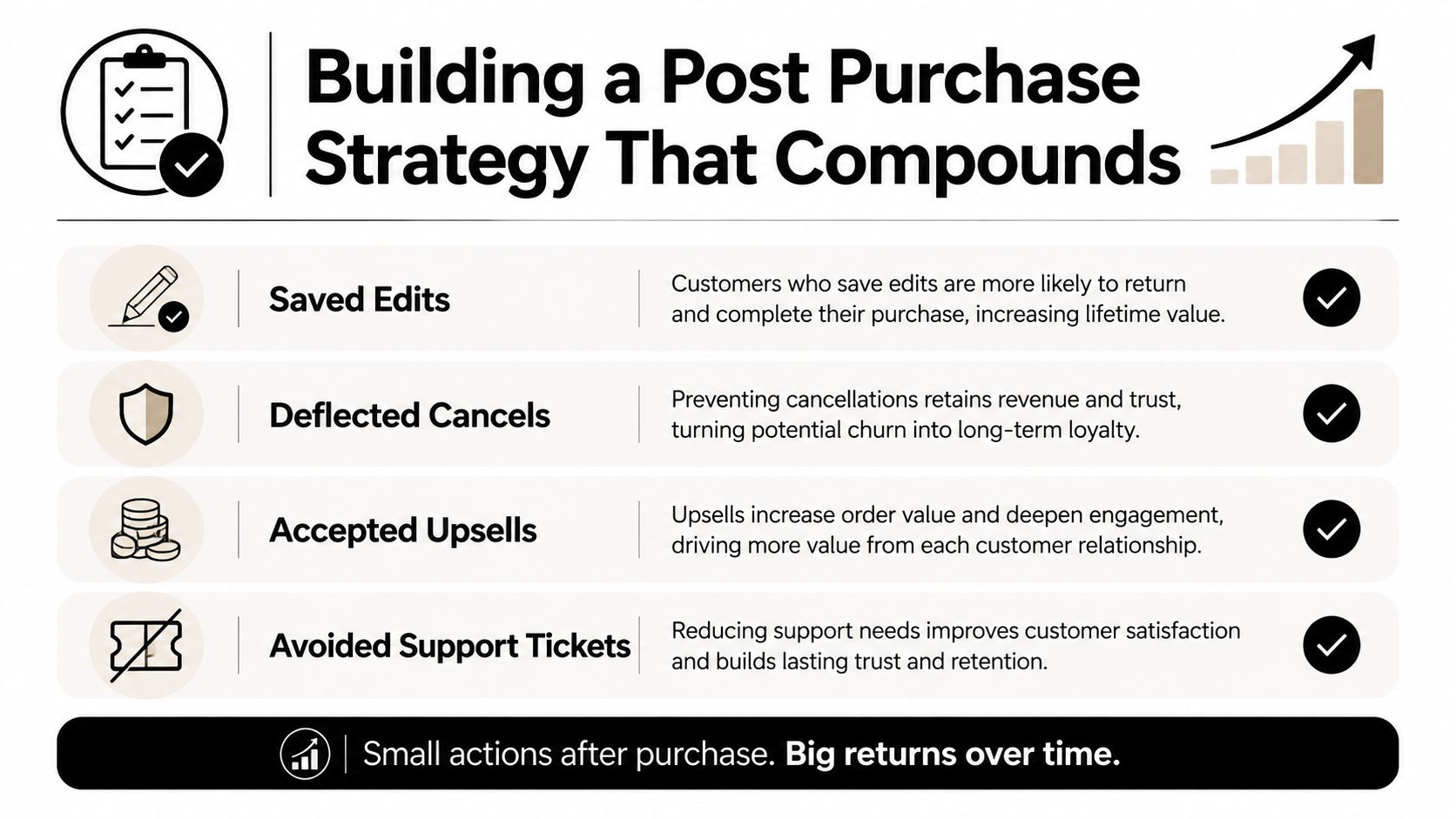
Every successful edit prevents a needless refund or reship. Every appropriate cancellation save preserves an order without forcing the customer into a policy fight. Every accepted add-on increases the value of an existing transaction, and every avoided ticket gives the support team capacity to handle issues that need human judgment.
That combination turns the post purchase customer experience into a merchant-governed revenue channel. The store still needs accurate shipping, fair returns, and responsive support, but those pieces work better when the customer can resolve routine changes directly and the business controls the exceptions.
Mayra Apps helps Shopify merchants manage self-serve order edits, cancellation deflection with store credit, and one-click post-purchase upsells through customer accounts and the order status page. Visit Mayra Apps to configure edit windows, fulfillment holds, approval rules, and revenue-protection workflows for your store.