
Jenna buys a phone case from your Shopify store, pays, and moves on. Ten minutes later, she emails support asking to upgrade to a larger bundle and add expedited shipping. The original payment is already settled, fulfillment may be preparing the package, and finance now needs to collect only the difference without creating a disconnected transaction.
That's where automated invoicing for Shopify order changes differs from the traditional accounts payable model. The invoice isn't just a PDF waiting for someone to approve it. It's a financial record tied to a live order, a payment transaction, a customer decision, and sometimes a refund that changes the order's final value.
Table of Contents
- Why Invoicing Changes After a Customer Hits Buy
- What Automated Invoicing Actually Means in a Shopify Store
- Post-Purchase Events That Trigger an Invoice
- How Additions and Refunds Reconcile With Shopify Payments
- Merchant Controls That Decide Whether Revenue Sticks
- Reading the Numbers Behind Recovered Revenue
- From First Edit to Steady Revenue Recovery
Why Invoicing Changes After a Customer Hits Buy
Before checkout, invoicing is relatively predictable. A shopper selects products, enters payment details, and receives an order confirmation or invoice based on the original cart. After checkout, the order can still change, and those changes create new financial obligations.
Jenna's request creates a simple sequence:
- The original order is captured. Shopify records the phone case, the customer, taxes, shipping, and the payment transaction.
- The customer requests an edit. She wants a larger bundle and faster delivery.
- The merchant calculates the difference. The new items and shipping service cost more than the settled order.
- A second invoice is issued. This invoice records the additional amount, while referencing the original order.
- The payment is collected through the existing Shopify payment flow. The merchant needs the added charge associated with the same customer and parent order.
- The order and ledger are updated. Finance can see the original charge, the added amount, and the resulting order total.
That second invoice is an adjustment invoice, or more plainly, an invoice for the delta, the difference between the original order and its edited value. It shouldn't replace the first invoice if that invoice represents a completed payment. Replacing it can create confusion around tax, payment status, refunds, and audit history.
Practical rule: Treat every post-purchase change as a controlled financial event, not as an informal note attached to a support ticket.
A static PDF sent to accounts payable is the wrong mental model because Shopify merchants usually aren't waiting for a supplier invoice to arrive. They're managing accounts receivable, where the store issues a customer-facing charge. The trigger is an order event, such as an added product, shipping upgrade, or approved correction.
Automated invoicing connects that event to the financial record. The system identifies what changed, recalculates the relevant lines, requests or captures the additional amount, and records the outcome against the parent order. That approach also aligns with the broader history of electronic invoicing, which grew from decades of document standardization and electronic data exchange rather than from one recent software release, as described in this history of e-invoicing.
What Automated Invoicing Actually Means in a Shopify Store
In a Shopify store, automated invoicing means software watches for eligible changes to an order and creates the appropriate financial record without asking a finance employee to recalculate totals in a spreadsheet.
The phrase can sound like an accounts payable feature, so separate the two use cases. AP automation receives supplier invoices, extracts information, routes approvals, and prepares payments. Shopify order-tied invoicing works in the opposite direction. It generates a customer charge when the merchant changes an order after checkout.
What remains familiar
Finance still needs the fundamentals:
- Invoice numbering: Each invoice needs a traceable identifier.
- Customer details: The billing record must identify the buyer correctly.
- Line items: Added products, shipping services, discounts, and taxes need clear treatment.
- Payment status: The record should show whether the amount is pending, paid, failed, refunded, or awaiting review.
- Audit history: Staff should be able to connect the adjustment with the original order and transaction.
These requirements don't disappear because the invoice is created by software. Automation should make them more consistent, not less visible.
What changes after checkout
The trigger is no longer “a new cart reached checkout.” It's an order event. The customer may add a product from an upsell, swap a variant, change delivery speed, or request a partial cancellation. The payer is generally the original customer using the payment flow associated with the Shopify order, subject to the payment provider's rules and the merchant's configuration.
The document also references an order ID rather than relying on a purchase order number. That connection matters because the finance team needs to reconcile the adjustment with the parent order, fulfillment status, payment transaction, and any later refund.
A useful implementation checklist should cover more than extraction and sending. It should also address duplicate records, tax treatment, approval routing, payment failures, and what happens if the customer edits an order while fulfillment is paused. Teams evaluating workflows can also review this practical guide to avoid pitfalls in invoice automation, especially where automated records still require clear controls.
For Shopify-specific order behavior, the Shopify order editing guide provides useful context on how post-purchase changes fit into the store's existing order record.
Post-Purchase Events That Trigger an Invoice
Not every customer message should create a new invoice. A billing layer should respond to a defined order event and know whether the event increases the amount due, decreases it, or changes the tax treatment.
The most common triggers are additions, upgrades, and approved corrections. A one-click upsell may add another product to the order. A customer support agent may add gift wrap after checkout. A shipping upgrade may increase the delivery charge without changing the product lines. Each event creates a delta that must be calculated against the original order.
Refund-related events work differently. A partial return or cancellation reduces what the customer owes or returns money already collected. If the merchant converts the amount into store credit instead of refunding it, the billing record still needs to show how the original order was adjusted and how the credit was issued.
Failed authorizations introduce another branch. If the first attempt doesn't complete and the customer retries with a different card, the system must distinguish the failed attempt from the successful transaction. Otherwise, finance may mistake an authorization attempt for settled revenue.
Required fields for every adjustment
The billing layer should preserve enough information for someone outside the original workflow to understand the transaction:
- Original order ID: The parent record that connects the adjustment to the Shopify order.
- Delta amount: The exact increase or decrease created by the event.
- Tax recomputation: The tax result after the item, shipping, destination, or discount changes.
- Event timestamp: When the edit, refund, or retry occurred.
- Shopify Payments transaction: The transaction that funded the added amount or received the refund.
- Changed line items: The products or services affected.
- Payment status: Whether the charge settled, failed, was refunded, or needs review.
| Trigger Event | Invoice Fields Required | Reconciliation Note |
|---|---|---|
| One-click upsell | Original order ID, added SKU, delta amount, tax, timestamp, funding transaction | Post the upsell against the parent order, not as an unrelated sale |
| Shipping upgrade | Original order ID, old and new shipping service, shipping delta, tax, timestamp, transaction | Keep the delivery change visible for fulfillment and finance |
| Gift wrap fee | Added service line, delta amount, tax treatment, timestamp, transaction | Separate the service from merchandise lines |
| Support-led manual edit | User or workflow identifier, changed lines, approval status, delta, timestamp | Preserve who authorized the change |
| Partial refund or store credit | Original SKU or service, negative line, refund or credit reference, timestamp | Reduce the net order value and connect the adjustment to the original tender or credit |
| Failed authorization retry | Failed attempt reference, successful transaction, amount, timestamp, payment status | Don't treat an authorization attempt as captured revenue |
| Cross-jurisdiction edit | Credit memo, replacement tax lines, new invoice, destination details, timestamps | Use both documents when the tax treatment changes across jurisdictions |
The difficult edge case is an edit that crosses tax jurisdictions. A destination change, for example, can alter the tax treatment of the original transaction. In that situation, a simple added line may not be enough. The merchant may need a credit memo for the original treatment and a new invoice for the corrected treatment, with both documents tied to the same order history.
How Additions and Refunds Reconcile With Shopify Payments
Added charges and refunds are mirror images in the ledger. One increases the amount collected from the customer, while the other sends money back or creates a credit against the original order.
For an upsell or order edit, the system first calculates the new order total and isolates the difference. It then requests the added payment through Shopify's payment flow, records the transaction, and attaches the invoice to the parent order. The customer shouldn't have to create an entirely separate checkout unless the merchant's payment or fulfillment rules require it.
For a refund, the system identifies the affected line or amount, creates a negative adjustment, and sends the refund to the original tender when that's the configured outcome. The order's net value then reflects the original capture less the refunded amount.
The added-charge path
- Edit requested: The customer adds an item, changes a variant, or upgrades shipping.
- Eligibility checked: Merchant rules confirm that the order can still change.
- Delta calculated: The system compares the edited order with the captured order.
- Payment requested: Shopify's payment flow attempts to collect the additional amount.
- Invoice issued: The invoice shows the added lines and references the parent order.
- Order updated: The Shopify order and financial records reflect the new total.
- Fulfillment resumes: If the order was held during editing, fulfillment can continue after payment and validation.
The refund path
- Return or cancellation approved: The merchant confirms what should be removed.
- Negative line created: The refunded product, service, or amount is linked to the original order.
- Tax recalculated: The adjustment reflects the tax associated with the returned or canceled item.
- Refund submitted: The amount goes back through the relevant Shopify Payments transaction, or becomes store credit when configured.
- Invoice or credit record updated: The customer receives a clear record of the decrease.
- Net order value refreshed: Finance can reconcile the final order value without deleting the original history.
| Step | Added Charge, Upsell or Edit | Refund, Return or Partial Cancel |
|---|---|---|
| Trigger | Customer increases order value | Customer decreases order value |
| Calculation | New total minus original captured total | Original captured amount minus approved reduction |
| Ledger entry | Positive delta | Negative line or credit adjustment |
| Payment action | Collect added amount through Shopify | Return funds to original tender or issue credit |
| Invoice result | Additional invoice for the delta | Credit or refund record tied to the parent invoice |
| Reporting | Parent order shows increased net value | Parent order shows reduced net value |
| Main risk | Duplicate sale or detached upsell record | Refund without a clear original line reference |
Finance should verify the payment gateway's handling of incremental charges, refunds, and related fees before enabling the flow. A focused guide to payment gateway fees can help teams identify which costs belong in their reconciliation model.
For merchant-side refund behavior, the Shopify refunds guide is a useful reference point when documenting approval and settlement rules.
Merchant Controls That Decide Whether Revenue Sticks
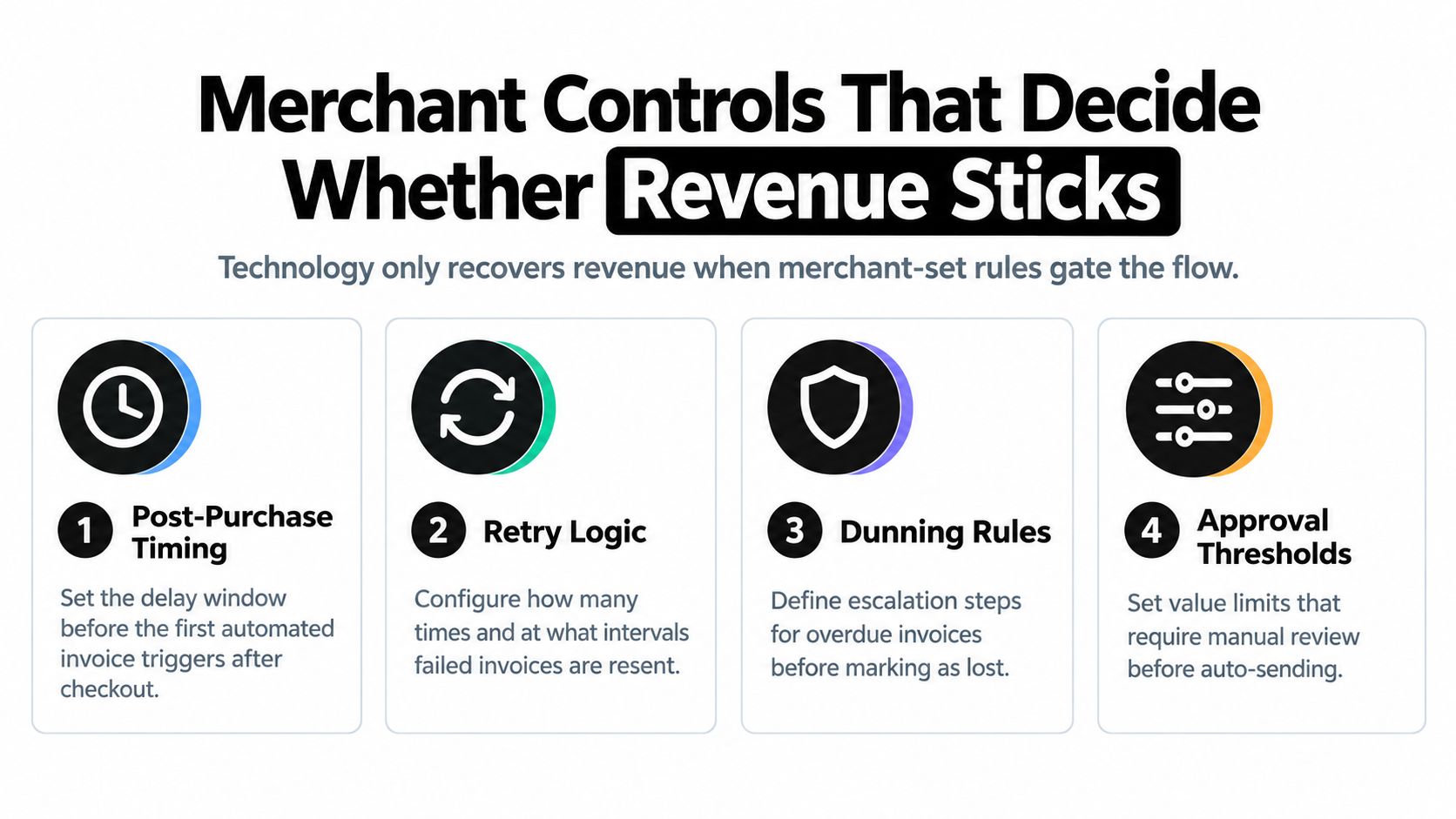
The invoicing engine can calculate a charge, but merchant rules decide whether that charge should happen. Without those rules, automation may collect revenue from a valid edit, yet expose the store to margin loss, fulfillment errors, customer disputes, or unwanted product changes.
Control the timing
An edit window defines how long a customer can change an order after checkout. A wider window gives shoppers more flexibility and creates more opportunities to recover add-on revenue. It also increases the chance that an order has already entered picking, packing, or carrier handoff.
A narrow window protects operations but may push legitimate requests back to support. Set the window around your fulfillment reality, not around an arbitrary growth target.
Require approval where exposure rises
Approval rules should apply when an edit creates unusual financial or operational exposure. A high-value addition, an expensive destination change, or a sensitive product category may need a human review before the invoice is sent.
Leaving every change automatic creates speed, but it removes judgment where a mistake is costly. Requiring approval for every small change creates control, but it recreates the support and finance workload automation was meant to reduce.
Cap the amount added to an order
A per-order cap limits how much a customer can add through a post-purchase flow. The cap protects against accidental quantity changes, unusual account activity, and offers that exceed the order's commercial logic.
A low cap reduces exposure but can frustrate customers who want a legitimate bundle upgrade. A higher cap supports larger purchases, provided the merchant also uses payment checks, product exclusions, and fulfillment safeguards.
Exclude products and destinations
An exclusion list can block edits involving final-sale products, fragile inventory, regulated items, margin-sensitive SKUs, or destinations with complicated tax treatment. Eligibility should also consider fulfillment state, because an edit that looks harmless in the storefront may be impossible once the package is sealed.
The most important revenue-recovery setting isn't the invoice template. It's the rule that decides whether the invoice is allowed to exist.
These controls create the operating boundary around automated invoicing. The engine performs the calculation and settlement, but the merchant decides which customer actions qualify, which changes require approval, and when the order must stop accepting edits.
Reading the Numbers Behind Recovered Revenue
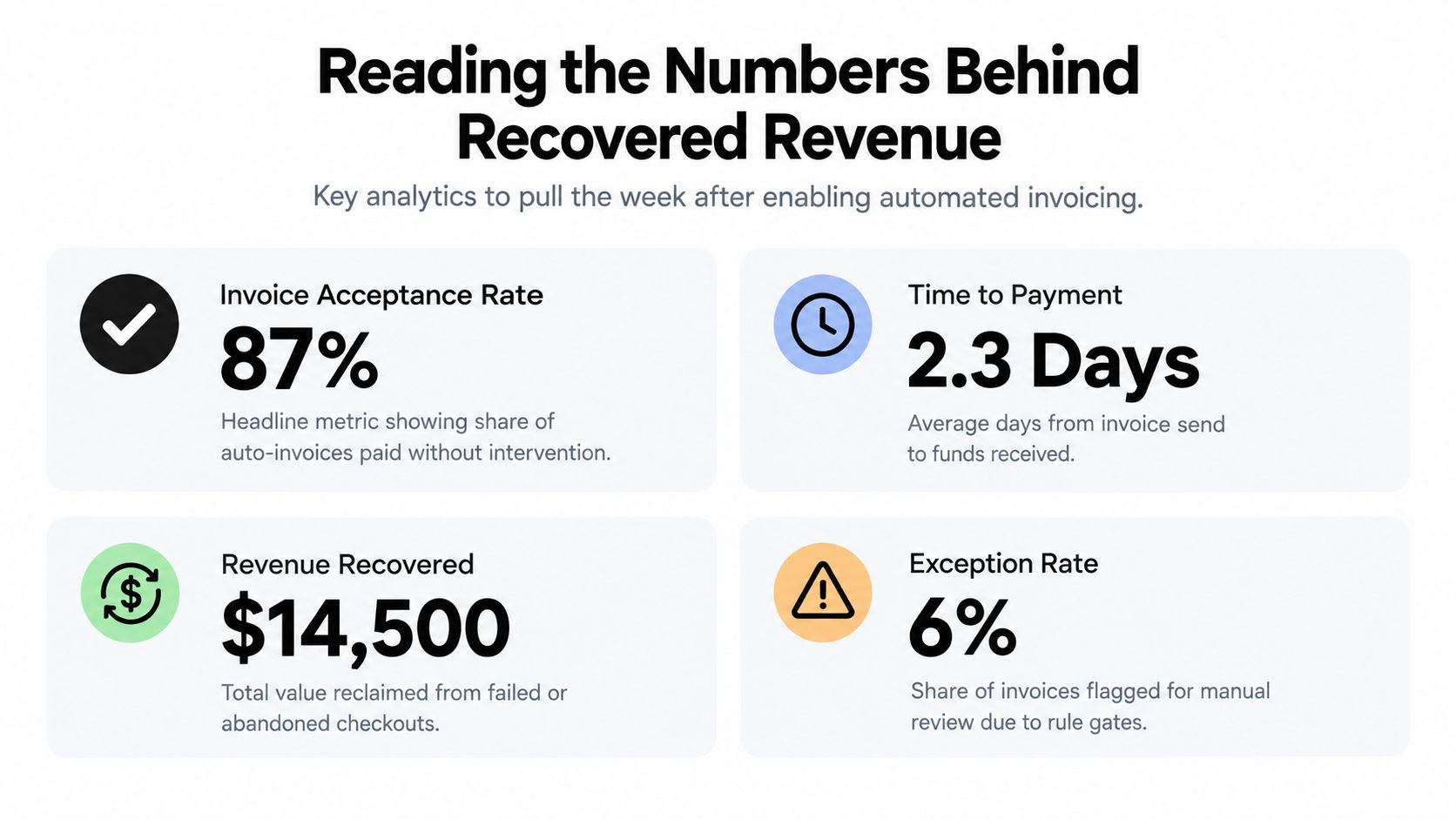
The first review after enabling automated invoicing should focus on whether the workflow is behaving correctly, not on the largest possible revenue figure. Pull the order, invoice, payment, refund, and exception records together so each metric can be traced back to a parent order.
Start with invoice acceptance
Invoice acceptance rate tells you how often customers pay or accept the adjustment without intervention. If acceptance is weak, inspect the offer, the timing, the explanation of the delta, and the payment experience before changing the invoice design.
An invoice can be technically correct and still perform poorly if the customer doesn't understand why the amount changed. Customer-facing clarity belongs in the operational review.
Use the delta to test your rules
The average upsell delta shows whether the edit window, product eligibility, and order cap match actual customer behavior. A small delta may indicate that shoppers prefer low-friction additions. A larger delta may justify stronger approval gates or a more careful fulfillment check.
The number matters less by itself than its relationship to payment failures, refunds, and support contacts.
Compare additions with reductions
The refund-to-add ratio helps identify aggressive sequencing. If a store sees many additions followed by refunds, the issue may sit in product fit, variant selection, offer timing, or customer expectations rather than invoice mechanics.
Review the affected SKUs and edit types. Don't respond by automatically tightening every rule. Separate a useful correction, such as a size swap, from an upsell that customers later reject.
Watch settlement and exceptions
Time to settle on the parent order is a practical proxy for clean reconciliation. Long delays can point to payment retries, approval queues, tax review, or a mismatch between the child upsell record and the original order.
The first metric to prioritize is the one that confirms the customer was charged correctly and the order record closed cleanly. Early on, don't overreact to a small volume of exceptions. Instead, look for a combination of rising refunds, slow settlement, and frequent manual review. Together, those signals suggest the controls need rebalancing.
Merchants who want a broader view of order edits, recovered revenue, saved orders, and operational activity can review Mayra Apps analytics.
From First Edit to Steady Revenue Recovery
Return to the customer who changes a post-purchase order. She originally selects a hoodie, then decides she wants a heavier jacket instead. During the edit, she accepts a relevant upsell, and the system calculates the difference between the new item, the removed item, and any shipping adjustment.
The original line doesn't vanish from history. The store records the reduction, invoices the added amount through the existing Shopify payment flow, and keeps both changes connected to the parent order. If the merchant has enabled a fulfillment hold, the warehouse doesn't ship the wrong item while the customer is still editing.
That first successful adjustment may feel isolated. Its value becomes clearer when the same rules handle the next customer who selects the wrong size, the next shopper who adds gift wrap, and the next buyer who accepts an accessory after checkout.
The operational handoff
Support no longer needs to chase a payment link for every approved addition. Finance can review the original charge, added amount, refund, and final net value in one order history. Fulfillment receives the corrected instructions before the package leaves the warehouse.
The merchant still needs to monitor exceptions and review rule performance. Automation doesn't remove judgment. It moves judgment to the places where it matters, such as approval thresholds, excluded products, tax-sensitive destinations, and failed payment attempts.
Over time, predictable recovery depends less on adding new tools and more on keeping the controls consistent. A store that changes its edit window, caps, and approval rules without reviewing settlement and refund behavior can lose the audit trail it worked to create.
Mayra Apps offers Shopify merchants self-serve order editing, cancellation deflection with store credit, one-click upsells, automatic settlement through Shopify, fulfillment holds, and merchant-defined eligibility and approval rules. Visit Mayra Apps to evaluate how those post-purchase workflows could connect order changes with customer-facing invoicing.