
A refund request rarely arrives at a convenient time. You're watching orders move through fulfillment when a customer asks for their money back, the warehouse wants to know whether the item is returning, and support wants a clear answer they can send immediately. The Shopify admin can process the transaction, but it can't decide whether a cash refund is the best commercial outcome.
That distinction matters. Refunds on Shopify are financial, inventory, payment, and customer-experience events at the same time. The right workflow starts by understanding what leaves the business, then gives customers better options before a refund becomes inevitable.
Table of Contents
- The True Cost of a Customer Refund
- How Refunds on Shopify Actually Work
- A Guide to Issuing Refunds in the Shopify Admin
- Automating Refunds and Setting Smart Thresholds
- From Refunds to Revenue Retention Strategies
- Building a Smarter Refund Management Workflow
The True Cost of a Customer Refund
A refund notification looks simple: approve the request, return the money, close the ticket. In practice, the merchant may also lose the original payment-processing cost, spend staff time reviewing eligibility, arrange reverse logistics, inspect returned stock, and absorb the risk that the customer won't purchase again.
The scale makes this more than an occasional support issue. The National Retail Federation and Happy Returns reported that U.S. retailers expected 16.9% of annual sales in 2024 to be returned, representing about $890 billion, and projected 15.8% of annual sales in 2025, equal to $849.9 billion. These figures are reported in Shopify return rate statistics and retail benchmarks.
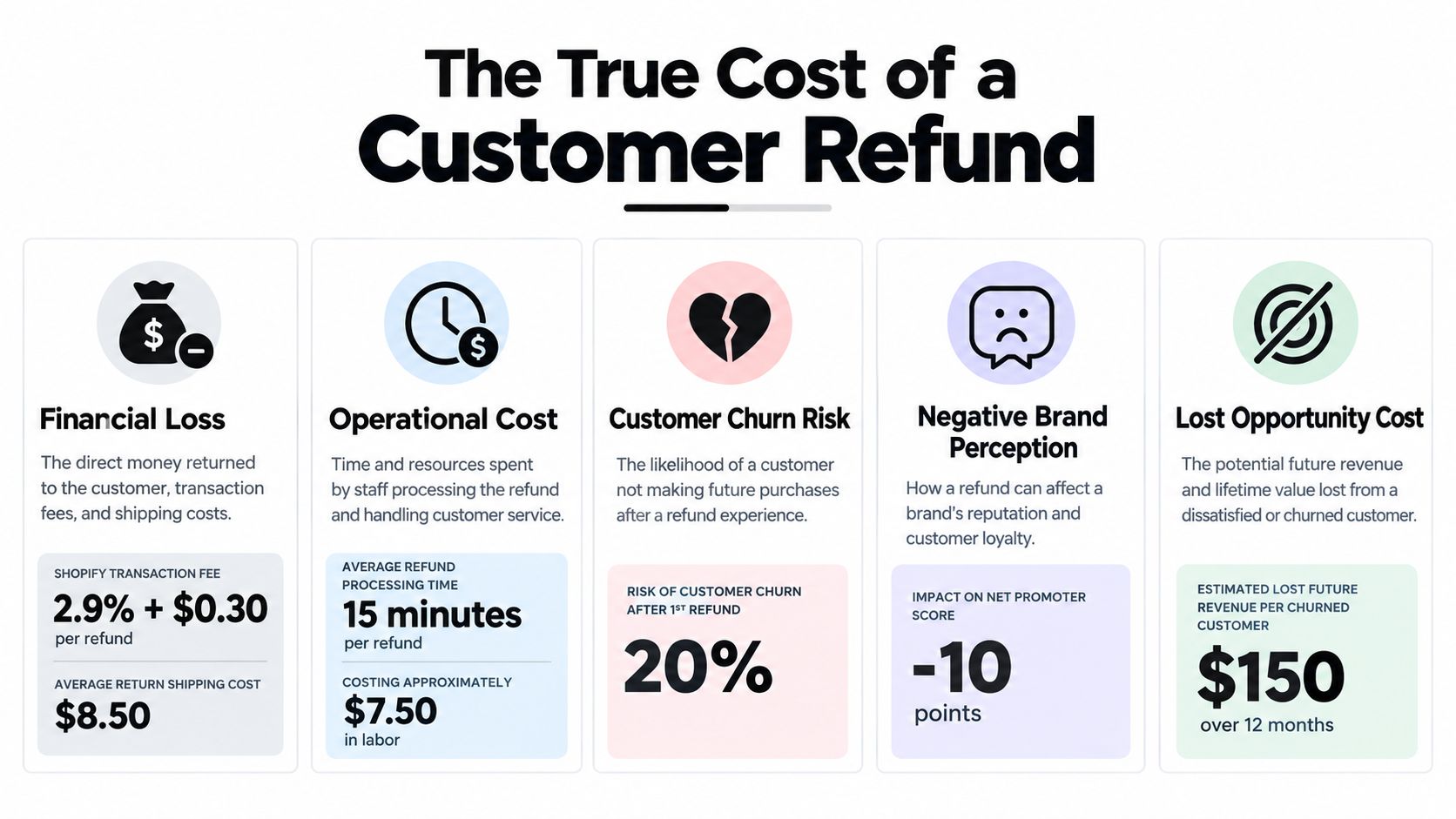
A refund can therefore create several separate workstreams:
- Payment impact: The customer receives money back, while the original card-processing fee may remain with the merchant.
- Support workload: An agent reviews the order, checks the policy, communicates the decision, and records the resolution.
- Fulfillment effort: A returned item needs receiving, inspection, grading, and a decision about restocking or disposal.
- Revenue risk: A cash refund ends the original sale unless the customer chooses an exchange or store credit.
- Experience risk: A slow or confusing resolution can damage trust, even when the refund itself is appropriate.
The operational answer isn't to make refunds difficult. Customers with valid claims need a fair and timely resolution. The better answer is to separate unavoidable refunds from preventable ones, then give customers practical alternatives when a mistake can be fixed through an edit, exchange, replacement, or credit.
Clear product information, accurate sizing guidance, and a well-designed policy can reduce avoidable requests. A useful starting point is this guide to reduce ecommerce returns, especially if your refund reasons repeatedly point to fit, expectations, or product descriptions.
Support capacity matters too. Merchants dealing with repetitive order questions can review ways to streamline Shopify customer service so agents have more time for exceptions that need judgment.
How Refunds on Shopify Actually Work
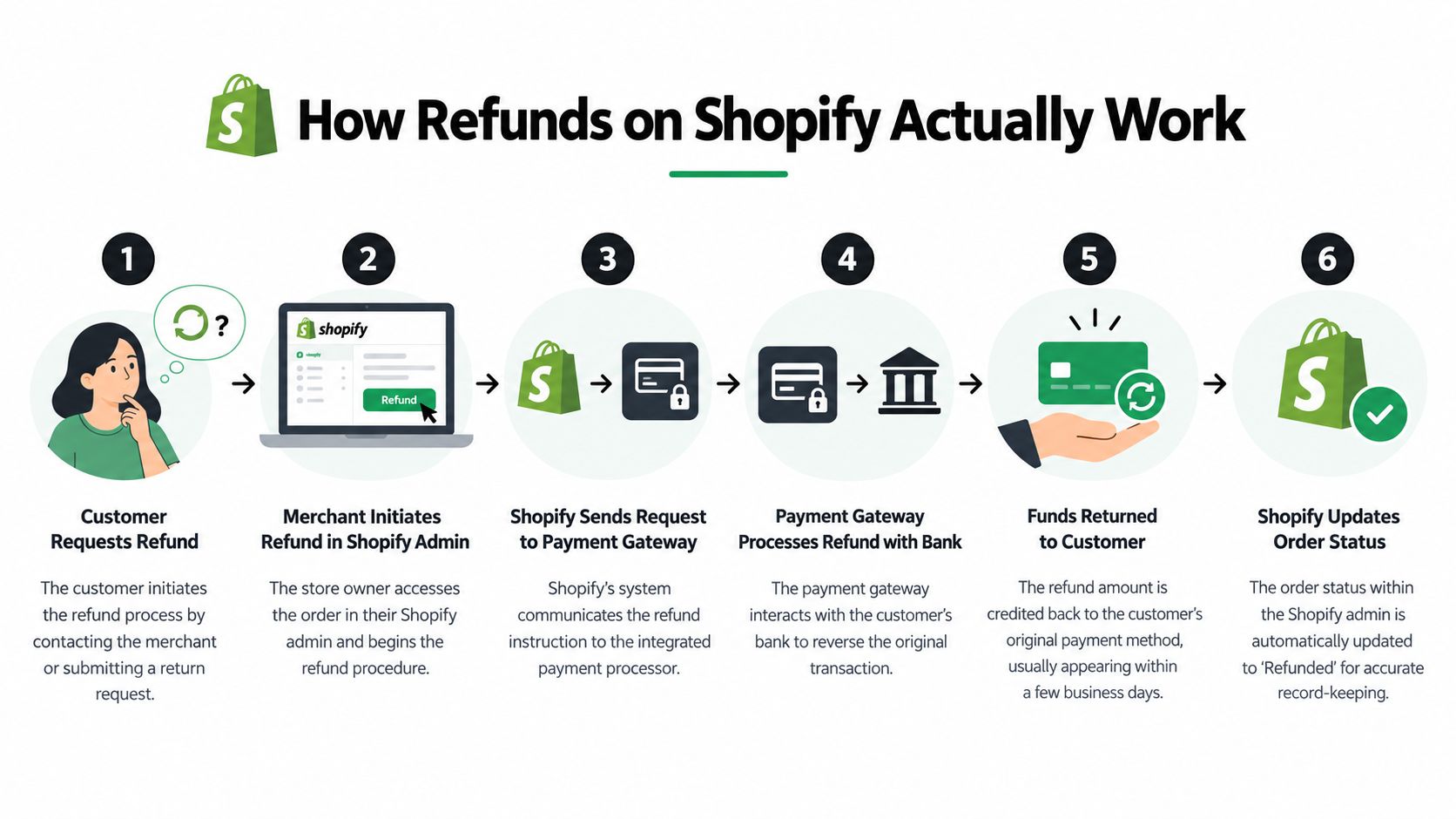
A Shopify refund has two connected but separate sides. Shopify records the merchant's decision and sends the payment instruction through the relevant gateway. The gateway then handles the movement of funds back toward the customer's payment method.
The payment fee that stays behind
With Shopify Payments, issuing a refund doesn't create an additional refund-processing charge. However, Shopify states that the original card-processing fee isn't returned to the merchant. Its official explanation of Shopify Payments refunds makes the financial effect clear: the order's sales revenue is reversed, but the original payment acceptance cost remains sunk.
Think of the original fee as the cost of opening and settling the payment transaction. Reversing the sale closes the revenue side, but it doesn't reverse every cost already incurred in processing it. For third-party gateways, fee treatment can depend on the country and gateway arrangement, so merchants should verify the applicable terms rather than assume every processor behaves like Shopify Payments.
Full, partial, and line-item refunds
A full refund reverses the eligible order value. It's appropriate when the entire order is cancelled, the customer returns everything, or the merchant has approved a complete remedy.
A partial refund settles only part of the transaction. Common uses include a price adjustment, a missing accessory, a service failure, or a complaint where the customer keeps the product. It can resolve a real issue without giving up the entire order value.
A line-item refund targets specific products or quantities. This is important when one item in a multi-product order is defective or returned, while the rest of the order remains valid. Before submitting the refund, check the item quantity, shipping treatment, taxes, discount allocation, and inventory choice. The payment decision and the stock decision must match the physical reality.
Practical rule: A return describes what happens to the merchandise. A refund describes what happens to the money. Track both events separately.
A Guide to Issuing Refunds in the Shopify Admin
Before you click Refund, confirm the order, the customer's requested outcome, the applicable policy, and whether the merchandise is coming back. Also decide whether the item should be restocked. A refund can be financially correct while an incorrect restock creates a separate inventory problem.
Full refunds for returned orders
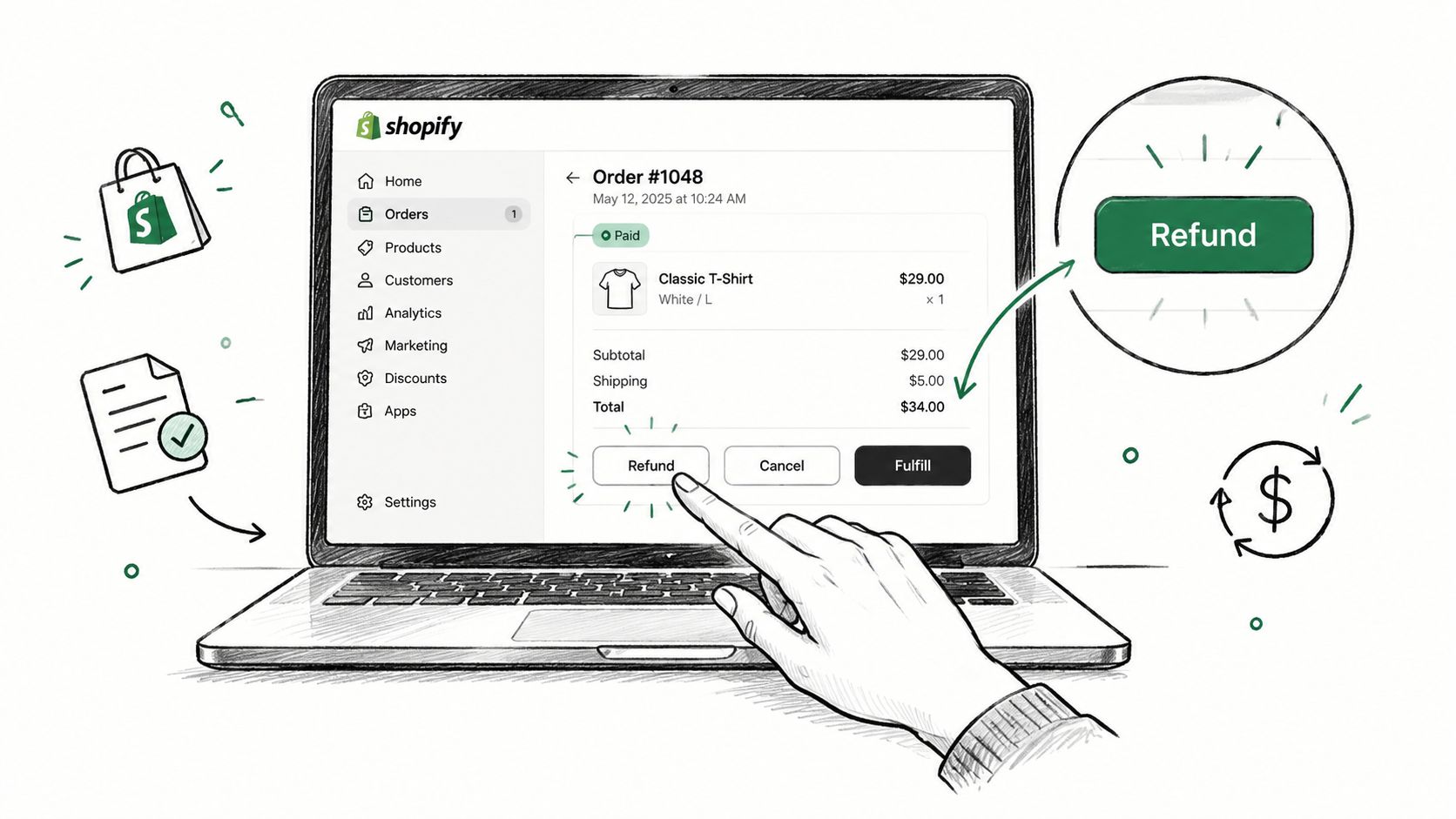
Open Orders in Shopify admin and select the relevant order. Choose Refund, review the eligible items and quantities, and select all products being refunded. If the return has arrived and the items are suitable for resale, enable the restock option for the correct location. If the merchandise is damaged, incomplete, or not coming back, don't place it back into sellable inventory.
Review shipping and any applicable adjustment before confirming. Shopify's refund screen shows the amount being returned, but your internal policy should determine whether shipping is refundable and whether a return fee applies. Submit the refund only after the order details and inventory outcome agree.
For cancellations before fulfillment, verify that no fulfillment action has already occurred. If the customer is cancelling rather than requesting a post-delivery return, the workflow may also involve order cancellation decisions. Keep your cancellation process aligned with your Shopify order cancellation guidance.
Partial refunds for service recovery
Use a partial refund when the customer is keeping the order and the issue affects only part of its value. In the refund panel, enter the amount or adjust the relevant line-item quantity, then add an internal note explaining the reason.
Avoid using an arbitrary amount merely to end a conversation. Tie the value to a documented policy, the missing component, the product issue, or the service failure. That makes future approvals more consistent and gives finance a usable reason code.
Refunds without a return
A returnless refund can be appropriate for a damaged delivery, a low-value item whose recovery isn't economical, a duplicate charge, or a goodwill resolution. Select the refund amount, leave inventory untouched when no product is returning, and record why the customer is keeping the item.
Finally, choose the refund method available for the order, review customer notification settings, and confirm the transaction. Shopify updates the order record, but the customer's bank or card issuer may take additional time to display the funds. Keep the order note, support conversation, and physical return status aligned so another agent doesn't issue a duplicate remedy.
Automating Refunds and Setting Smart Thresholds
Manual processing is still the normal operating model for many Shopify businesses. Shopify's enterprise guidance reports that 65% of refunds are processed manually and 35% through apps, as documented in its ecommerce returns guidance.
That split doesn't mean every refund should be automated. It means merchants should decide which refunds need human judgment and which ones follow a clear, low-risk pattern. Automation works best when it enforces a policy rather than replacing one.
Start with decision rules
A workable ruleset can separate routine cases from exceptions:
- Eligibility: Check whether the order, product, destination, and request reason qualify.
- Amount: Route smaller, straightforward refunds through automatic processing and send higher-value cases for approval.
- Condition: Treat damaged, used, customized, and final-sale products differently.
- Timing: Distinguish pre-fulfillment cancellations from post-delivery returns.
- Resolution: Offer exchange or store credit before cash where the customer and policy allow it.
- Inventory: Restock only when the item's physical condition and location are confirmed.
The exact threshold should come from your margin, fraud exposure, average order value, and team capacity. Don't copy another merchant's number. A threshold that suits a low-cost accessory store may be reckless for high-value electronics or made-to-order goods.
Use automation for consistency
A rules-based workflow can prevent different agents from making different decisions on identical cases. It can also create approval queues, apply reason codes, notify the customer, and keep a record of who approved the outcome.
Measurement should focus on operational quality, not just processing speed. Review refund reasons, approval overrides, repeat requests, exchange acceptance, store-credit usage, and cases where inventory was restocked incorrectly. Merchants building broader reporting systems may also find these articles on AI marketing analytics useful for connecting post-purchase activity with customer and channel data.
Automation should remove repetitive clicks, not remove accountability. Every automatic rule needs an exception path.
From Refunds to Revenue Retention Strategies
The most valuable refund is usually the one you prevent without making the customer feel trapped. That means intervening before fulfillment, identifying the customer's actual problem, and offering a resolution that preserves the order when it's commercially and operationally sensible.
Fix the order before it ships
Many refund requests begin with a correctable mistake. The customer chose the wrong size, selected the wrong color, entered an outdated address, or forgot an item. Once the parcel ships, the merchant may need to absorb return handling, replacement shipping, and the original payment cost. Before fulfillment, an order edit can solve the issue without turning the sale into a reversal.
A self-serve edit flow should have clear boundaries. Let merchants control the editing window, eligible products, fulfillment state, address changes, quantity changes, and approval requirements. Hold fulfillment while an active edit is being processed, otherwise the warehouse may ship an order using details the customer has already changed.
The customer experience should remain inside familiar Shopify surfaces, such as the customer account or order status page. The goal isn't to add another support form. It's to let the buyer correct a mistake while the order is still actionable.
Deflect cancellations without hiding the exit
Cancellation deflection works when it presents a useful alternative, not when it obstructs a legitimate cancellation. Ask why the customer wants to cancel, then match the response to the reason.
- Wrong variant: Offer a product or variant change.
- Changed mind: Offer store credit if the customer is open to keeping value with the brand.
- Timing problem: Explain whether the order can be edited or delayed.
- Address issue: Allow an address correction before fulfillment.
- Product concern: Route the customer to support rather than forcing an automated offer.
Shopify supports store credit as a refund method for full, partial, returned-item, and cancelled-order refunds. Store credit changes the financial outcome from an immediate payment reversal to a customer-account liability, but it must be offered transparently and in a way that complies with the merchant's policy and local requirements.
Apply return fees deliberately
Shopify's documentation states that return fees aren't automatically deducted from refunds. Merchants must apply them manually, which creates room for inconsistency unless the policy, approval flow, and refund screen all point to the same rule. The Shopify documentation on return rules highlights why fee handling belongs in the operating procedure, not as an afterthought.
A fair fee policy should explain when a deduction applies, who pays shipping, and which fault conditions are exempt. Don't use fees to punish customers for merchant-caused errors, defective goods, or fulfillment mistakes. Use them to manage defined costs when the customer's request falls within the stated policy.
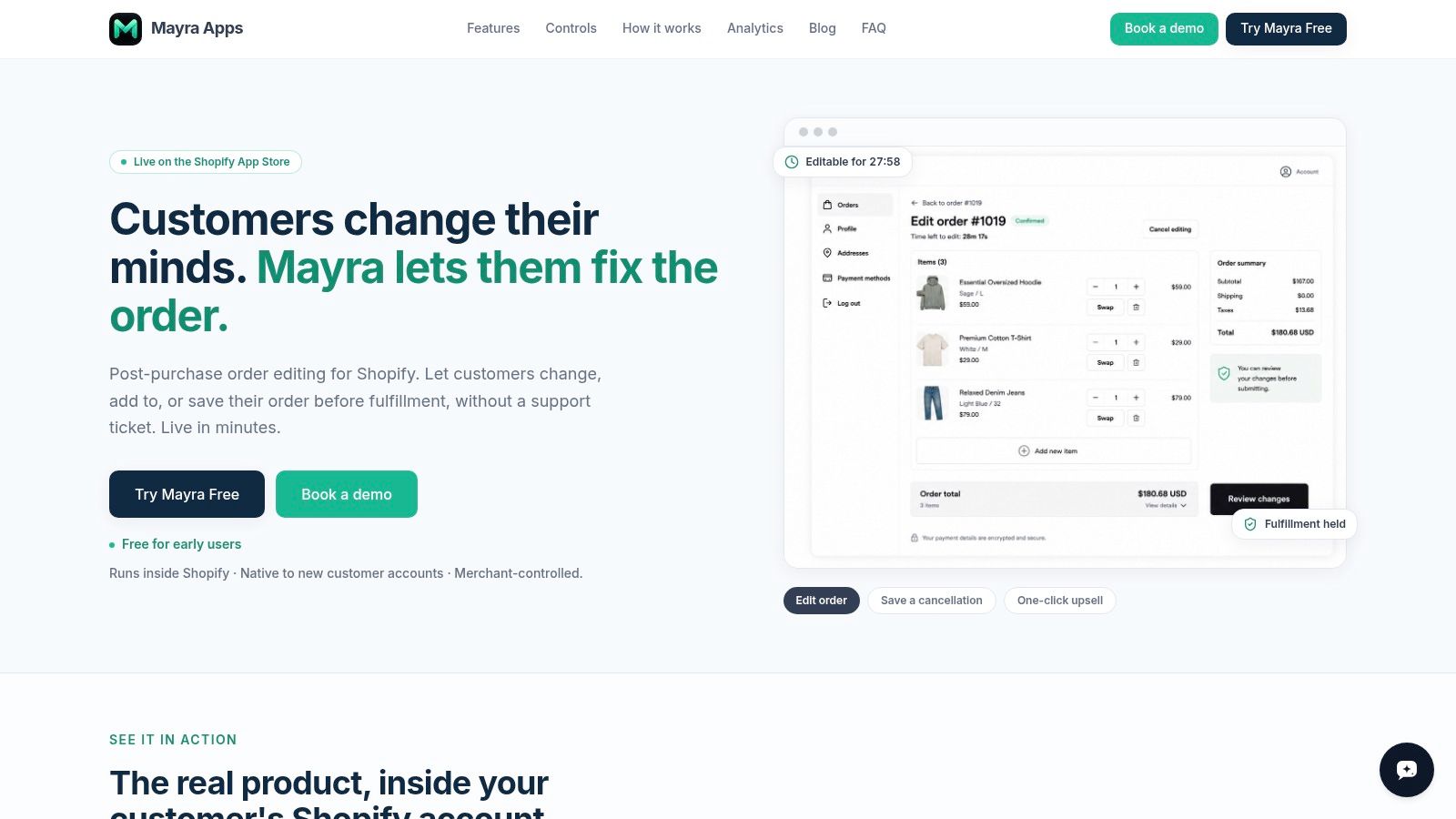
Mayra Apps is one option for this type of post-purchase workflow. Its order-edit and upsell app supports self-serve changes inside customer accounts and the order status page, cancellation save offers using store credit, merchant-controlled eligibility rules, fulfillment holds, and Shopify-based settlement when an edit changes the order total.
For a deeper policy decision, compare the trade-offs in store credit versus a refund on Shopify. Store credit can retain value, but cash may be the correct remedy in some situations. The customer's reason, the product condition, the policy, and the market should determine the outcome.
Building a Smarter Refund Management Workflow
A reliable refund operation has three layers. First, the finance team understands the payment consequences, including the original fee that remains with Shopify Payments refunds. Second, support and operations process full, partial, returnless, and store-credit outcomes consistently. Third, the business reduces preventable refunds through better product information, order editing, exchanges, and cancellation alternatives.
Start with a shared reason taxonomy. “Customer changed mind” is less useful than a structured reason that distinguishes fit, wrong variant, damaged delivery, fulfillment error, duplicate order, and policy exception. Those categories tell merchandising, fulfillment, support, and marketing what to fix.
Then assign ownership:
- Support: Classifies the request and communicates the approved resolution.
- Operations: Controls return handling, restocking, and fulfillment holds.
- Finance: Reconciles refunds, fees, credits, and payment reports.
- Merchandising: Acts on recurring product, sizing, or expectation problems.
- Growth: Monitors whether retained customers return after a service recovery.
Review the workflow regularly, especially the cases where an agent overrides a rule. Those exceptions often reveal a policy that's too rigid, a product page that's unclear, or an approval threshold that doesn't match actual risk.
Teams comparing helpdesk tools can also use this overview of top Shopify support apps when deciding how refund requests should move between customer service and Shopify admin.
Refunds shouldn't be treated as proof that the store is failing. A fair refund protects trust. A precise process protects margin. A proactive post-purchase experience prevents correctable mistakes from becoming refunds in the first place.
Mayra Apps helps Shopify merchants manage post-purchase changes through self-serve order edits, cancellation deflection with store-credit offers, fulfillment holds, and merchant-controlled approval rules. Visit Mayra Apps to see how its order-management workflow can help your team resolve customer changes before they become unnecessary refunds.