
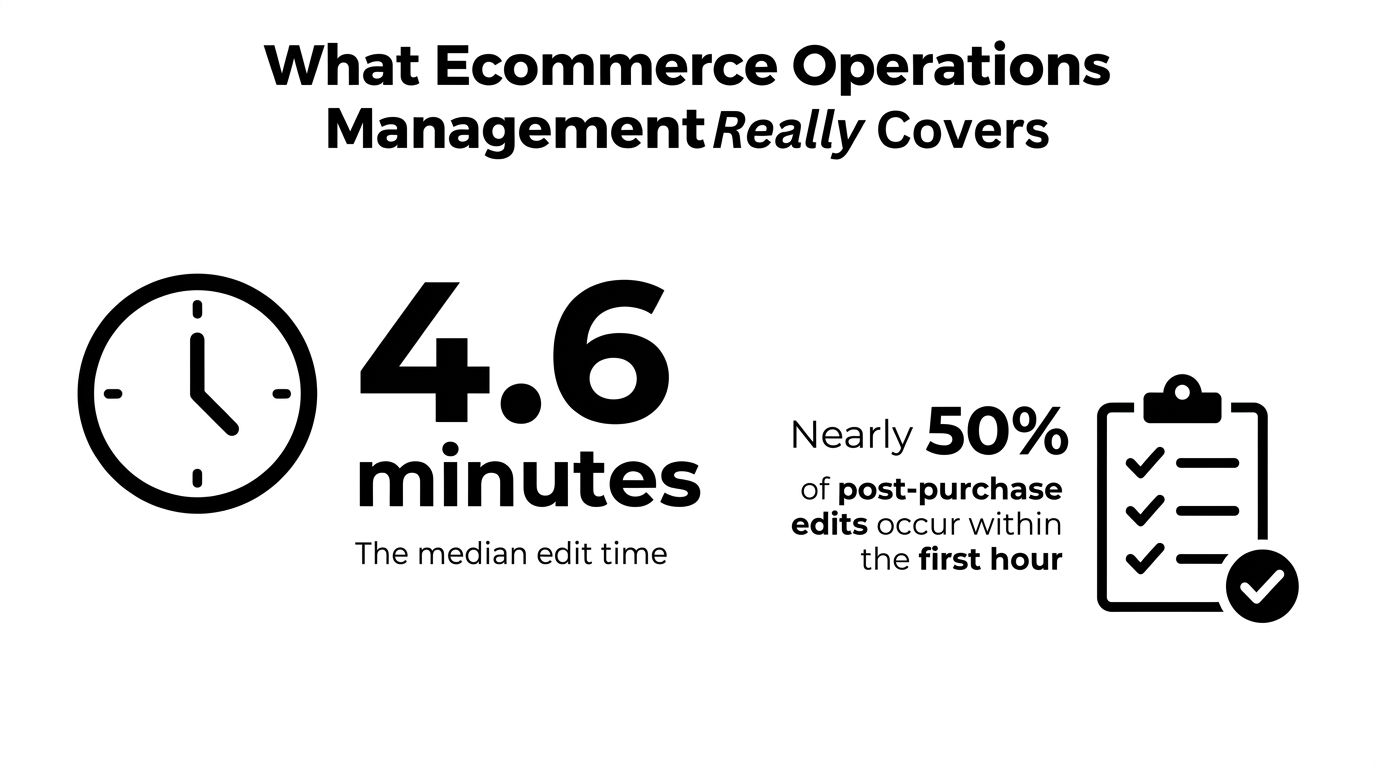
In 2026, the median ecommerce order edit happens just 4.6 minutes after checkout, with 80.6% occurring within the first hour and 90.4% within 24 hours, according to a 2026 analysis of 7.6 million Shopify orders. The most common correction is a shipping-address change, followed by cancellation. That reframes ecommerce operations management: many expensive post-purchase problems begin before the warehouse has picked a single item.
A Shopify merchant who treats every edit as a support ticket is already working too late. The stronger model creates a controlled recovery window immediately after checkout, gives customers safe self-serve options, pauses fulfillment when necessary, and sends only resolved orders into the warehouse. This guide explains how that loop works across order management, fulfillment, inventory, returns, support, and tooling.
Table of Contents
- What Ecommerce Operations Management Really Covers
- The Six Core Pillars of Ecommerce Operations
- Order Management From Checkout to Fulfillment
- Fulfillment Holds and How They Prevent Costly Mistakes
- Returns and Cancel Deflection in Practice
- Support Workflows That Deflect Tickets
- Tooling That Reduces Friction and Cost
- Putting It All Together and Measuring Success
What Ecommerce Operations Management Really Covers
Ecommerce operations management is the connective tissue between your Shopify admin, warehouse or 3PL, support inbox, payment process, and customer. It determines what happens after a buyer clicks Pay, but before the parcel reaches a carrier. The work includes capturing changes, checking inventory, approving exceptions, protecting order accuracy, and making sure every team sees the same final order.
The 4.6-minute median edit time matters because it places the highest-value recovery activity before fulfillment, not after delivery. The analysis found that 80.6% of edits happen within the first hour, so a customer who notices a wrong size or incomplete address usually needs a fast, controlled path while the order is still operationally flexible. Ecommerce order-editing data from Revize supports a simple conclusion: the first hour deserves its own operating design.
The air-traffic-control analogy
Think of your operation as an airport before takeoff. Checkout creates a flight plan. Inventory reservation assigns the aircraft and gate. The warehouse is the runway. A fulfillment hold is the controller telling the ground crew to wait while a destination, passenger detail, or safety issue is corrected.
Without that coordination, each system can act on a different version of the order. Shopify may show a new address, the 3PL may still have the old one, and support may promise a cancellation that the warehouse never received. Operations management prevents those conflicting instructions.
The six-pillar mental model
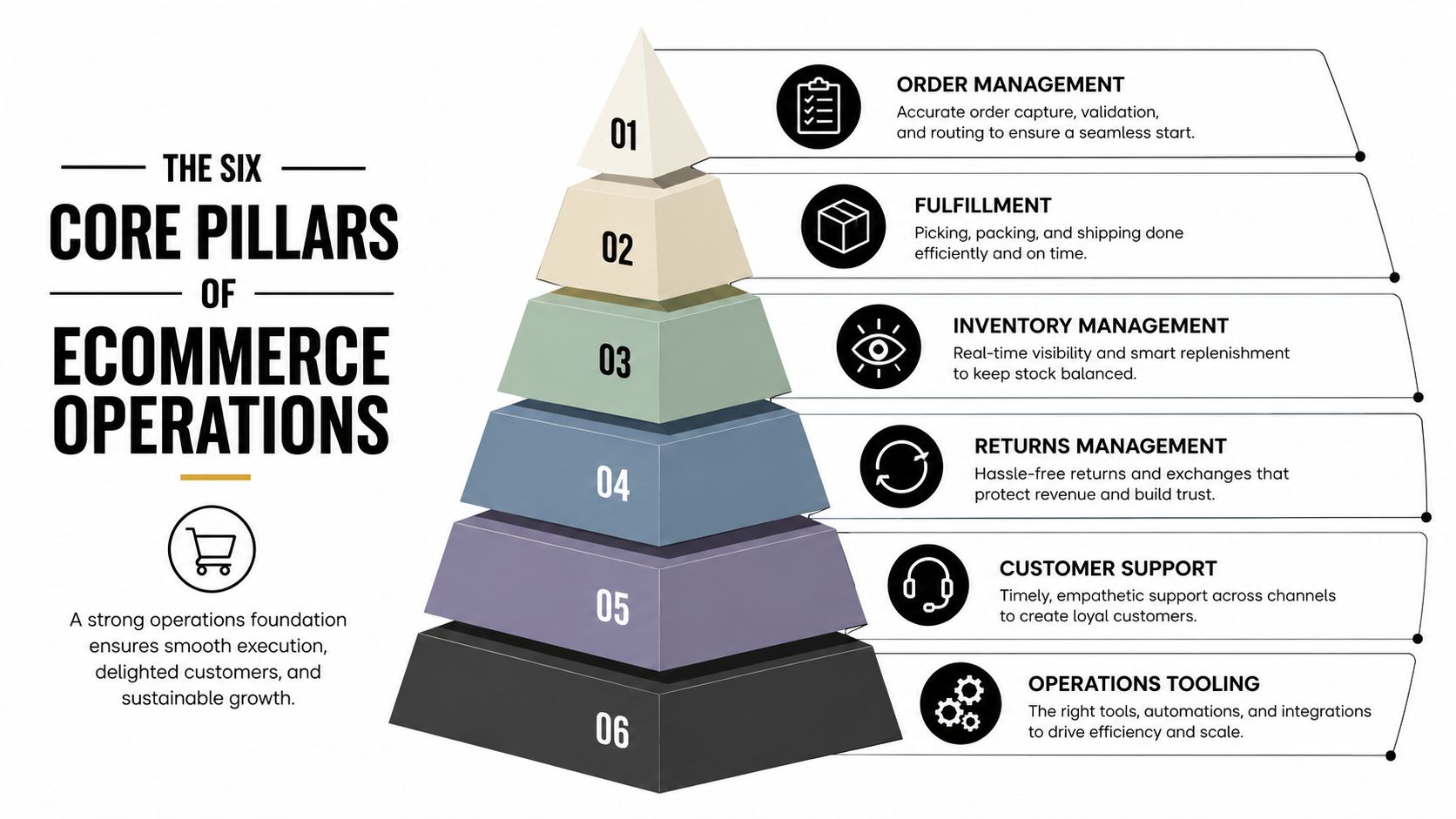
Use six connected pillars to audit the operation:
- Order management, which controls edits, cancellations, payment changes, and order state.
- Fulfillment, which turns the approved order into a picked, packed, and shipped parcel.
- Inventory visibility, which shows what can be sold or substituted.
- Returns and exchanges, which manages the reverse flow when recovery fails.
- Customer support, which handles exceptions and gives customers clear answers.
- Tooling and integrations, which keeps Shopify, warehouse, finance, and support data aligned.
The distinctive opportunity sits where order management, support, and tooling meet. Catch the mistake before fulfillment, and the warehouse receives a clean instruction instead of a problem that must be repaired later.
The Six Core Pillars of Ecommerce Operations
The six pillars work as a connected stack rather than six independent departments. Customer-facing actions sit at the top, operational execution sits beneath them, and integrations provide the plumbing that keeps every state synchronized.
Customer-facing control
Order management answers, “What can change, and until when?” A customer selects the wrong size shortly after checkout. A rule allows a variant swap while the order remains unpicked, updates the original order, and prevents a needless return.
Customer support answers, “Who needs help, and can the customer solve this alone?” Instead of making an agent copy an address from an email into Shopify, an account page can expose an approved address-edit action while routing unusual requests to a person.
Returns and exchanges answers, “What happens when recovery isn't possible?” A return portal can check eligibility, create the next step, and offer an exchange or store credit where that matches the merchant's policy. Independent guidance on ecommerce operations recommends automating return eligibility, labels, refunds, and exchanges.
Execution and visibility
Fulfillment turns the final order into a shipment. Its central pain point is acting on stale information. A warehouse hold gives the customer or system time to resolve an issue before picking begins.
Inventory visibility prevents an edit from creating a new failure. If a customer requests a different color, the system must check sellable inventory rather than display a variant that can't be allocated. The same principle applies across locations and sales channels.
Infrastructure
Tooling and integrations connect the customer account, Shopify, payment processor, warehouse system, returns portal, and helpdesk. APIs and webhooks should pass state changes to the system of record instead of creating a second unofficial order database.
Operational rule: A pillar only works when the next pillar receives its output. A polished returns portal can't repair an order that was edited incorrectly upstream.
The pre-fulfillment recovery window sits at the intersection of the first, second, and sixth pillars. That's why merchants should design it as a complete workflow, not as a small customer-account feature.
Order Management From Checkout to Fulfillment
An order begins as customer intent, but it becomes an operational object through several state changes. The customer submits checkout, Shopify creates the order, payment is authorized, inventory is reserved, and the order enters a fulfillment queue. Each transition narrows what you can safely change.
The first design task is to define eligibility. A merchant shouldn't expose every action on every order. The customer needs to see only actions that match the current fulfillment state.
| Request | Suitable eligibility rule | Problem prevented |
|---|---|---|
| Shipping address change | Allow until label creation or the merchant's chosen fulfillment cutoff | Rerouting, failed delivery, or reshipment |
| Variant or size swap | Allow while inventory is available and picking hasn't started | A preventable return |
| Cancellation | Allow before the order reaches the carrier stage | A canceled order that still ships |
| Gift message edit | Allow while the order remains pre-fulfillment | Incorrect personalization |
A short, clearly defined edit window is common operational guidance, often one to two hours or until warehouse processing starts, as described in self-serve order-editing UX guidance. Your actual cutoff should follow warehouse behavior, not an arbitrary promise. If the 3PL begins picking immediately, the window may need to close earlier. If the warehouse batches orders later, you may be able to offer more flexibility.
Build the order around a hold
When a customer starts an eligible edit, place the fulfillment process on hold. The hold should stop picking, packing, and label creation while the system validates the requested change. After confirmation, update the original order, recalculate price and shipping consequences, and release the order with one final instruction.
checkout optimization for ecommerce stores connects to post-purchase operations. A clean checkout reduces initial mistakes, but no checkout eliminates every address typo or last-minute change.
Preserve one final version
The Shopify admin, not a spreadsheet or private support note, should show the committed order. Record the requested action, the approved result, payment adjustment, inventory effect, and fulfillment release. That audit trail lets support explain what happened and gives the warehouse a reliable handoff.
Fulfillment Holds and How They Prevent Costly Mistakes
A fulfillment hold is a controlled pause, not a lost order. It tells the warehouse that the order exists but isn't ready for physical action. While the hold is active, the warehouse shouldn't pick, pack, or create a shipping label for that order.
Use holds when the order needs a decision or a verification step. Common triggers include:
- Customer edit: An address, quantity, variant, or line-item change is in progress.
- Risk review: Payment or destination details need manual inspection.
- Address verification: The shipping address fails validation or appears inconsistent.
- Shipment recalculation: A split shipment or inventory change alters the fulfillment plan.
- Payment confirmation: A high-value order requires an additional authentication check.
The hold prevents two teams from acting at once. Support can resolve the customer's request while fulfillment waits for the final state.
Release with a gate
A safe release process has three parts. First, the system or an approved employee confirms that the requested change is complete. Second, it rechecks inventory, payment status, shipping eligibility, and any risk conditions. Third, it writes an audit event showing who or what released the hold and when.
Don't rely on a chat message that says, “This one is good to ship.” That message can be missed, misread, or disconnected from the order record. The release should happen in the workflow that owns fulfillment status.
A hold can also protect against a serious loss. For example, an order worth $620 might trigger review because the destination resembles a reshipper address. If the hold stops shipment until a manual check is complete, the merchant can avoid sending the parcel into a potentially fraudulent flow. The fulfillment KPI guidance on order accuracy explains why small improvements in error-free fulfillment matter: wrong items, quantities, and addresses create refunds, reships, and support work.
Configure holds without creating a queue
Start with rules that have a clear operational reason. Then give each rule an owner, a review action, and a release condition.
- Define triggers: Document the exact event that creates the hold.
- Set review ownership: Assign risk, support, or operations staff by trigger type.
- Add automatic checks: Revalidate inventory and payment before release.
- Monitor aging: Investigate holds that remain unresolved instead of letting them become invisible backlog.
- Audit exceptions: Review false positives and adjust rules when legitimate orders face repeated friction.
Returns and Cancel Deflection in Practice
A customer who spots an address mistake shortly after checkout is still inside the pre-fulfillment recovery window. For example, a Toronto customer orders two jackets and enters the wrong unit number. Refund-and-reorder would create extra movement. A controlled cancel-deflection flow keeps the original order active while correcting the problem.
The system checks whether the order can still be changed. If it is eligible, the customer opens a self-serve address edit, replaces the unit number, and confirms the destination. The order then continues toward fulfillment with the corrected details. An address typo becomes a quick order update instead of a delivery failure.
The same interaction can support a relevant add-on. In this scenario, the merchant offers a beanie at 15% off. The item joins the existing order, so the customer avoids another checkout and the merchant avoids creating a separate fulfillment record.
What the merchant is protecting
The value comes from preserving the original order, not only from adding another product. A simple correction can prevent cancellation, reverse logistics, and the handling work tied to a refund. That work may include return shipping, inspection, restocking, payment processing, and lost contribution margin. Actual order events should determine the cost because the result depends on the products, policy, warehouse, and carrier arrangements.
Store credit gives the merchant another option when cancellation is the customer's stated preference. The workflow can capture the reason, present credit when it fits the situation, and keep a full cancellation and refund available as a clear fallback. See this practical guidance on cancellation deflection workflows and store-credit offers for Shopify merchants for an approach that treats the offer as a revenue-retention workflow rather than a way to block legitimate refunds.
Start before the return exists
Returns handling starts before a parcel leaves the warehouse. A wrong address, wrong size, or missing item may be resolved while the order remains editable. Once the parcel reaches the customer, the same request can become a delivery exception, return, reshipment, or refund.
The operational loop is straightforward: expose eligible self-serve edits, place a fulfillment hold while the change is checked, then release the order with the updated details. If the customer wants to cancel, offer a suitable deflection option without hiding the cancellation path. Track which requests are resolved in this window and which proceed to returns or refunds.
The better question is not only how to reduce returns. Ask which customer requests can be resolved before fulfillment, and which require a formal return or cancellation process.
Support Workflows That Deflect Tickets
Ticket-driven support and self-serve support solve the same customer problem through very different operating paths. In the legacy path, a customer emails about a wrong size, an agent opens a ticket, checks the order, waits for approval if required, edits Shopify, and replies. Guidance for self-serve editing recommends exposing common actions within a short post-checkout window so customers can resolve them without opening a ticket, as described in post-purchase self-service guidance.
In the self-serve path, the customer opens the order from an account or order-status link, sees eligible variants based on available inventory, confirms the replacement, and receives a final confirmation. The system records the change and can place or release a fulfillment hold without asking an agent to copy details between systems.
Independent 2025 operations guidance claims customer-facing return portals can deflect 30% to 40% of repetitive support tickets through automation, including common return and exchange tasks. See the returns automation guidance from QuickReturns for that benchmark.
| Dimension | Ticket-Driven Workflow | Self-Serve Workflow |
|---|---|---|
| Customer effort | Customer writes, waits, and answers follow-up questions | Customer selects an eligible action in the account |
| Agent workload | Agent verifies, edits, documents, and replies | Agent handles exceptions and higher-risk requests |
| Data quality | Details may be copied from free-text messages | Structured fields can be validated before submission |
| Fulfillment safety | Depends on manual timing and communication | Can trigger a hold during the edit |
| Best use | Complex refunds, fraud concerns, and sensitive cases | Address, quantity, variant, and eligible cancellation actions |
Choose the first automations carefully
Automate requests that are frequent, reversible, and easy to validate. Address corrections and variant changes often fit because the system can apply eligibility rules and check inventory. Complex partial refunds, fraud-flagged destinations, and high-touch VIP situations still deserve human review.
A customer self-service portal should also explain why an action is unavailable. “This order is already being packed” gives the customer a useful boundary. It's better than displaying an edit button that fails after submission.
Measure more than ticket volume. Track the request type, edit attempt, successful commitment, hold duration, and any later return or support contact. That shows whether automation solved the problem or merely moved it to another queue.
Tooling That Reduces Friction and Cost
A practical ecommerce operations stack has layers, and each layer should own a clear responsibility. Shopify or an order-management system holds the canonical order. A post-purchase edit layer manages permitted changes. The warehouse or 3PL executes the final instruction. A returns portal handles reverse flow, while the helpdesk handles exceptions.
A connected stack
Start with the system of record. Every committed edit should write back to Shopify so payment, inventory, fulfillment, customer support, and reporting reference the same order.
Add a pre-fulfillment edit layer for controlled address changes, quantity changes, variant swaps, item additions, removals, and cancellations. Mayra Apps offers Mayra Order Edit and Upsell App, which supports merchant-defined edit windows, eligibility rules, fulfillment holds, Shopify-based payment adjustments, and customer-account actions. Treat it as one option in the stack, and verify that its write-back behavior matches your operational requirements.
Your warehouse management system or 3PL connector should receive only the approved state. A returns portal should own eligibility, labels, exchanges, and refund or credit routing. The helpdesk should receive escalations with the order history attached, rather than asking agents to reconstruct events from separate notes.
What to inspect before installation
- Install footprint: Confirm whether the tool fits Shopify customer accounts and the Order status page without unnecessary theme changes.
- Write-back fidelity: Check that edits update the original order and preserve line-item, payment, inventory, and fulfillment context.
- Audit trails: Confirm that the system records requested, approved, rejected, and released actions.
- Integration behavior: Verify how APIs and webhooks communicate holds, edits, cancellations, and fulfillment updates.
- Governance: Make sure you can restrict actions by fulfillment state, order value, product, collection, tag, or destination where needed.
Spreadsheets and manual tags fail when several people edit the same order during a busy sales period. They create competing versions of the truth and make it difficult to tell whether an order was changed before or after warehouse processing. Native Shopify integrations can close that gap by keeping the admin record central while passing structured events to connected systems.
For a small operations team scaling beyond 5,000 orders per month, a sensible starter stack is Shopify, a controlled edit and cancellation layer, a WMS or 3PL connection, a returns portal, and a helpdesk with customer-account context. Add complex analytics only after the basic event trail is reliable.
Putting It All Together and Measuring Success
The operating loop is simple to describe:
- Enable an edit window: Define which actions customers can take and when each action closes.
- Configure fulfillment holds: Pause orders during active edits, verification, or risk review.
- Deploy cancel and return flows: Offer appropriate alternatives while keeping legitimate cancellation and refund paths visible.
- Connect support to the account: Let agents see the same order state customers see.
- Instrument every event: Record requests, approvals, commitments, cancellations, returns, refunds, credits, and support contacts.
The numbers should answer operational questions, not decorate a dashboard. Review edit rate and edit success rate to see whether customers can correct mistakes. Review fulfillment hold release time to find process delays. Review cancel deflection rate and refund-to-credit conversion to understand retention behavior. Review return rate, support tickets per 100 orders, and cost per resolved ticket to identify where downstream work remains.
Every quantitative benchmark in that list needs a consistent definition. For example, an edit attempt shouldn't count as a successful edit unless the original order was updated and the fulfillment system received the final state. A canceled order shouldn't count as deflected if the customer later cancels through another channel.
Build one event view
Create a dashboard that connects these events:
- Edit requested: The customer or agent starts a change.
- Edit committed: The order is successfully updated.
- Order canceled: The merchant processes cancellation.
- Return created: A reverse flow begins.
- Support contacted: The customer opens a ticket or conversation.
- Hold released: Fulfillment receives permission to proceed.
This view shows where friction concentrates. A high number of address-edit requests may indicate checkout confusion or unclear shipping fields. Many failed variant edits may point to weak inventory visibility. Long hold times may reveal an approval bottleneck rather than a warehouse problem.
Review habit: Revisit eligibility rules monthly, audit hold triggers after carrier incidents, and use post-purchase events as product and process signals.
Continuous improvement doesn't require changing every workflow at once. Start with the first-hour recovery window, validate that edits write back correctly, then expand automation only where the event data shows repeatable demand and manageable risk.
Mayra Apps helps Shopify merchants manage self-serve order edits, cancellation deflection, store-credit offers, and one-click upsells within customer accounts and the Order status page. Visit Mayra Apps to explore how a controlled post-purchase layer can connect the recovery window, fulfillment holds, and Shopify order records.