
A change order is a formal written instruction that changes the scope, price or schedule of an existing agreement, and it's issued under that agreement's own authority rather than negotiated as a brand-new deal. Work keeps moving, the contract stays in force, and only the parts that changed get re-priced, re-dated or removed.
Which raises the question most explanations skip. If a change order exists to keep one agreement alive instead of replacing it, why do so many merchants treat a customer's post-checkout request as a support problem rather than a controlled change? The machinery is identical: something was agreed, something needs to be different, and somebody has to authorize the difference and record what it cost. The vocabulary just changes when you cross from a construction trailer into a Shopify admin.
Get the contract version straight and the store version stops being confusing. One decision test does most of the work, and it sorts every request into a formal change order, a routine edit or a cancellation.
Table of Contents
- What a Change Order Means in Plain Terms
- Change Orders, Routine Edits and Cancellations Compared
- How a Change Order Moves From Request to Record
- What Happens When Parties Disagree on a Change
- How Change Order Logic Applies to Store Order Edits
- Common Misconceptions About Change Orders and Edits
What a Change Order Means in Plain Terms
A change order is a controlled modification to something already agreed, written down and authorized. The original contract sets the baseline: the drawings, the quantities, the delivery dates, the methods, the price everyone signed. A change order amends that baseline. It doesn't erase it, and it doesn't require tearing up the agreement and starting a fresh competition for the work.
Where the term is most formally defined. In U.S. federal contracting, the Federal Acquisition Regulation treats a change order as a written instruction that changes work within the general scope of an existing contract. The contracting officer can issue it unilaterally when the contract's Changes clause authorizes the modification, and the contractor generally has to continue performing the work as changed. That authority is deliberately strong, because a project that halted every time a detail shifted would never finish. The same regulation still expects the order to identify the affected requirements, an effective date, the implementation authority and the expected effect on price and schedule.
The route map analogy. Picture the original contract as a route map with a destination, a road and a fuel budget. A change order is a signed reroute, not a new trip. Same vehicle, same driver, same destination unless the reroute says otherwise. What changes is the road taken and the fuel it costs, and both get written on the map so nobody argues about it at the toll booth.
Three things most changes touch:
- Scope: an extra room added to a building contract, or an added line of 200 units on a supply order that originally called for a single pallet.
- Price: the labor, materials and subcontract work the added scope brings with it, priced rather than estimated out loud.
- Schedule: a delivery date pushed back because the substituted item isn't in stock yet.
A change order is a controlled modification with a paper trail, not an informal request that someone remembers later. Everything that follows shows how the mechanism runs, where it fails, and how the same logic applies to a store order that's already been paid for.
Change Orders, Routine Edits and Cancellations Compared
Most confusion comes from lumping three different transactions under one word. Here's how they separate.
| Criterion | Change order | Routine edit | Cancellation |
|---|---|---|---|
| Purpose | Modifies agreed scope, price or schedule | Corrects a detail inside an open order | Ends the agreement or order |
| Who approves | Authorized party under the contract clause | Owner or staff within set rules | Customer request under merchant or contract policy |
| Price effect | Priced through a documented adjustment | Difference shown before confirmation | Refund, store credit or no charge |
| Record kept | Written order and adjustment record | Updated receipt or order record | Cancellation and refund record |
| Example | Adding a bathroom to a building contract | Changing a size before shipment | Cancelling an order before shipment |
The first column always changes what was agreed. The second fixes a detail inside something already agreed. The third stops the agreement before it's delivered.
Two pairs of examples make the line visible. A homeowner who decides mid-build to add a bathroom is asking for a change order: new scope, new price, new completion date, all signed by whoever holds authority under the contract. A builder who fixes a misspelled door label in the spec packet is not. That's a correction, and treating it as a change order buries a two-minute fix under paperwork.
On the store side, a shopper swapping a medium for a large before the parcel leaves the warehouse is making a routine edit. The same shopper cancelling before shipment ends the order, and the refund policy takes over from there. A worked-through cancellation policy is what makes that second path predictable instead of a negotiation.
The four-question checklist
- Does it alter the scope, price or schedule of a signed agreement? Use a formal change order, with written authority and a price record attached.
- Does it correct a detail on an open order? Use a routine edit under rules set in advance, so staff aren't improvising an answer at the counter.
- Does the order need to end? Use a cancellation governed by the refund policy, with the reason captured.
- Is the order already shipped or fulfilled? Stop. The request is now a return or a new order, because the edit window has closed.
Rules set in advance are what make the middle category safe. Customers can change quantities, swap variants, update the shipping address and add or remove items on their own order with no support ticket, and every one of those changes shows the price difference before the customer confirms it. The merchant sets those edit rules before any order becomes editable, which is the whole trick.
The single test: does this change alter what is owed, by how much, and by when? If yes to all three, it's a change order. If it only corrects a detail, it's an edit. If nothing is owed because the order is ending, it's a cancellation.
How a Change Order Moves From Request to Record
A change isn't finished when someone says yes to it. Four moves take it from a request to a defensible record, and each one exists to close a specific hole.
Here's the flow at a glance.
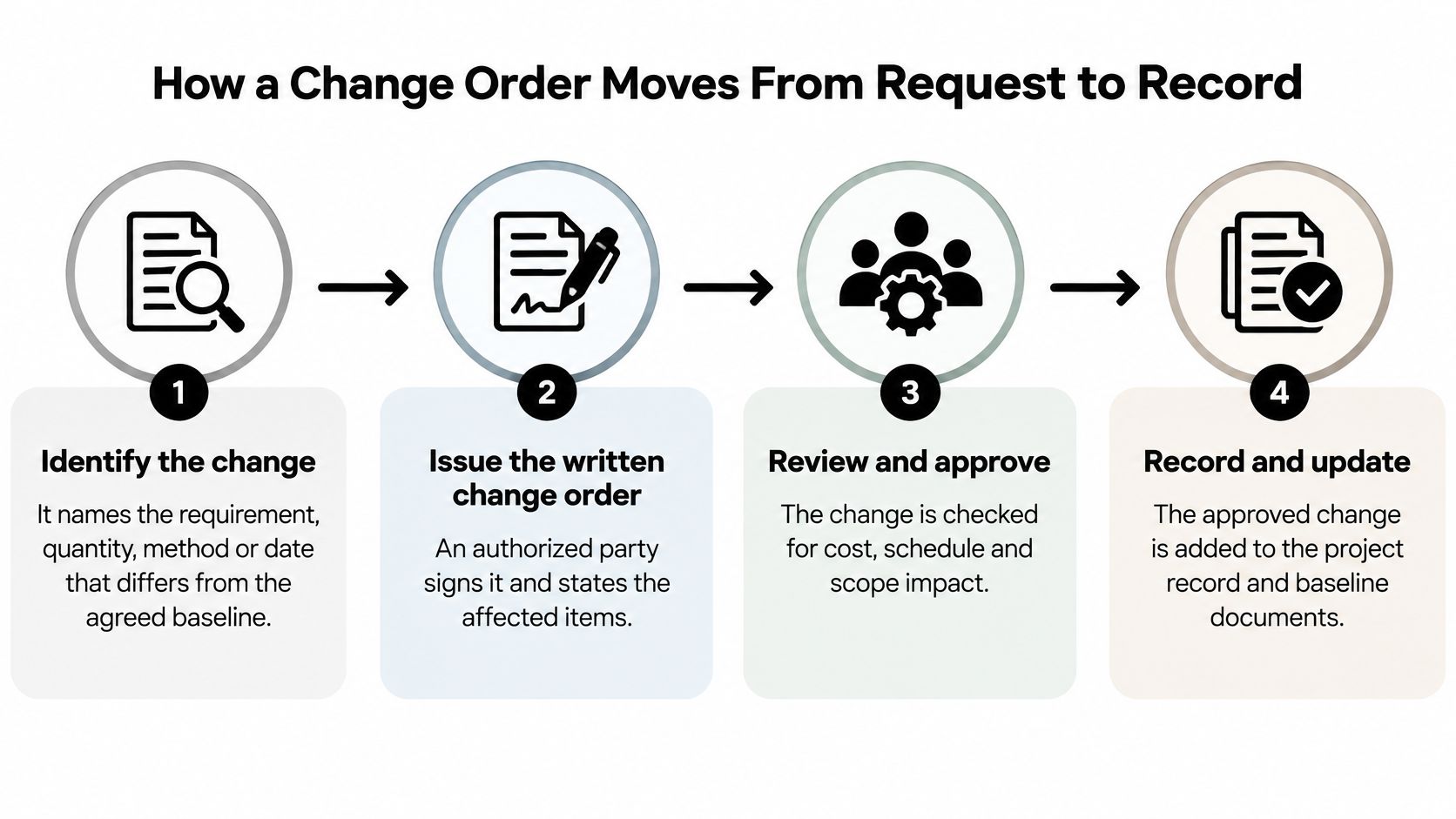
1. Identify the change. Name the requirement, quantity, method or date that now differs from the agreed baseline. Vagueness here is what turns into a dispute six weeks later, because "some extra work" can't be priced or proven.
2. Issue the written change order. An authorized party signs it, stating the affected requirements, the effective date and the implementation authority. This is the moment work is allowed to proceed differently, and it's separate from the moment anyone agrees what it costs.
3. Assess the impact. Estimate the cost, the schedule effect and whether the available funding covers the work. On cost-reimbursement or incrementally funded agreements, this step decides whether the work can start at all.
4. Agree the price. A supplemental agreement records the equitable adjustment, supported by cost analysis where appropriate and covering the actual costs attributable to the change: added labor, materials, subcontract work, prototypes or retrofit activity. The FAR subpart on change orders is explicit that an unpriced change order needs both the written order and a supplemental agreement documenting the adjustment, and that additional funds must be secured before an adjustment is made when the change requires them.
5. Proceed and record. Work continues as changed, and the register gets updated. Without that evidence, contractors end up performing out-of-scope work with no recoverable entitlement, while buyers pay for unsupported costs and lose sight of how far the scope has crept.
What a change register holds
| Register field | What it records |
|---|---|
| Baseline requirement | The agreed scope, quantity, method or date before the change |
| Revised requirement | The requirement as it will read after the change |
| Responsible approver | The authorized party who signed the change order |
| Direct and indirect costs | Added labor, materials, subcontract work and indirect costs |
| Schedule effect | The change in delivery or completion dates |
| Funding status | Whether funds cover the change before work proceeds |
| Final negotiated value | The agreed price of the equitable adjustment |
Keeping authorization apart from pricing is the design choice that prevents most fights. A signed order lets the crew keep working; a priced adjustment lets the invoice survive scrutiny. Merge them and one side ends up carrying risk it never agreed to. If you run store orders rather than construction jobs, the same sequence maps onto your order workflow after checkout, with the edit window standing in for the written order.
A change is complete when the record shows three things: what changed, who approved it, and what it costs.
What Happens When Parties Disagree on a Change
Three failures account for most change-order disputes, and none of them is about the change itself. They're about the record around it.
The scope argument. A buyer orders extra work and the contractor believes it was already in the contract. Without a documented baseline, both sides are describing different projects from memory.
The unpriced change. Work gets done on a verbal yes, and no supplemental agreement ever follows. The contractor has performed and has no agreed number to invoice against.
The unfunded change. A change is issued, the work happens, and the money to pay for it isn't there. Someone absorbs the difference.
When you're in one of those situations, the response follows a fixed order.
- Check the Changes clause. Confirm the party who issued the instruction has authority to modify the work. An instruction from someone without that authority isn't a change order, however official it looks.
- Compare the revised requirement to the baseline. The register entry decides whether the work is out of scope or a restatement of what was already bought.
- Require the supplemental agreement. Cost analysis before the price is final, not after.
- Hold financially material work until funds are secured. Performing first and sorting out funding later shifts the risk onto the party least able to carry it.
- Escalate through the contract's disputes procedure. Negotiation first, formal process when it stalls.
The reason to hold the line on step four is asymmetrical risk. Perform out-of-scope work without a record and you may never get paid for it. Pay unsupported costs as a buyer and you weaken your position on every future change while hiding cumulative scope growth from your own budget.
Record the direction the same day it's given, even when the price isn't settled yet. A same-day note naming who directed what, and where it sits against the baseline, is worth more than a perfect summary written three weeks later.
How Change Order Logic Applies to Store Order Edits
An order placed online is an agreement. It has a scope (these items, these variants, this quantity), a price and a schedule (this delivery address, this date). So a customer who wants something different after checkout is asking for a change to an agreement, which is why the contract discipline transfers directly.
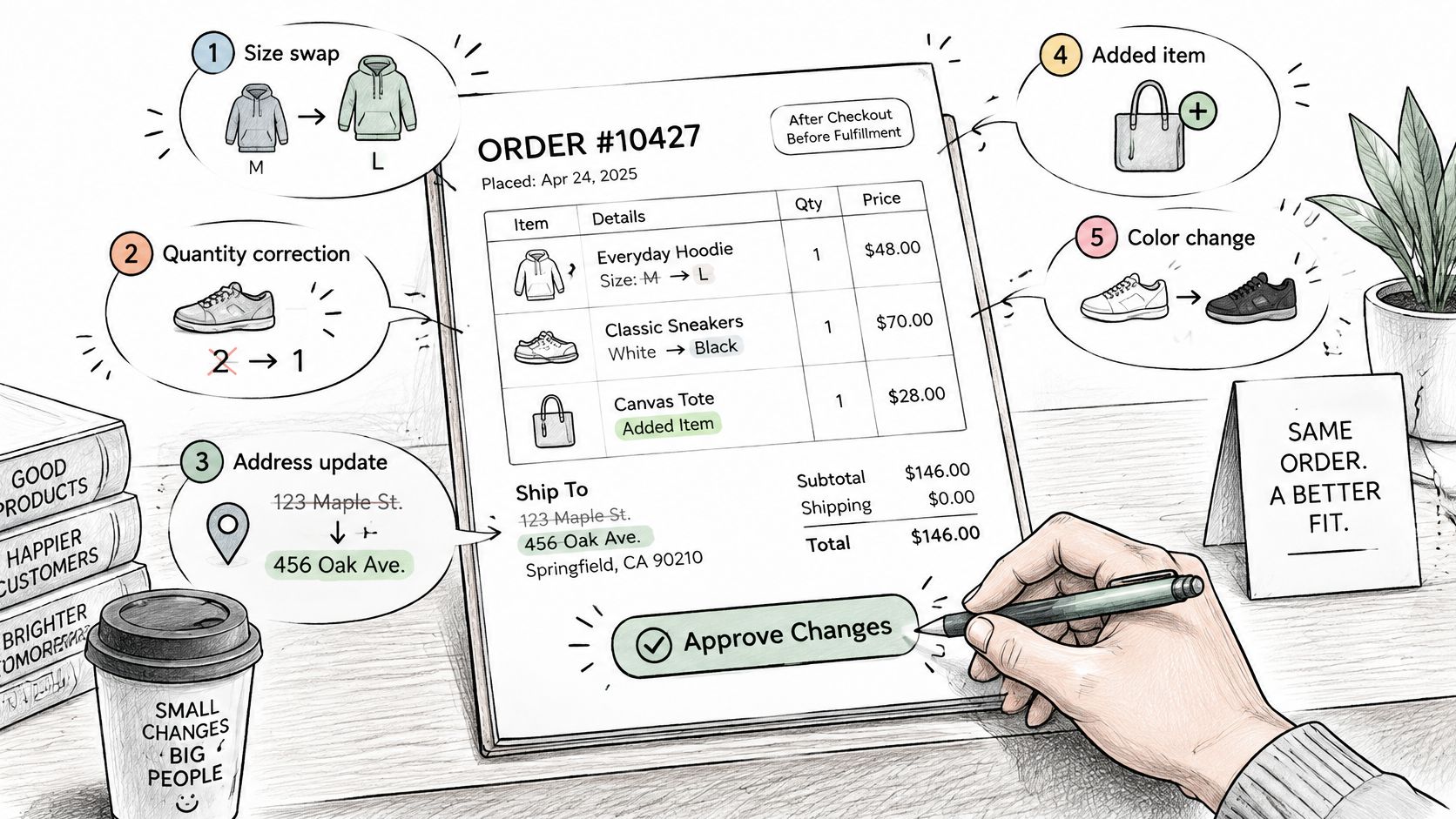
The five requests that arrive most often each need a rule, an approver and a record.
- A size or variant swap. The merchant's edit rules approve it if the order is still open, and the price difference is calculated before the customer confirms.
- A quantity correction. Same path, whether the customer is adding a second unit or dropping one.
- An address update. Low risk while the order is unfulfilled, impossible once it's with the carrier, so eligibility depends on fulfillment status.
- An added product. This raises the total, so a payment step has to attach to the original order rather than creating a second one.
- A full cancellation. Here the cancellation policy governs, and store credit may be offered as an alternative to a refund.
The U.S. Department of Transportation's report on construction change orders describes them as contractual tools for modifying scope, schedule and budget without restarting procurement. Swap "procurement" for "checkout" and you have the ecommerce version: the operational question isn't only who approves the change, it's whether inventory, tax, payment, fulfillment and customer communication stay synchronized while it happens.
The controls that make an edit safe
Four controls turn an informal support request into a controlled transaction. An edit window sets how long a customer has, with a countdown so the deadline is visible rather than discovered at the moment it expires. An approval threshold routes refunds above a set amount to a person, so small changes move and large ones get a second look. Eligibility rules based on fulfillment status, product, tags, collections or destination decide which orders can be touched at all. An audit trail writes every change to the original order, so the admin stays the single source of truth instead of splintering across support tickets and email threads.
Two mechanics matter most in practice. Fulfillment is held while a customer is editing an eligible order, so nothing ships mid-change. And orders that are already fulfilled, cancelled or archived can't be edited by customers at all, which pushes those requests into return or new-order handling where they belong.
The underlying systems have to keep up, and if you're weighing how well the platform supports post-purchase changes, this independent look at Shopify's features is a fair starting point. For the step-by-step version of the same workflow, see this guide to editing an order before it ships. The principle holds regardless of platform: a store edit is complete when the record shows what changed, who changed it and what it cost.
Common Misconceptions About Change Orders and Edits
Three assumptions cause most of the bad decisions.
That self-service editing is automatically good. It's a convenience, and it also creates inventory, fraud, reconciliation and warehouse risks. The trade-off is sharpest in high-return categories: the National Retail Federation and Happy Returns estimate that 19.3% of online sales were returned in 2025, compared with 15.8% across retail overall. In categories like that, a merchant has to decide deliberately when an edit is permitted, when it needs approval, and when cancellation is the cheaper answer.
That a saved cancellation equals profit. It doesn't, not on its own. Whether a saved order made money depends on handling costs, refund timing, whether the stock is resalable, shipping and the customer's future value. An avoided support ticket is a cost saving; a retained order is revenue. Mixing them into one "saved" number flatters the report and hides the margin.
That store credit is free. A bonus percentage keeps revenue on the books today and creates a liability for later. Offered broadly, it also pressures margin on the next order when the credit gets spent.
Track contribution margin on edited orders, not the count of edits. Completion rate, fulfillment exceptions, refunds, reshipments and cancellation deflection belong beside it, because volume alone tells you nothing about whether the program pays for itself.
Mayra ‑ Order Edit & Cancel gives your customers a self-serve way to change quantities, swap variants, correct a shipping address, add or remove items, and cancel, all against the original order and only while it's still editable. Every change shows the price difference before the customer confirms it, fulfillment pauses while an edit is underway, and the order record stays the source of truth afterward. Set your edit window and approval thresholds once, add the block to the order status page, and visit Mayra ‑ Order Edit & Cancel to turn checkout into the start of the relationship rather than the end of it.