
A customer places an order, then notices the selected size is wrong. A few minutes later, they email support asking to swap the variant and update the shipping address before the parcel leaves the warehouse. Your support agent now has to find the order, confirm what can still change, coordinate with fulfillment, adjust payment details, and reply before the shipment moves.
That familiar sequence explains why a Shopify post-purchase app should be evaluated as an operations tool, not only as an upsell widget. The important question is whether customers can complete useful actions quickly, while your team keeps control over fulfillment, refunds, eligibility, and order records.
Shopify has also changed where these actions belong. The Order status page is now closely tied to customer accounts, and Shopify supports native app UI on that page through dedicated extension targets. The result is a more structured post-checkout destination, not merely a receipt that customers revisit for tracking.
This guide breaks the subject down in practical terms. You'll see what post-purchase apps do, where they create value, which Shopify access rules matter, and how to design safeguards around the short period when an order can still be changed. For a broader view of the customer journey, explore this post-purchase customer experience guide.
Table of Contents
- Understanding What a Shopify Post Purchase App Actually Does
- The Three Jobs Every Post Purchase App Should Handle
- Key Features Constraints and Access Rules You Should Know
- How Merchant Controls and Safeguards Prevent Costly Mistakes
- How Mayra Apps Implements Post Purchase Workflows Natively in Shopify
- Choosing and Launching the Right Shopify Post Purchase App
Understanding What a Shopify Post Purchase App Actually Does
A Shopify post-purchase app operates after checkout, usually on the Order status page within the customer-account experience. Shopify describes this page as the place where customers can view, track, and manage a specific order. Customers can reach it from order notifications or by selecting an order in the Order index, and Shopify identifies it as the final page of checkout. See Shopify's customer accounts developer documentation for the platform framework behind these placements.
Think of the old receipt as a printed ticket. It confirms what happened, but it doesn't give the customer a secure counter where they can request approved changes. The authenticated Order status page works more like that counter. The customer returns to a known order, the app receives a controlled extension surface, and the merchant defines which actions are available.
Where the app appears
The placement matters because customers already have a reason to visit the page. They may be checking shipment status, reviewing the order, or looking for account details. A post-purchase app can add native controls in that same environment instead of asking the merchant to rebuild a theme template.
Shopify's developer documentation shows that apps can add UI to the Order status page and use it as an extension target for order-related actions. That technical model is different from inserting a custom script into a theme. The app works inside the customer-account layer, which is better suited to identity-sensitive actions such as changing an address or requesting a cancellation.
Who can access the order
Authentication is central to safe post-purchase workflows. Shopify explains that a customer who opens an order notification may be sent to a pre-authenticated Order status page. If the customer isn't logged in, Shopify may ask them to verify the order number together with the email address or phone number used at checkout.
This gives the app an order context without making the order publicly editable. Shopify also provides a useful glossary of terms if your support or implementation team needs a plain-language reference for customer accounts, order actions, and related ecommerce concepts.
The practical distinction is simple:
- Tracking: The customer checks status and order information.
- Editing: The customer requests an allowed change to the existing order.
- Selling: The merchant presents a relevant add-on after payment.
- Saving: The workflow responds to cancellation intent with an approved alternative.
A capable app shouldn't treat every customer or order identically. It should read the order state, apply the merchant's rules, and expose only the actions that remain safe.
The Three Jobs Every Post Purchase App Should Handle
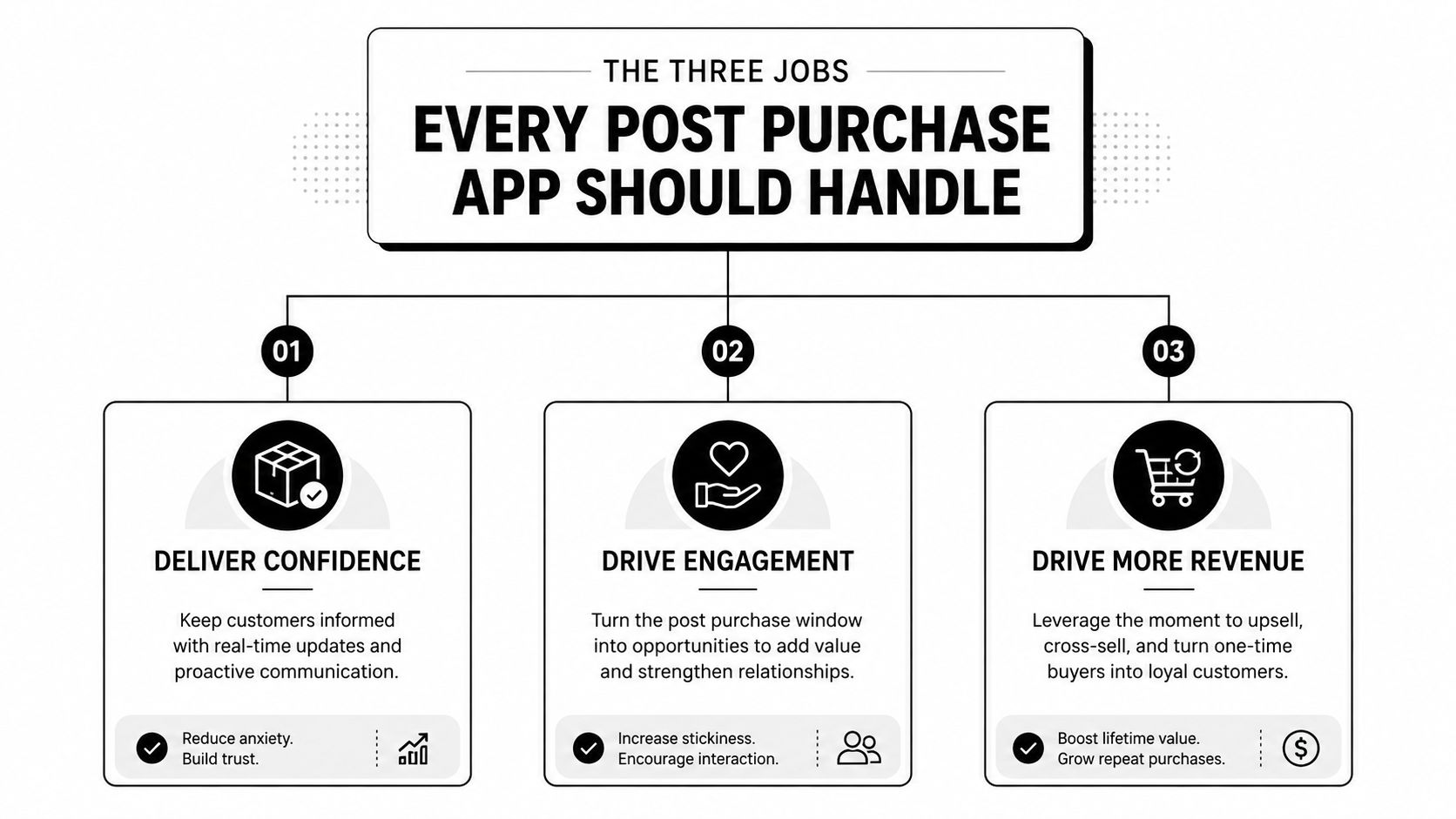
A useful post-purchase workflow performs three separate jobs. They can appear in the same customer-account area, but they solve different problems and should be measured differently.
Self-serve edits resolve urgent intent
The first job is correction. A customer may need to swap a variant, change a quantity, update a shipping address, add an item, remove an item, or cancel. The value isn't theoretical. The customer already knows what they want changed, and a fast self-service path can prevent a support ticket or a wrong shipment.
Timing determines whether the option helps. In a 2026 analysis of more than 10M Shopify orders, 80.6% of edits happened within the first hour, and the median time from checkout to edit was 4.6 minutes. Those figures are reported in the analysis, not Shopify's own documentation, and are available in the Shopify order editing guide. The operational lesson is clear: an edit button that appears too late has little practical value.
One-click upsells extend the original decision
The second job is a relevant add-on. A customer who bought a main product might add a compatible accessory, refill, protection product, or complementary item without starting a new checkout. The offer should improve the original purchase, not interrupt it with unrelated choices.
For example, someone ordering a coffee machine may want filters. Someone buying a skincare cleanser may need a compatible moisturizer. The app should use the original order as context and add the accepted product to that order when Shopify's workflow allows it.
The distinction between a post-purchase upsell and an ordinary product recommendation matters. A recommendation invites another shopping trip. A post-purchase offer asks whether the customer wants to complete the purchase they've already started. Learn more about the mechanics in this guide to what a post-purchase upsell is.
Cancel deflection gives the customer a better exit
The third job is retention, but it shouldn't mean blocking cancellation. A well-designed flow captures the reason, presents an appropriate alternative when one exists, and keeps a straightforward cancellation path available when the customer still wants to leave.
A merchant might offer store credit instead of an immediate refund when the customer has changed their mind, or suggest an address correction when the cancellation request resulted from a delivery concern. The customer retains agency, while the merchant gets a structured opportunity to save an order.
Practical rule: Treat edits, upsells, and cancellation saves as different customer intents. They need different eligibility rules, messages, and success metrics.
These jobs also happen at different moments. An edit responds to urgency. An upsell responds to continued buying intent. A cancellation flow responds to dissatisfaction or changed circumstances. Combining them in one app is useful only when the customer sees a clear, low-friction action rather than a crowded collection of offers.
Key Features Constraints and Access Rules You Should Know
A post-purchase app can't place any control anywhere. Shopify separates public and authenticated versions of the Order status experience, and that distinction affects what an app can safely do.
The public unauthenticated page exposes limited order information and doesn't support extensions. Authenticated or tokenized access can expose fuller order details and support UI extensions, which makes it the appropriate environment for account actions. Shopify's Order status page documentation explains this access model and the tokenized links used in order notifications.
Tokenized links also have a defined lifespan. Shopify documents that they can remain usable for up to 3 weeks in the same browser session or 2 weeks across up to 5 browser sessions before the customer falls back to the unauthenticated view. Those limits matter when support teams tell customers where to find an edit option.
Shopify access and review requirements
Post-purchase extensions aren't fully open by default. Merchants or app developers must request access through the Partner Dashboard, and Shopify says review can take up to seven days. Builders must use the required checkout-extension API scope and follow Shopify's user-experience rules.
For post-purchase offers, Shopify limits buyers to a maximum of 2 consecutive post-purchase requests. When the flow ends, the app must redirect the customer to the order confirmation page. These constraints protect the checkout experience and should be included in launch planning, not discovered during implementation.
| Capability | Native Shopify | With Post Purchase App |
|---|---|---|
| View order and shipment information | Available through the Order status page | Available with additional contextual UI |
| Update customer profile or shipping details | Supported through customer accounts | Can expose a guided, merchant-controlled workflow |
| Edit products, quantities, or shipping fees | Available through Shopify order editing tools | Can make eligible actions available to the customer |
| Add a relevant product after checkout | Requires a supported merchant or admin workflow | Can present a focused post-purchase offer |
| Apply cancellation alternatives | Requires manual or custom handling | Can structure reason capture and approved save options |
| Enforce detailed eligibility rules | Limited to Shopify's native controls | Can apply merchant-defined windows, exclusions, and thresholds |
| Add native UI to the Order status page | Not a merchant-configured app workflow by itself | Uses Shopify's extension target after approval |
Native Shopify editing may be enough for a small team that handles changes manually. An app becomes more useful when the store needs consistent customer self-service, fulfillment coordination, payment settlement, and reporting. The choice depends less on the presence of a single feature and more on whether your team can govern the entire change safely.
How Merchant Controls and Safeguards Prevent Costly Mistakes
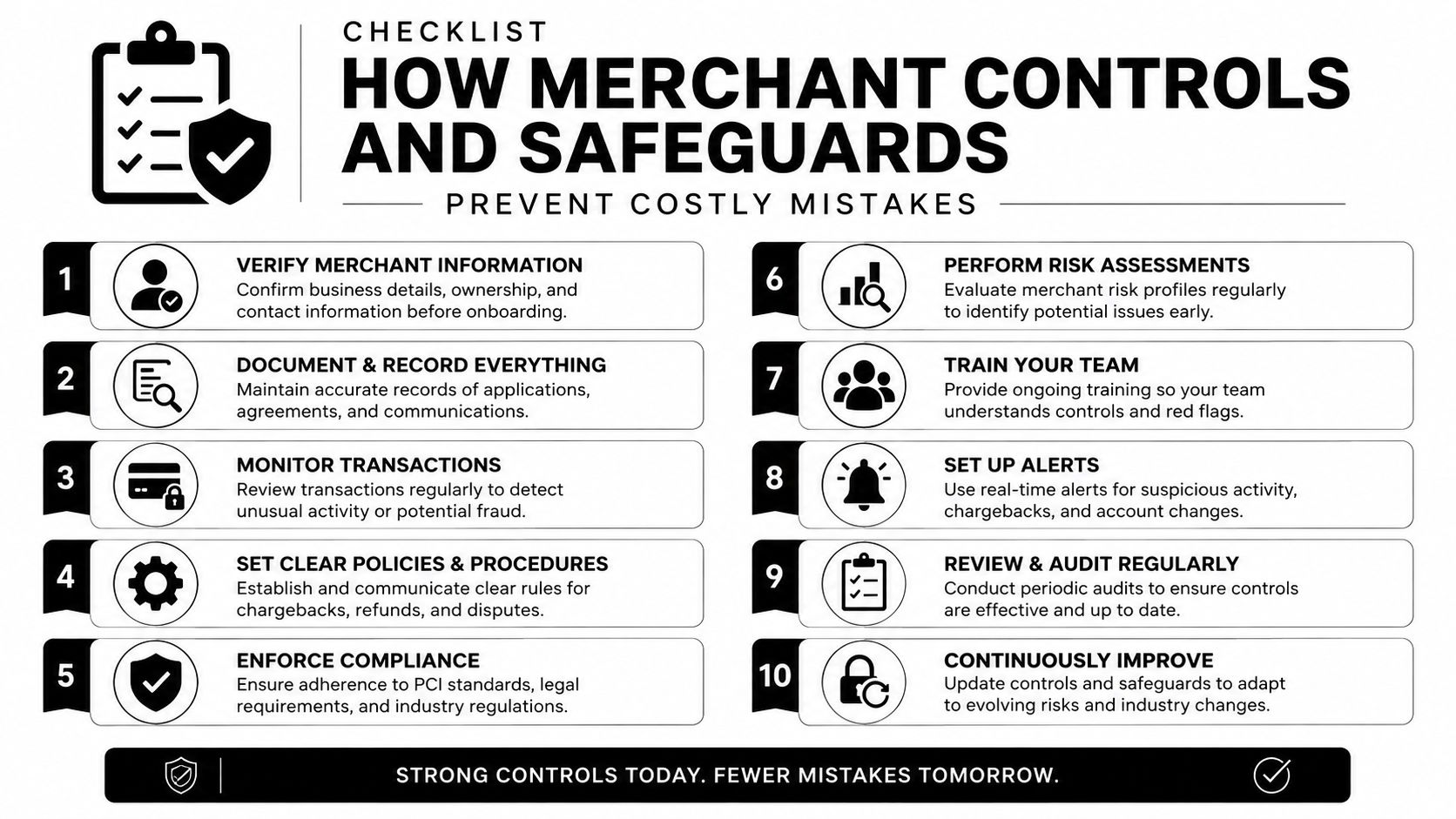
Self-service only works when the customer can make the right change while your operation can still fulfill it. Shopify documents that edits can affect products and shipping details, and its order model exposes committed post-purchase adjustments through webhooks and order-state retrieval. That means an edit should be treated as a stateful operational event, not as a cosmetic change to a confirmation page.
Start with the edit window
The 4.6-minute median edit time discussed earlier shows why speed matters, but merchants still need to choose a window that matches their warehouse process. A store with frequent pick-and-pack activity may keep the window narrow. A made-to-order operation may allow more time because fulfillment doesn't begin immediately.
Don't expose every action just because the platform can support it. Use capability toggles to decide whether customers can change quantities, swap variants, update addresses, add products, remove products, or request cancellation.
Connect customer actions to fulfillment
A fulfillment hold is one of the most important safeguards. When an edit becomes active, the shipment should pause long enough for the order state to settle. Otherwise, a warehouse may ship the original address or variant while the customer is still changing it.
Eligibility rules should reflect the actual operation:
- Fulfillment state: Exclude orders already picked, packed, shipped, or otherwise beyond a safe change point.
- Order value: Require review for higher-value orders or changes with greater financial exposure.
- Products and collections: Exclude fragile, personalized, regulated, or inventory-sensitive items.
- Destination: Apply country or region rules where tax, delivery, or compliance handling differs.
- Change type: Allow address corrections automatically while routing refunds or removals for review.
Reconcile every financial outcome
A quantity increase or added item can create an additional charge. A removal or cancellation can require a refund. The workflow should use Shopify's invoicing and refund processes, with an approval threshold for changes that deserve human review.
Shopify's order model also supports event-driven handling through webhooks and order-state retrieval. Your support, warehouse, and finance teams should agree on which system is authoritative, what status signals a committed change, and how exceptions are recorded.
Operations rule: A customer-facing edit is complete only when the order, payment state, fulfillment state, and internal records agree.
The 2026 analysis found that 92.2% of edits were completed without an agent, while shipping-address changes represented 30.2% of edits. Both figures are from the independent Shopify order editing analysis and documentation. They point to a practical design priority: automate common changes, but reserve unusual or financially sensitive cases for review.
How Mayra Apps Implements Post Purchase Workflows Natively in Shopify
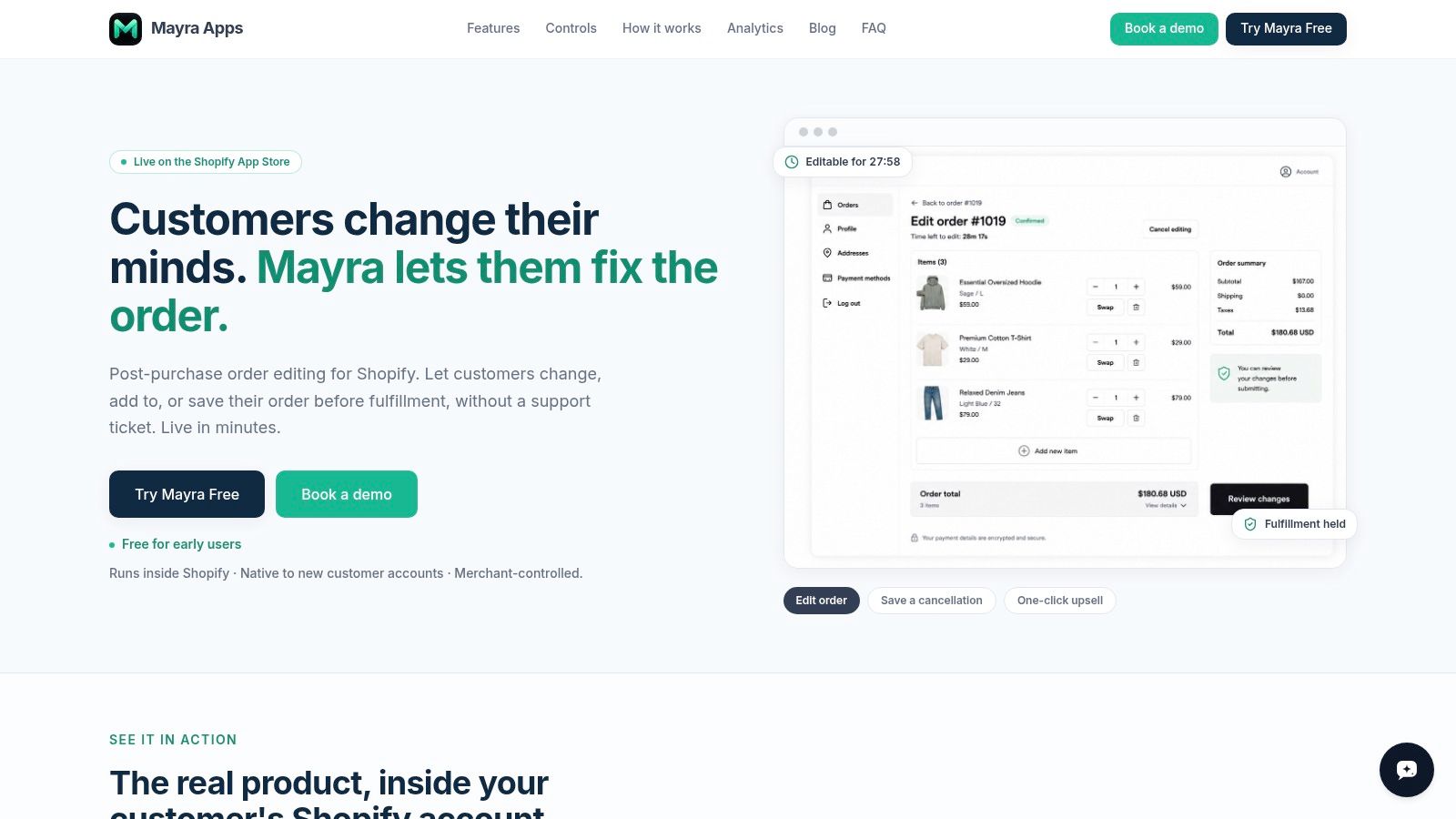
Mayra Apps provides one example of a Shopify-native approach through its Mayra Order Edit and Upsell App. A merchant installs the app from Shopify, adds the Mayra block to the Order status page and customer account, and configures the rules that determine which customers can act and what they can change.
Configure the workflow around the warehouse
The merchant controls edit windows, permissions, approvals, and eligibility. Capability settings can allow or restrict quantity changes, variant swaps, address updates, additions, removals, and cancellations. Rules can also use order value, fulfillment state, product, collection, tag, or destination country.
That configuration lets an operations manager match the app to the warehouse rather than forcing the warehouse to adapt to a generic workflow. For instance, address changes might remain available while an order is unfulfilled, while personalized products are excluded from all customer edits.
Keep Shopify as the system of record
Mayra writes edits back to the original Shopify order instead of creating a disconnected replacement order. That keeps the admin order record central for support, fulfillment, and reporting.
Financial handling follows Shopify's payment workflows. Additional charges can be invoiced through Shopify, while refunds can be processed automatically or held for approval according to the merchant's rules. Fulfillment holds pause shipment during an active edit, reducing the chance that a warehouse acts on outdated order details.
Pair changes with relevant offers
The app can present one-click upsells during an edit or on the Order status page. An accepted item is added to the same order, which keeps the customer's action connected to the existing purchase rather than sending them through a separate checkout.
It also supports cancellation deflection through reason capture and store-credit offers, with cancellation remaining available when saving the order isn't appropriate. Reporting covers store-specific activity such as orders edited, revenue recovered, orders saved, and modeled ticket avoidance. Configuration details and placement guidance are available through Mayra's workflow overview.
The important implementation principle is native placement. By using customer accounts and the Order status page, the workflow can operate without a theme rewrite while remaining close to the order data and fulfillment process.
Choosing and Launching the Right Shopify Post Purchase App
Choose a post-purchase app by starting with the operational problem, not the most attractive offer template. If support receives urgent address and variant requests, prioritize fast self-serve editing. If the store has strong complementary products, assess one-click upsell relevance. If cancellations create avoidable refunds, inspect reason capture and save-offer controls.
A practical evaluation checklist includes:
- Edit coverage: Confirm which fields customers can change and whether edits write back to the original order.
- Timing controls: Set an edit window that reflects the warehouse's real fulfillment sequence.
- Governance: Look for fulfillment holds, approval thresholds, exclusions, and order-state rules.
- Settlement: Verify how added charges, refunds, and failed payment outcomes are handled.
- Placement: Confirm the app works on the authenticated Order status page and customer account.
- Measurement: Track edited orders, saved orders, recovered revenue, support avoidance, and exceptions separately.
Launch with a narrow, low-risk workflow. Permit common address or variant corrections for eligible unfulfilled orders, monitor exceptions, and review warehouse feedback. Then expand into additions, cancellation saves, or post-purchase offers once the core order-change process is reliable.
The right Shopify post-purchase app turns a short and stressful customer-service window into a controlled operating process. Growth matters, but growth without order accuracy creates more support work than revenue.
Mayra Apps offers customer-account and Order status page workflows for self-serve edits, one-click upsells, cancellation deflection, fulfillment holds, and merchant-defined approvals. Visit Mayra Apps to review how the app can help your team manage the post-purchase window with clearer controls and fewer manual interventions.