
Order management keeps one accurate record across a market UNCTAD sized at approximately $26.7 trillion in global e-commerce sales in 2019, including about $21.8 trillion in business-to-business commerce. It is the coordinated process of capturing, validating, changing, fulfilling, tracking and closing a customer order across sales, inventory, payment and shipping systems.
You are probably looking at an order a shopper just tried to change. They want a different size, a corrected address, or one item removed, and someone on your team has to decide whether that change is still safe. The parcel might still be a row in your admin. It might already be on a pick list. That gap, measured in minutes, is where most order problems start.
Table of Contents
- What Order Management Means and Why It Matters
- How an Order Moves Through Its Lifecycle
- Which Systems Handle Each Part of an Order
- When Customers Can Still Change an Order
- Measuring Whether Order Management Works
- Map Your Order Flow Before You Choose Software
What Order Management Means and Why It Matters
A hotel runs on one booking per room. There is no separate note at the front desk, another in housekeeping and a third in billing. The clerk checks whether the room is free, writes any date change onto that same booking, and every department works from the current version. Order management does the same job for goods. The order record is the booking. Stock is the room. Payment, tax, the warehouse and the carrier are the departments that must not keep a private copy.
Walk a simple web order. A shopper checks out, the order is created, stock is reserved, payment is confirmed, and the warehouse picks and packs. Each step locks the order a little further. An address change is a quick edit while the parcel is still a row in your admin, a relabel once the label is printed, and a redirect or a lost parcel once the carrier collects. The record itself never moves. Only the price of changing it does.
The same control covers more than a retail checkout. Teams also run wholesale purchase orders, EDI feeds, marketplace sales, subscription renewals and changes made after the sale. The volume behind that work is large: UNCTAD's e-commerce estimates put business-to-consumer sales at approximately $4.9 trillion in 2019, with business-to-business commerce at about 82% of the roughly $26.7 trillion total. A later UNCTAD working paper found that businesses in 43 developed and developing economies generated nearly $25 trillion in e-commerce sales in 2021. At that scale, order management is shared commercial infrastructure, and treating it as a checkout feature understates the job.
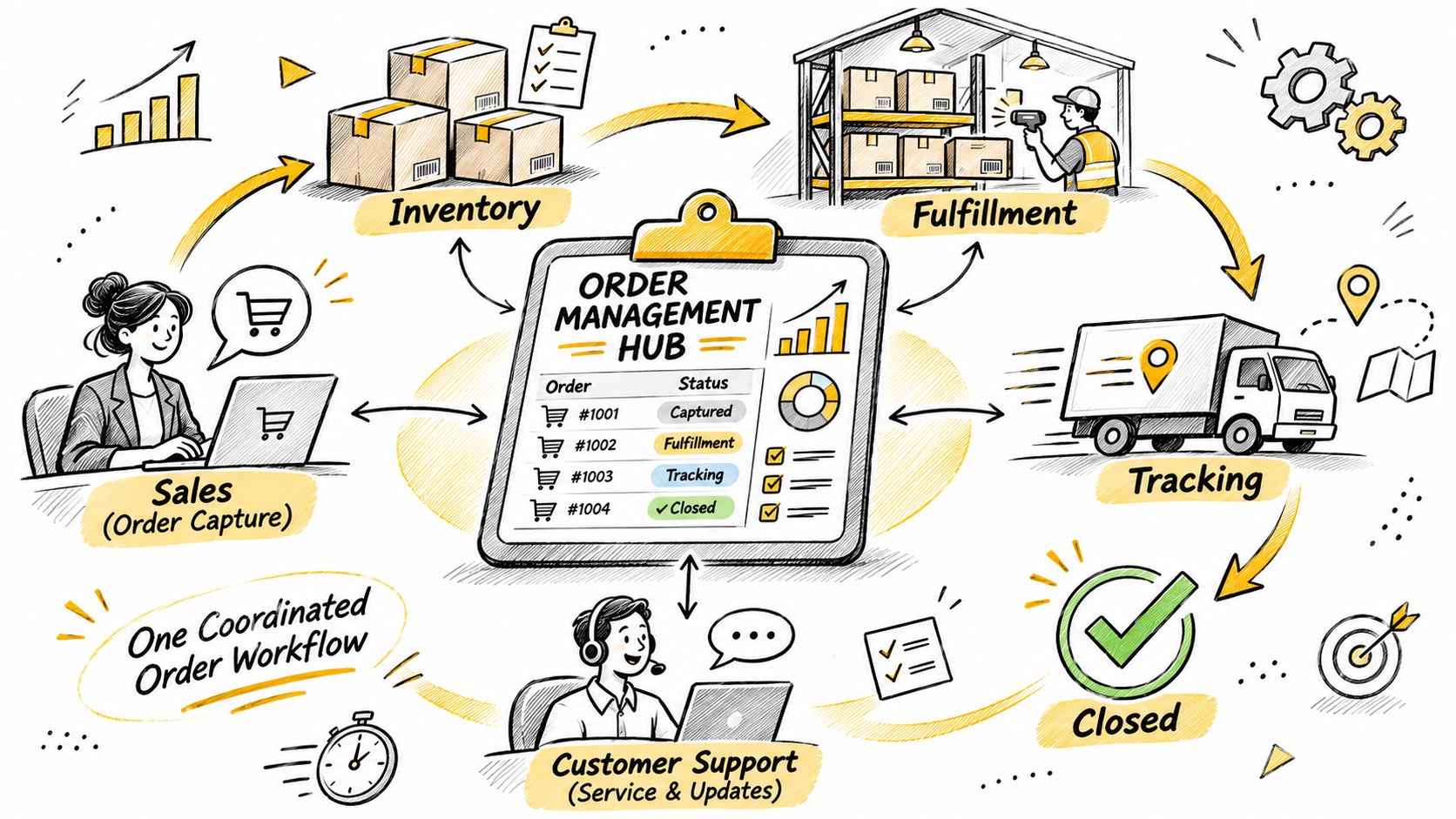
What one bad day looks like in a store
Say a retailer ships 10,000 orders a day and 1% go out wrong. That is 100 wrong orders every day. Each one tends to bring a return label, a refund and a support ticket, and the warehouse still has to put the item back on the shelf.
The cause is usually plain. Two people acted on two versions of the order.
A team can be holding several order types at once:
- Web checkout: a paid cart from your own storefront, often the one customers expect to edit themselves.
- Marketplace sale: the same SKU, but the marketplace clock and the cancellation rules aren't yours alone.
- Wholesale purchase order: larger quantities, sometimes an EDI feed, with invoicing that has to match the buyer's record.
- Subscription renewal: a repeat order that can fail payment or stock without a shopper sitting at checkout.
- Post-purchase change: a quantity edit, a variant swap, an address correction or a cancellation against an order that already exists.
Each type lands in the same record, and each carries its own deadline. The marketplace change window, the pick list print run and the carrier cut-off all decide what can still be edited safely.
Practical rule: If an order changes, every team should be able to open the same current version. When they can't, the order lives in several inboxes rather than one managed record.
Size the job before you buy software. Multiply daily orders by your error rate, then compare that count with what one error costs you in outbound shipping, handling and support time. That product is the bill for a record nobody owns, and the earlier a change arrives, the cheaper it is to grant.
How an Order Moves Through Its Lifecycle
An order isn't a single action. It's a chain, and each link has a specific way to fail. Capture creates the order from a website, a marketplace, a B2B portal or an EDI feed. If capture fails, orders are lost or duplicated. Validation checks the product, the address, the payment and the tax. Skip it and you ship undeliverable parcels or chase payment declines. Allocation reserves stock. Reserve stock that isn't on the shelf and you oversell, or you split one order across buildings because the first building was short.
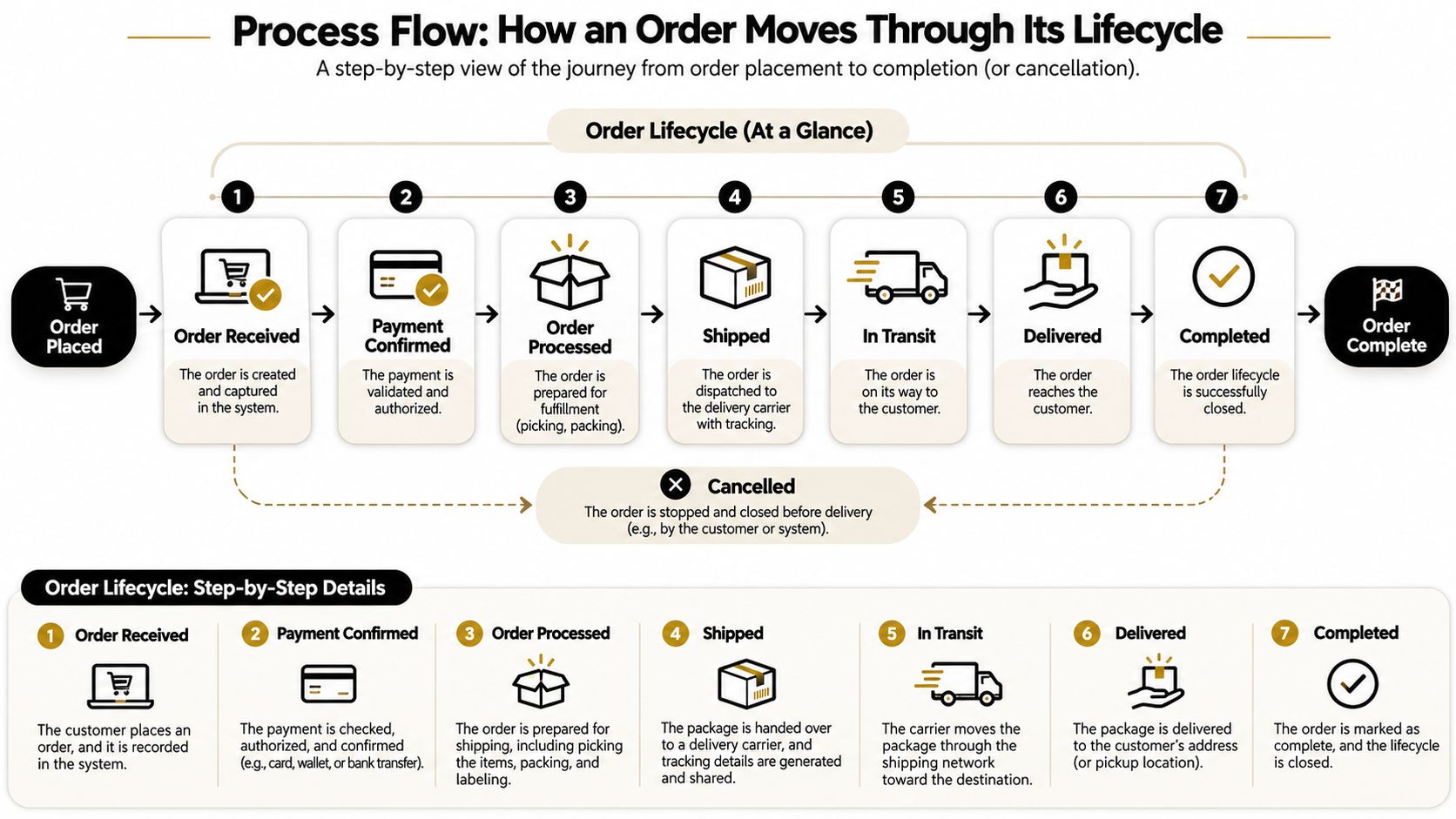
Routing then picks the warehouse or store that should fulfill the order. A poor choice raises shipping cost and slows delivery. Picking, packing and labelling gather the items. A miss here ships the wrong item or quantity. Shipment is the handoff to the carrier. Miss the dispatch cut-off and the delivery is late even if the pick was perfect. Invoicing and payment settlement issue the bill and collect or refund the money. An unreconciled refund leaves accounts out of balance. Changes and close cover returns, exchanges, cancellations and refunds until goods and money match. Untracked refunds become disputes.
| Stage | What Happens | What Breaks If It Fails |
|---|---|---|
| Capture | Order is created from web, marketplace, B2B portal or EDI | Lost or duplicated orders |
| Validation | Product, address, payment and tax are checked | Undeliverable parcels and payment declines |
| Allocation | Stock is reserved for the order | Overselling and split shipments |
| Routing | Fulfilling location is chosen | Higher shipping cost and slower delivery |
| Picking and packing | Items are gathered, packed and labelled | Wrong item or quantity shipped |
| Shipment | Parcel is handed to the carrier | Missed dispatch cut-off and late delivery |
| Invoicing and payment | Invoice is issued and payment settled | Unpaid balances and accounting gaps |
| Changes and close | Returns, exchanges, cancellations and refunds are reconciled | Untracked refunds and disputes |
One edit has to cross several stages
Say a shopper orders two shirts in size M on Monday night, then swaps one to size L at 8:00 the next morning. That isn't a note for customer service to remember. The change has to recheck stock for size L, reprice the order, recalculate tax and shipping, and reach the warehouse before picking starts. If size L isn't in the building that was going to ship the order, routing may have to move, and the payment difference has to be collected or refunded against the original order. If picking has already started, the clean edit becomes a correction on the floor.
People mix this up with fulfillment and with customer service. Fulfillment is the physical slice, the pick, the pack and the carrier handoff, which is why it helps to map your order fulfillment process as its own stretch of the chain. Customer service is the conversation. Order management is the rule that says which version of the order both of them are allowed to act on.
Sketch your own flow on one page. For each stage above, write the name of the person or the system that owns it today. A blank owner is the stage where edits will get lost.
Which Systems Handle Each Part of an Order
An order management system (OMS) is an orchestration layer. It sits between the sales channels and the systems that do the physical and financial work. It isn't the warehouse, and it isn't the general ledger. IBM's description of order management treats the OMS as the layer that keeps state from capture through inventory checks, fulfillment, delivery, invoicing, returns and exchanges, while inventory, warehouse, transportation, payment and service tools execute their own jobs.
| System | What It Owns | Question It Answers |
|---|---|---|
| Order management system | Order record, state and event history | What is the current status of this order? |
| Warehouse management system | Bin locations, picking and packing tasks | Where is the item and has it been packed? |
| ERP | Financial and inventory ledgers | Is the sale booked and is stock correct? |
| Payment gateway | Authorisations, captures and refunds | Has the customer been charged or refunded? |
| Carrier or shipping platform | Labels, parcels and tracking events | When will the parcel arrive? |
| Helpdesk | Customer conversations and tickets | What did the customer ask and what was agreed? |
One record, many readers
The source-of-truth rule is simple. One system holds the authoritative order. The others read from it, or they write back through a defined event such as "payment captured" or "parcel scanned." They don't each keep an editable copy of the shipping address.
On Shopify, that authoritative record is the order in the admin. When a customer changes an eligible order in our flow, every change is written to the original order, so the admin stays the record everyone checks. A helpdesk note that never lands on that order is invisible to the picker.
The common failure is two systems editing the same field. Support updates the address in a ticket. The shipping platform still has the old label. The customer was promised the new street, and the carrier delivers to the old one. Nobody lied. They each saved a different version.
If two screens can change the same field, you will eventually ship the version the customer didn't see.
Before you add another app, answer three questions in writing. Which system owns order status? Which one owns inventory the warehouse is allowed to pick? Which one owns the payment record, including refunds? If two names appear on any line, that line is where mismatches will show up on a busy afternoon.
When Customers Can Still Change an Order
A shopper changes a size at 10:00. Picking on that order starts at 11:00. The edit is safe only if it is accepted, stock is rechecked, and the pick list is updated before 11:00. A change at 11:05 conflicts with work the warehouse has already started. Someone has to stop a picker, put the first size back, and hope the new size is in the same bin area. That is no longer a storefront convenience. It is a floor interruption.
WareDock's order-accuracy benchmarks put best-in-class distribution centers at at least 99.68% order-picking accuracy and 99.5% on-time shipment performance. A late address correction, a variant swap or an added item can interrupt picking, packing, allocation and carrier handoff. Flexibility after that point isn't free, even in a building that almost never misses.
| Order State | Customer Edits Allowed | Typical Merchant Action |
|---|---|---|
| Placed, payment pending | Usually yes, for quantity or address | Confirm payment before release |
| Paid, not yet allocated | Yes, with repricing and tax recalculation | Recheck stock when the edit is saved |
| Allocated to warehouse | Limited, only with a fulfillment hold | Pause allocation while the edit is underway |
| Picking or packing | Rarely, route to support | Stop the edit or handle it as an exchange |
| Shipped | No | Use the returns or refund flow |
| Cancelled or archived | No | Keep the record for audit |
Rules that close as the order advances
Treat each state as a gate, not a suggestion. While payment is still pending, quantity and address edits are usually fine, but the order shouldn't release to the warehouse until payment is real. Once it is paid and not yet allocated, the edit can still go through, as long as price, tax and stock are recalculated when it is saved. After allocation, allow the change only if you can pause the warehouse.
Fulfillment is held while a customer is editing an eligible order, so the order can't ship in the middle of the change. That hold is the difference between a clean swap and a parcel that leaves with the old contents while the new total is still unpaid. Set a maximum order value above which self-serve editing is turned off. High-value orders are where a wrong swap hurts margin and where you want a person to look.
If the edit raises the total, the customer should pay the difference before the change completes. On Shopify, that balance goes out as a separate invoice tied to the same order, and refunds stay on that order too. A refund that lives only in a support macro will not match the books.
Once the order is fulfilled, cancelled or archived, customers can't edit it. A shipped order belongs in the returns or refund flow. A cancelled or archived order stays as an audit record, not a cart you reopen. For the cases you do allow, spell the path in your order modification rules so support and the warehouse aren't inventing policy per ticket.
Stock can also disappear between the click and the save. If the new variant isn't available, the edit should fail visibly rather than confirm a promise the shelf can't keep. The same applies when tax or shipping changes because the address moved to another region. Show the new total before the customer confirms it.
An edit is eligible only when it is still reversible, the money matches, and the warehouse is working from the new version.
Write one cutoff for each state in your own building. For many stores the hard stop is "allocated, pick not started." After that, route the shopper to support or to an exchange, and don't pretend the picker can absorb unlimited changes.
Measuring Whether Order Management Works
A single "orders look fine" feeling hides which stage is failing. You want measures that point at a place in the chain. Oracle's order-management guidance frames order accuracy as error-free orders divided by total orders, and it treats line accuracy, unit-pick accuracy, perfect-order rate and OTIF (on time, in full) as separate reads on the same operation.
| Metric | Formula | What It Diagnoses |
|---|---|---|
| Order accuracy | Error-free orders divided by total orders | Whether the whole order was right |
| Line accuracy | Error-free order lines divided by total lines | Errors within multi-item orders |
| Unit-pick accuracy | Correctly picked units divided by total units picked | Picking errors in the warehouse |
| Perfect-order rate | Orders on time, complete, undamaged and correctly documented divided by total orders | Overall end-to-end performance |
| OTIF | Orders delivered on time and in full divided by total orders | Timeliness and completeness of delivery |
What each number is allowed to tell you
Unit-pick accuracy isolates the pick. If units are wrong and everything upstream was clean, look at bins, scans and pack stations. Order accuracy asks whether the whole order was right, so a single bad line fails the order even when most units were correct. Line accuracy sits between them and is the one to watch on multi-item carts, where one wrong variant ruins an otherwise good shipment. OTIF adds the carrier and the promise date. A perfect pick that misses the truck is still a failed OTIF order. The perfect-order rate is stricter still, because damage and bad paperwork fail it even when the SKU and the date were right.
Edits need their own counts, or you will blame the warehouse for a rule you set too late. Track the number of edited orders, the reason the shopper gave, how many cancellations converted to store credit, and how many orders needed a manual correction after an edit. If order accuracy drops in the weeks after self-serve edits go live, check whether the cutoff is after picking has started. That pattern means the edit window is open too long, not that pickers suddenly got worse.
Pick three metrics, record a 30-day baseline, and review them on the same weekday every week. A number without a baseline is a mood.
Don't start with all five plus the edit counts. Choose one accuracy measure, one time measure (OTIF or perfect order), and one edit measure. Write down the owner who investigates a miss. A metric nobody is assigned to will be a chart you stop opening.
Map Your Order Flow Before You Choose Software
Start from the stages you already listed, capture through close. Don't redraw them. Next to each stage, write the person or system that owns it. A stage with two owners, or with none, is the one that will double-ship or forget a refund.
Then set an edit cutoff for each order state. Paid and not allocated can stay open. Allocated should require a hold. Picking, shipped, cancelled and archived should close. Define eligibility in the same pass: order value, fulfillment status, specific products, collections and destination country. An order that fails any rule shouldn't appear as editable to the shopper.
Pick three metrics from the set above and record a baseline before you change the window or the software. If you switch tools and measures on the same day, you won't know which one moved the result.
For Shopify stores that want customers to handle eligible changes themselves, Mayra - Order Edit & Cancel runs in Shopify's new customer accounts and on the order status page. Shoppers can change quantity, swap a variant, update the shipping address, remove an item or cancel, inside rules you set, and each change is written to the original order while fulfillment is held. Shoppers should contact the store they ordered from first, because the merchant controls the order data and we assist merchants with valid requests. If you are still choosing the commerce platform those orders live on, the CIQRA Commerce selection considerations are a practical pass over channel fit and how much of the operation you intend to own. A closer look at order management software helps once the map, the cutoffs and the baseline exist.
Answer these three questions before you sign anything. Who owns each stage today? At which state does a customer edit become a warehouse risk? Which three numbers will tell you, within 30 days, whether the new rule made orders more accurate or only more flexible?
Mayra - Order Edit & Cancel lets Shopify customers correct quantity, variant, address, item removal and cancellation on the original order, inside the edit window and eligibility rules you set, while fulfillment is held so the parcel can't leave mid-change. That is order management applied to the minutes after checkout, when a change is still cheaper than a return. See how it fits your states and cutoffs at Mayra ‑ Order Edit & Cancel.