
Shopify's customer portal handles order tracking well, including pre-authenticated access for up to 3 weeks after an order notification. Complex post-purchase changes often exceed Shopify's native surface, so merchants may need an app such as Mayra for advanced order editing and cancellation deflection.
A customer emails your support team at 11 PM. They chose the wrong size and want to swap it before the warehouse picks the order. Another customer needs to correct a shipping address, while a third wants to remove one item from a multi-product order. None of these requests is unusual, but each can create manual work, fulfillment risk, or a preventable refund.
That's where the Shopify customer portal becomes more than an account page. It can give shoppers a reliable place to view orders, follow delivery progress, and manage parts of their post-purchase experience without opening a support ticket. The important qualification is that Shopify's native tools handle straightforward account and order visibility better than complex order modification.
Merchants need to treat the portal as both a customer convenience feature and an operations control point. If customers can change an order, the store also needs rules for fulfillment status, payment state, approvals, inventory, and timing. A polished interface alone won't prevent a warehouse from shipping the wrong item.
Table of Contents
- Understanding the Shopify Customer Portal
- How Customer Accounts and Order Status Pages Work Together
- Native Capabilities and Their Operational Limits
- Configuring Your Customer Portal for Maximum Impact
- Advanced Self-Service with Mayra Apps Integration
- The Hidden Economics of Self-Service Portals
- Building Your Post-Purchase Strategy
- Common Myths About Customer Portals Debunked
Understanding the Shopify Customer Portal
The traditional post-purchase journey is reactive. A shopper notices a mistake, searches for a support email address, explains the problem, waits for a reply, and hopes the order hasn't entered fulfillment. The support agent then checks the order, confirms what's possible, and may need to coordinate with the warehouse or cancel and recreate the order.
A customer portal changes that sequence. Instead of making support the first point of intervention, it gives the shopper a controlled place to find order information and complete eligible actions. Shopify describes customer accounts as a hub where customers can view order history, check order status, edit their profile, and take actions related to their orders. The Shopify customer account documentation also identifies the Order status page as a customer account page, not merely a static receipt.

What customers expect after checkout
Customers generally don't separate “account,” “order status,” and “support” into different operational systems. They see one relationship with the store. If the order page shows the item, delivery status, and available next steps, they expect those next steps to work without another conversation.
Shopify's native account experience is well suited to routine questions:
- Order visibility: Customers can revisit order history and inspect a specific purchase.
- Delivery tracking: The Order status page can show order status and, for supported carriers, real-time location updates.
- Profile management: Customers can edit profile details and manage account information.
- Post-purchase access: Customers can return to the Order status page multiple times instead of treating it as a one-time confirmation screen.
The operational gap appears when the shopper wants to change the order itself. A size swap, quantity adjustment, address correction, or line-item addition affects inventory, payment, and fulfillment. Those actions need more than a page that displays order data.
Practical rule: Build the portal around the decisions customers need to make after checkout, then restrict each decision according to its operational risk.
A strong Shopify customer portal therefore does two jobs. It answers “Where is my order?” quickly, and it offers safe intervention when the order hasn't progressed too far for a change. Merchants evaluating that experience can also review this guide to Shopify customer accounts for implementation context.
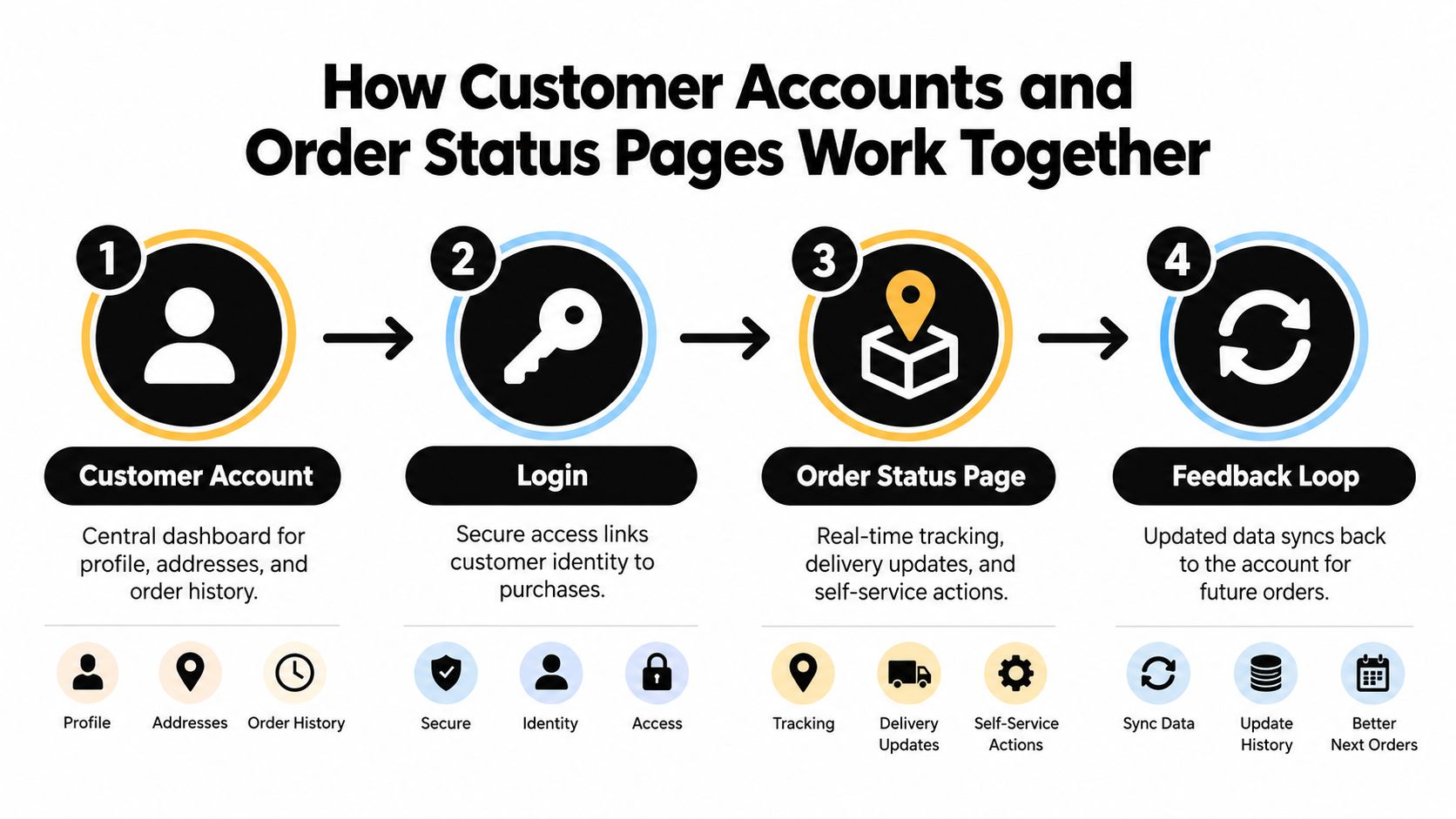
How Customer Accounts and Order Status Pages Work Together
Shopify's architecture separates the broad customer account experience from the detail page for a particular order. The account acts as the customer's wider hub, while the Order status page is the order-specific workspace where tracking and eligible actions belong.
Customers can reach the Order status page through several routes. In the new customer-account system, they can reach it from the store header. They can also open it from order notifications or the Orders index. That flexibility matters because a customer who receives a shipping email may not start from the account dashboard at all.
The access model
Shopify's Order status page documentation distinguishes between direct access and access through an order notification. When a shopper opens the page directly, Shopify displays public order information such as the products, order status, and order total. When the shopper follows a notification link, the URL includes a token that provides partial authentication for that order.
That token lets the customer view all data related to the order without logging in, provided they use the same browser session. The pre-authenticated access window lasts 3 weeks, which creates a useful period for time-sensitive post-purchase actions while still keeping access controlled. After that period, a customer without an account may need to verify an email address or phone number together with the order number.
This design reduces friction without making the order permanently public. It also gives merchants a practical place to surface an approved edit or support action when the shopper is already checking delivery progress.
Why the distinction affects app placement
An app placed only in the general account area may be easy to miss when the customer is dealing with a specific order. An extension on the Order status page appears closer to the customer's intent, particularly when the shopper has arrived from an order email.
That context can also help prevent Shopify disputes by making order information and available resolution paths easier to find before frustration escalates. The portal won't eliminate every dispute, but clear status information and accessible self-service can give customers a better first response than a generic support link.
The account page and Order status page should share a consistent experience, but they shouldn't be treated as interchangeable. The account is the relationship-level dashboard. The Order status page is the control surface for one order, its status, its tracking information, and any permitted intervention.
Native Capabilities and Their Operational Limits
Shopify's native customer portal is strong at visibility and basic account management. It isn't a complete order modification system for every merchant workflow. That distinction is easy to miss because “manage orders” can mean anything from checking a delivery status to rebuilding the contents of an order.
The native experience can support order history, profile updates, order tracking, and other account actions. Shopify also supports several post-purchase edits in the admin before fulfillment. Merchants can add or remove products, change quantities, update shipping fees, and apply or remove manual discounts. However, Shopify's order-editing considerations state that fulfilled items can't be removed or adjusted, and some orders with pending payments may be blocked from editing.
What native tools handle well
A merchant can use Shopify's built-in surface when the customer mainly needs to:
- Check an order: Show the products, total, status, and related information.
- Follow delivery progress: Let customers return to the Order status page after tracking information is added.
- Manage account details: Allow profile and customer-account actions without exposing internal admin workflows.
- Start supported self-service actions: Keep routine account and return interactions within the customer experience.
These functions reduce unnecessary navigation. They also preserve Shopify's role as the central record for the customer relationship and order history.
Where the workflow becomes difficult
Line-item changes introduce a different risk profile from customer-detail edits. Correcting a phone number is not the same as changing a variant, removing an item, or adding a product with a new charge. The latter may affect inventory reservations, discounts, taxes, payment collection, warehouse picking, and fulfillment timing.
Merchants often respond in one of two ways. They send every request to support, which protects control but creates avoidable workload. Or they build a heavily customized interface without defining approval rules, which gives customers freedom but can expose the warehouse to mid-process changes.
| Native Shopify surface | Specialized post-purchase workflow |
|---|---|
| Displays order and account information | Applies merchant-defined eligibility and permissions |
| Supports selected admin order edits | Presents customer-facing quantity, variant, or item changes |
| Separates customer-detail updates from line-item edits | Coordinates changes with payment and fulfillment rules |
| Works within Shopify's standard account structure | Extends the Order status page or account with targeted actions |
The practical question isn't whether native Shopify is good or bad. It's whether the native surface covers the actions your customers request most often. Merchants dealing with recurring size errors, address corrections, or cancellation requests should map those workflows before deciding whether Shopify order editing needs an app layer.
Configuring Your Customer Portal for Maximum Impact
A customer portal works best when every visible action has an operational owner. “Edit order” shouldn't be a universal permission. It should mean that the customer can perform a defined change under a defined set of conditions.
Start with the order lifecycle. Identify the point at which your warehouse begins picking, packing, or handing an order to a carrier. Before that point, a customer may be able to change a shipping address or swap a variant. After that point, the same action may create a delivery failure or require manual intervention.
Set the rules before adding buttons
Review these questions with fulfillment, support, finance, and merchandising teams:
- Which orders are eligible? Exclude orders that are fulfilled, already in a carrier handoff, or otherwise difficult to modify.
- Which fields can change? Separate address updates from quantity changes, variant swaps, additions, removals, and cancellation.
- What happens to payment? Decide how the store handles extra charges, refunds, discounts, and orders that haven't completed payment.
- When does support take over? Give customers a clear escalation path when a request falls outside the allowed rules.
- Who approves exceptions? High-value orders, restricted products, or unusual destinations may need staff review.
Shopify's access model is useful here because the Order status page can be reached from order notifications and revisited after purchase. That makes it a natural place to present an action while the order is still relevant. It doesn't mean every action should remain available for the full access period.
Design for clarity, not maximum choice
A crowded portal makes customers uncertain about what they can safely change. Show only the actions that apply to the current order. If an order is already fulfilled, replace an edit button with a concise explanation and the appropriate support or return route.
Use plain labels such as Change size, Update address, or Remove item. Explain whether the customer will be charged, refunded, or asked to wait for approval. A confirmation screen should show the resulting order state before the customer submits the change.
A portal protects operations when it makes the safe path obvious and the unsafe path unavailable.
Test the experience from the order email, the store header, and the account's Orders index. Check the same order at different fulfillment states. Your support team should also know exactly what customers see, because confusing internal and external instructions will send customers back into the ticket queue.
Advanced Self-Service with Mayra Apps Integration
Native tracking answers the most common post-purchase question, but many stores need a customer-facing way to correct the order itself. A specialized app can place controlled editing actions inside the customer account and Order status page, while keeping Shopify's admin as the system of record.
Mayra Order Edit and Upsell App is designed for this workflow. It can let customers change quantities, swap variants, update shipping addresses, add or remove line items, and respond to cancellation flows from the post-purchase surface. The merchant controls the rules, including edit windows, enabled capabilities, fulfillment-state limits, product or collection exclusions, destination restrictions, and approval thresholds.
Preserve the original order record
The operational advantage of writing changes back to the original order is traceability. Staff don't need to manage a disconnected replacement order every time a customer corrects a size or adds an item. Shopify remains the place where the order is viewed and administered, while the portal provides the customer-facing interaction.
That approach still needs safeguards. Active edits can place a fulfillment hold so the warehouse doesn't ship while the order is changing. Additional charges can be invoiced through Shopify, while refunds can follow merchant-defined approval rules. These controls matter because a self-service button without fulfillment coordination moves the error from support to logistics.
Turn cancellation intent into a controlled decision
Cancellation is another area where a portal can support both service and retention. The customer should be able to cancel when saving the order isn't appropriate, but the flow can first capture the reason and present a store-credit offer where the merchant has configured one.
One-click upsells can also appear during an eligible edit or on the Order status page. If the shopper accepts a relevant addition, the item is added to the existing order rather than forcing a separate checkout. This keeps the action close to the original purchase and gives the operations team one order context to manage.
The right implementation starts with a narrow ruleset, not every possible permission. Merchants can begin with address corrections and variant swaps, observe how fulfillment handles them, and then consider additions or cancellation offers. The product's post-purchase workflow should be evaluated against the store's actual payment, warehouse, and approval process.
The Hidden Economics of Self-Service Portals
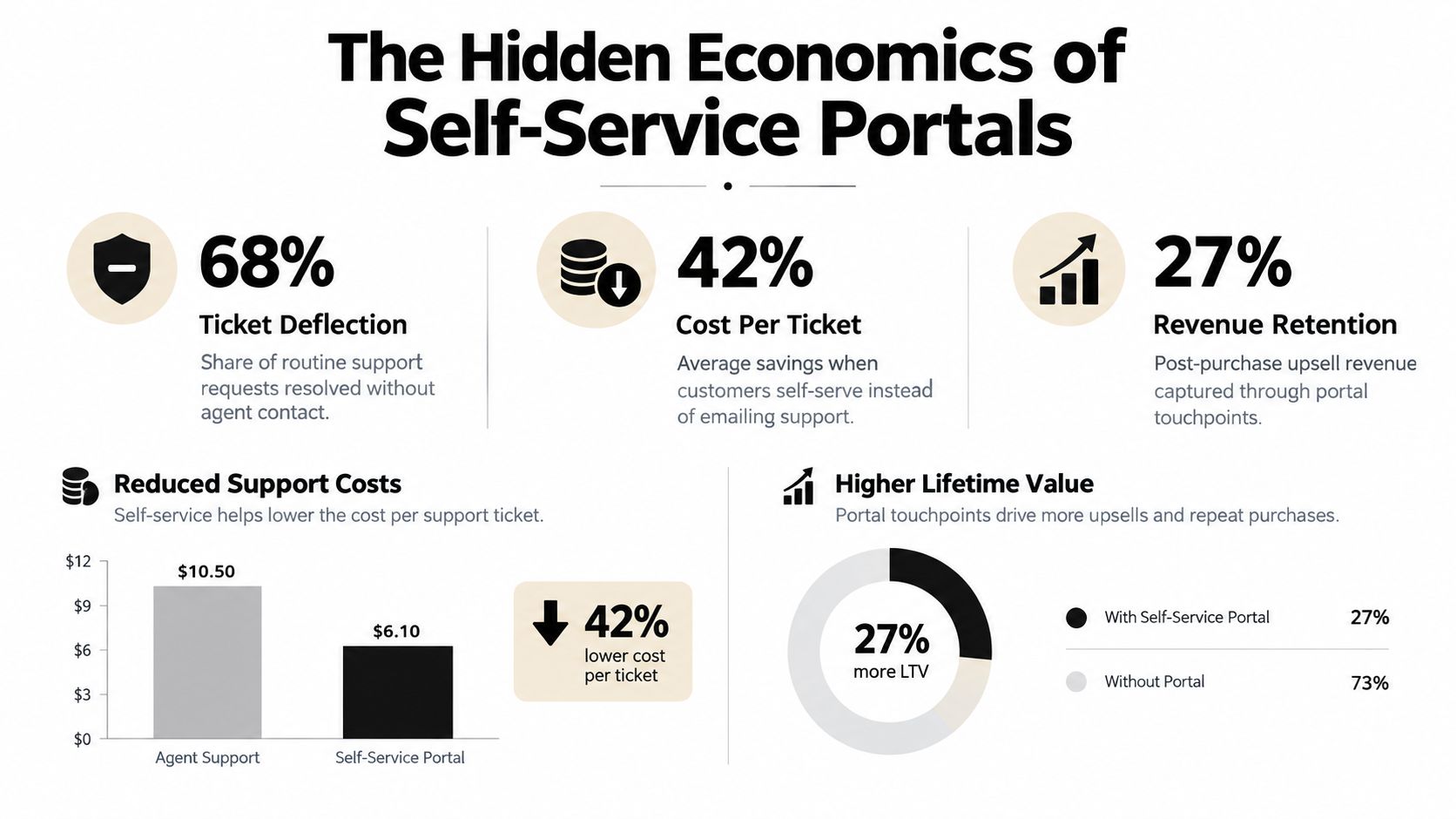
The value of self-service isn't evenly distributed across every portal action. Generic profile editing may improve convenience, but an address correction before fulfillment can prevent a delivery failure. A variant swap can avoid a wrong-item return. A cancellation offer can preserve the order when the customer's problem is flexibility rather than dissatisfaction with the product.
That's why merchants should evaluate the portal by intervention value, not by the number of features displayed. The most useful action is often the one that prevents a downstream operational event.
Three economic lenses
Ticket deflection is the clearest starting point. Every eligible request resolved in the portal avoids at least one round of customer and agent communication. The value depends on the request type, the time needed to investigate it, and whether the agent must coordinate with fulfillment.
Logistics protection often matters more than support savings. An address correction can prevent a shipment from going to the wrong location. A size or variant change can prevent the store from delivering an item the customer is likely to return. These outcomes are operational benefits, even when the customer never sees the internal cost.
Revenue retention comes from keeping the customer inside the original order flow. A cancellation reason can guide a save offer, while a relevant add-on can increase the value of an order that already exists. Neither should override a legitimate cancellation or create pressure when the customer needs a straightforward resolution.
Measure by action, not vanity adoption
Portal login volume can look healthy while the operational experience remains weak. Track the actions that matter to your store:
- Address corrections: Count eligible changes completed before fulfillment and review any delivery exceptions afterward.
- Variant and quantity edits: Compare common misorder requests with the changes customers complete independently.
- Cancellation outcomes: Separate full cancellations, accepted save offers, and cases escalated to staff.
- Support avoidance: Label portal-originated actions so the team can compare them with equivalent ticket categories.
- Fulfillment exceptions: Monitor whether edits create picking, payment, refund, or shipment problems.
Shopify's native documentation establishes the available tracking and access structure, but it doesn't provide a universal financial value for self-service. Each merchant needs to connect portal events to its own support workload, fulfillment costs, refund handling, and retained orders.
Building Your Post-Purchase Strategy
The assumption that Shopify's native portal is sufficient for every store usually comes from looking at the account page rather than the operational workflow behind it. Order history and tracking may cover the majority of visits, while a smaller group of high-friction requests creates a disproportionate burden for support and fulfillment.
Start with the last group of tickets, not with the app marketplace. Sort recent post-purchase requests into address changes, item changes, quantity changes, cancellation, delivery questions, and returns. Then identify which requests arrive before fulfillment and which arrive after the warehouse can no longer act safely.
Choose the smallest useful intervention
A sensible rollout has three layers:
- Foundation: Make order history, tracking, account access, and return routes easy to find.
- Controlled edits: Enable the specific changes that solve a recurring operational problem, with eligibility and timing rules.
- Retention actions: Add cancellation offers or relevant upsells only where they fit the customer's intent and the store's economics.
This sequence prevents the common mistake of launching a broad edit tool before the team agrees on fulfillment holds, payment treatment, and exception handling. It also gives support a clear explanation for why one order can be edited while another requires assistance.
Assign ownership inside the organization
The customer portal doesn't belong only to marketing. Support owns the language and escalation path. Operations owns fulfillment safety. Finance owns charges and refunds. Merchandising may own which substitutions and add-ons are appropriate.
Create one internal policy that states what customers can do, when they can do it, and what happens after submission. Review the policy whenever the warehouse process, carrier setup, product catalog, or payment workflow changes. A portal that accurately reflects the current operation will outperform a more ambitious portal built on outdated assumptions.
Common Myths About Customer Portals Debunked
Myth one native accounts cover every post-purchase action
Native customer accounts cover important fundamentals. Customers can view order history, access order status, manage profile information, and use supported account actions. But Shopify separates customer-detail updates from true order edits, and its order-editing rules include fulfillment and payment constraints.
That means a merchant shouldn't promise customers unlimited post-purchase control just because the store has customer accounts enabled. A portal can be fully native and still require support for quantity changes, variant swaps, address corrections, or additions that aren't available in the standard experience.
Myth two self-service always increases risk
Uncontrolled self-service increases risk. Controlled self-service can reduce it by replacing informal email instructions with explicit permissions, eligibility checks, and confirmation steps.
A customer typing a new address into a defined form is easier to govern than an agent copying an address from an email into the admin under time pressure. The same principle applies to variant changes and quantity edits. The workflow should block changes after fulfillment milestones, account for payment state, and pause fulfillment while an active edit is being processed.
The risk isn't that customers get control. The risk is giving them control without defining the boundaries.
Myth three tracking pages are just digital receipts
Shopify's Order status page is a durable post-purchase destination. Customers can return to it after tracking information is added, open it from order notifications, and revisit it multiple times after purchase. That makes it a logical location for relevant actions, not just a place to display a confirmation message.
The page is especially valuable when the customer's intent is tied to one specific order. A general account menu may tell shoppers where their orders are, but the Order status page gives them the context needed to decide whether to track, edit, contact support, or request a return.
Myth four every store needs a fully custom portal
A custom build may make sense when the customer account is central to a complex retention model, subscription workflow, or broader digital product. It also creates another surface to maintain, test, secure, and update as Shopify changes its account architecture and app capabilities.
Many merchants need a narrower solution. They can keep Shopify's native account and tracking foundation, then add only the post-purchase actions that solve a documented problem. This usually produces a clearer customer experience than assembling unrelated features without deciding which system owns the account relationship.
Myth five more features automatically mean better retention
Customers don't need a portal filled with actions they'll never use. They need the right answer at the moment a problem occurs. Address correction before fulfillment may be more valuable than a decorative account widget. A clear cancellation path may protect trust better than an aggressive offer.
Treat the portal as a service surface first and a retention surface second. Measure completed corrections, avoided support interactions, fulfillment exceptions, cancellations, and accepted offers. Those signals tell you whether the portal is helping customers and protecting the operation.
Mayra Apps provides Shopify tools for self-serve order edits, cancellation deflection with store-credit offers, and one-click upsells inside customer accounts and the Order status page. If your team needs to move beyond native tracking while keeping merchant-controlled rules and Shopify as the system of record, visit Mayra Apps to review the available post-purchase workflows.