
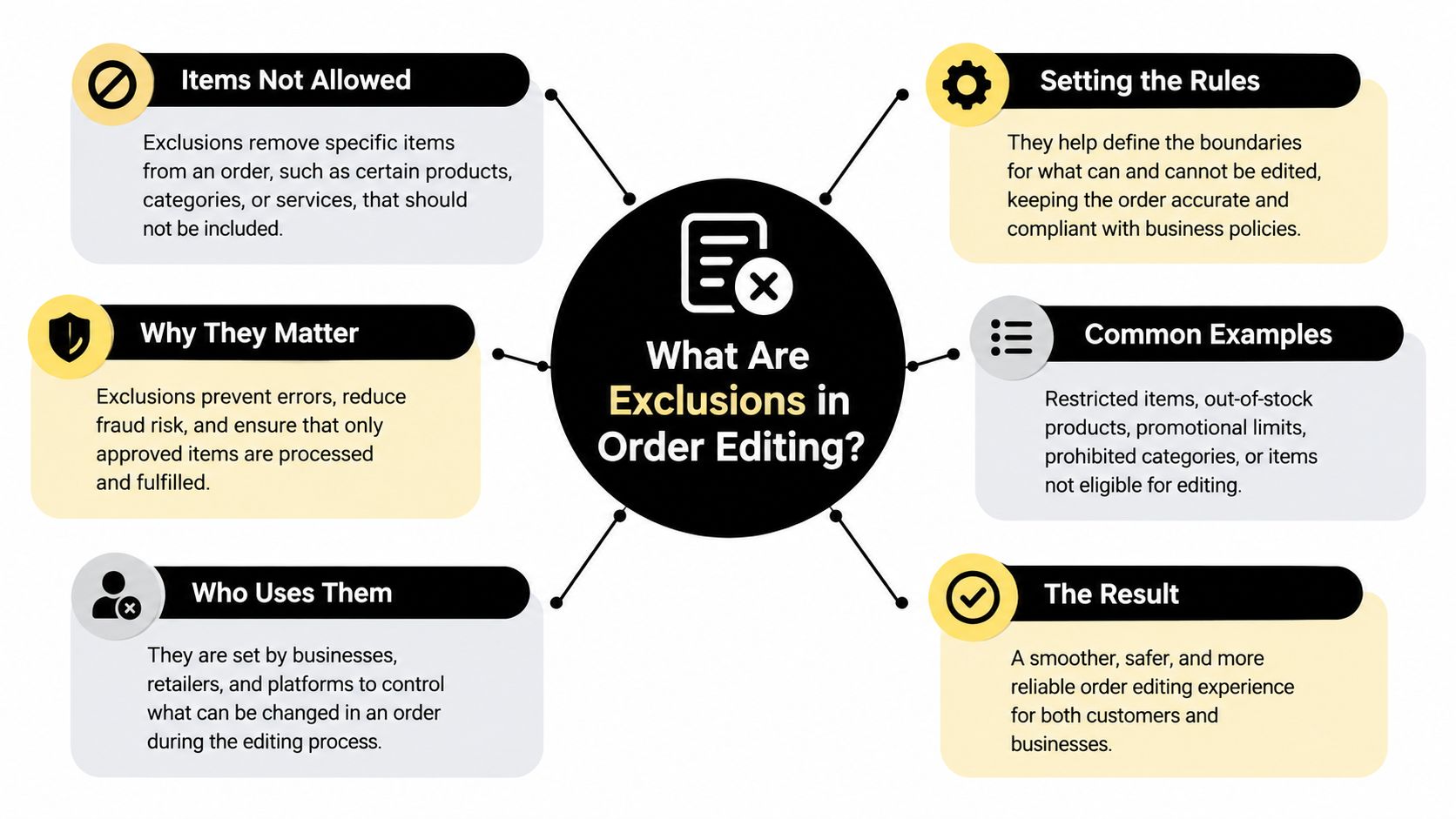
An exclusion is a rule that removes specific products, collections, tags, destination countries, or order states from self-serve order editing eligibility, so routine orders stay editable while risky ones route to support. In practice, it defines where a general editing rule stops applying and what fallback the customer receives instead.
A customer opens the order status page shortly after checkout and notices the wrong size. They want to swap a variant, but the order also contains a personalized item and is already moving toward fulfillment. Allowing the change without checking the order's current state could disrupt picking, alter a duty calculation, or create a handling problem for a fragile product.
That's the tension behind post-purchase editing. Self-serve support can help customers resolve routine changes without contacting your team, but unlimited editing exposes your store to fulfillment, financial, and compliance risks. An exclusion is the control layer between those two outcomes. It lets you keep ordinary orders editable while sending exceptions to approval, manual review, or cancellation.
Table of Contents
- Why Some Orders Should Never Be Self-Serve Edited
- What Are Exclusions in Order Editing
- The Five Things You Can Exclude
- Why Merchants Use Exclusions
- Configuring Exclusions in Mayra Order Edit
- When Orders Become Ineligible Mid-Edit
- Your Pre-Launch Exclusion Checklist
Why Some Orders Should Never Be Self-Serve Edited
A customer ordering a made-to-measure garment may be able to change a standard accessory, but changing the personalized garment after production begins could make the original item unsellable. A customer shipping to a destination with complex duties may want to change the address, yet that change could affect taxes, carrier paperwork, and delivery eligibility. A customer buying a fragile glass set may ask to add another item, even though the revised package needs a different fulfillment process.
These aren't just “difficult” orders. They have conditions that make a general edit rule unsafe.
Practical rule: If a change can affect fulfillment, legal obligations, margin, or the physical handling of an order, define the condition explicitly instead of relying on support staff to notice it later.
An exclusion can apply to the product, the line item, the destination, the customer, or the order state. For example, you might allow edits while an order is unfulfilled and the edit window remains open, then exclude any order containing a personalized product. The eligible order still gets a convenient path. The excluded order gets a controlled alternative.
This distinction matters when you design Shopify order editing workflows. The question isn't only whether customers can edit. It's which changes your operation can safely accept without creating a second problem.
The operational trade-off
Without exclusions, a store tends to choose between two blunt options. It can disable self-serve editing for everyone, which sends routine requests to support, or it can allow broad editing and accept that some orders need intervention after the change has already created risk.
A precise exclusion offers a third path. It preserves convenience for the safe majority of orders while keeping sensitive cases visible to the team that can handle them. That approach fits a wider self-serve support strategy, where automation handles predictable requests and support retains control over exceptions.
The rest of the policy should answer three practical questions. What qualifies an order for editing? Which conditions remove that eligibility? What happens after removal? A useful fallback might be approval, a support handoff, or a full cancellation and replacement process.
What Are Exclusions in Order Editing
An exclusion is a negative eligibility condition. The base rule first determines that an order appears eligible for an action. The exclusion then removes the order, line item, or requested change from that action. If an exception or override exists, the system evaluates it after the exclusion.
Think of a velvet rope outside an event. The ticket is the base rule. Everyone with a valid ticket can approach the entrance, but a separate list can stop a person from entering. The list doesn't mean the event is closed to everyone. It defines a boundary around who can proceed.
A typical evaluation sequence looks like this:
- Match the base rule. For example, the order is unfulfilled and the edit window is open.
- Test exclusions. Check for a restricted product tag, destination country, fulfillment state, or value condition.
- Apply an exception or override. If your policy allows approval or another controlled path, send the order there instead of rejecting it outright.
This order matters because an exclusion only makes sense in relation to an underlying benefit. A product tag such as pre-order might remove an order from self-serve editing, but it doesn't necessarily mean the order must be canceled. It may mean the customer needs staff approval before the requested change reaches fulfillment.
Explicit rules are easier to log and explain than informal notes. A support agent can see that an order was excluded because it contains a tagged product or ships to a restricted destination. That explanation is more useful than a generic “editing unavailable” message.
For broader implementation context, merchants comparing key features for order management systems should look for rule evaluation, auditability, and controlled fallbacks, not only an edit button.
The boundary-condition idea is the one to remember. An exclusion isn't merely a refusal. It's a precise statement of where the general editing rule stops applying. You can use the same logic when planning eligibility rules for Shopify, because the policy should describe both the normal path and the exceptions.
The Five Things You Can Exclude
Merchants usually build exclusions from the information already attached to an order. The most useful dimensions are products, collections, tags, destinations, and order states. Each one answers a different risk question, and several can apply to the same order.
| Exclusion type | Typical use case | Risk it contains |
|---|---|---|
| Individual products | Personalized or final-sale item | Production, resale, or refund complications |
| Collections | Fragile or regulated product group | Handling, compliance, or packaging problems |
| Tags | Pre-orders or special fulfillment items | Timing and fulfillment conflicts |
| Destination countries | Shipping locations with complex duties | Tax, carrier, and delivery uncertainty |
| Order states | Fulfilled, held, or high-value orders | Shipment, financial, or operational exposure |
Individual products
Use a product exclusion when the risk is specific to one SKU or variant. A personalized necklace, engraved gift, or made-to-order item may not be suitable for a variant swap or removal after production starts.
This is the narrowest control. It avoids blocking unrelated products in the same catalog, much like placing a protective case around one delicate instrument rather than closing the entire room.
Collections
A collection exclusion works when several products share a handling requirement. A fragile glassware collection might be excluded from address changes because changing the destination could require different packaging or carrier treatment. A regulated collection could require a staff check before any edit proceeds.
Collections reduce maintenance when the same policy applies across a group. Review them when products move between collections, because the rule's behavior follows the classification you configure.
Tags
Tags are useful for operational states that aren't always visible from the product name. A pre-order tag can identify items with a later release schedule. A special-handling tag can cover products that require a warehouse instruction. A final-sale tag can signal that removal or substitution needs review.
Tags act like labels on warehouse bins. They don't change the item itself, but they tell the workflow how to treat it.
Destination countries
Country exclusions are appropriate when an automated address change could affect duties, taxes, carrier availability, or local delivery requirements. You might block self-serve address edits for a destination that requires manual recalculation, while still allowing support to evaluate the request.
Don't treat the country rule as a universal decision about every customer right. It should describe the operational limit of the automated workflow.
Order states and value conditions
State-based exclusions respond to what has happened to the order, not what it contains. A fulfilled order may no longer support the same changes as an unfulfilled order. A high-value order might require approval before additions, removals, or address changes.
Time is where it enters the policy. An order can start as eligible and later become excluded when fulfillment begins, payment information changes, or another operational transition occurs. Treat the state as a live condition, not a permanent label.
Overlap is normal. An order might contain a pre-order tag, belong to a fragile collection, ship to a restricted country, and exceed your approval threshold. Define which result takes precedence, and make sure the customer receives a useful next step rather than several contradictory messages.
Why Merchants Use Exclusions
Merchants use exclusions to contain specific risks while keeping routine service fast. The point isn't to create friction for its own sake. The point is to stop an automated action at the boundary where a person, warehouse process, or market-specific policy needs to take over.
Fulfillment safety is one common reason. If a warehouse has started picking an order, a quantity or variant change can create a mismatch between the order record and the parcel. An exclusion gives the operation time to verify the request before the wrong item leaves the facility.
Regulatory and duty exposure is another. An address change can alter the information used for tax, customs, or carrier processing. Blocking the automated address change for a particular destination may be sensible when your system can't recalculate those elements reliably.
Margin protection also matters. Personalized, customized, and special-handling products may carry consequences that aren't obvious from the edit request. Removing one item can change a production decision, while adding another can create a packaging or shipping cost that the self-serve flow isn't designed to evaluate.
Operational eligibility is not legal eligibility
A merchant-controlled exclusion should never be mistaken for a statement that a customer has no rights. Shopify's return-rule documentation supports the distinction between an operational workflow and applicable consumer obligations. A destination can be excluded from automated editing because of duties or carrier constraints without automatically removing legally required cancellation, refund, withdrawal, accessibility, or disclosure channels.
That means your policy needs separate questions:
- Operational question: Can the system safely process this edit without staff involvement?
- Legal question: Does the customer retain a cancellation, refund, or other mandatory route?
- Communication question: Can the customer understand why self-serve editing isn't available and what to do next?
A country exclusion should therefore route the customer to an appropriate process, not merely hide every remedy. Market-specific customer-account content and disclosures can help you present the right workflow for different regions instead of forcing one global rule onto every order.
Keep sensitive changes in the admin
Some requests belong in the Shopify admin because they require judgment. An approval path lets staff verify inventory, fulfillment instructions, payment implications, and customer communication before committing the change. The system remains convenient for straightforward cases, while the team retains control over exceptions.
A good exclusion answers, “Why does this need review?” If the answer is unclear, the rule may be too broad. If the answer is “we don't support this through automation, but support can handle it,” configure a review fallback instead of presenting a dead end.
Configuring Exclusions in Mayra Order Edit
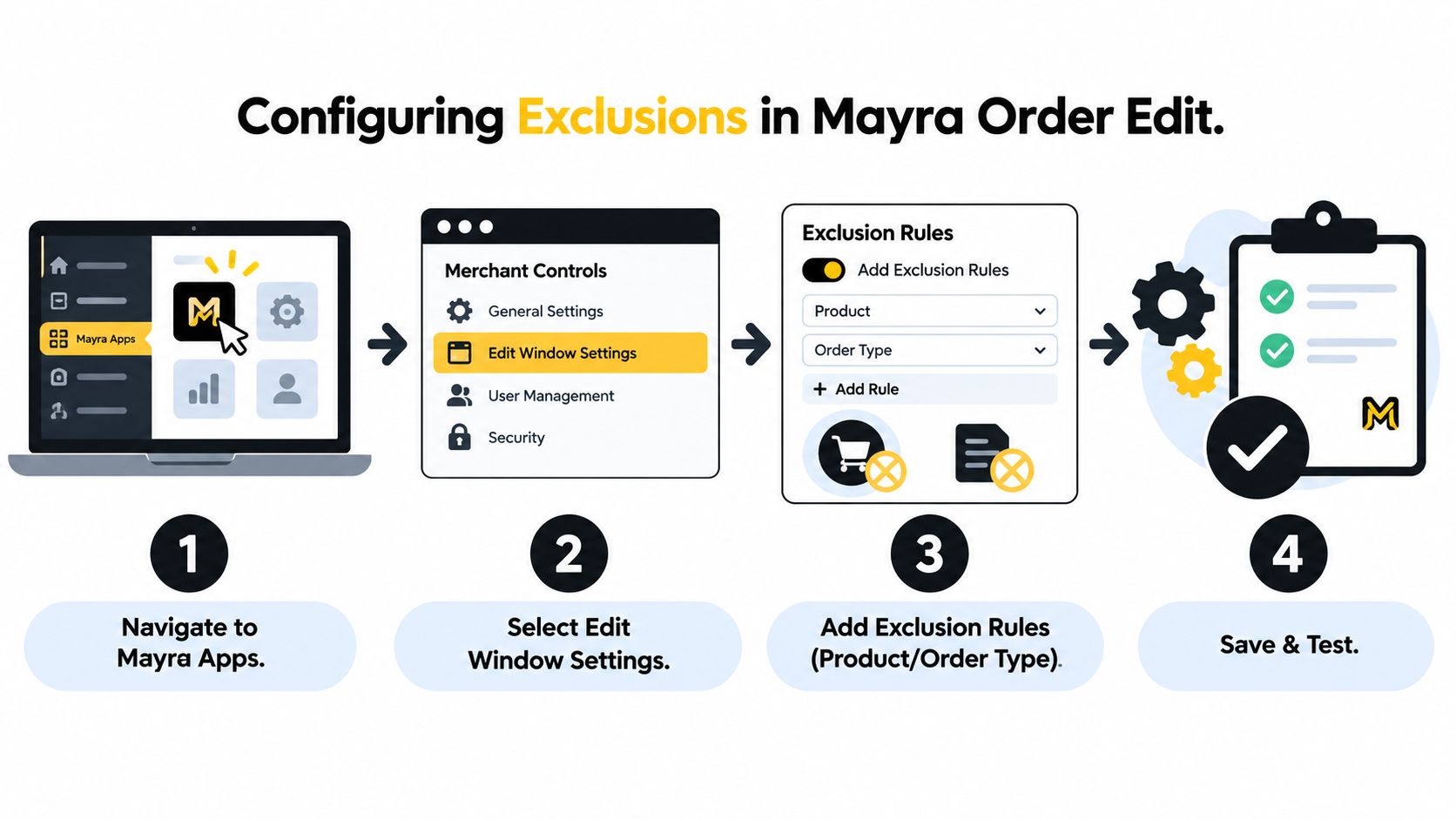
Start with the normal eligibility policy before adding exclusions. Write it in plain language first: “Customers can edit unfulfilled orders while the edit window is open.” Then list the changes you want to permit, such as quantity changes, variant swaps, address updates, additions, or removals.
Mayra Order Edit provides merchant controls for these capabilities alongside approval rules, order-value limits, fulfillment conditions, and exclusions. Its edits write back to the original order, keeping the Shopify admin as the system of record. During an active edit, fulfillment holds help prevent a shipment from moving while the order details are changing.
Build the policy in layers
Use this sequence when configuring the workflow:
- Set the edit window. Choose when customers may request a change.
- Choose capabilities. Decide whether the flow allows quantity changes, variant swaps, address updates, additions, or removals.
- Add exclusions. Select products, collections, tags, destinations, fulfillment conditions, or order-value limits that should leave the self-serve path.
- Choose the fallback. Route excluded cases to approval, support, or cancellation and recreation.
- Test transitions. Check an eligible order, an excluded order, and an order whose fulfillment state changes during the process.
Consider a store selling standard apparel, pre-order items, and fragile home goods. The merchant could allow edits for unfulfilled orders while the window remains open, exclude any order containing the pre-order tag, block automated address changes to a destination with complex duty handling, and route high-value orders to approval.
That policy is more useful than a single “allow editing” switch because each condition has an operational reason. It also gives support a clear explanation when a customer asks why one order behaves differently from another.
For customer-facing placement, review how the Shopify edit order status page fits with your account experience. The customer should see the available action, the reason for a restriction where appropriate, and the next route for help.
Write each rule with an owner, a reason, and a review point. When the catalog or fulfillment process changes, revisit the exclusion rather than assuming it remains accurate indefinitely.
When Orders Become Ineligible Mid-Edit
The most important exclusion may be the one that appears after the customer starts. Eligibility changes because order state changes. A customer can open an eligible order, begin an edit, and then encounter a fulfillment transition before the requested action is committed.
Shopify distinguishes between editable and non-editable states. Unfulfilled items can generally be edited, while fulfilled items can't be removed or have their quantities changed. An order containing fulfilled line items may therefore become ineligible for further editing, and Shopify's guidance on editing orders also warns that some third-party fulfillment services don't support edits.
The practical analogy is a railway switch. Before the train enters the next track, the route can change. Once it has passed the switch, the same instruction may no longer be safe or possible.
Re-check every decision point
Evaluate eligibility at three moments:
- At order entry. Check the product, destination, tags, value, and initial fulfillment state.
- At every edit attempt. Re-check the current order, not the state stored when the customer first opened the page.
- At fulfillment transitions. Re-evaluate when picking, fulfillment acceptance, partial fulfillment, or another state change occurs.
This prevents a stale approval from authorizing a change that no longer matches the order. It also protects against mixed carts, where one line remains unfulfilled while another has already moved forward.
Third-party fulfillment requires particular caution. An unsupported change can lead to missed or incomplete fulfillment. A cancellation request that hasn't been confirmed by a fulfillment provider may still result in shipment and fulfillment charges, so the fallback must make provider status visible to the team handling the case.
Give the customer a controlled next step
An ineligible result shouldn't leave the customer guessing. Offer manual review when staff can assess the request, approval when a responsible team member must authorize it, or cancellation and recreation when the original order can't be safely modified.
The rule should also preserve the reason. “This order has entered fulfillment” is more useful than “something went wrong,” and it helps support give a consistent answer. Re-evaluation turns exclusions from static filters into a live safety policy that follows the order as it moves.
Your Pre-Launch Exclusion Checklist
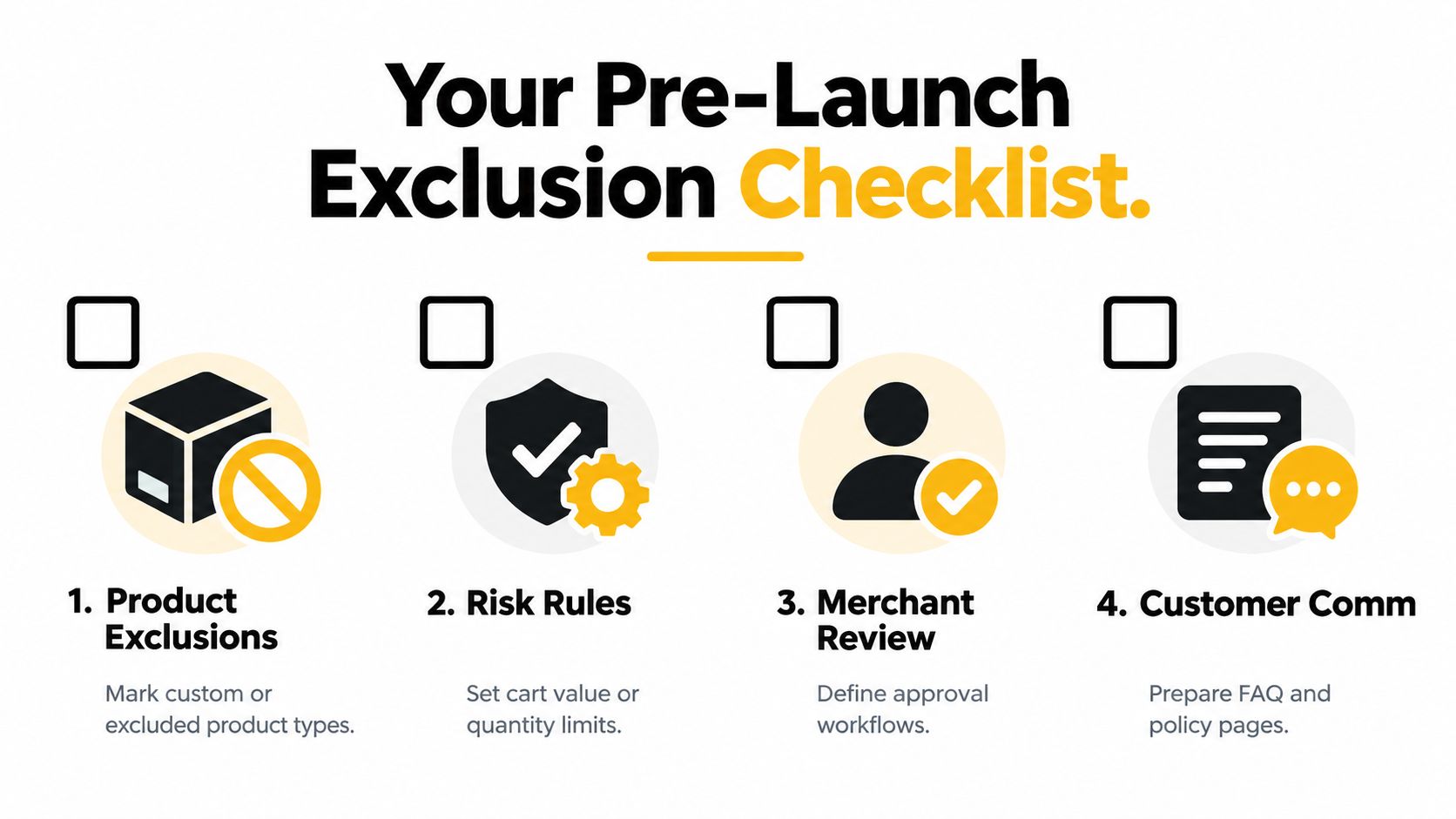
Before enabling self-serve edits, test the policy against real catalog and fulfillment situations. The goal isn't to exclude as much as possible. It's to identify the cases where automation should stop and make the alternative obvious.
Catalog review
- Mark sensitive products. Identify personalized, final-sale, fragile, regulated, and special-handling products.
- Review collections. Check whether a collection-level exclusion would simplify maintenance or block products that should remain editable.
- Audit tags. Make sure tags such as
pre-orderandspecial-handlingare applied consistently and removed when their meaning expires. - Check mixed carts. Decide whether one excluded line blocks the entire order or only the affected line item.
A product classification is only useful when your team maintains it. Assign ownership for new products, collection changes, and tag conventions.
Policy review
- Define the base rule. State which fulfillment states and edit-window conditions make an order eligible.
- Choose capabilities. Decide separately whether customers can change quantities, variants, addresses, additions, and removals.
- Set value controls. Route orders above your chosen limit to approval rather than allowing an unrestricted edit.
- Specify precedence. Decide what happens when a product exclusion, country exclusion, and fulfillment exclusion apply at the same time.
Test boundary cases, including an order at the exact value limit, an order transitioning to fulfillment, and a mixed cart with both eligible and excluded items. These cases reveal gaps that ordinary examples won't show.
Rights, communication, and fallback
- Separate legal and operational rules. Confirm that a country or product exclusion doesn't remove a cancellation or refund route required in the relevant market.
- Explain the result. Give customers a clear reason when self-serve editing isn't available.
- Provide a fallback. Choose manual review, approval, or full cancellation and recreation.
- Monitor outcomes. Compare eligible, excluded, and indeterminate orders for edit success, support contacts, refunds, cancellations, and retained revenue.
An indeterminate state is safer than forcing uncertain data into an exclusion. If fulfillment status is unavailable, hold the request for review or block it conservatively while exposing the reason to operators.
Every exclusion should have an owner, an effective date, a rationale, and a rollback path. Treat it like a governed workflow rule, not a permanent note in a spreadsheet. As you observe edit attempts and cancellation outcomes, refine rules that are too broad, too narrow, or poorly communicated.
Mayra Apps provides self-serve post-purchase order editing with merchant controls for edit windows, permitted changes, approvals, value limits, fulfillment conditions, and exclusions. Visit Mayra Apps to review how its order-edit workflow can route sensitive Shopify orders away from unsafe automation while keeping routine changes inside the customer account experience.