
A customer notices the wrong size five minutes after checkout. Another realizes the shipping address is outdated. A third wants to cancel because a competitor is selling the same style for less. Meanwhile, the warehouse is already preparing the next picklist, and your support inbox is becoming the only place where those changes can happen.
That gap is what a Shopify order app is meant to close. The important question isn't just whether customers can edit an order. It's whether they can do it while the order is still operationally safe to change, and whether your team can govern the process without creating duplicate orders, incorrect refunds, or warehouse confusion.
Table of Contents
- The Post-Purchase Moment Every Shopify Merchant Eventually Hits
- What a Shopify Order App Actually Does
- Core Features to Look For in a Shopify Order App
- The Hidden Timing Race Between Edits and Fulfillment
- Merchant Controls and Governance to Compare
- Why Cancellation Flow Is a Revenue Channel, Not Just Refund Prevention
- A Short Evaluation Checklist Before You Install
- When a Shopify Order App Pays for Itself
The Post-Purchase Moment Every Shopify Merchant Eventually Hits
Monday morning brings a manageable-looking support queue with three familiar requests. One customer wants to change a medium to a large. Another entered an old address. A third wants to cancel after finding a lower price elsewhere. None is unusual, but every request has a shrinking window before fulfillment removes the available options.
The agent opens Shopify admin, checks the order status, confirms whether fulfillment has started, applies an approved change, reviews the revised total, and explains the result. If picking is already underway, someone may need to contact the warehouse, pause the shipment, or reject the request. A simple customer action becomes coordination across support, operations, payments, and fulfillment.
Operational reality: customer intent often arrives faster than warehouse execution.
That timing gap creates the critical Shopify order app decision. Self-service is useful only while the order remains safe to change. A size swap before picking may require a quick line-item update. The same request later can involve inventory reconciliation, relabeling, a refund, and a replacement decision. Address corrections carry similar risk once a carrier label or fulfillment request exists.
Cancellation requests add another layer. A customer asking to cancel may be reacting to price, delivery timing, or uncertainty rather than rejecting the product. A governed flow can offer an approved alternative, such as changing the item or shipping option, while still routing exceptions to staff. The point is not to block refunds. It is to give merchants a controlled chance to preserve the order before the warehouse commits resources.
The support burden is substantial across ecommerce. A 2026 industry summary of ecommerce support benchmarks reports that WISMO, returns, and account-related issues can represent 60% to 80% of support tickets, with WISMO often reaching 30% to 40% of total volume and rising above 50% during peak seasons. It places email and chat support at $2.70 to $5.60 per ticket, while phone contacts cost $5 to $22.
Those figures will vary by store, product, and season. They still show why post-purchase work needs defined rules instead of another inbox macro. A Shopify order app should let customers act during the safe window, while merchant controls determine which changes require review, which are blocked, and how the warehouse is kept informed.
What a Shopify Order App Actually Does
A Shopify order app extends the workflow that begins after checkout. It typically adds controls to the customer-facing order status page or customer account, then provides a merchant-side interface for deciding which changes are allowed and how they affect the original order.
Shopify already provides the underlying customer touchpoint. Its customer account documentation explains that customers can view order history and current order status, and can take actions on a specific order from the order status page, including requesting a return. Shopify also says order notification emails can send authenticated shoppers directly to that page. An app works best when it extends this existing journey instead of sending customers to a disconnected support portal.
The customer-facing workflow
A typical flow looks like this:
- The shopper opens the order status page or customer account.
- The app checks whether the order is eligible for a change.
- The shopper selects a permitted action, such as changing a variant, adjusting quantity, updating an address, adding an item, or cancelling.
- Shopify recalculates the financial result, which may require an additional invoice or a refund.
- The customer receives an updated order view and confirmation.
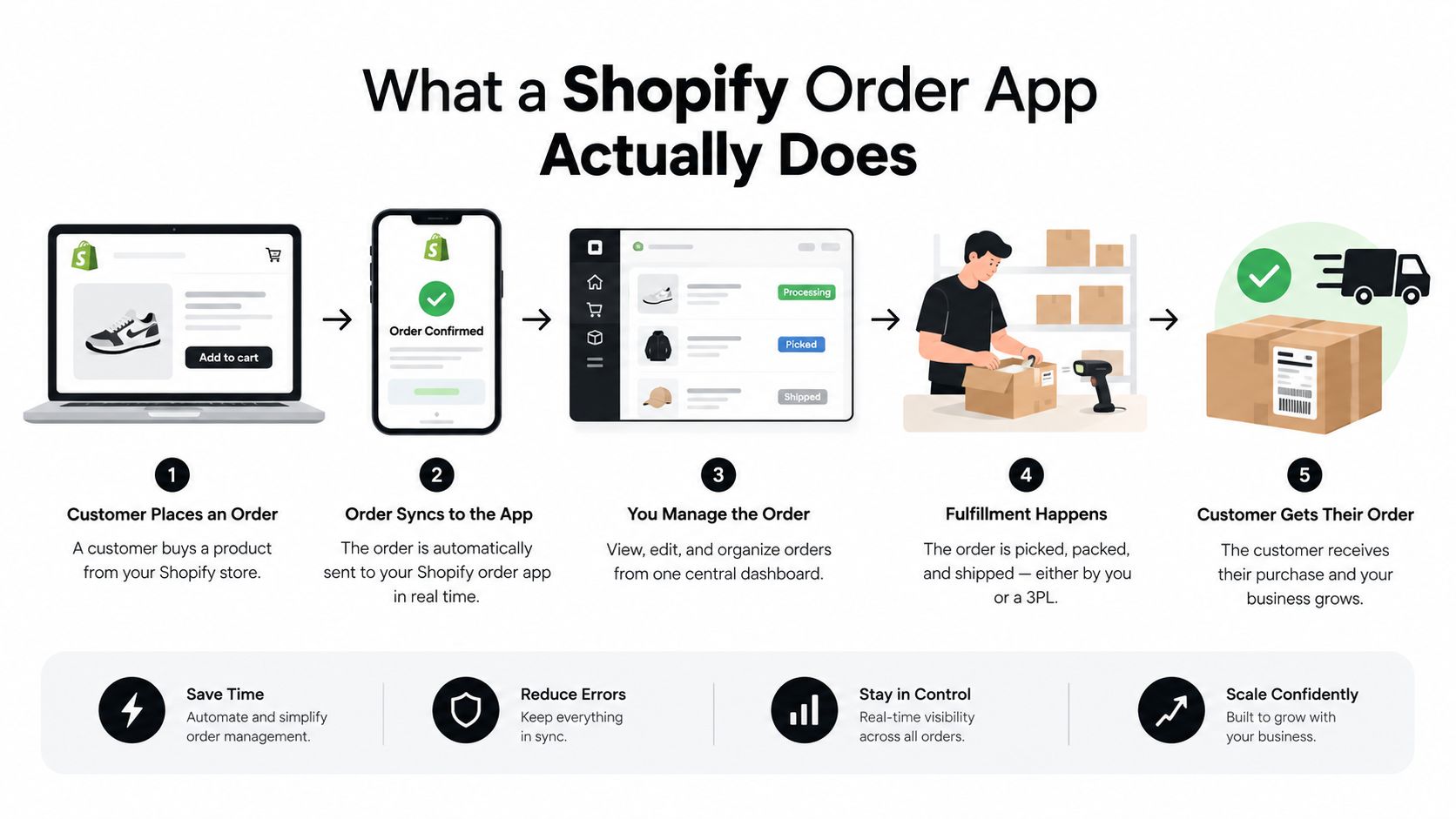
The merchant side determines the boundaries. You might allow variant swaps and address corrections automatically, require approval for high-value additions, and block changes after fulfillment begins. The app should write changes back to the original Shopify order, not create an unrelated replacement record. Shopify's native editing model supports adding or removing products, changing quantities, updating shipping fees, and applying manual discounts, with an updated invoice when the total rises and a refund when it falls. Those mechanics are documented in Shopify's order editing considerations.
That distinction separates order-editing tools from adjacent categories:
- Returns apps manage the process of sending goods back and resolving the return.
- Helpdesk tools organize conversations, but usually don't provide the customer with direct order controls.
- Shipping protection apps address loss or damage risk rather than changing the order itself.
- Upsell tools may promote additional products, but aren't necessarily connected to order state, payment settlement, or fulfillment timing.
A useful overview of the broader post-purchase app category is available in this Shopify post-purchase app guide. The key test is simple: does the tool let the customer make a governed change to the existing order while Shopify remains the system of record?
Core Features to Look For in a Shopify Order App
Feature lists can make every Shopify order app look interchangeable. The useful question is operational: which feature removes a support handoff, protects warehouse execution, or preserves revenue without creating a second order to reconcile?
Start with edits customers actually request
The order status page is usually the highest-value customer surface. It should let shoppers change a variant, adjust a quantity, correct an address, or add a forgotten item while the order is still eligible for change. Show the revised total before submission, then process any additional charge or refund through Shopify. The customer should see the new order state immediately.
The business case is strongest when the app targets repeatable requests rather than adding another promotional tab. An ecommerce support benchmark summary highlights how support volume rises sharply during peak shopping periods. Merchants piloting self-service edits should measure deflection on address corrections, variant swaps, and quantity changes first. Those requests are easier to govern than broad cancellation policies and expose whether the app can update the original order reliably.
Address changes need stronger controls
An address field without validation moves the problem from support to fulfillment. Look for country, postal-code, and region checks where relevant, along with rules for edits after a fulfillment request has been sent. The app should distinguish an accepted change from a blocked or pending one. A generic success message leaves both the customer and the warehouse guessing.
Address changes also need permission rules. A typo correction may be safe before picking begins, while a destination change can affect tax, shipping eligibility, fraud review, and carrier service. Configure those cases separately instead of giving every customer the same control.
Cancellation should be configurable
A cancel button is only the starting point. The app should define when cancellation is allowed, record the reason, and present alternatives where they fit the customer's situation. Store credit, a replacement product, or delayed shipment can retain an order in some cases, but the customer still needs a clear route to a full cancellation when saving the purchase is inappropriate.
Track the result by reason, offer, and order status. A save offer shown after the warehouse has started work creates frustration and may not prevent the operational cost of cancellation. Governance matters as much as the offer itself.
Upsells should use the same order object
Post-purchase additions work best when they attach to the existing order and follow the same payment and fulfillment rules. A second checkout can create another order, shipment, payment record, and reconciliation task. A connected add-on flow is cleaner, provided the app checks inventory, product eligibility, discount rules, and fulfillment status before accepting the addition.
The app should also make clear whether an added item changes the shipping charge or requires a new payment step. A polished offer is not useful if operations must merge orders manually.
Use the comparison table as a buying framework
Public app positioning changes frequently, so test capabilities instead of assigning unsupported maturity labels.
| Capability | App A | App B | App C | App D |
|---|---|---|---|---|
| Customer edits from order status page | Verify live | Verify live | Verify live | Verify live |
| Variant and quantity changes | Test by SKU type | Test by SKU type | Test by SKU type | Test by SKU type |
| Address validation and fulfillment locks | Confirm workflow | Confirm workflow | Confirm workflow | Confirm workflow |
| Original-order writeback | Confirm in admin | Confirm in admin | Confirm in admin | Confirm in admin |
| Automatic invoice and refund handling | Test both directions | Test both directions | Test both directions | Test both directions |
| Cancellation reason capture and save offer | Review rules | Review rules | Review rules | Review rules |
| Merchant approval and audit controls | Inspect permissions | Inspect permissions | Inspect permissions | Inspect permissions |
Two features often receive more credit than they deserve. A highly animated customer interface cannot compensate for weak order-state logic, and a large recommendation carousel adds little value if accepted products create separate orders or manual fulfillment work. Prioritize reliable edits, accurate settlement, and fulfillment governance before visual extras.
The Hidden Timing Race Between Edits and Fulfillment
The decisive variable is not whether an order can be edited. It's whether the edit reaches Shopify before the warehouse acts on the existing instructions.
Consider a size swap requested three hours after ordering. If the order is still unfulfilled, the app can present eligible variants, update the original order, and show the customer the new state. If the fulfillment team has generated a picklist but hasn't picked the item, the merchant may need to hold the order before accepting the change. If a label has already been printed or the package has entered carrier handling, self-service should usually stop and route the request to staff.
Shopify documents a useful control for this problem. When a fulfillment is placed on hold, inventory can remain reserved, but the order can't be fulfilled until the hold is released and the status returns to unfulfilled. The Shopify fulfillment hold documentation makes the operational purpose clear: the warehouse shouldn't complete an order while a material change is still unresolved.
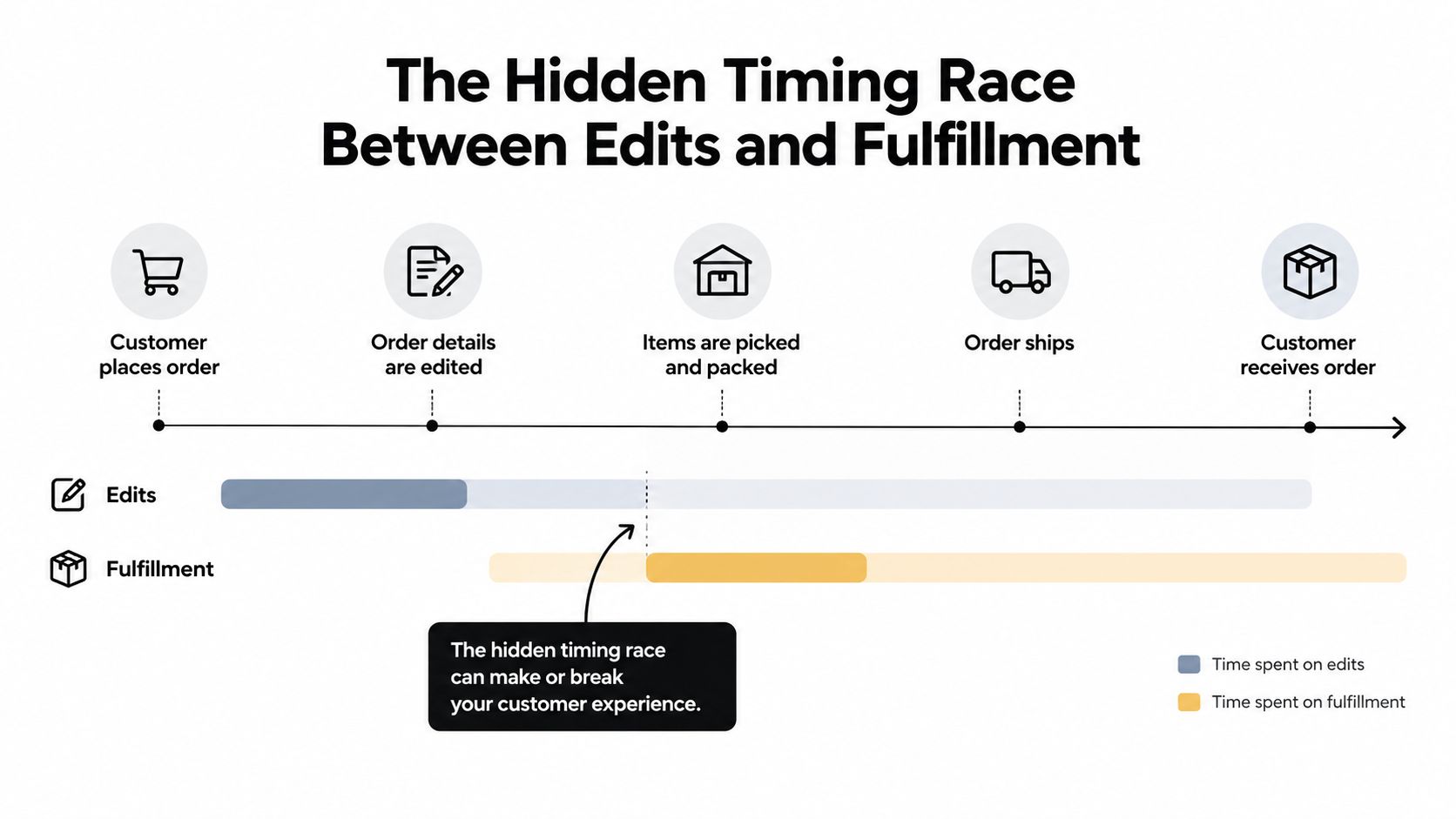
Independent analysis of more than 10M Shopify orders found that 80.6% of edits occurred within the first hour, the median edit occurred in 4.6 minutes, and 92.2% of edits never touched a support agent, as summarized in the available Shopify order-status research reference. That timing matters because the opportunity is concentrated before fulfillment activity becomes irreversible. Native Shopify constraints still prevent changes once fulfillment has begun.
The same source reports that 39,142 cancellations in its sample were resolved without a support agent, while only 7.8% of edited orders created a support ticket. Those figures point to a practical design requirement: the app must read fulfillment status quickly and fail safely when it can't.
For a deeper operational perspective, see this ecommerce fulfillment automation resource. The best workflow doesn't promise every customer every edit. It gives customers fast access to safe changes and gives staff a clear exception queue for late ones.
Merchant Controls and Governance to Compare
Merchants usually choose between two governance postures. A permissive setup exposes many changes until a cutoff. A tightly controlled setup offers only the changes the catalog, warehouse, and support team can handle confidently.
Permissive rules can produce stronger deflection because more customers can resolve issues without staff. They also increase the chance of invalid variants, margin-sensitive refunds, address problems, or changes that arrive too close to fulfillment. Tightly controlled rules reduce that exposure, but customers may still contact support for ordinary corrections that could have been safely automated.
Compare the operating posture
| Dimension | Permissive Setup | Tightly Controlled Setup |
|---|---|---|
| Customer access | Broad edits until a defined cutoff | Selected edits only |
| Ticket deflection | Higher potential | More predictable but narrower |
| Edit-error exposure | Greater if rules are weak | Lower through restricted eligibility |
| Refund exposure | More downward adjustments may be automated | Exceptions can require approval |
| Staff workload | Lower for routine changes, higher for exceptions | Higher for routine requests, clearer escalation |
| Catalog suitability | Simple products and stable inventory | Complex variants, bundles, and constrained stock |
| Fulfillment protection | Depends on accurate real-time locks | Easier to enforce conservatively |
The configuration knobs matter more than the headline feature count. Set edit windows by fulfillment method where possible, block products that can't be changed safely, lock variants with constrained inventory, and define whether an increased total can be invoiced automatically. For refunds, establish an approval threshold rather than forcing staff to review every small correction.
A permissive posture suits a mature operation with clean inventory data, predictable fulfillment signals, and a support team that can manage exceptions. It can also work well for straightforward apparel or accessories where a variant swap has a known operational path.
A tightly controlled posture is safer for bundles, personalized goods, made-to-order products, and stores with multiple fulfillment services. It also fits teams that are still learning which edits create downstream problems.
Governance rule: automate the change only when the warehouse can execute the new instruction without interpretation.
Start conservatively, review blocked-change attempts, and widen eligibility based on observed exceptions. Expanding the rules is easier than repairing a large batch of incorrect edits.
Why Cancellation Flow Is a Revenue Channel, Not Just Refund Prevention
A cancellation request contains more information than a refund event. The shopper has already selected your product, completed checkout, and then revealed the reason the purchase is at risk. Treating that screen as a dead end wastes a high-intent merchandising opportunity.
The flow should begin by identifying the reason. Price concerns may call for a store-credit offer or relevant incentive. A timing problem may be better addressed with delayed shipment. A product mismatch may justify a replacement recommendation. If the alternative isn't appropriate, the customer should be able to cancel without friction.
The process can be structured as:
- Detect the cancellation intent.
- Ask for a useful reason without making the form burdensome.
- Present one relevant alternative.
- Apply store credit or update the order when accepted.
- Refund the customer when the save attempt is declined or unsuitable.
The economics are easy to understand without assuming that every customer will accept an offer. A $112 order that is fully refunded returns $112 to the customer and leaves no order revenue. If the customer accepts $112 in store credit, the business retains that future purchase opportunity, although it still needs to account for redemption, margin, and the possibility that the credit would have been used anyway. The point isn't that credit equals profit. The point is that a cancellation flow can preserve a relationship instead of ending it at the refund screen.
The available Shopify changelog notes that merchants can toggle the Buy again button on the order status page and orders page, while customer-account targets for order status extensions make the post-purchase surface more active. That supports a broader operational view of the account area. It isn't merely a tracking page. It can become a controlled place for recovery, replenishment, and support deflection.
The cancellation experience should still respect the original reason. Don't offer a discount to someone who entered the wrong address, and don't push store credit when the customer needs immediate cash back. A good Shopify order app uses rules and context, not a blanket save offer.
For a focused look at this retention model, review this cancellation deflection and store credit guide. The strategic shift is straightforward: cancellation handling isn't only about preventing refunds. It's about choosing the most appropriate recovery path before the order disappears.
A Short Evaluation Checklist Before You Install
Treat the trial as a production pilot, not a polished demo. Use real order states and test both successful changes and blocked exceptions.
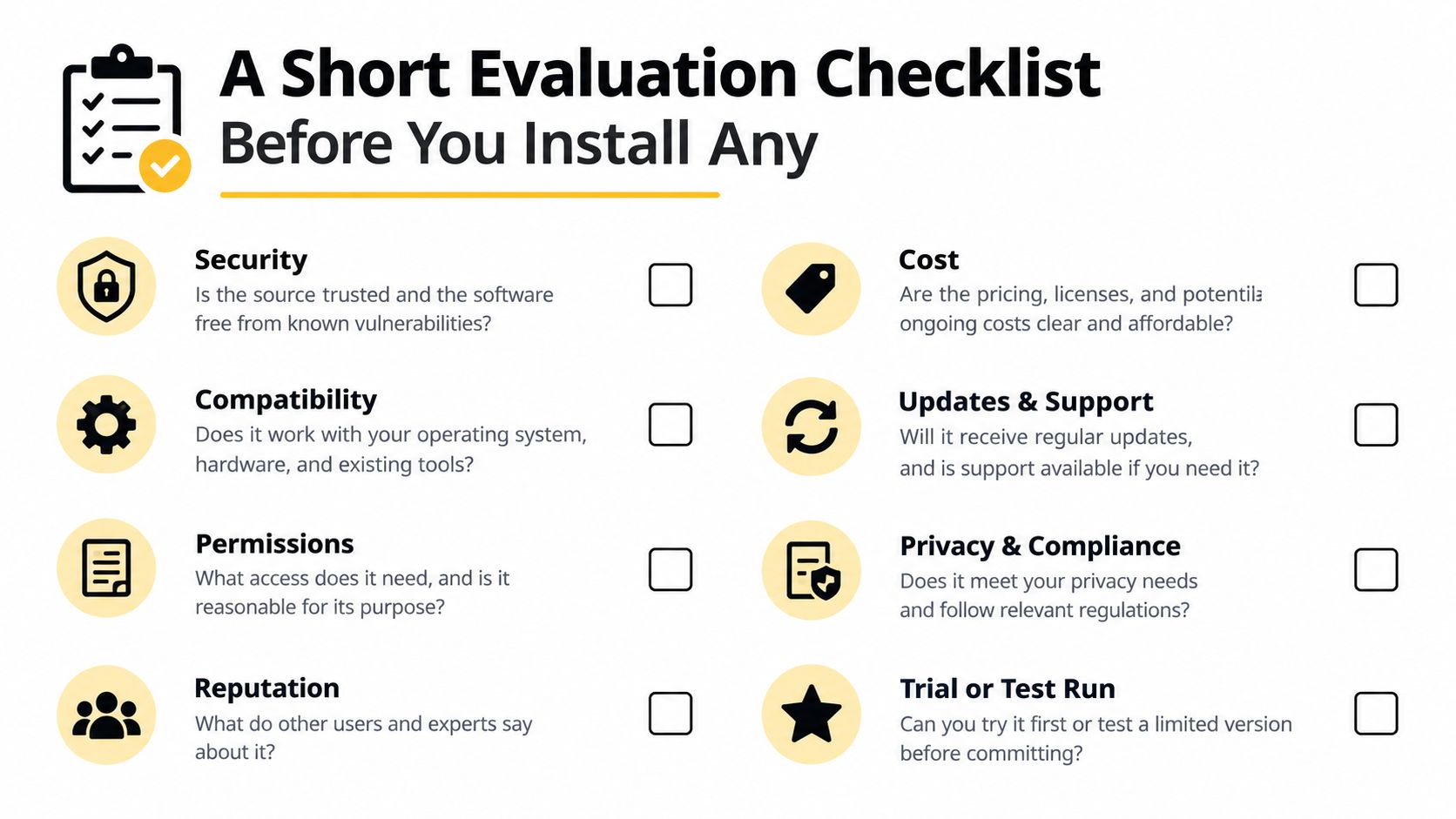
Check these points before committing:
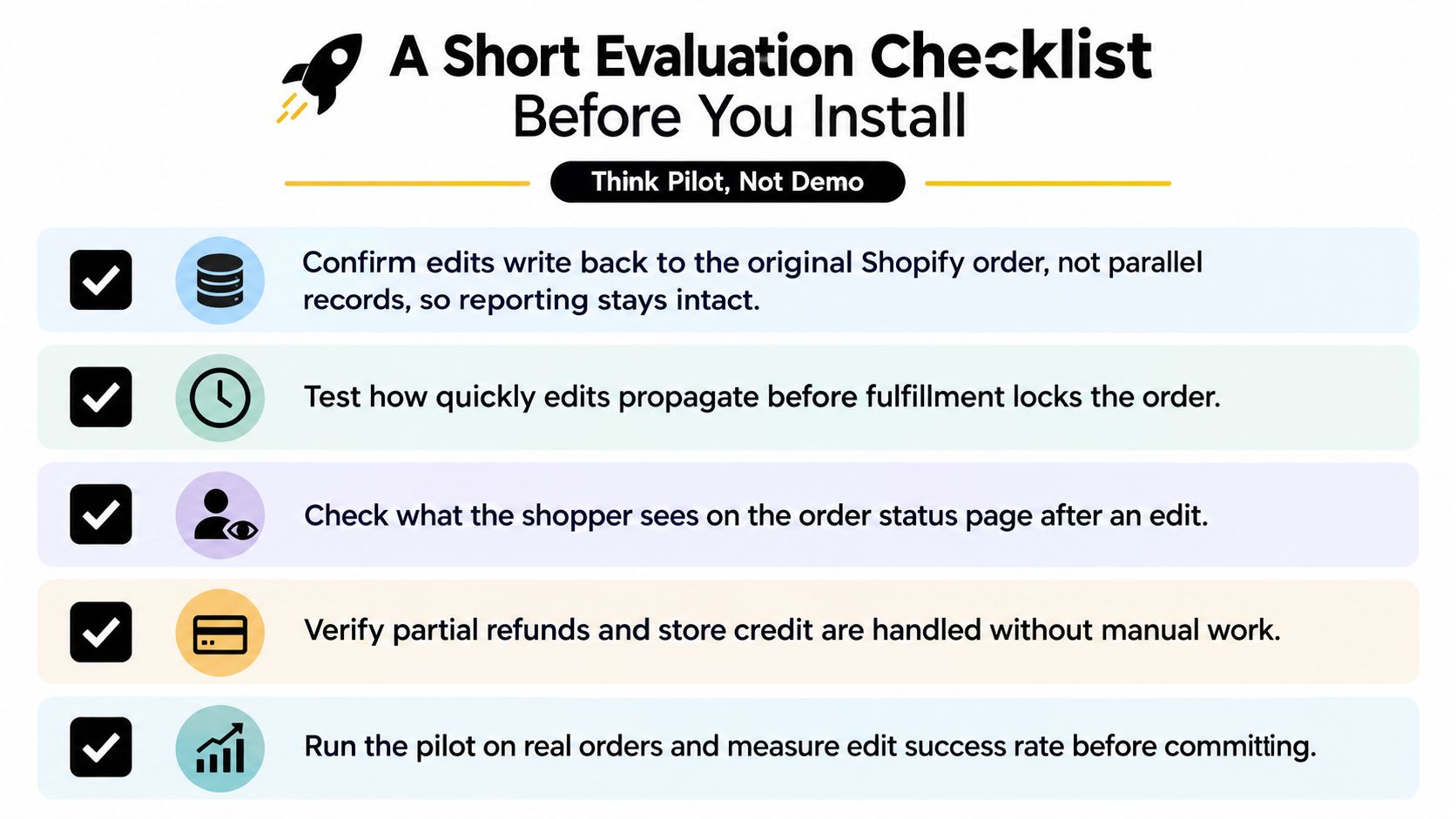
- Original-order integrity: Confirm that edits write back to the original Shopify order and don't create parallel records.
- Fulfillment timing: Test the response before and after a fulfillment service has pulled the order.
- Customer visibility: Verify exactly what the shopper sees on the order status page after an edit or cancellation attempt.
- Settlement accuracy: Test additional charges, partial refunds, store credit, tax, inventory, and shipping recalculation.
- Permission control: Identify who can approve exceptions, who receives alerts, and where the audit history is stored.
- Failure handling: Ask what happens during a Shopify outage or when the fulfillment service has already acted.
- Rule granularity: Confirm whether edit windows can vary by shipping method, product, destination, or fulfillment state rather than applying globally.
A useful pilot records the customer's requested action, whether the app accepted it, whether the order changed correctly, and whether staff intervention was required. That evidence is more valuable than a feature tour.
When a Shopify Order App Pays for Itself
A customer submits an address change while the warehouse is picking the order. The app either gives the shopper a safe path to fix it, or the request becomes a support ticket, fulfillment interruption, and possible refund. The subscription earns its place when it consistently wins that timing race.
Build the business case from your own order flow:
- Count monthly requests for address changes, variant swaps, additions, and cancellations.
- Measure how many arrive before fulfillment and how many arrive after the cutoff.
- Separate actions the app can approve automatically from exceptions requiring staff review.
- Calculate: (monthly edit-eligible tickets × average handle time × blended labor cost) + (cancellations deflected to store credit × average order value × redemption rate) versus the app subscription.
- Discount the result for failed edits, manual exceptions, and store credit that customers never redeem.
The ecommerce ticket analysis offers general context, but your internal handle time and labor cost should drive the calculation. Include the work agents perform around refunds, warehouse coordination, payment changes, and follow-up. Those tasks often determine whether automation produces real savings.
Cancellation deflection can improve the result when the offer fits the customer's reason for canceling. Store credit may preserve future revenue, but it is not equivalent to immediate sales, and governance should define when the option appears, who can override it, and how exceptions are recorded.
The case is weaker for low-volume stores, rarely edited products, or operations with long fulfillment lead times. Native Shopify tools or a lighter workflow may be enough. Mayra Apps supports self-serve edits, cancellation deflection with store credit, and post-purchase upsells while Shopify remains the system of record. Review it at Mayra Apps against your fulfillment rules.