
You've got a promising Shopify app idea, a development store, and a project that renders locally. Then the platform details start to matter: authentication has to happen at the right point, the admin UI runs inside an embedded context, webhooks can't block on database work, and a post-purchase workflow may depend on Shopify's current customer-account architecture. That's where many otherwise capable web developers lose time.
Learning how to build a Shopify app means designing for Shopify's platform behavior, not just connecting a React frontend to an API. The decisions you make before launch, especially around app type, customer accounts, event processing, permissions, and billing, determine whether merchants experience a dependable product or another fragile integration.
Table of Contents
- Why Building a Shopify App Is Different From Building a Regular Web App
- Choosing Between Custom Apps and Public App Store Listings
- Setting Up Your Development Environment and First Auth Flow
- Webhook Architecture and Production Billing Integration
- Testing, Deployment, and App Store Submission Checklist
Why Building a Shopify App Is Different From Building a Regular Web App
A developer coming from React or Node.js often begins with a familiar plan: create routes, add a database, build a dashboard, and connect an API. That plan works for a conventional SaaS product. It becomes incomplete when Shopify controls the merchant context, authentication lifecycle, admin frame, installation flow, and event delivery.
An embedded Shopify app doesn't behave like a standalone website in a browser tab. Its main interface appears inside the Shopify admin iframe, so navigation, redirects, authentication, and admin actions need to respect that context. App Bridge provides the communication layer for embedded interactions, while Polaris supplies interface patterns that help the product feel native to Shopify. Shopify's Polaris and embedded app documentation also makes clear that App Bridge and Polaris have independent versioning concerns, so upgrading one doesn't automatically validate the other.
Authentication is another boundary. Your app needs to establish the correct OAuth or session-token flow before performing protected setup or admin work. A common failure mode is treating token handling as an ordinary frontend concern, storing or passing credentials manually, then discovering that reinstall, iframe navigation, or session expiration breaks the experience.
The platform owns more of the workflow
Shopify merchants expect an app to respect installation state, scopes, store identity, permissions, and uninstall behavior. A standalone application can choose its own account model. A Shopify app must reconcile its own records with events and actions originating in a merchant's Shopify store.
That difference is especially important for order workflows. An app that allows an authenticated buyer to edit an order needs more than an admin screen and an API mutation. It must fit the customer-facing account surface, verify who can act, enforce merchant-defined eligibility rules, and preserve Shopify as the system of record. The architecture described in this Shopify order workflow guide is a useful example of why post-purchase features cross admin, customer, fulfillment, and financial boundaries.
Practical rule: Treat Shopify as a platform with lifecycle rules, not as a database with a storefront attached.
Webhooks reinforce that distinction. Shopify sends events asynchronously, and the app must verify, acknowledge, queue, and process them safely. If a request handler tries to perform every database write and business operation before responding, a temporary dependency problem can turn into missed events or duplicated work.
The right mental model is a platform-native product with several surfaces: embedded admin UI, authenticated customer experiences where relevant, API operations, asynchronous event processing, billing, privacy handling, and operational monitoring. Build those boundaries deliberately, and the rest of the implementation becomes much easier to reason about.
Choosing Between Custom Apps and Public App Store Listings
The first commercial decision is whether the app serves one merchant or a market. A custom app is usually the sensible path for a single store, an agency engagement, or an internal workflow. A public app makes sense when the problem is repeatable across merchants and distribution through the Shopify App Store is part of the business model.
These paths share platform fundamentals, but they create different product obligations. A custom build can focus tightly on one store's processes, data shape, and operational preferences. A public listing must handle variation in themes, settings, permissions, plan states, reinstall behavior, support expectations, and merchant onboarding.
Shopify's ecosystem is already crowded. An independent June 2026 Shopify App Store report counted 23,538 live public apps, 981,772 total reviews, an average rating of 4.66 stars, and 2,001 new app launches in that month. The same report notes that another 2026 ecosystem report described an App Store serving millions of merchants and active app installs climbing nearly 20% over the prior year. Those figures make positioning and reliability engineering part of development, not post-launch decoration.
| Factor | Custom App | Public App Store |
|---|---|---|
| Primary audience | One merchant or a defined client | A broad merchant segment |
| Distribution | Direct installation or controlled deployment | App Store discovery and listing |
| Product scope | Tailored to known workflows | Designed for variation and self-service |
| Billing | Can be deferred or handled commercially | Needs a deliberate billing model early |
| Support | Direct relationship with the client | Documentation, onboarding, and support at scale |
| Review exposure | More limited platform review path | App Store requirements and review process |
| Architecture | Optimized for a known environment | Resilient across stores and configurations |
A custom app isn't automatically simpler. If it handles sensitive customer or order data, it still needs sound authentication, least-privilege scopes, webhook processing, uninstall cleanup, and privacy controls. The advantage is that you can make informed assumptions about the merchant instead of building every setting for an unknown audience.
A public app has the opposite trade-off. You spend more effort on onboarding, empty states, error recovery, billing, documentation, support workflows, and compatibility. In return, the App Store can become a distribution channel rather than every installation requiring a sales conversation. The custom app installation path is a useful reference when the project is intended for one store rather than marketplace distribution.
Decide from the workflow, not the technology
Ask three questions before scaffolding:
- Who has the problem? If the answer is one merchant, a custom app may be the fastest route. If the answer is a clearly defined class of merchants, validate whether the workflow repeats.
- What must vary? Public apps need configurable rules for permissions, eligibility, plans, and integrations. A custom app can encode more of the known operating model.
- How will the product earn trust? Public distribution requires clear positioning, dependable behavior, useful support, and a review-worthy merchant experience.
Billing is the point many teams postpone incorrectly. A public app that intends to charge merchants should establish its pricing logic, plan states, trial behavior, cancellation handling, and access controls before polishing the listing. A custom implementation can defer monetization, but it shouldn't defer the entitlement model if the app may later become public.
Setting Up Your Development Environment and First Auth Flow
Start with a Shopify development store and Shopify CLI. The CLI scaffolds the project structure, connects the app configuration, and gives the implementation a platform-aware starting point instead of forcing you to assemble every integration manually.
The exact project template can vary, but the sequence should remain disciplined:
- Create the app with Shopify CLI. Select the framework and language that your team can operate in production.
- Connect a development store. Use it for installation, permissions, embedded navigation, and representative data.
- Run the scaffold locally. Confirm that the app loads in the Shopify admin iframe before adding complex business logic.
- Inspect the generated App Bridge setup. The scaffold adds the embedded bridge, so don't replace it with an improvised token-passing scheme.
- Define only the scopes you need. Every scope increases the trust surface and can affect review and merchant confidence.
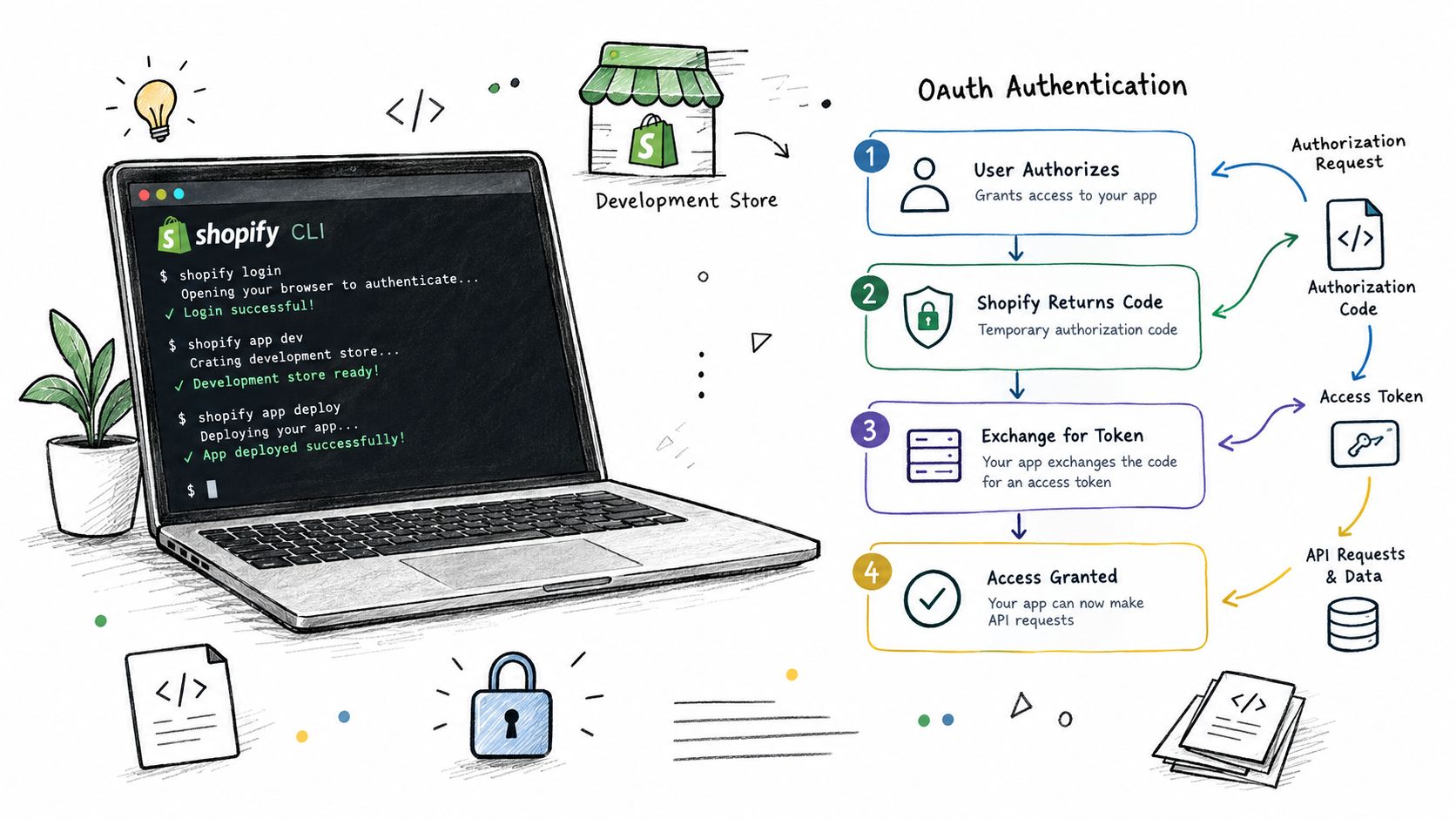
Shopify's embedded app and Polaris guidance emphasizes a specific relationship between the pieces. The main UI renders inside the admin iframe with App Bridge and Polaris, and admin communication should use App Bridge rather than custom handling for embedded admin requests. This keeps navigation and platform interaction aligned with the context Shopify provides.
Put authentication before application setup
Your installation route should establish the store and session context before the app creates dependent records or starts other setup tasks. OAuth should happen immediately before those later steps, including after a reinstall. If your code assumes that a previous installation always left a valid session, reinstall testing will expose the mistake.
A robust flow typically does the following:
- Identify the shop and installation context. Validate the incoming installation request and avoid trusting arbitrary client-provided store values.
- Run OAuth or the current session-token flow. Exchange and verify credentials through the supported mechanism.
- Persist the installation state. Store the shop identity, granted scopes, access information, and timestamps securely on the server.
- Register required webhooks. Do this only after authentication succeeds and make registration repeatable.
- Render the embedded surface. Initialize App Bridge and use Polaris patterns for admin UI.
- Revalidate sessions on protected requests. Expiration and reinstall are normal lifecycle events, not exceptional bugs.
Don't place long-running setup inside the first browser request. If registration, data synchronization, or migration takes time, enqueue it after the authenticated installation has been recorded. The merchant should see a useful state, not a blank iframe while the server waits on unrelated work.
Teams that need extra engineering capacity can also evaluate LATAM developers for implementation or maintenance work. The useful question isn't just whether someone knows React. Look for experience with Shopify installation lifecycles, embedded navigation, API scopes, webhook reliability, and production support.
Keep App Bridge and Polaris independently healthy
App Bridge isn't versioned with Polaris. Pin and review those dependencies independently, test the generated scaffold after upgrades, and verify iframe navigation in the actual Shopify admin rather than relying only on a normal browser tab.
The first milestone isn't a beautiful dashboard. It's a correctly installed embedded app that authenticates, loads reliably, makes a permitted admin request, handles a missing or expired session, and gives the merchant a clear recovery path. Once that foundation works, feature development stops fighting the platform.
Webhook Architecture and Production Billing Integration
A Shopify app becomes production software when it can survive events arriving outside the browser. Orders change, customers update information, fulfillment progresses, stores uninstall apps, and privacy requests arrive independently of the screen the merchant happens to have open.
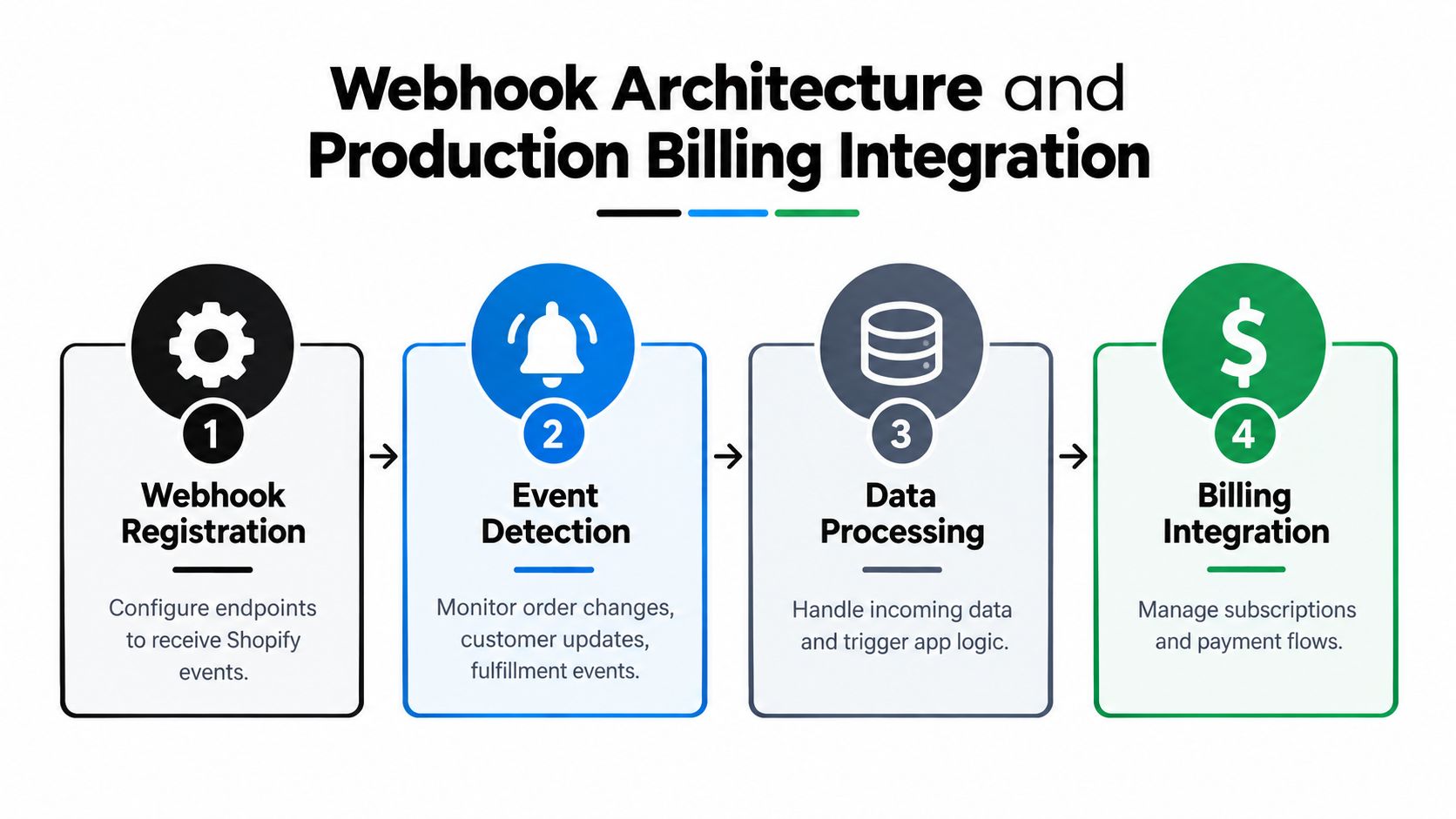
Shopify's authentication and authorization documentation describes webhooks as a change-detection mechanism and requires authenticated API access. For Admin API requests, send the X-Shopify-Access-Token header with the appropriate access token. For webhook deliveries, the handler should verify the signature before accepting the payload as trustworthy.
Make the request path small
The webhook endpoint should do a small amount of work:
- Read the raw request body needed for signature verification.
- Verify the delivery signature.
- Extract the webhook ID and relevant metadata.
- Check whether that delivery has already been accepted.
- Place the event on a durable queue.
- Return an acknowledgement quickly.
The widely used operational target is to respond in about 200 milliseconds, while staying below Shopify's 5-second webhook timeout window, as summarized in the production guidance linked above. The exact implementation can use a managed queue, a worker process, or a job system backed by durable storage. The important property is separation between receipt and business processing.
Deduplication matters because retries and repeated deliveries can happen. Store the webhook ID or an equivalent idempotency key, then make the worker safe to run again. If processing an order event creates a record, update the existing record when the key already exists instead of creating a second one.
Acknowledge first, process second. A fast endpoint protects event intake. The worker protects business logic.
Don't perform synchronous database writes, external API calls, inventory work, and complex calculations inside the request thread. That design feels straightforward during local testing and becomes fragile when a dependency slows down. For teams designing event endpoints across systems, the Formbricks REST API and webhook guide offers useful comparative patterns for signatures, delivery handling, and asynchronous processing.
GDPR handling belongs in the same infrastructure plan. Shopify requires data-request, data-erasure, and customer-redaction webhook handlers for app submission. Add uninstall cleanup, scope validation, and a clear data-retention policy to the implementation rather than treating privacy work as listing copy.
Billing needs a state machine
Billing isn't just a checkout screen. Your app needs to know whether a merchant has an active subscription, accepted a charge, cancelled a plan, entered a trial state, or returned after an interrupted approval flow.
Choose the commercial model around the product:
- Recurring subscriptions fit ongoing functionality such as automation, analytics, or operational tooling.
- One-time charges fit a discrete feature, implementation, or defined purchase.
- Usage-sensitive pricing requires careful entitlement and measurement design so merchants understand what triggers a charge.
Keep billing state on your server and make access checks explicit. The UI can show a plan screen, but the server must decide whether a protected operation is available. Handle the approval redirect, declined payment, cancellation, reinstall, and plan change paths. Test those transitions in a development store before connecting billing to the rest of your launch process.
For post-purchase products, financial mutations deserve additional safeguards. An order edit may require an extra invoice or a refund, while fulfillment must not proceed against stale order data. A product such as Mayra Order Edit and Upsell illustrates this category of implementation by supporting customer-account order edits, merchant-defined eligibility rules, one-click additions, and Shopify-managed invoicing or refund handling. The broader principle is to keep the platform's order and payment records authoritative rather than creating a parallel financial ledger.
Testing, Deployment, and App Store Submission Checklist
A local app that loads successfully proves very little. Production confidence comes from testing the lifecycle events that don't appear in the happy path: reinstalling, declining billing, losing a session, receiving a duplicate webhook, changing a scope, uninstalling, and opening a customer-facing workflow against an order that no longer qualifies.
Use a development store as a controlled environment, then test with realistic catalog, customer, order, and fulfillment states. Keep test data that exercises permissions and edge cases, not only the clean record created for the initial demo.
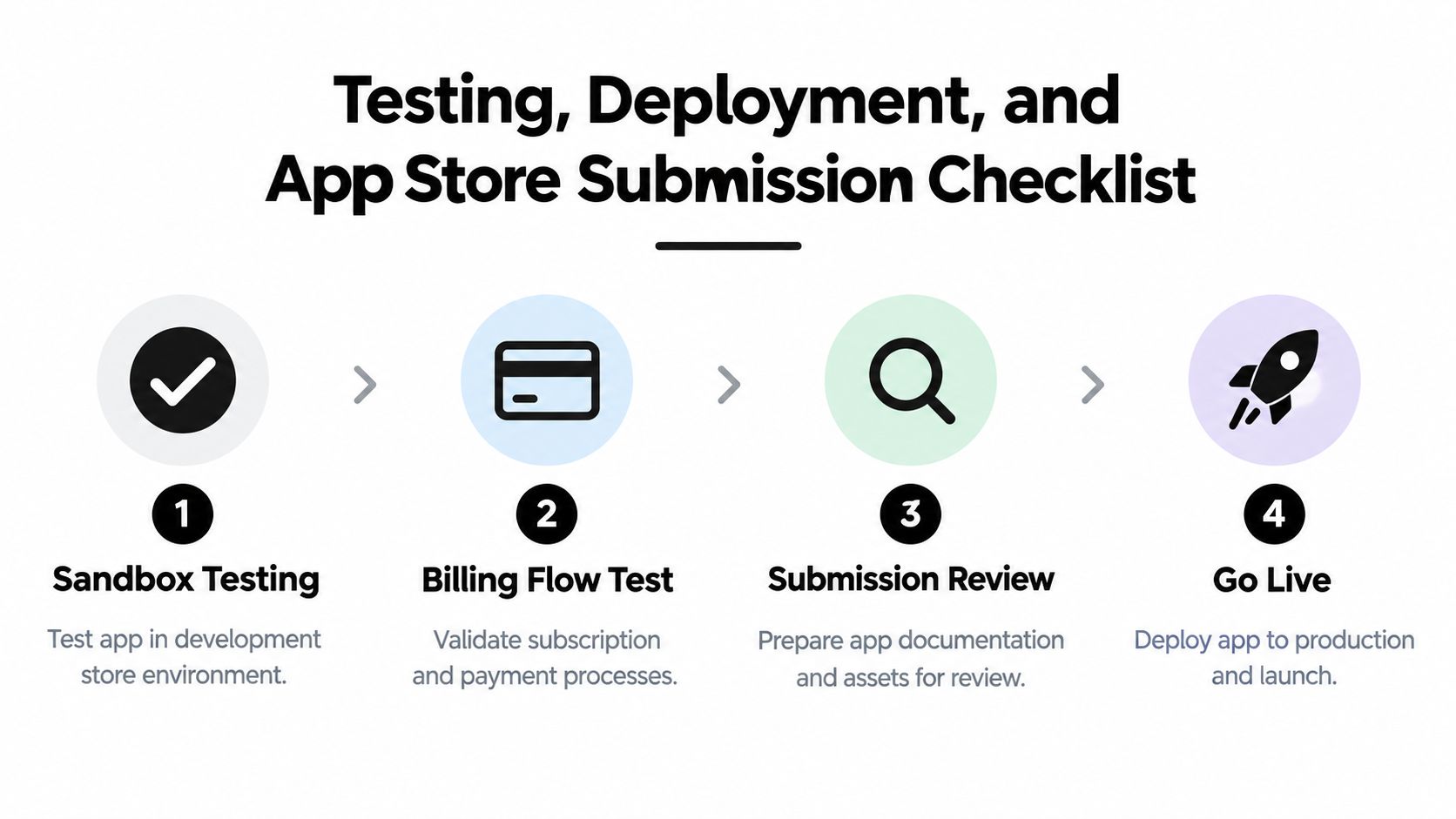
A useful software testing plan for products can help turn these scenarios into repeatable acceptance criteria. Shopify-specific testing should connect each criterion to a merchant action, a server-side state change, and the expected recovery path.
Test the failures merchants will actually encounter
- Installation and reinstall: Confirm that a new installation creates the correct records, while a reinstall refreshes authentication and doesn't duplicate configuration.
- Embedded navigation: Open the app from Shopify admin and test redirects, back navigation, deep links, and expired sessions inside the iframe.
- API permissions: Remove or change access deliberately, then verify that the app explains the problem instead of failing with an opaque server error.
- Webhook delivery: Send valid, invalid, repeated, delayed, and out-of-order events. Verify signature rejection, deduplication, queue behavior, and retry safety.
- Billing transitions: Test approval, decline, cancellation, plan changes, and access removal. A merchant shouldn't retain paid functionality after the server marks the entitlement inactive.
- Privacy and uninstall: Confirm that required GDPR handlers respond correctly and that uninstall cleanup removes or isolates the data your policy covers.
Deployment can be manual through Shopify CLI while the product is small, but a repeatable CI/CD process is safer once several people or environments are involved. Build the application, run tests, apply migrations deliberately, deploy immutable artifacts, and monitor the first installation after each release. Keep configuration and secrets outside the repository, and document rollback steps before you need them.
Treat customer accounts as an architecture gate
Shopify deprecated legacy customer accounts on February 26, 2026, made them unavailable to new stores, and requires merchants to upgrade to the latest customer accounts model, according to Shopify's customer accounts documentation. This is not a cosmetic migration for apps that touch authenticated customer actions.
If your app supports post-purchase editing, shipping updates, account-based offers, or customer authentication, build against the current customer-account surface. Check placement, installation behavior, permissions, and authenticated actions in the latest account experience. An app that still assumes the old account stack may work in a narrow test setup while failing for merchants using the current framework.
Your submission checklist should therefore include:
- Product clarity: Explain the exact merchant workflow, required permissions, and setup steps.
- Privacy readiness: Publish an accurate privacy policy and implement data-request, data-erasure, and customer-redaction handling.
- Lifecycle safety: Test uninstall cleanup, reinstall authentication, webhook registration, and session recovery.
- Account compatibility: Verify every customer-facing placement against the latest customer-account model.
- Billing transparency: Document plan behavior, approval flow, cancellation, and entitlement changes.
- Support materials: Provide screenshots, setup instructions, troubleshooting guidance, and a route to contact support.
- Operational monitoring: Track failed jobs, rejected signatures, API errors, billing state mismatches, and installation failures.
A strong submission package reflects a product that can operate without developer intervention for ordinary merchant actions. Reviewers and merchants both notice when the listing promises a simple workflow but the implementation depends on hidden manual fixes.
Mayra Apps builds Shopify post-purchase tools for merchants that need customer-account order editing, cancellation deflection, and one-click upsells while keeping Shopify Admin as the system of record. If your app or store workflow depends on the latest customer accounts model, reliable order changes, or controlled post-purchase operations, visit Mayra Apps to review the available approach and setup options.