
You search “Exchange by Shopify” because a customer wants to swap a jacket for another size. The results mention a Shopify marketplace that no longer exists, while Shopify admin shows return and exchange tools that are still part of daily operations. Both references are legitimate, but they describe completely different products and processes.
The confusion comes from one shared word. Exchange once referred to a Shopify marketplace for buying and selling entire Shopify businesses. Today, an exchange usually means a post-purchase order workflow, where a customer returns one item and receives another. The marketplace belongs to Shopify's history. The order workflow belongs to your current fulfillment, accounting, inventory, and support routines.
Table of Contents
- Two Different Things Called Exchange by Shopify
- The Marketplace That Ran From 2017 to 2022
- What an Order Exchange Actually Means in Shopify
- Running Exchanges Inside Shopify Admin and POS
- Self-Serve Exchanges Versus Staff-Assisted Exchanges
- Why Exchanges Are Not Just Returns Plus Replacements
- Keeping the System of Record Clean During Exchanges
- Choosing the Right Exchange Path for Your Store
Two Different Things Called Exchange by Shopify
The fastest way to separate the two meanings is to ask what's being exchanged.
If the subject is a Shopify-based business, the reference is probably Exchange, Shopify's former marketplace for buying and selling stores. If the subject is a product a customer already purchased, the reference is the exchange workflow inside Shopify admin, Shopify POS, or a customer account.
The legacy marketplace appears mostly in older articles, archived discussions, and press coverage. The operational workflow appears where your team handles orders, returns, fulfillment, refunds, and customer requests. In Shopify, customers can access order information through notifications or customer login, while merchants manage order changes and returns in the admin. Shopify's customer-account documentation describes the order-status page as a central place for customers to track and manage a specific order.
A practical example makes the distinction clear:
- Marketplace meaning: You want to buy an existing Shopify store from another merchant.
- Order meaning: A customer bought a medium shirt and wants a large.
- Marketplace meaning: You're researching an old Shopify product called Exchange.
- Order meaning: Your support agent is processing a return and replacement against an existing order.
The second meaning is the one most merchants need today. A product exchange can involve a return, a replacement line, an additional payment, a refund, inventory decisions, and fulfillment timing. It isn't merely a customer-service note.
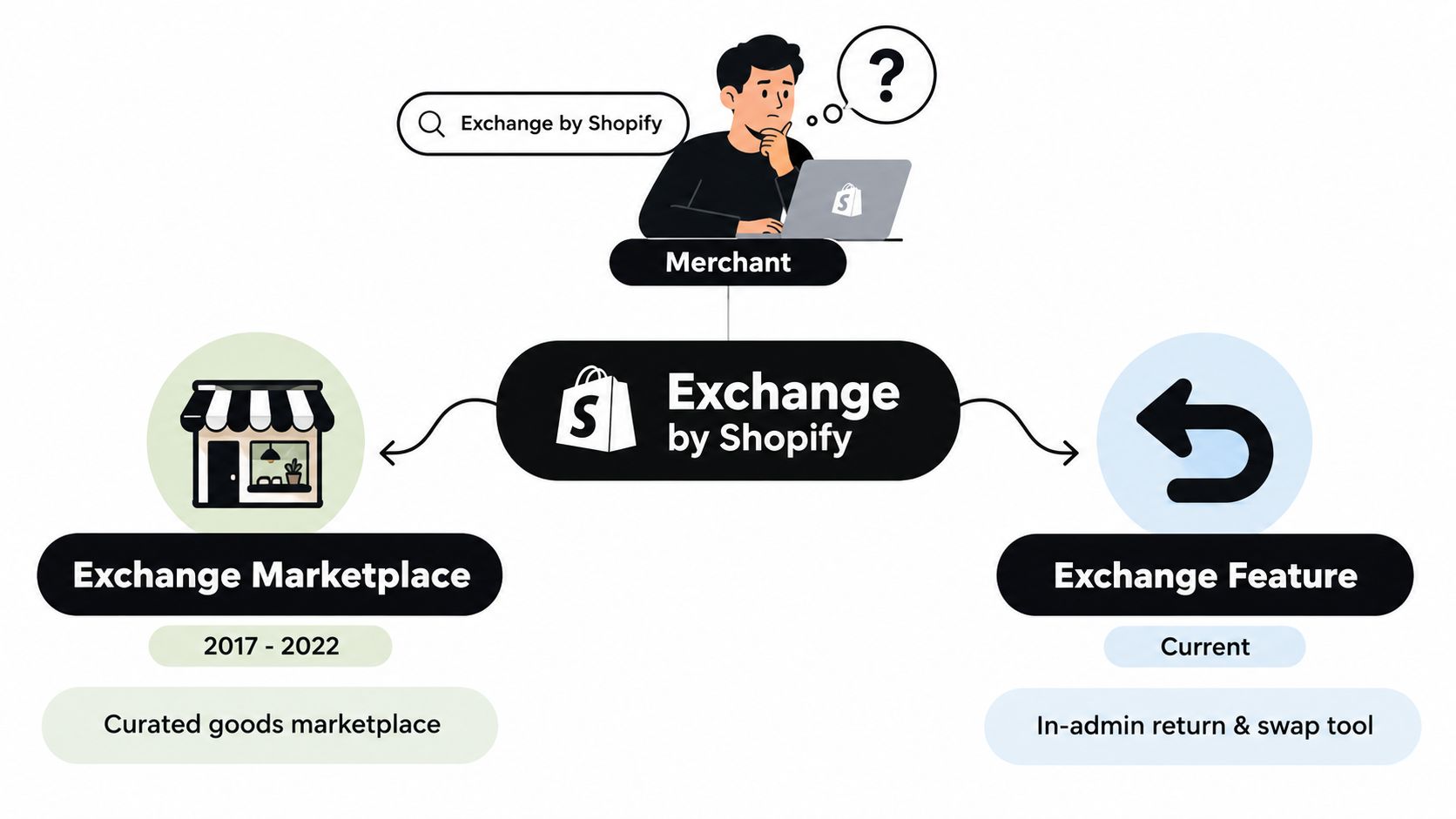
Practical rule: If the customer is changing an item, open the original order. If a buyer is acquiring a business, you're looking at historical marketplace information, not a current Shopify sales feature.
The Marketplace That Ran From 2017 to 2022
Shopify launched Exchange in 2017 as a built-in marketplace for buying and selling Shopify-based businesses. It gave merchants a way to list stores within the Shopify ecosystem, rather than finding buyers entirely through unrelated business-sale channels. The marketplace was positioned as an exit path for merchants whose business information could be verified through Shopify.
Exchange served a broad range of sellers. Independent coverage reported that it hosted more than 10,000 stores for sale at one point, with listings ranging from $50 to $1 million. Other summaries described listings beginning around $200 and extending into the six-figure range, which illustrates the range of businesses represented before the marketplace closed. Sellbrite's coverage of Shopify Exchange documents that wide spread, from small starter stores to established e-commerce operations.
That range mattered because “buying a Shopify store” could mean several different things. One buyer might look for a small, inexpensive starting point with an existing storefront. Another might evaluate a mature operation with products, traffic, suppliers, customers, and established processes. Exchange brought those opportunities together under a Shopify-oriented marketplace identity.
Shopify later shut Exchange down on November 1, 2022, ending its five-year run. Empire Flippers' account of the closure describes the shutdown as the end of a marketplace where sellers could list stores directly from the Shopify ecosystem.
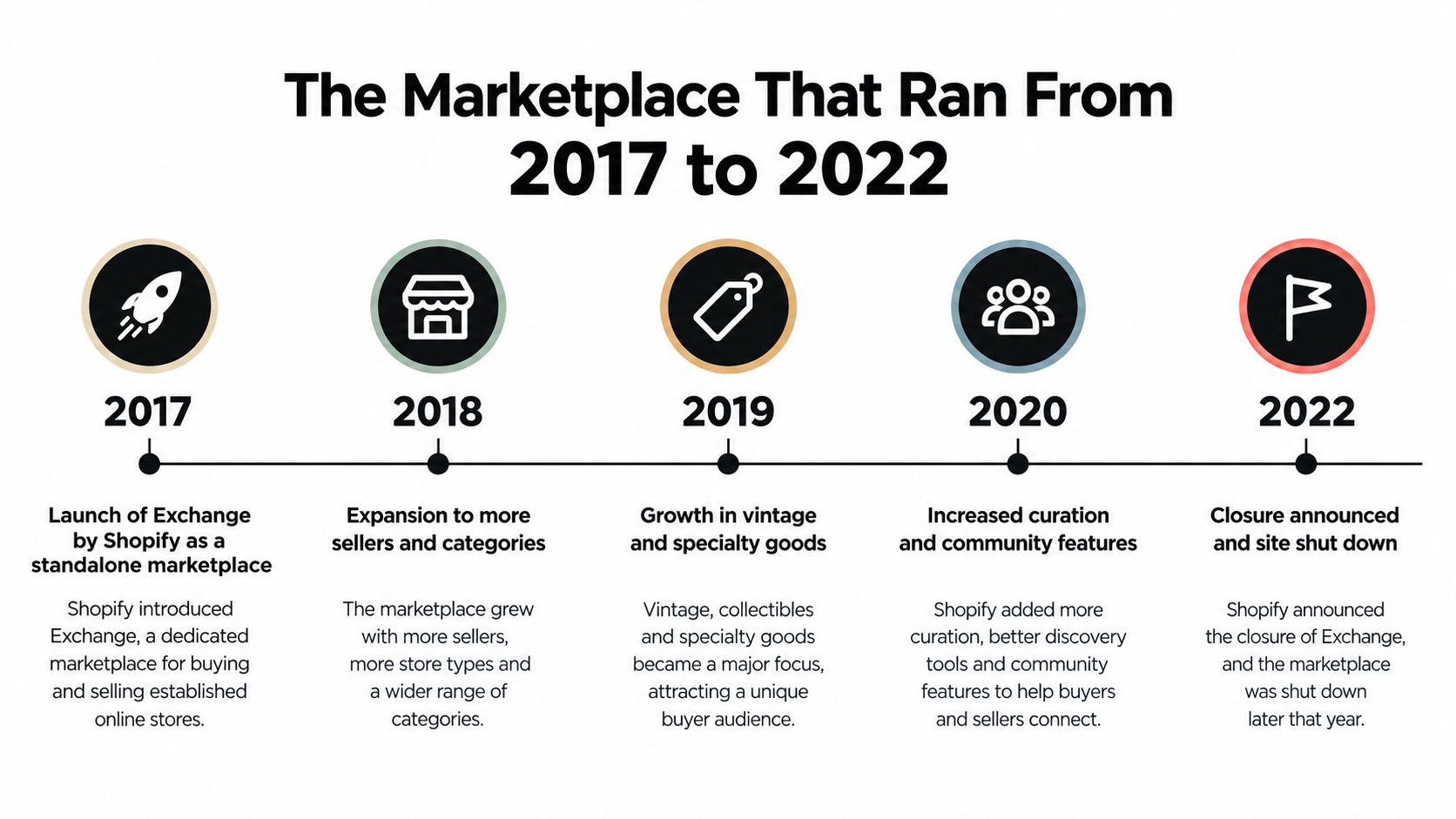
The important operational conclusion is simple: there is no current Shopify marketplace product called Exchange that merchants can use to list or acquire stores. If an old article sends you toward Exchange marketplace pages, merchant listings, or the former exchange.shopify.com destination, you're looking at discontinued material.
That history has no direct connection to swapping a customer's product. The word survived in everyday commerce language, but the marketplace did not become Shopify's current return-and-replacement feature.
What an Order Exchange Actually Means in Shopify
A Shopify order exchange is best understood as a linked transaction on an existing order. The merchant identifies what the customer is sending back, adds what the customer should receive, and settles any difference in value. Shopify's native order tools support editing products, quantities, shipping fees, and item-level discounts, while its return workflow supports replacement items and financial adjustments. Shopify's order-editing guidance explains how changes remain connected to the original order record.
Consider two examples. A customer returns a black shirt in medium and receives the same shirt in large at the same price. That's a straightforward variant swap. If the customer changes to a more expensive coat, Shopify needs to collect the difference. If they choose a less expensive item, the store needs to refund or otherwise settle the difference according to its configured process.
The exchange has several moving parts:
| Component | Role in the exchange |
|---|---|
| Original order | Anchors the customer, payment history, discounts, and order timeline |
| Returned line item | Identifies the product or variant coming back |
| Replacement line item | Defines what the merchant will fulfill next |
| Inventory status | Helps the team decide whether the replacement can be allocated |
| Balance due or refund | Resolves any difference between the returned and replacement value |
| Fulfillment record | Tells the warehouse or store what should ship or be handed over |
| Customer notification | Communicates the exchange status and next action |
The distinction between an even exchange and a value-changing exchange is important. An even swap may require no new collection or refund, but an upgrade or downgrade creates a financial event that must remain connected to the original order.
For merchants improving broader order accuracy, it also helps to understand how order records support fulfillment and inventory discipline. A practical overview of how to cut costs with Tagada can add useful context around order-management controls. For a deeper look at the mechanics of changing existing Shopify orders, see this guide to Shopify order editing.
Running Exchanges Inside Shopify Admin and POS
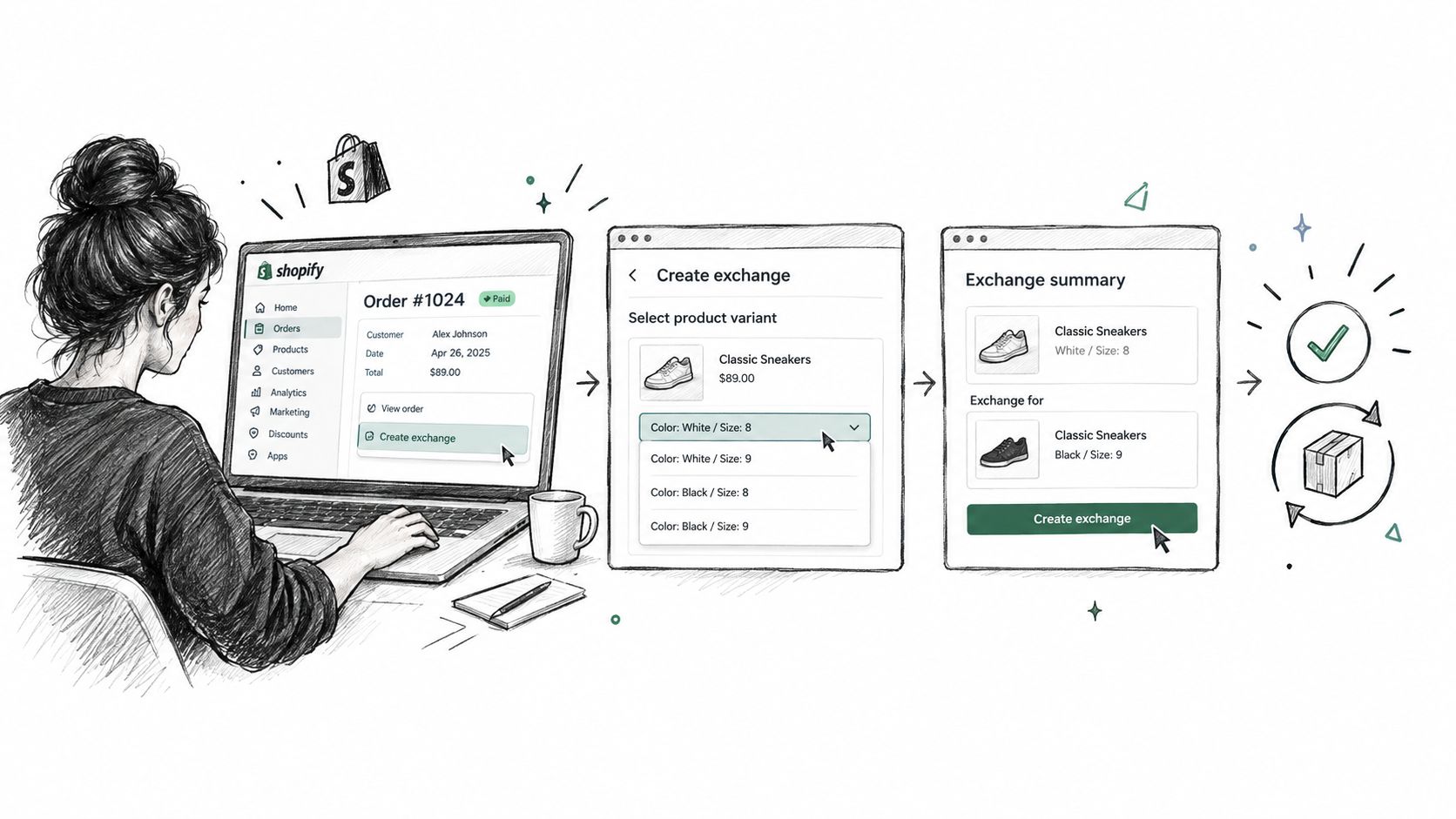
Staff should begin with the original order, not a new standalone checkout. In Shopify admin, the usual path is to open Orders, select the relevant order, start the return or exchange action, identify the item coming back, and add the replacement product or variant. The interface then presents the financial result, which may be an additional amount to collect, a partial refund, or an even exchange.
The reason for starting with the original order is traceability. The customer, payment activity, discounts, fulfillment details, and timeline stay connected. Shopify's return documentation explains that exchanges can be processed in admin and POS, with the balance collected or refunded according to the price difference. The official returns workflow also notes that staff need suitable permissions for fulfillment-related work.
A careful admin routine looks like this:
- Find the original order. Confirm the customer and the exact line item.
- Select the exchange action. Mark what will return and add the replacement.
- Review the value difference. Confirm whether the customer owes money or receives a refund.
- Check inventory and fulfillment. Don't promise a replacement that the warehouse can't allocate.
- Complete the exchange. Keep the activity attached to the existing order timeline.
- Confirm the customer message. Make sure the customer knows whether to send an item back, pay a balance, or wait for a refund.
In Shopify POS, the associate locates the original order on the selling device, begins the return or exchange flow, selects the replacement item, and resolves any difference using the available tender options. The updated receipt gives the customer a record of what was returned and what was issued.
Permissions matter in both environments. A cashier or support agent may be able to start the process without having authority to approve every financial or inventory action. Assign access deliberately, especially if exchanges involve refunds, restocking decisions, or high-value products.
Inventory timing deserves close attention. A replacement can consume available stock before the returned item has been inspected and restocked. If the requested variant is the last unit available, the team should verify allocation before promising immediate fulfillment.
Self-Serve Exchanges Versus Staff-Assisted Exchanges
A customer-account exchange and a staff-assisted exchange solve different operational problems.
Self-service puts the first step in the customer's hands. The customer signs in, opens the order-status page, reviews eligible items, and submits a request according to the rules the merchant has configured. Shopify's customer-account architecture supports order access and profile management, but exchange-specific eligibility and automation still depend on the store's chosen setup.
Staff assistance gives a support agent, warehouse operator, or retail associate control over the exception. The team can inspect the order, handle a partial swap, choose a different product, resolve unusual pricing, and coordinate with fulfillment. That flexibility comes at the cost of staff time and more opportunities for inconsistent decisions.
| Dimension | Self-Serve Customer Account | Staff-Assisted Admin or POS |
|---|---|---|
| Entry point | Customer account or order-status page | Shopify admin Orders or Shopify POS |
| Availability | Depends on enabled rules and eligible order conditions | Depends on staff access and store process |
| Best fit | Predictable catalog, common size or variant swaps | Exceptions, complex products, high-touch service |
| Customer effort | Customer submits the request independently | Customer contacts or visits the store team |
| Merchant control | Rules define what customers can request | Staff evaluate and approve each case |
| Main risk | An unsuitable request may pass if rules are too broad | Queue growth and inconsistent handling |
Self-service works well when the catalog has clear variants and the merchant can define sensible eligibility. Configure the return window, eligible products, shipping rules, and fulfillment safeguards before opening the path to customers. A store that sells standard apparel may allow size changes, while a custom-product business may need manual review for every request.
Staff assistance is more appropriate when the replacement depends on inspection, personalization, serial numbers, or customer consultation. It also suits stores where the exchange can happen in person through POS and the associate needs to verify the physical product before completing the transaction.
Merchants evaluating a customer-led process can review this guide to Shopify self-serve returns. The decision should follow catalog complexity and operational capacity, not a blanket preference for automation.
Why Exchanges Are Not Just Returns Plus Replacements
The phrase “return this item and create a new sale” sounds convenient, but it can produce the wrong operational model. A proper exchange connects the item coming back with the replacement going out, while a separate return and new order can split the financial and fulfillment story across unrelated records.
The timing difference is the first problem. A return may wait for the product to arrive and be inspected before the merchant finalizes the refund or restock. An exchange often needs the replacement moving sooner, otherwise the customer remains without the product they want. Shopify's documented workflows reflect this complexity by allowing merchants to process exchange items within the returns process and manage fulfillment holds where payment or review is still pending.
Inventory creates a second problem. The outgoing replacement needs an allocation decision before the returned product is safely available for resale. Treating the returned item as immediately available can cause overselling, especially when the replacement is a scarce variant. Treating the replacement as a brand-new sale without linking it to the return can also obscure why inventory moved.
Financial reporting adds another layer. When product values differ, the merchant must collect an additional balance or issue a partial refund. The original order remains the financial source of truth for the edited transaction, which helps preserve a coherent record for downstream fulfillment and accounting. Creating a separate sale can make staff reconcile two records that should have been understood together.
| Common assumption | Operational reality |
|---|---|
| Item A is refunded, then item B is sold | Item A and item B are linked through an exchange workflow |
| The replacement can ship whenever the new sale is created | Fulfillment may need a payment, inventory, or return-status check |
| The returned unit is immediately sellable | The item may need inspection and later restocking |
| Finance can reconcile two unrelated orders | The original order should retain the exchange history |
Shipping creates the final complication. The customer may need a label for the returned unit while the warehouse prepares a separate outbound shipment for the replacement. Those movements have different tracking, timing, and carrier consequences.
An exchange is a composite transaction. Treating it as two unrelated actions makes the books and the warehouse work harder than necessary.
Keeping the System of Record Clean During Exchanges
Shopify admin should remain the system of record for the original order, return, replacement, refund, and additional payment. That rule matters even when a support platform, returns app, POS device, or warehouse system helps staff complete the work.
Use a closeout checklist before calling an exchange complete:
- Original order: Confirm that the exchange is attached to the correct order ID.
- Replacement inventory: Verify that the new line is allocated before the replacement ships.
- Financial settlement: Reconcile any extra payment or refund against the same order.
- Fulfillment state: Check whether a hold remains and whether the correct location will fulfill the item.
- Customer notice: Send the status message from the connected Shopify workflow.
- Audit trail: Confirm that the order timeline contains enough detail for a finance review.
Partial exchanges require extra discipline. A customer might return one unit from a multi-item order while keeping the other products. Gift card payments, store credit, discounts, and combined return-plus-exchange requests can create entries that look duplicated unless the team checks the original line items and transaction history together.
Order tags can help staff identify exchange-related work, but tags aren't a substitute for the financial record. Draft orders may be useful for controlled adjustments in specific processes, yet creating a separate draft order for every exchange can fragment reporting if the final activity doesn't write back correctly. Technical teams should also verify how any exchange-related API or webhook integration records the event, because an app that keeps a parallel ledger can drift from Shopify when a refund, restock, or fulfillment update changes later.
A strong integration writes changes back to Shopify and preserves the original order relationship. For a broader operational framework, review this guide to Shopify order workflow.
Audit rule: If finance, support, and fulfillment need different records to understand one exchange, the workflow is probably splitting the transaction too early.
Review exchange records during busy periods rather than waiting for month-end reconciliation. Look for orders with an unresolved balance, a replacement that remains unfulfilled, a return without a received status, or an inventory quantity that doesn't match the physical inspection.
Choosing the Right Exchange Path for Your Store
The right workflow depends on the product, the promise made to the customer, and the team's ability to control inventory. A simple apparel catalog and a custom-goods catalog shouldn't expose the same exchange options.
Start with four questions:
- How predictable are customer requests? Frequent size or color swaps are easier to govern than custom modifications.
- How quickly must replacements ship? Fast fulfillment requires clear holds and inventory commitments.
- Who can approve exceptions? Decide whether support staff, warehouse staff, or managers can authorize refunds and replacements.
- Can your inventory system handle linked movements? If it can't, adding automation may increase reconciliation work.
| Store profile | Recommended exchange path | Surface used | Key control |
|---|---|---|---|
| Small DTC apparel brand with predictable sizing | Customer-led exchanges for eligible variants | Customer account and order-status page | Variant eligibility and return rules |
| High-value store with concierge service | Staff-assisted exchanges | Admin and Shopify POS | Approval permissions and customer verification |
| Store with heavy return volume | Exchange-focused app layered onto Shopify | Customer account plus admin | Inventory synchronization and write-back |
| Regulated or custom-product merchant | Fully staff-assisted review | Shopify admin | Explicit approval before replacement fulfillment |
A small apparel brand may gain the most from letting customers resolve routine size changes through the order-status experience. A high-value retailer may prefer an associate-led interaction, particularly when the replacement requires inspection or product advice. Stores with substantial return volume can consider an exchange application, but only if it updates Shopify rather than maintaining a separate order ledger.
For merchants that want customer-account editing, Mayra Apps provides self-serve order changes through customer accounts and the order-status page, including variant swaps, quantity changes, shipping-address updates, and additions or removals under merchant-controlled rules. It also handles exchange-related price differences through Shopify's payment and refund workflows, while fulfillment holds can pause shipment during an active edit.
Configure the chosen path through the relevant surfaces: customer-account settings and eligibility rules for self-service, staff roles and permissions for assisted exchanges, and fulfillment controls for both. Revisit the setup as your catalog, support workload, and inventory process change.
If you're deciding how to keep post-purchase edits and exchanges connected to Shopify, visit Mayra Apps to review customer-account editing, controlled eligibility rules, fulfillment holds, and Shopify-based settlement options. Choose the workflow that fits your catalog, then test it against a real size swap, a price upgrade, and a partial exchange before enabling it broadly.