
A product drop goes live, orders pour in, and the support queue fills before the warehouse finishes its first pick wave. Customers want to change a size, correct an address, cancel an order, or return an item, yet each request lands in the same inbox and waits for a person to interpret the policy. The result is familiar to most Shopify operators: fulfillment keeps moving while support tries to reconstruct what should happen next.
Shopify self-serve returns solve only part of that problem, but they solve an important part. A customer can start an eligible return or cancellation from the order status page or customer account, while the merchant retains control over approval, fulfillment, refunds, and inventory. Shopify introduced self-serve returns as a native capability during its Winter 2023 customer accounts rollout, and its current documentation explains how merchants can enable return requests, cancellation requests, or both under Settings > Customer accounts. See Shopify's documentation on self-serve returns for the current setup context.
The practical question isn't whether a returns portal looks modern. It's whether the workflow moves routine decisions away from support without allowing an incorrect request to release inventory, ship a replacement too early, or create an untraceable refund. Returns work best when they're connected to the wider post-purchase system, including order edits, address changes, cancellation deflection, fulfillment holds, and operational reporting.
Table of Contents
- Why Shopify Self Serve Returns Matter Right Now
- What Self Serve Returns Actually Cover in Shopify
- Writing a Return Policy That Protects Margin
- Choosing Between Native Shopify and Returns Apps
- Configuring Eligibility, Fees, and Approvals
- Designing the Customer Return Journey
- Metrics That Prove the Program Is Working
Why Shopify Self Serve Returns Matter Right Now
A merchant wakes up after a restock to a support queue packed with order questions. Some customers are asking where their parcel is. Others bought the wrong variant, want to change an address, or need to return an item. If every return request requires a support agent to locate the order, check the policy, confirm the line item, and explain the next step, the team becomes the workflow.
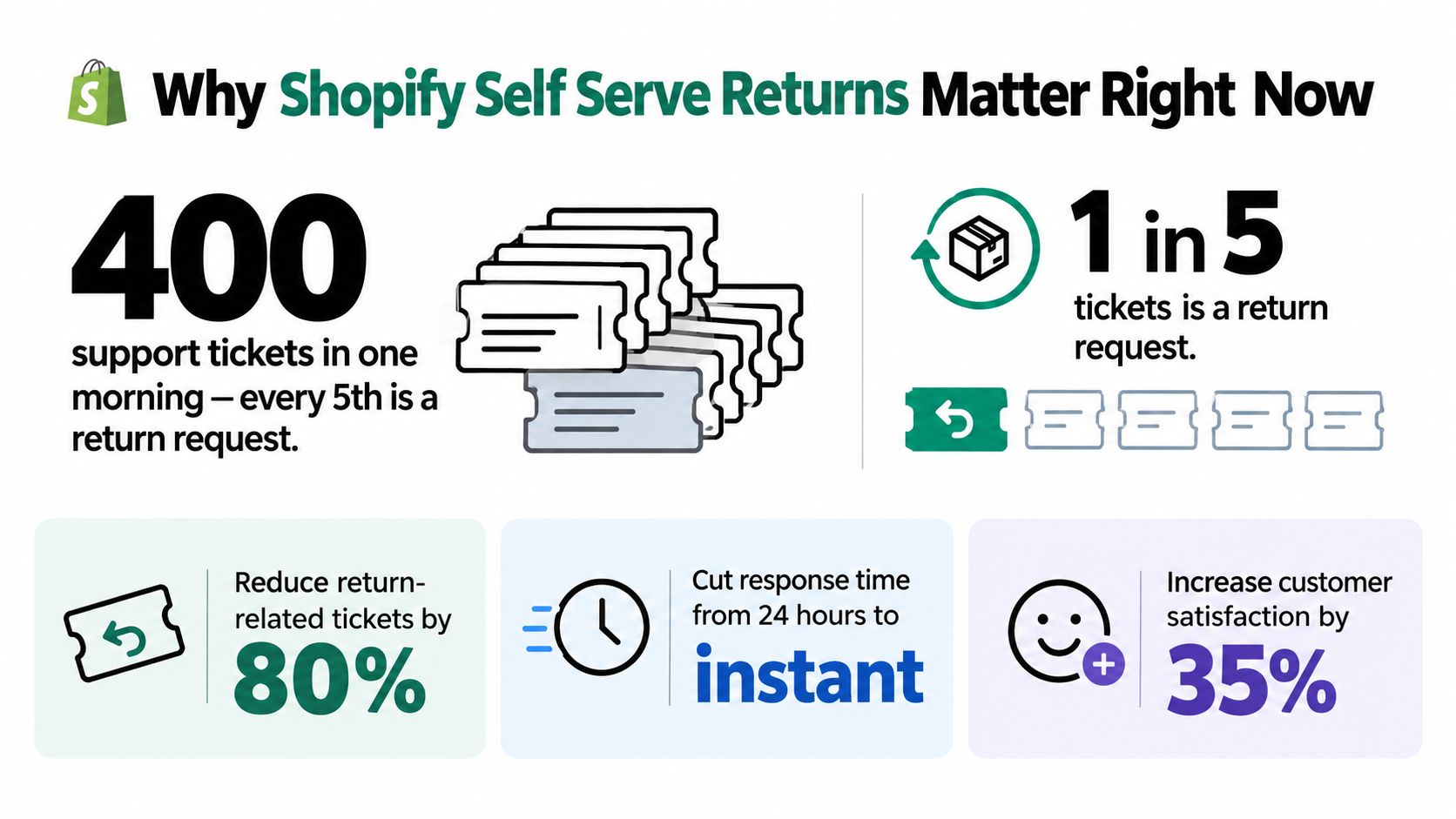
Self-serve returns change the first move. The customer opens the order status page, selects the eligible item, gives a reason, and submits a request. Shopify then places the request where the merchant can review and manage it in admin. That doesn't eliminate operational work, but it removes repetitive intake and gives the customer an immediate, structured path instead of another email thread.
Independent ecommerce-return research cites Forrester data indicating that self-service can remove roughly 25% to 30% of call volume from support queues. The same research on Shopify self-serve returns reports that one returns portal reduced email and chat inquiries by 18% and phone calls by 26% for a brand, while another saw where-is-my-order contacts fall by 20%. Those figures aren't a promise for every store. They show why the workflow matters economically, especially during launches and seasonal spikes.
Practical rule: Automate the request, not the judgment. Let policy rules handle predictable cases, while people retain authority over exceptions that could affect margin, fraud exposure, or fulfillment.
The margin question matters just as much as ticket deflection. A refund ends the original sale. An exchange or store-credit resolution can preserve more of its value, provided the replacement is available and the economics make sense. Research cited by Ringly reports that leading stores convert 30% to 40% of return requests into exchanges or store credit, compared with 15% to 20% for average stores. For teams building the broader customer self-service model, a self service guide like SupportGPT is useful background on how structured customer-led workflows reduce repetitive support interactions.
What Self Serve Returns Actually Cover in Shopify
Shopify's native flow gives customers a controlled way to request a return or cancellation from the order status page or customer account. The customer starts the request, but the merchant decides whether to approve, decline, refund, exchange, or apply another resolution. That separation is important. A customer-facing button isn't the same as an automatic promise that every request will be accepted.
Native Shopify is strongest when the catalog has straightforward rules. A merchant can define return eligibility, configure return fees, choose request types, and link the relevant policy. The admin remains the operational control point, where staff review the request and update the order as the return progresses.
| Request Type | Customer Initiates | Merchant Decides | Surfaces On |
|---|---|---|---|
| Return request | Selects eligible items and submits a reason | Approves, declines, sets the resolution, and manages the return | Order status page, customer account, Shopify admin |
| Cancellation request | Requests cancellation before the order moves too far through fulfillment | Confirms whether cancellation is still operationally possible | Order status page, customer account, Shopify admin |
| Exchange request | Requests a different eligible outcome where the configured flow supports it | Confirms inventory, policy eligibility, and fulfillment treatment | Customer-facing request flow and Shopify admin |
| Order edit | Usually requires an edit-specific workflow or app | Controls permissions, timing, and changes to the original order | Customer account, order status page, or admin, depending on the tool |
| Address change | Requires a supported post-purchase editing workflow | Decides whether the order can be changed before fulfillment | Customer account, order status page, or admin, depending on the tool |
Shopify's native return feature shouldn't be confused with a complete returns-experience platform. It provides the request and review foundation, but merchants still need to decide how complex cases are governed. Mixed orders, partial shipments, bundles, destination rules, high-value items, and warehouse routing often need more decision logic than a basic request tool supplies.
That distinction affects implementation. If the store only needs customers to request routine returns and cancellations, native Shopify may be enough. If the store needs automated approvals, branded exchange incentives, live replacement inventory, multi-warehouse routing, or coordinated fulfillment holds, an app-based layer may be the more practical choice.
Writing a Return Policy That Protects Margin
A self-serve portal only performs as well as the policy behind it. Write the policy before configuring the customer-facing flow, then make sure the administrative rules use the same definitions. Customers should know what qualifies, while staff should know what to do when a request falls outside the normal path.
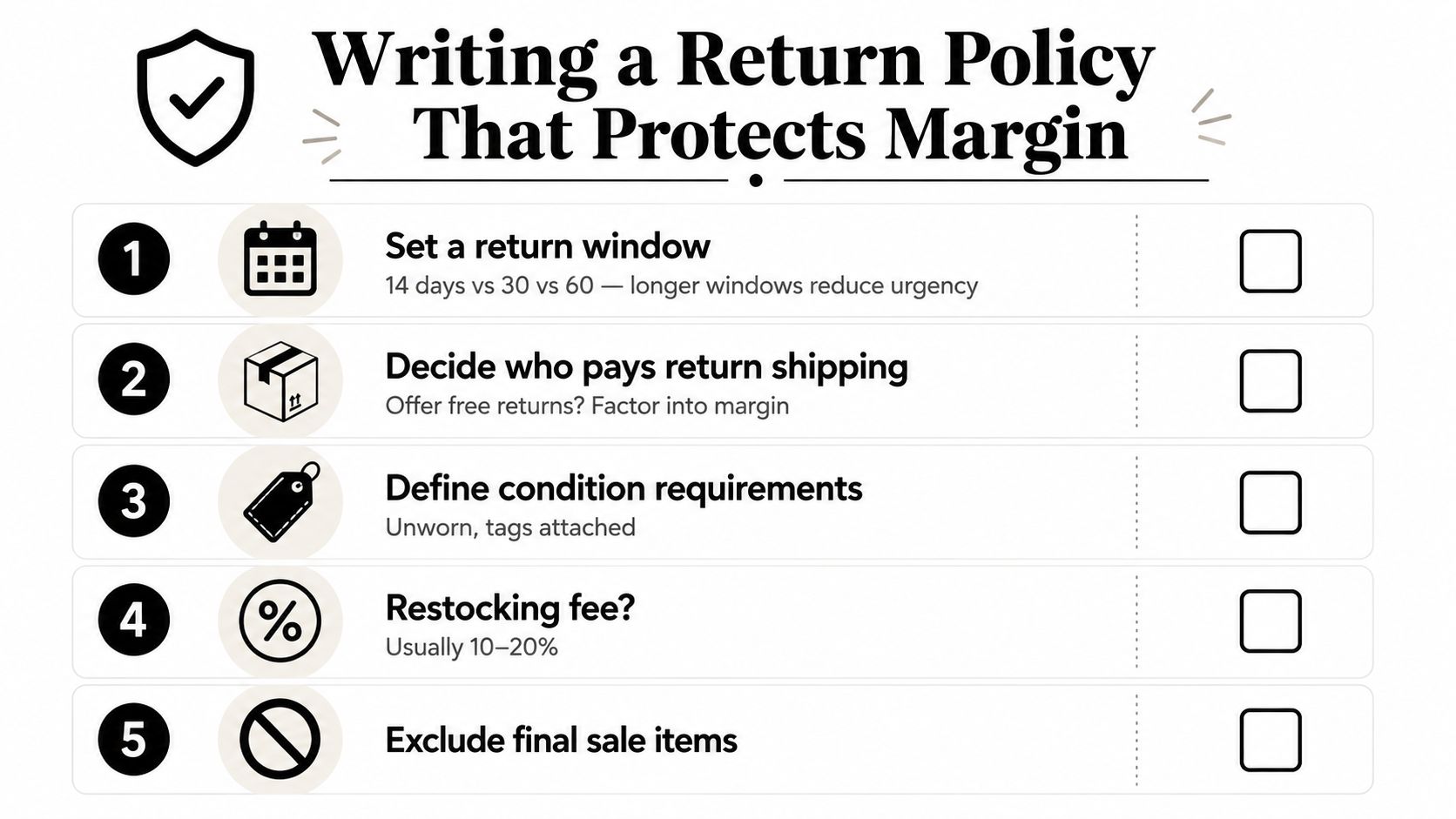
Start with the return window. A 14-day window creates a tighter operational boundary, while 30 or 60 days gives customers more time and may reduce the pressure to decide immediately. The right choice depends on product type, resale value, seasonality, and how long returned inventory can remain commercially useful. Don't promise a broad window if the warehouse can't inspect and disposition items consistently.
Then define who pays for the return. You can absorb the label cost, pass it to the customer, or deduct it from the refund. Each choice sends a different signal. Free returns reduce visible friction but need to be treated as a margin expense. Customer-paid shipping protects the order economics but can make a refund feel punitive, particularly when the original item arrived damaged or materially different from its description.
Make condition rules operational
State whether products must be unworn, unused, or returned with tags, packaging, seals, or accessories intact. Apply restocking fees only where the team can explain and administer them consistently. A fee for an opened item may protect value, but it can also create disputes if the customer couldn't evaluate the product without opening it.
Final-sale rules need equally clear treatment. Cosmetics, intimates, clearance items, customized products, and digital downloads often require separate eligibility logic. List the excluded categories by product, collection, or tag instead of relying on a vague sentence that customers and agents interpret differently.
Exchange language should make the preferred outcome easy to understand. Explain whether customers can choose another size, color, or product, and whether store credit has an incentive such as a bonus amount or longer usability. Don't hide the refund option, but present an exchange or credit resolution early when it benefits the customer.
For a practical companion to policy design, use this reduce e-commerce returns playbook. You can also review guidance on Shopify store credit before deciding how credit should work across refunds, exchanges, and future purchases.
Check the policy before publishing
- Window: Define when the clock starts and when the request must be submitted.
- Condition: Specify wear, tags, packaging, seals, and missing components.
- Fees: State who pays shipping and when deductions apply.
- Exclusions: Identify final-sale products and non-returnable categories.
- Resolution: Explain refunds, exchanges, store credit, and inspection timing.
- Exceptions: Write holiday rules with exact order dates and deadlines.
- Escalation: Give staff a clear process for damaged, defective, or unusual cases.
Choosing Between Native Shopify and Returns Apps
The native Shopify flow is a sensible starting point for a simple catalog. A store with one warehouse, standard product conditions, and uncomplicated eligibility can keep the system close to Shopify's order record and avoid adding another operational dashboard.
The decision changes when the catalog creates branching logic. Bundles, mixed variants, final-sale products, multiple warehouses, and exchange incentives all add cases that a basic request flow may not govern cleanly. Platforms such as Loop, AfterShip Returns, and Returnly can extend the customer experience with capabilities that are more specialized than the native feature.
| Store Profile | Native Flow | Returns App |
|---|---|---|
| Simple catalog and standard conditions | A practical first implementation | May add unnecessary cost and process overhead |
| One warehouse and straightforward routing | Easier to operate from Shopify admin | Useful if the team needs branded tracking or automation |
| Bundles, mixed eligibility, or final-sale SKUs | Requires careful manual review | Better suited to policy and exception logic |
| Multiple warehouses or destination-specific rules | Limited operational flexibility | More appropriate for routing and location-aware workflows |
| Exchange-led retention strategy | Basic exchange handling may be enough for simple cases | Better fit for incentives, live product selection, and exchange governance |
| Detailed returns analytics | Shopify reporting can provide a foundation | Better when reason, resolution, and workflow reporting drive decisions |
Native Shopify can handle fundamental eligibility, return fees, and request management. It doesn't automatically solve every question around instant exchanges, warehouse routing, or branded reasons to choose credit instead of a refund. An app earns its place when it governs those decisions rather than adding another returns form.
The cheapest implementation is the one your operations team can still explain six months after launch.
Migration deserves more attention than it usually receives. Return reasons, label formats, customer communications, and reporting schemas rarely transfer cleanly between systems. Before choosing native or app-based, read the comparison of Shopify order editing and returns apps and map the broader post-purchase workflow. If a store expects complexity soon, selecting the right tier upfront is often less disruptive than rebuilding the process after the catalog and support volume have expanded.
Configuring Eligibility, Fees, and Approvals
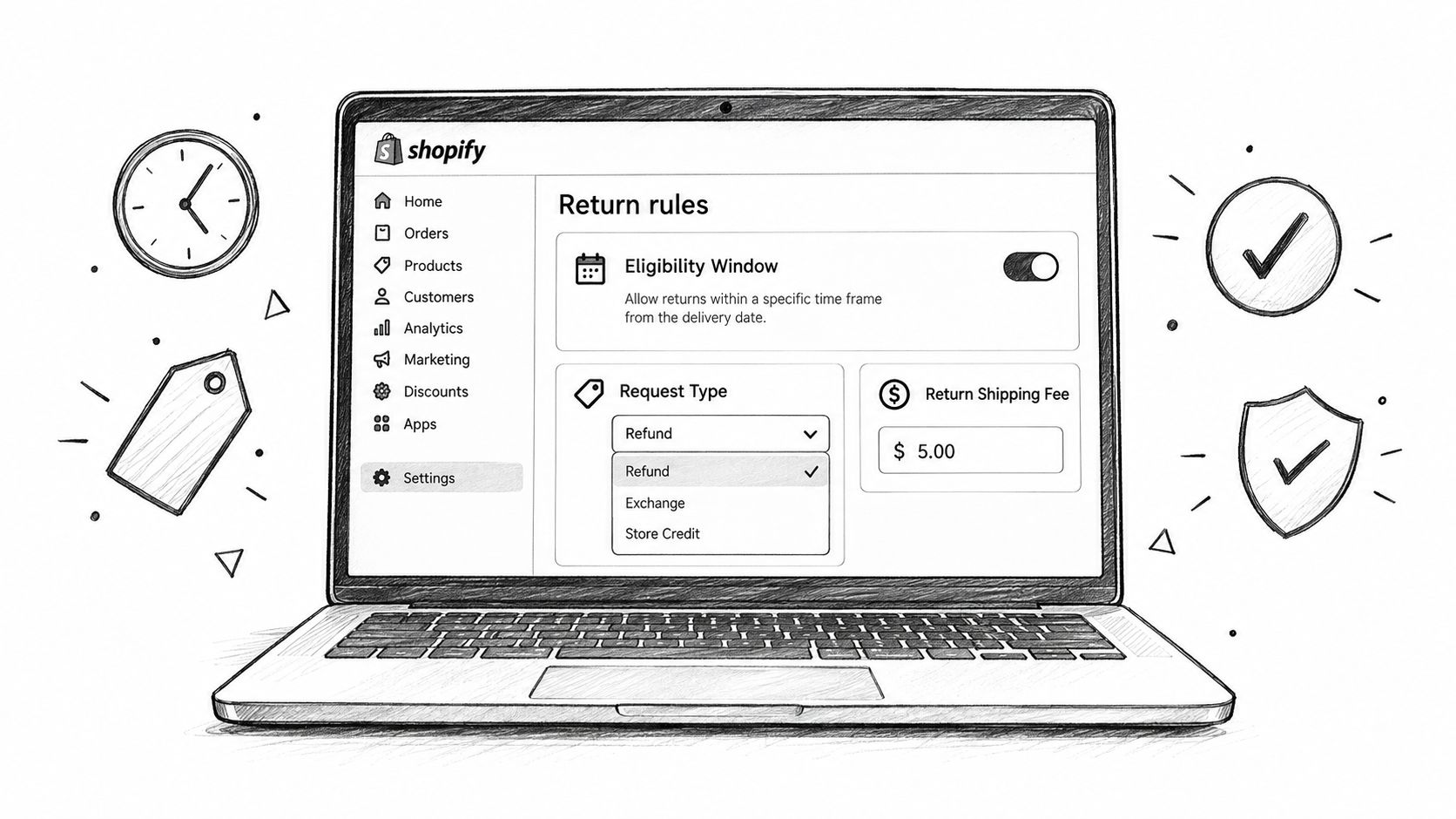
Open the return settings with the policy beside you. Configure the request types first, then define which products or collections qualify, how long the window remains open, and what the customer pays. Treat each setting as an operational rule, not a display preference.
A workable configuration usually separates three decisions:
- Resolution: Decide whether the request can lead to a refund, exchange, store credit, or a combination.
- Cost allocation: Specify whether return shipping is absorbed, charged directly, or deducted from the refund.
- Approval path: Set routine cases to automatic handling only when the product, value, condition, and customer history make that safe.
The most common error appears in a mixed cart. One order may contain an eligible garment, a final-sale item, and a digital download. Shopify evaluates eligibility at the line-item level, so the presence of one eligible product shouldn't cause the whole order to qualify. Your customer-facing copy must make that distinction visible, or customers will interpret a partial approval as a broken promise.
Use automatic approval for low-risk, easily inspected products where the policy is unambiguous. Reserve manual review for high-value goods, final-sale exceptions, suspected abuse, damaged-item claims, or cases where the requested resolution could create fulfillment exposure. Every manual approval adds staff work, and the operational burden becomes noticeable when routine cases aren't separated from genuine exceptions.
Test rules at the line-item level
Bundles deserve special attention. If a bundle inherits the strictest rule from one component, an otherwise valid exchange can be blocked. Decide whether the bundle returns as a complete unit, whether individual components can be returned, and how inventory is restored after inspection.
Approval rules also need an operational owner. Support can review customer context, operations can validate fulfillment status, and finance can define refund thresholds. Don't let all three teams edit the same rules without a change log. A small configuration change can alter eligibility, labels, refund timing, and inventory behavior at once.
Document the expected outcome for each exception. For example, a customer may be allowed to submit a request but receive a manual review rather than an automatic label. That distinction keeps the interface helpful without turning the portal into an unrestricted refund mechanism.
Designing the Customer Return Journey
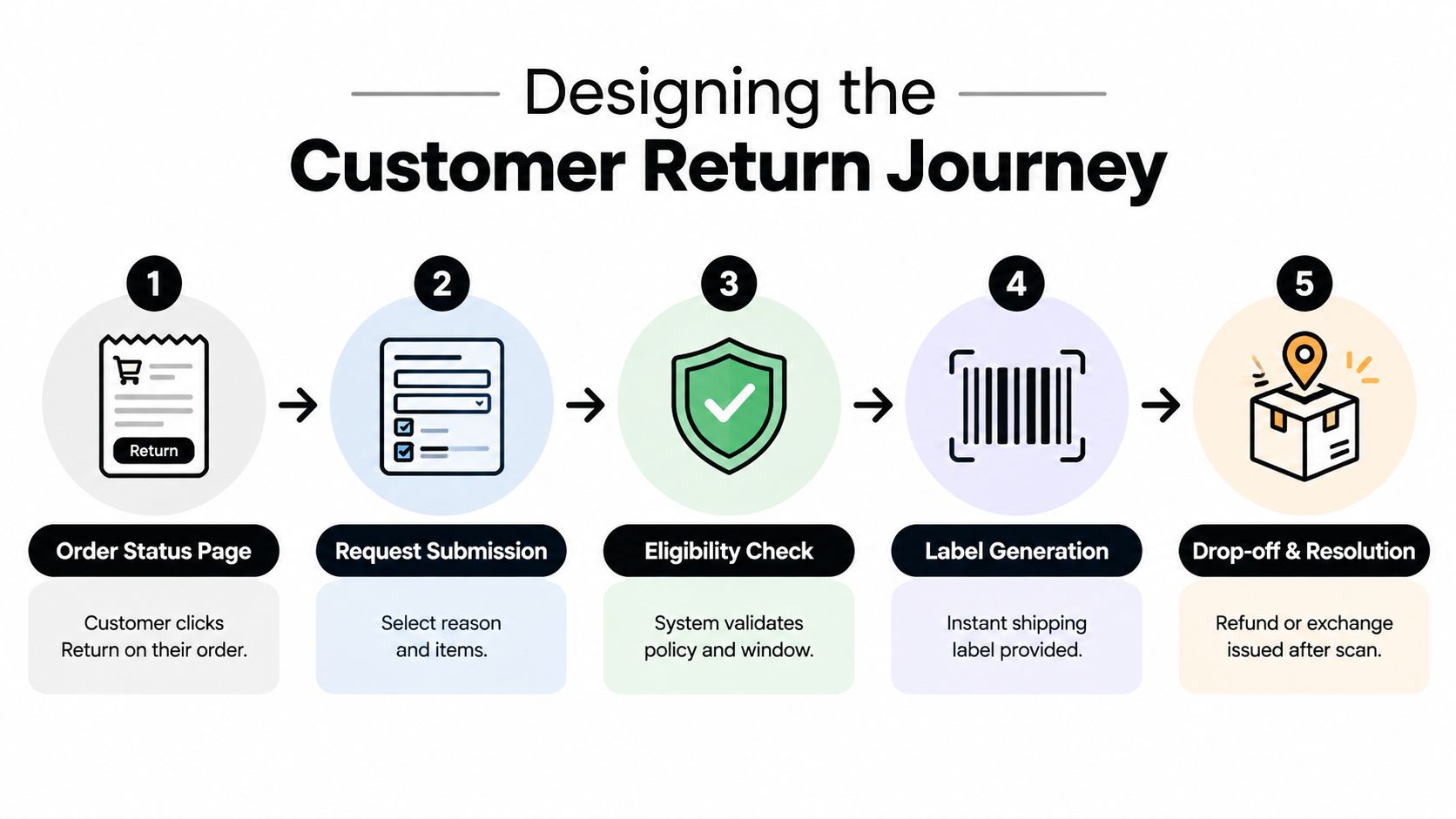
The customer should encounter the return option where they already go to check the original order. Shopify's order status page and customer account provide that context, so the process doesn't begin with an unfamiliar form or a support email. A clear button should lead to a short request flow that identifies the order, eligible line items, policy outcome, and next action.
Keep the front end decisive
The first screen should answer a basic question, “What can I return from this order?” Show eligible items clearly and explain exclusions beside the item, not buried in a policy link. If the request is outside the window, say what happened and offer the appropriate support path. A generic error creates more contact than a precise explanation.
The reason selector should collect useful information without turning the customer into an auditor. Use practical choices such as wrong size, changed mind, damaged, defective, or not as described. Add a short optional note when the reason needs context. These codes become operational data later, so avoid a long list of overlapping options that produces inconsistent reporting.
Customers commonly abandon the journey at three points:
- Eligibility errors: The system rejects a line without explaining the policy or separating eligible products.
- Label download: The customer receives instructions but can't find the label, carrier details, or drop-off requirement.
- Exchange selection: The portal offers an exchange without showing reliable size, color, or replacement inventory.
Put the exchange option before the refund option when preserving the sale is important, but don't make the customer fight for a refund. A useful exchange screen shows what can ship, when it can ship, and what happens if the replacement costs more or less. If inventory isn't current, offer a clear manual path rather than presenting an unavailable variant.
A strong post-purchase experience can also support build lasting loyalty in ecommerce, because customers judge the brand by how it handles the correction, not only by how the original order performed. For merchants refining the wider account experience, this customer self-service portal guide provides useful context for keeping post-purchase actions in one customer-facing location.
Approval starts the back-office workflow
The return request is only the beginning. As soon as a return is approved, assign responsibility for the label and define the carrier or drop-off method. Make the status visible to both the customer and the team, then tie the expected refund event to a real milestone, such as a carrier scan, receipt, or inspection.
If an order still has an active edit, address change, or cancellation review, hold the original fulfillment. Shipping while the order is changing creates avoidable errors, especially when the customer has corrected a variant or address. The hold should release only after the edit is settled or declined, and the order record should remain the system of record throughout.
When the returned item arrives, inspection needs a disposition rule:
- Sellable: Return it to available inventory at the correct location.
- Quarantine: Hold it for quality review, repackaging, repair, or a decision about resale.
- Write off: Move it to a damages, customer-remorse, or other controlled category when it can't return to sellable stock.
The warehouse should record that disposition once, in the system that controls inventory. If Shopify and a 3PL both maintain stock for the same SKU, a manual adjustment in only one location can create an inaccurate promise to the next customer.
Treat exchanges as fulfillment events
An exchange isn't merely a different refund button. It creates a replacement obligation. Decide whether the replacement becomes a new order, a linked fulfillment, or an adjustment to the existing order, and make sure the relationship remains visible to support and finance.
If the replacement ships before the original item arrives, the merchant carries more risk. Confirm the customer eligibility, payment status, and stock reservation before releasing it. If the exchange requires an additional payment, collect it through the approved Shopify workflow rather than relying on an informal support link. If the replacement costs less, define how the balance is handled before the customer submits the request.
Three mistakes appear repeatedly in live operations:
- Shipping the replacement before the financial condition is settled.
- Counting the returned unit as available inventory before inspection.
- Updating Shopify while the 3PL or another sales channel retains the old stock state.
Test the journey before launch with final-sale products, expired windows, bundles, partial shipments, and guest orders. Run both a refund and an exchange, cancel a request, scan a label, and verify the customer-facing status after each transition. A portal isn't ready because the happy path works. It's ready when the team knows exactly what happens when a rule, inventory record, or shipment doesn't match expectations.
Metrics That Prove the Program Is Working
A returns program needs more than a count of requests. The useful dashboard connects customer behavior to operational effort and retained value. Start with the reason code, then follow the request through approval, shipment, receipt, inspection, and final resolution.
Track return rate by reason, exchange share, time to approve, time to refund, and net revenue retained per dollar refunded. A high exchange rate can look positive while hiding costly replacement shipping, repeated exchanges, or low-margin items that shouldn't receive an incentive. A low refund time can also be misleading if the warehouse is skipping inspection and releasing questionable inventory.
Ringly's research roundup reports that returns-related tickets can fall by up to 80% when proactive status updates are layered onto a self-serve experience. It also cites a customer preference gap, with 81% of customers wanting self-service options while only about 48% of retailers providing a portal. Those figures are directional benchmarks, not a forecast for your store. Use your own baseline to determine whether the new flow is reducing contact without increasing fulfillment mistakes.
| Metric | Definition | Average Range | Target After 90 Days |
|---|---|---|---|
| Return rate by reason | Returned units or requests grouped by the selected reason | Establish your store baseline by product and reason | A reliable reason-code trend that identifies fixable product or policy issues |
| Exchange share | Exchanges divided by eligible return requests | Ringly cites 15% to 20% for average stores and 30% to 40% for top-performing stores, in its operational returns benchmark | Improve from baseline without sacrificing margin or customer choice |
| Time to approve | Time from request submission to approval or decline | Measure separately for automatic and manual paths | Routine requests move promptly, exceptions remain governed |
| Time to refund | Time from the defined refund trigger to completed refund | Segment by scan, receipt, and inspection policy | Customers receive a clear, consistent expectation |
| Net revenue retained per dollar refunded | Revenue preserved through exchanges or credit after return costs | Calculate from your own order and finance data | Positive movement alongside stable service and inventory accuracy |
Roll out in controlled stages
Days 1 to 30: Finalize the public policy, choose native Shopify or an app, configure eligibility and fees, and soft-launch on one product line or a controlled traffic segment. The operations owner should approve rules, support should test customer copy, and the warehouse should confirm labels and receiving steps.
Days 31 to 60: Activate exchanges, tune approval thresholds, connect the 3PL or warehouse process, and collect reason-code data. Review rejected requests and manual escalations weekly. The goal isn't maximum automation. It's a clean boundary between routine requests and cases that need judgment.
Days 61 to 90: Expand across the catalog, add store-credit incentives or instant exchanges only where the economics support them, and schedule a monthly review of the metrics above. Assign one owner for policy, one for fulfillment, one for support reporting, and one for finance reconciliation.
Before launch, confirm that every owner has signed off on the customer copy, eligibility rules, label path, fulfillment holds, inspection dispositions, refund trigger, exchange inventory, and reporting definitions. Shopify self-serve returns become an operational asset when those pieces agree. If they don't, the portal moves confusion from the inbox to a different screen.
Mayra Apps helps Shopify merchants connect self-serve post-purchase actions with controlled order edits, address changes, cancellation deflection, store credit, and fulfillment holds while keeping Shopify as the system of record. Visit Mayra Apps to see how its post-purchase workflows can complement a governed returns operation.