
You can have clean checkout data and still spend your afternoon untangling the same mess, a customer moved apartments after placing the order, the label printed anyway, and now support is trying to save a package that's already headed to the wrong house. That's why address verification Shopify work can't stop at payment. The job is managing the whole address lifecycle, from entry to fulfillment to post-purchase edits, so a bad address doesn't turn into a reshipment, a delay, or a refund.
Table of Contents
- Understanding Native Shopify Address Validation
- Configuring Checkout Address Format Rules
- Navigating International Address Edge Cases
- Separating Shipping Logistics from Payment Risk
- Managing Post-Purchase Address Edits and Holds
- Building a Resilient Fulfillment Workflow
Understanding Native Shopify Address Validation
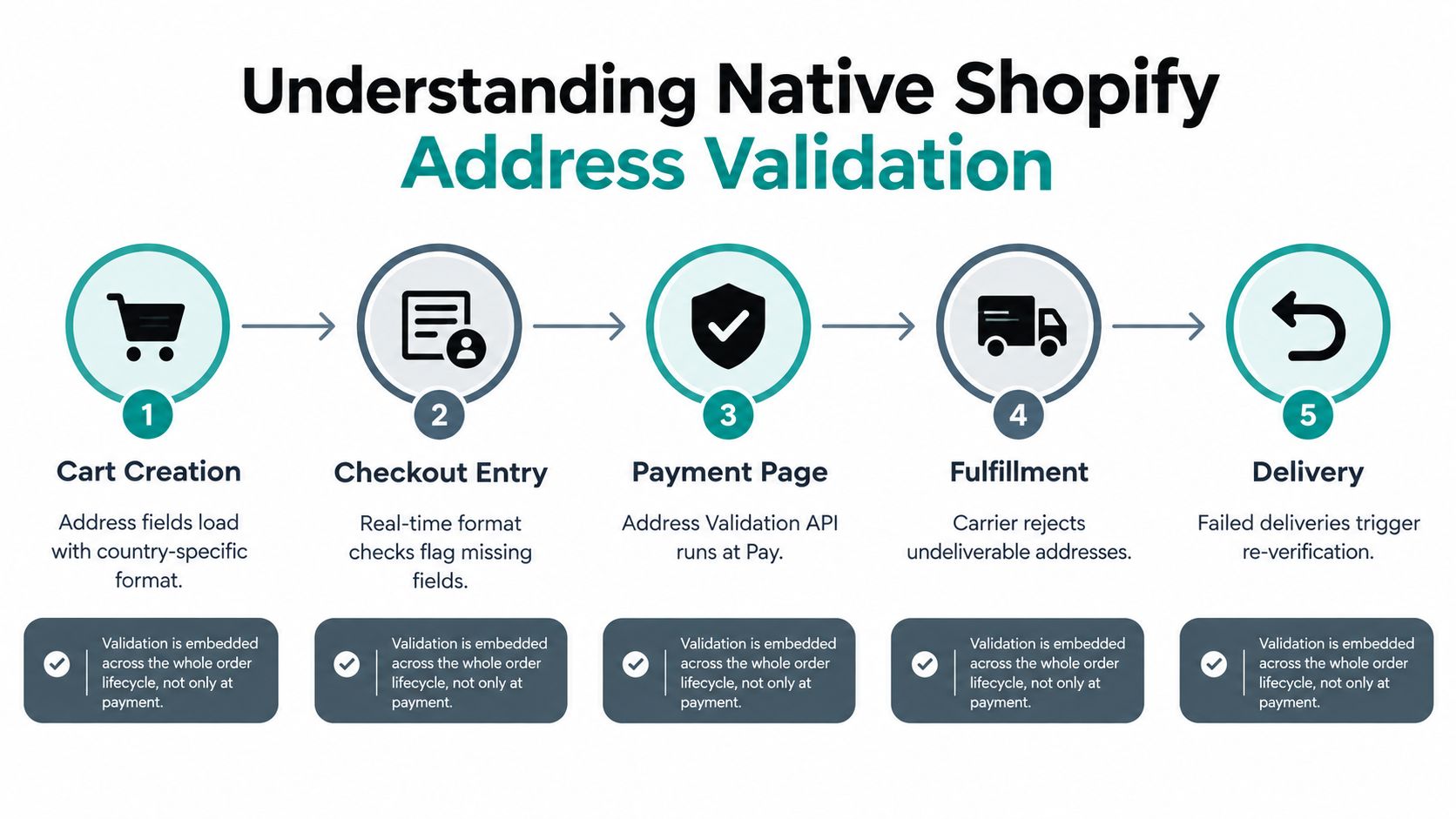
Shopify's native address verification is broader than most merchants realize. It doesn't just check an address when the buyer hits pay, it validates at several points in the order lifecycle, including online order placement, API-created orders, draft orders receiving a customer, fulfillment location updates, shipping label creation, and admin edits to customer addresses. Shopify also added a shipping-address validation-result field on July 1, 2024, which lets applications query whether an address has passed validation or hasn't been checked yet, and that's a meaningful shift from simple data entry toward a queryable operational state. Shopify's address validation documentation makes it clear that this is now part of the workflow, not a one-time checkout check.
Warning and error are not the same thing
That distinction matters in the warehouse. Shopify treats a warning as something that may still deliver late or fail, while an error is very likely to cause delayed or failed delivery. In other words, warnings deserve a human decision, errors usually need a correction before fulfillment continues. If you run post-purchase editing, that difference becomes your routing logic, because not every flagged address should be handled with the same urgency.
Practical rule: keep warnings visible to support and fulfillment, but reserve hard blocks for addresses that Shopify says are very likely to fail.
Administrators can accept Shopify's suggested address, correct it manually, or, for warnings only, mark the original address as valid. Shopify also supports emailing the customer for confirmation before changing an order address, which is a useful control when the buyer's note and the carrier suggestion don't line up. For teams building a stronger workflow, the point isn't just to catch an error. It's to preserve enough state that support, ops, and the customer can all see what happened.
For a deeper look at checkout behavior and related optimization work, this checkout optimization guide is useful context.
Configuring Checkout Address Format Rules
Checkout rules work best when they prevent bad data from entering the order in the first place. Shopify lets merchants validate shipping-address format before the order is placed, then validates again after the order is created, so you can catch missing fields early without relying on a manual review later. That matters when your support queue is full and your warehouse needs clean data the first time.
Use format rules to match how carriers read addresses
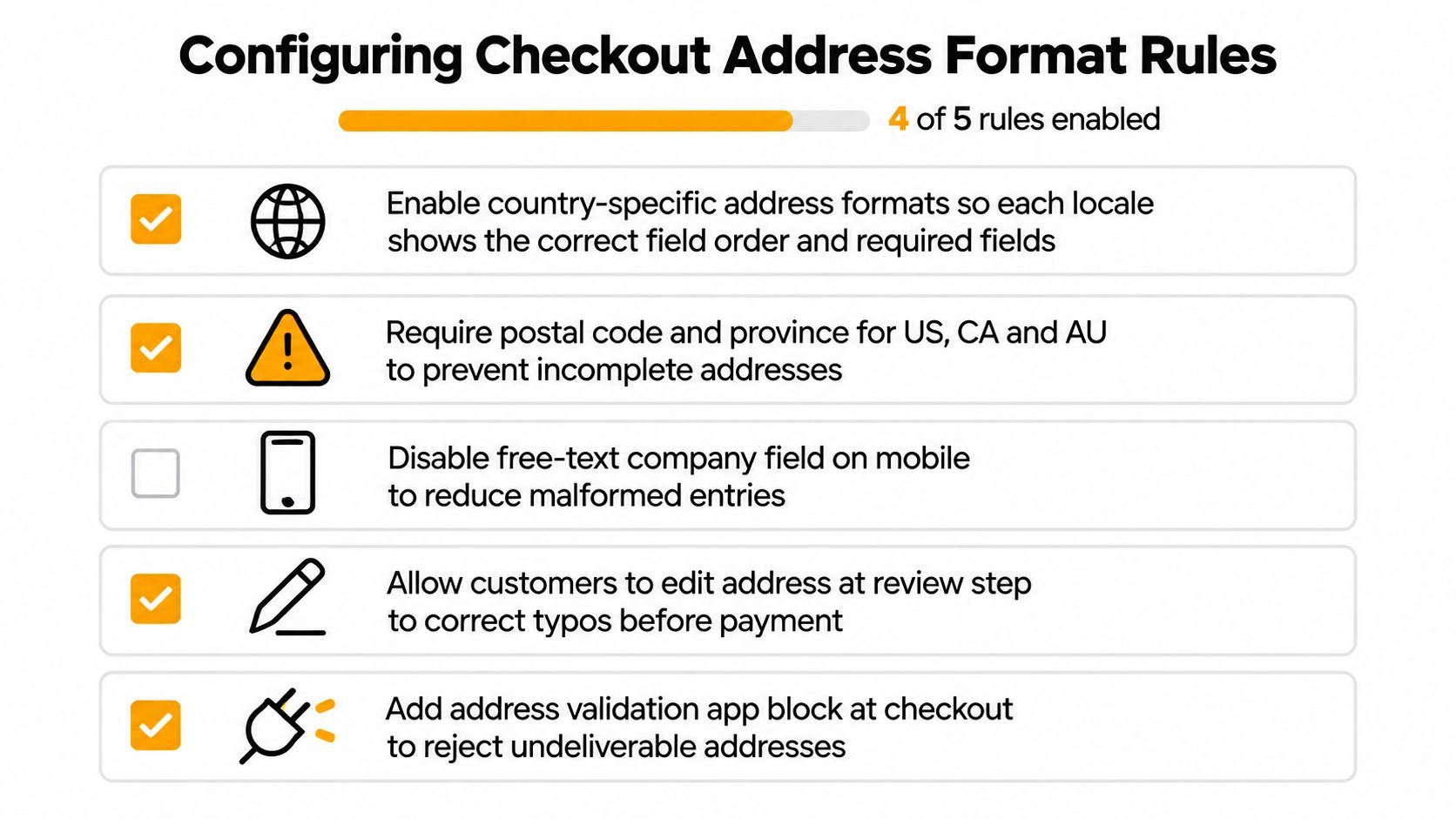
Shopify's checkout format validation can enforce market-specific rules, block address types such as diplomatic, military, parcel-locker, and PO-box addresses, and require or restrict ZIP and postal codes. It can also impose minimum or maximum character counts. That's useful when the carrier's system rejects a format that looks fine to the customer but won't survive label creation. Shopify's documentation also notes that these format rules currently target shipping addresses, not billing addresses, which keeps the checkout logic focused on delivery rather than payment identity. Shopify's address format validation guide shows the main knobs merchants can turn.
A good setup starts with the markets you serve. If certain destinations need province fields, postal codes, or stricter field ordering, configure those rules explicitly instead of assuming one global form will work everywhere. If your catalog includes restricted shipping destinations or carrier-sensitive address types, block them upfront and route exceptions into review rather than letting the order drift into fulfillment and fail there.
Don't over-tighten the form
The mistake I see most often is merchants making checkout so rigid that legitimate buyers get blocked. A rigid address form can be just as costly as an unchecked one, especially for international customers whose local formatting doesn't match your default assumptions. Mayra Apps is one option in this space for merchants who want order edits and address changes handled after purchase, but the core principle stays the same, let the customer enter a deliverable address without forcing unnecessary friction. If you also need broader logistics tooling, this Shopify fulfillment app overview gives useful operational context.
Navigating International Address Edge Cases
Global shipping breaks universal rules fast. Shopify's own guidance points merchants to country-specific postal tools like USPS, Canada Post, Royal Mail, La Poste, Poste Italiane, and An Post, and it notes that formatting must match the carrier's system. It also acknowledges that some countries do not use or require postal codes, which is exactly where rigid validation scripts start rejecting good orders for the wrong reason. This international shipping resource is a good companion if your brand sells across borders and wants to think about logistics beyond a domestic playbook.
Syntactic correctness is not the same as deliverability
That's the trap. A postal address can look valid on screen and still be undeliverable because the unit number is missing, the locality is formatted incorrectly, or the destination country handles rural delivery differently than your checkout form expects. The reverse happens too, a rigid rule can mark a legitimate address as invalid because it doesn't fit a template built for another market.
Risk-based handling works better than absolute pass or fail logic. Use soft confirmation when Shopify returns a warning, ask for explicit customer verification when apartment or unit details are missing, and tighten controls for high-value or restricted destinations where a failed shipment hurts more. Keep the original customer input on file so support and fraud teams can see the exact wording, especially when the carrier suggestion and the buyer's entry conflict.
Treat local conventions as data, not exceptions
International address handling gets better when operations teams stop treating every edge case as an anomaly. Local-script addresses, transliteration, rural delivery points, and territories all create patterns that need defined workflows, not one-off heroics from support. The right question isn't whether the address can be “fixed” in a universal sense. The question is whether your system can decide, by country and by risk, when to confirm, when to correct, and when to let a human choose.
Separating Shipping Logistics from Payment Risk
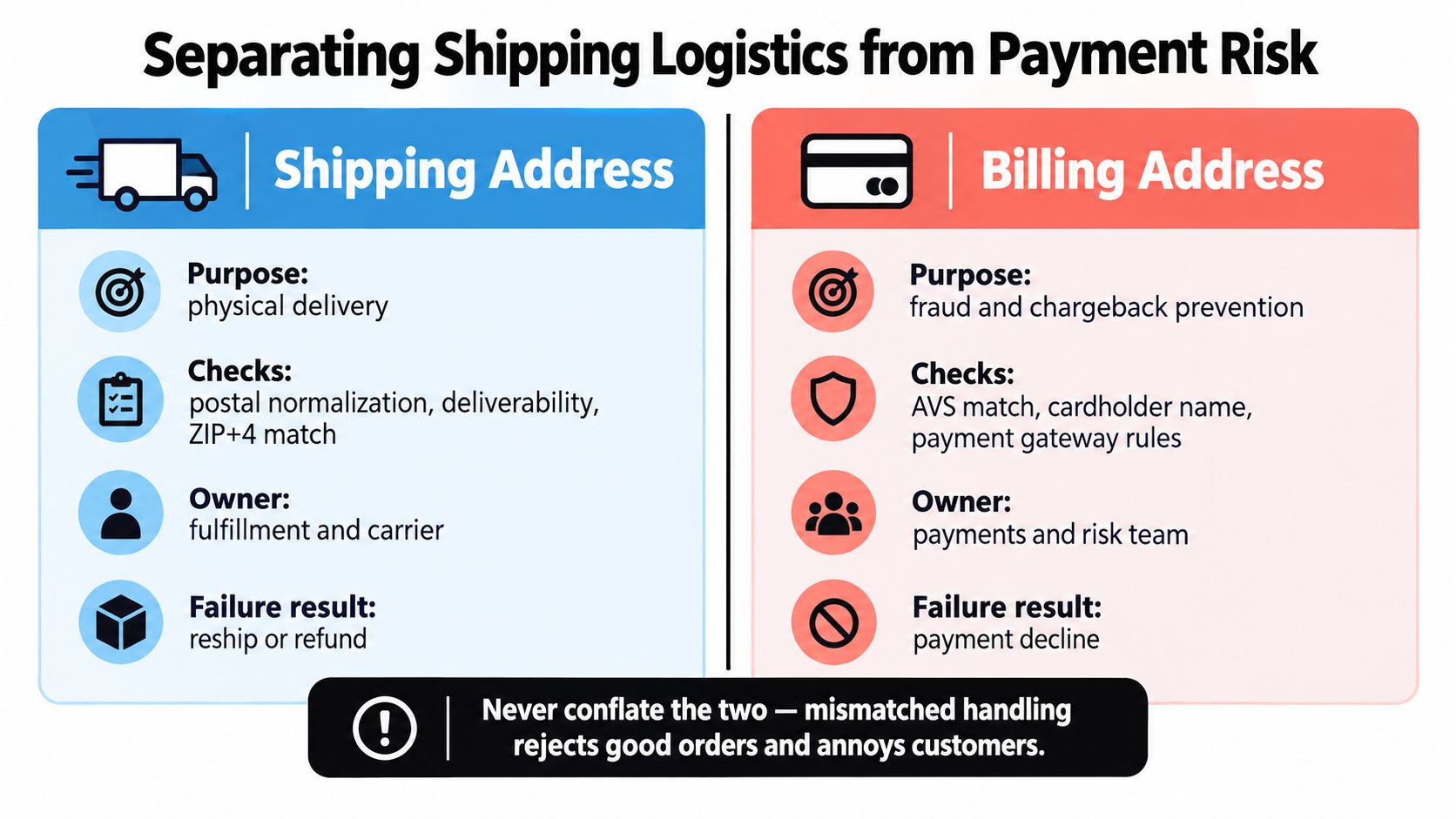
Shipping verification and payment verification solve different problems, and mixing them causes avoidable declines. USPS Verify API is built to correct common street errors, abbreviations, and missing information for U.S. shipping addresses, and it can return ZIP Code or ZIP+4 data. Separately, card Address Verification Service, or AVS, compares the billing street address and postal code submitted during payment with issuer records and returns an issuer response code. That's why a shipping problem should stay in logistics, while a billing mismatch belongs in the risk stack. Stripe's AVS overview is a useful reference for that separation.
Keep the workflows separate
USPS also restricts its Verify API to validating, completing, and correcting addresses captured through the merchant's own process, not sourcing new addresses for a database. That's an important boundary, because address normalization is about making a real delivery address usable, not inventing new customer data. AVS plays a different role, it helps flag higher fraud risk, but it shouldn't automatically reject every order because support varies by country and postal-code conventions differ.
For operations, the cleanest setup is simple. Revalidate any changed shipping address before fulfillment, keep the original and normalized versions for auditability, and route AVS anomalies into review while allowing low-risk shipping corrections to continue. That way, a valid delivery address doesn't get rejected just because the billing address differs, and a payment issue doesn't stall warehouse work that was otherwise ready to go.
Build routing, not one giant decision
The most useful systems create separate paths for separate problems. Shipping exceptions go to fulfillment, payment anomalies go to risk, and customer edits stay visible to both. If your team can see which workflow owns the issue, they can move faster without re-litigating the same order in three different inboxes.
Managing Post-Purchase Address Edits and Holds
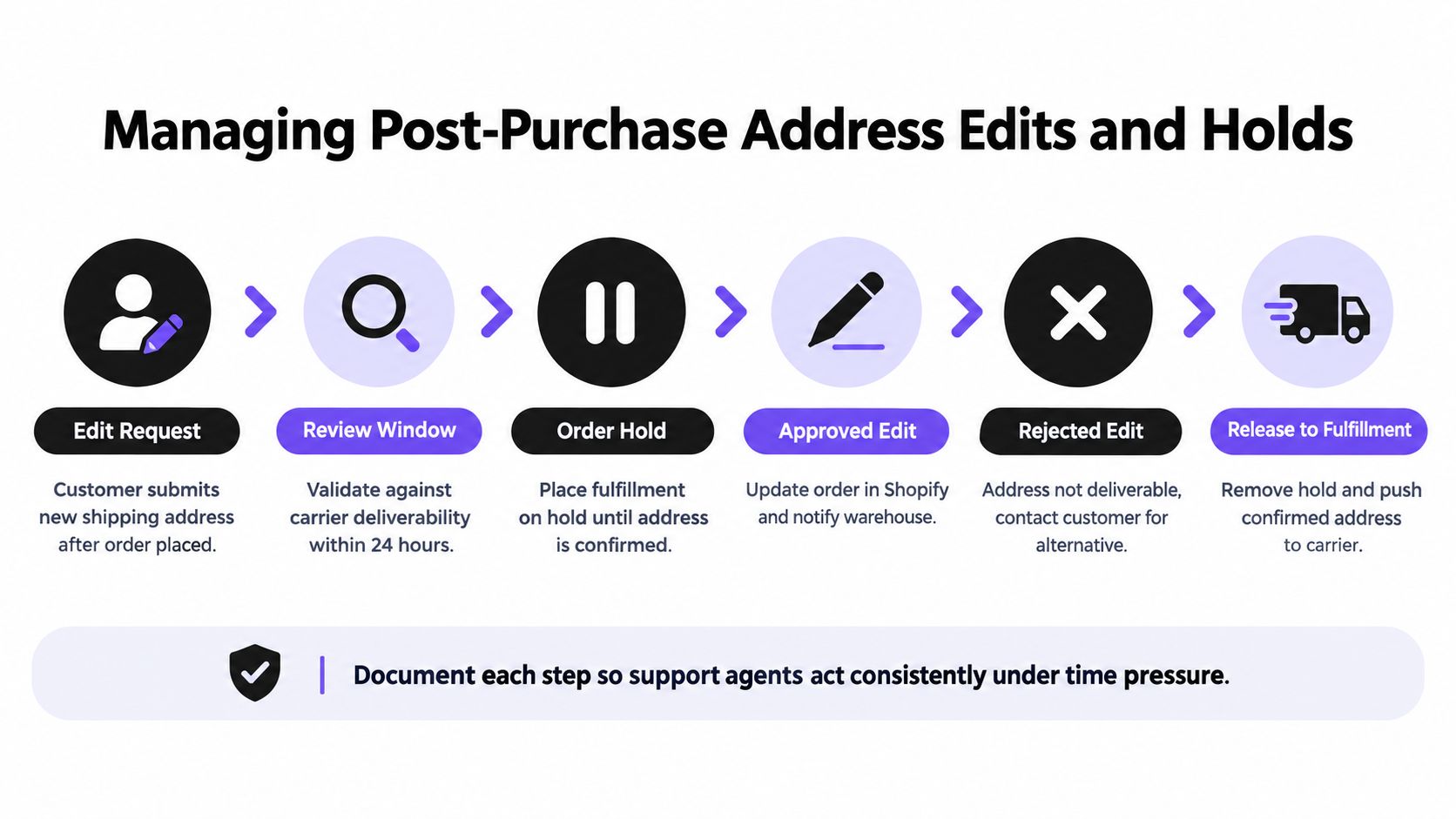
A buyer doesn't stop needing address changes just because the order is placed. People move, typo their street name, forget an apartment number, or realize they shipped to work instead of home, and that's where self-serve editing matters more than another checkout rule. Mayra Apps lets customers edit eligible orders, including shipping addresses, through the Shopify customer account or order status page, and it keeps the Shopify admin as the system of record while merchant rules control what can be changed. The update shipping address guide is relevant if you're mapping the customer-facing flow.
Hold the order before the warehouse touches it
The critical safeguard is a fulfillment hold. If the address is under review or actively changing, the shipment should pause until the edit is confirmed and written back cleanly. That prevents the worst version of this problem, where the warehouse prints the old address while support is still trying to correct the new one.
Merchant-controlled approval rules make the workflow safer. You can decide which orders are eligible for editing, how long the edit window stays open, and which changes need manual approval before the system releases the package. That's especially useful when a customer asks for a last-minute address change after fulfillment has already started, because the business decision should be explicit, not hidden in a support note.
Make the customer do the easy part
Self-serve edits reduce back-and-forth when the correction is straightforward. The customer enters the new address, the system validates it, and support only steps in if the destination is questionable or the order is already too far along in the warehouse queue. If you want a broader picture of integrations that can sit around this workflow, this ecommerce integration platform article is a solid companion read.
Keep the customer-facing edit simple, then let the ops rules do the hard work in the background.
Building a Resilient Fulfillment Workflow
Address verification works when it behaves like a workflow, not a plugin. The strongest setup starts at checkout, continues through carrier validation, and stays alive after purchase through edits, holds, and audit trails. That matters because every package that ships correctly on the first attempt saves your team from a support ticket, a reprint, or a resend.
Preserve the original input
Original customer-entered data should stay visible even after normalization. That gives support, fraud, and fulfillment the context they need when a buyer disputes what was changed or when carrier data disagrees with the checkout form. It also makes reviews faster, because agents can compare the buyer's wording, the normalized address, and the carrier suggestion without digging through unrelated notes.
Design for the failure modes you already see
The best verification setup doesn't just chase bad data, it anticipates where your operation breaks. Label creation failures, delivery delays, and reshipments usually come from the same predictable gaps, so your workflow should route each one to the right owner instead of letting them pile into one general support queue. That's where post-purchase editing, fulfillment holds, and carrier-specific checks earn their keep.
If you're looking at outsourcing or layering support around these exceptions, the discussion around scaling back-office support without overhead is worth a read. The goal isn't to move work away from your team blindly, it's to make sure the right exceptions are reviewed without turning address changes into a constant interruption.
A resilient system keeps customer experience and operational control in the same lane. It lets simple corrections move fast, holds risky edits before they create a shipping mistake, and preserves enough data for auditability when something still goes wrong.
If you want a post-purchase workflow that lets customers fix shipping details without flooding support or risking a bad label, take a look at Mayra Apps. It's built for Shopify order editing with merchant-controlled rules, fulfillment holds, and account-based address changes, which makes it a practical fit for teams managing address verification at the order level.