
In 2025, the National Retail Federation benchmark cited 19.3% of online sales as returned, while 2026 industry summaries converge near 20% overall. That means roughly one in five online orders can come back, turning Shopify returns management into a core operations issue rather than a policy page hidden in the footer. The same benchmark set puts projected U.S. retail returns at $849.9 billion in 2025, down from $890 billion in 2024, so even small operational improvements affect a substantial flow of merchandise. (Richpanel's ecommerce return-rate benchmark)
A working system has four jobs. It needs a policy that triggers consistent decisions, a self-serve path that deflects routine requests, pre-fulfillment controls that prevent avoidable returns, and reporting that shows whether those controls are working. Shopify's customer accounts, order status page, and admin now expose many of the levers that merchants once handled entirely through apps, but those levers still need careful rules and fulfillment discipline.
Table of Contents
- Why Returns Management Is Now a Core Shopify Operations Problem
- Building a Returns Policy That Actually Does Work
- Self-Serve Returns and Cancellations in Customer Accounts
- Stopping Returns With Pre-Fulfillment Order Edits
- Cancel Deflection and Store Credit Save Offers
- Choosing Between Native Rules and Returns Apps
- Metrics and Analytics That Prove Returns Are Improving
- A 30-Day Rollout Plan and Final Checklist
Why Returns Management Is Now a Core Shopify Operations Problem
A return doesn't start when a parcel reaches the warehouse. It often starts earlier, when a shopper realizes they chose the wrong variant, entered an outdated address, placed a duplicate order, or changed their mind before fulfillment. If the only available response is a support ticket followed by a refund, the merchant has missed the cheapest intervention point.
That's why Shopify returns management should be designed as a post-purchase control system, not as a collection of labels and policy clauses. The return itself is the visible event. The operational causes sit across customer accounts, order edits, payment settlement, fulfillment timing, inventory reservations, and support workflows.
Shopify's own surfaces now make this approach practical. New customer accounts and the order status page can expose self-serve returns and cancellations, per-fulfillment tracking, refund status, and outstanding balances. When an order is edited to add items, the customer can also be prompted to pay the balance from the order status page. (Shopify's customer-account customization options)
The four jobs an ops team must solve
- Write executable rules: Define eligibility, timing, fees, exchanges, and credit in settings that staff and customers can use.
- Deflect routine service work: Let shoppers request eligible returns or cancellations without asking an agent to copy information between email, admin, and a warehouse system.
- Correct orders before shipment: Give customers a controlled way to fix sizes, variants, quantities, addresses, and add-ons while the order remains unfulfilled.
- Measure avoided loss: Track edits, saves, exchanges, refunds, resolution time, and support deflection by reason and product.
A policy PDF still matters for transparency, but it doesn't hold inventory, pause fulfillment, collect a balance, or update the original order record. Those actions need to happen where the work happens, inside Shopify and connected post-purchase tools. For a broader view of practical interventions, the eCommerce return strategies from ECORN are useful as a planning reference, especially when you're connecting customer experience changes with warehouse decisions.
Practical rule: Treat every return reason as a possible earlier intervention. “Wrong size” may call for a better product-page explanation, while “ordered by mistake” may be solved by a short edit window.
Building a Returns Policy That Actually Does Work
A Shopify returns policy isn't just a paragraph describing goodwill. In the platform, rules determine whether a customer can request a return, which items qualify, whether fees apply, and whether the workflow points toward a refund, exchange, or store credit.
Start with the customer promise, then configure the matching operational rule. A generic “returns accepted within 30 days” statement is incomplete if final-sale products, bundles, opened beauty items, digital goods, international orders, or partially fulfilled orders follow different treatment.
Configure the decision points
Set the return window and define when the clock starts. A delivered-order window may suit apparel, while a product that needs installation or inspection may require a different internal process. Mark final-sale and clearance items explicitly, rather than relying on support agents to remember exceptions.
Fees need equal precision. Decide whether the customer pays return shipping, whether a restocking fee applies, and whether an agent can waive it. For example, an apparel merchant might publish a 30-day window with a $7 restocking fee waived above $80. That can work if the fee is visible before purchase and the warehouse can identify the qualifying order without manual interpretation.
Exchange-first routing needs a customer-friendly reason. A beauty brand may steer an eligible customer toward an exchange before a refund, but it shouldn't force an exchange where hygiene, safety, or product availability makes that outcome unsuitable. A furniture store may use store credit with a 10 percent bonus to preserve purchasing power, provided the incentive is clearly explained and financially approved.
| Policy Toggle | What It Controls | Operational Effect |
|---|---|---|
| Return window | How long an eligible customer can request a return | Prevents inconsistent deadline decisions |
| Final-sale exclusions | Which products or collections cannot be returned | Removes unsupported items from self-serve eligibility |
| Return-shipping responsibility | Whether the merchant or customer bears label cost | Changes margin exposure and customer instructions |
| Restocking fee | Whether an eligible return carries a deduction | Gives the team a consistent cost-recovery rule |
| Store-credit priority | Whether credit is presented before a cash refund | Creates a retention option without hiding the refund path |
| Exchange routing | Whether customers can choose a replacement item | Converts a correction into a continued order where appropriate |
Shopify's order-management guidance also separates the financial effects of edits. Removing items or reducing quantity creates a refund obligation, while adding items or increasing quantity creates an amount-to-collect workflow. The admin supports refunds, invoices, checkout payment, return rules, and self-serve returns, so the order remains the system of truth rather than splitting the record across spreadsheets. (Shopify's order-management documentation)
Bundles, digital products, and partially fulfilled orders deserve a test order before launch. Eligibility isn't merely a customer-facing question. It determines what your warehouse can receive, what inventory can be returned to stock, and whether the payment team can settle the change cleanly.
Self-Serve Returns and Cancellations in Customer Accounts
Self-serve works only when the customer reaches a complete decision path. Turning on customer accounts without configuring eligibility, instructions, and approval behavior creates a polished dead end that still sends shoppers to support.
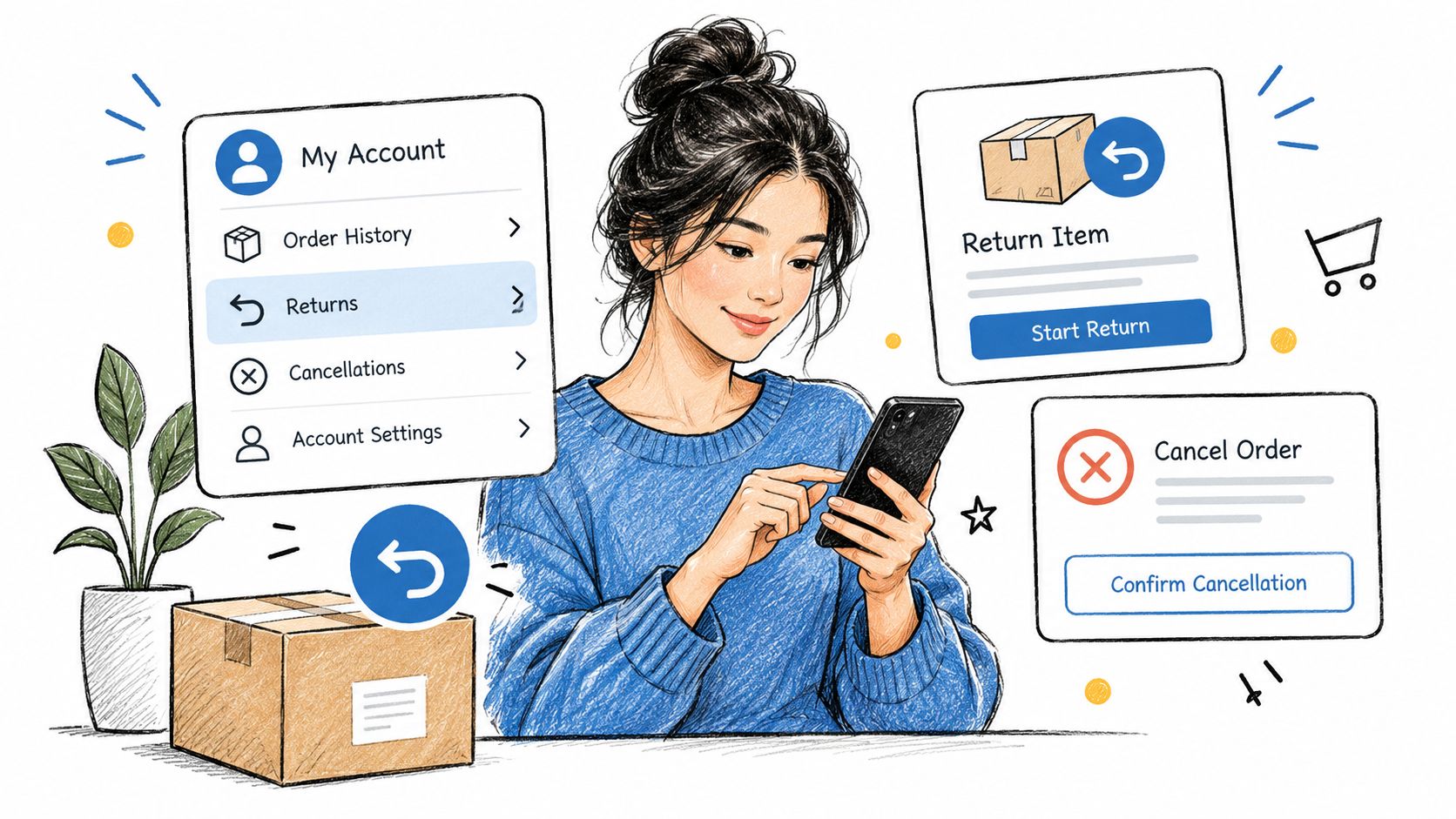
The main shopper-facing surfaces are new customer accounts and the order status page. An eligible order can expose a return request action, allowing the customer to select items, provide a reason, and follow the configured route. Depending on the rules, the outcome may be a refund, an exchange, or another approved resolution.
What the shopper can do
A useful account flow should answer three questions immediately:
- What is eligible: Show the relevant item and explain why an action is or isn't available.
- What happens next: Present return instructions, label handling, approval status, and refund or exchange expectations.
- What choice is available: Let the customer select the applicable item and resolution without writing a long explanation to an agent.
Cancellations belong beside returns, but they aren't the same event. A cancellation request usually concerns an unfulfilled order and must be evaluated against fulfillment timing. A return concerns goods that may already be delivered or in transit, so it carries different inventory and payment consequences.
What the merchant still controls
The merchant decides the return window, eligible products, approval requirements, shipping-label provider, fees, and final refund action. The team also needs a clear escalation path for exceptions, such as a damaged product, a partially fulfilled order, or a request outside the configured window.
Shopify describes self-serve returns and cancellations as a way to reduce processing time, with customers able to request returns for delivered items or cancel unfulfilled items from the same account area. (Shopify's self-serve returns management guidance)
Before launch, place a test order, log in as the customer, request a return, submit a cancellation, and inspect the resulting admin record. Check that the customer sees per-fulfillment tracking, outstanding balances, and refund status where relevant. A self-serve button isn't a workflow until the warehouse, finance, and support teams know what it creates.
Stopping Returns With Pre-Fulfillment Order Edits
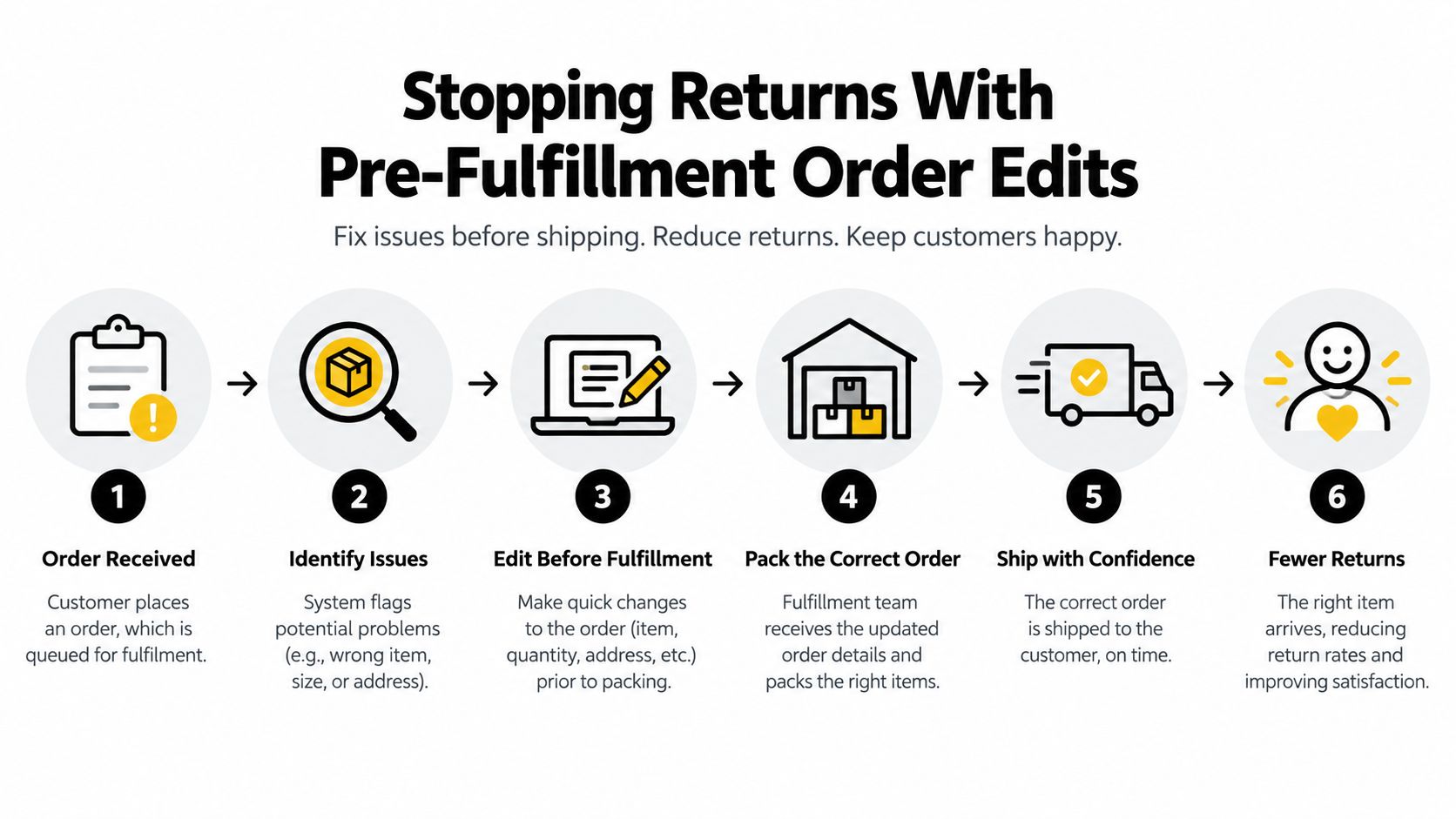
The cheapest return is often the one prevented before picking begins. An unfulfilled order is still a correction opportunity, not merely a warehouse queue entry. If a shopper selected the wrong size or needs to fix the shipping address, editing the original order can avoid a shipment, a reverse movement, a refund, and a second customer-service interaction.
Shopify's admin order-edit flow supports changes such as adding or removing items and adjusting quantities. In a controlled post-purchase experience, merchants can also allow variant swaps, address corrections, gift-note changes, or an order-level fulfillment hold. The hold matters because an edit that finishes after the picker has already packed the parcel is no longer a reliable prevention mechanism.
Understand the payment branch
The financial workflow changes depending on the direction of the edit:
- Adding items or increasing quantity: Shopify creates an amount-to-collect path. The customer may pay through an invoice or checkout from the order status page.
- Removing items or reducing quantity: Shopify creates a refund obligation. The team must verify whether payment was captured and whether the correct action is a refund or a void.
- Swapping a variant: The order value may stay the same, but inventory reservations still need to be released and reallocated. A variant that looks available to the customer may not be available at the fulfillment location.
- Changing an address: The edit may prevent a delivery failure, but it can also affect shipping rates, taxes, carrier eligibility, and fraud review.
Set the edit window around your actual fulfillment cutoff, not an arbitrary promise. High-value orders may need an address lock or manual approval, while low-risk orders can support more flexible changes. Exclude products, collections, destinations, or fulfillment states that create warehouse or compliance problems.
A fulfillment hold is operational protection, not a customer perk. Use it only while the order can still be changed, then release it deliberately.
For teams formalizing these dependencies, a complete guide to order fulfillment automation helps frame the relationship between order events, inventory, payment, and warehouse execution. Merchants evaluating the Shopify-specific mechanics can also review Shopify order editing as a practical implementation reference.
A manual hold can save an order that no return policy could have rescued. It gives the team time to verify the edit, settle the payment difference, and release the correct fulfillment instruction. Without that pause, the system may preserve the wrong SKU perfectly.
Cancel Deflection and Store Credit Save Offers
A cancellation request shouldn't arrive as an unstructured email that an agent answers from instinct. Capture the reason first, then decide whether a save offer is appropriate, whether the order should be edited, or whether cancellation should proceed without friction.
The sequence matters. Present save, then edit, then cancel. A duplicate-order reason may call for removing one line or canceling one order. A wrong-size reason may be better handled as a variant change. A budget concern may justify a store-credit offer, but only if the economics and customer relationship support it.
Build the decision logic
Use reason codes that expose the underlying action:
- SKU or variant mismatch: Offer a swap if the correct item is available.
- Duplicate order: Cancel the duplicate cleanly and release its inventory reservation.
- Budget concern: Present store credit only when the customer accepts the trade-off.
- Gift or timing change: Offer an address or item edit if fulfillment hasn't started.
- General change of mind: Allow a straightforward cancellation without forcing a retention pitch.
Store credit can preserve future purchasing power, but it shouldn't become a barrier to a legitimate refund. Conditional offers can be based on order value, customer tier, product margin, or inventory position. Keep the copy specific. Tell the customer what they receive, when it becomes available, and what happens if they decline.
| Cancel Trigger | Save Offer | Fallback Action |
|---|---|---|
| Wrong variant | Swap to an available variant | Cancel or refund the affected item |
| Duplicate order | Remove the duplicate or keep one order | Cancel the duplicate and release stock |
| Budget concern | Offer merchant-approved store credit | Process the cancellation cleanly |
| Delivery timing | Change address or hold the order if possible | Cancel before fulfillment begins |
| General change of mind | Optional credit offer with clear terms | Complete the cancellation without pressure |
Shopify supports cancellation of unfulfilled orders, but the payment treatment needs review against the order's actual authorization and capture state. A team shouldn't assume that every cancellation uses the same void, refund, or balance process. Confirm the settlement result in admin and communicate a realistic timeline.
Inventory is another edge case. Once a cancellation succeeds, reserved stock must become available according to the store's inventory process before another order can consume it. If fulfillment has already picked the order, cancellation may require a warehouse intervention rather than a simple button click.
For implementation ideas around credit-based retention, see this guide to Shopify store credit. The important principle is simple: offer a save when it solves the customer's stated problem, not because the workflow needs a higher save count.
Choosing Between Native Rules and Returns Apps
Native Shopify rules are a strong fit for a straightforward policy. They become less comfortable when the business needs conditional incentives, warehouse routing, detailed reason analysis, or different behavior by SKU and customer context.
The comparison should focus on operational decisions, not feature-count marketing. Ask whether the tool can keep the original order record authoritative, pause or coordinate fulfillment, generate the required label, and show the team why a customer chose refund instead of exchange.
| Capability | Native Rules | Returns App |
|---|---|---|
| Basic eligibility windows | Suitable for clear, store-wide policies | Usually configurable with more conditions |
| Product or collection exceptions | Available for common exclusions | Better suited to complex SKU-level rules |
| Restocking fees | Supports standard fee logic | Can add conditional or incentive-based behavior |
| Exchange-first routing | Possible for supported workflows | Often offers richer exchange journeys |
| Store-credit bonuses | Limited by native configuration | More likely to support dynamic incentives |
| Automated approvals | Works for defined rule sets | Better for thresholds, fraud signals, and routing |
| Return-label generation | Supports core label workflows | May connect multiple carriers or routing rules |
| Analytics | Useful for basic store reporting | Typically deeper by reason, product, and outcome |
| Customer experience | Customer-account and order-status integration | Native extension or off-site portal, depending on app |
When native rules are enough
Stay native when your policy has a single return window, predictable exclusions, uncomplicated fees, and a manageable approval process. Native surfaces also reduce integration points and keep staff close to Shopify admin.
The experience can suffer if an app sends shoppers to an off-site portal that looks unrelated to the store. A returns portal inside customer accounts generally creates a more continuous journey, but the theme-app extension, account configuration, and tracking events still need testing across devices.
When an app earns its place
Consider an app when you need SKU-level rules, BOPIS-specific handling, warehouse routing, branded exchanges, dynamic credit incentives, custom reason trees, or richer analytics. An app also makes sense when approval decisions depend on conditions that native rules can't express cleanly.
Don't add software to compensate for an unclear policy. First document the decision tree, then identify the branch Shopify can't execute. Merchants comparing order changes with dedicated return workflows may find order editing versus returns apps on Shopify useful for separating prevention from post-delivery processing.
Keep payment disputes separate from ordinary returns. Your customer-service flow should align with documented chargeback best practices, especially when a cancellation, refund, or delivery issue could otherwise become a payment dispute.
Mayra Apps is one option for the pre-fulfillment layer. Its Mayra Order Edit and Upsell App places self-serve edits and cancellation-deflection offers in customer accounts and the order status page, with merchant-controlled windows, eligibility, fulfillment holds, and Shopify-based settlement. Evaluate it alongside returns software rather than treating order editing as a replacement for inspection, labels, or warehouse disposition.
Metrics and Analytics That Prove Returns Are Improving
A lower refund total doesn't automatically mean the operation improved. Sales volume, product mix, delivery timing, and policy changes can move the number. Track the actions that explain the outcome, then segment them by SKU, channel, fulfillment state, and reason.
Use your own baseline. Industry benchmarks can provide context, but the useful question is whether this week's wrong-size requests, edits, exchanges, and resolution times are moving in the right direction for your store.
The operating scorecard
- Return rate: Calculate gross returned units divided by fulfilled units. Keep the denominator consistent and separate orders from units.
- Exchange rate: Measure exchanges as a share of initiated returns. A rising rate may indicate that the portal is presenting a relevant alternative, but review customer satisfaction and inventory impact too.
- Edit rate: Count orders changed before fulfillment, then classify the edit as quantity, variant, address, removal, or addition.
- Save rate: Divide edits plus successful cancellation-deflection saves by triggered cancellation or change requests.
- Ticket-avoidance rate: Estimate support requests prevented per 1,000 orders by comparing self-serve actions with the prior support baseline. Label this as an estimate, not a directly observed fact.
- Time to resolution: Measure the interval from request to completed refund, exchange, edit, or cancellation.
Shopify admin exports provide the order and financial records. Customer-account events and post-purchase apps can add the interaction data that native order reporting may not contain. Join those records with a stable order identifier, then preserve the original reason code even if the customer changes the item.
Make the dashboard actionable
A Shopify-built dashboard or a lightweight Looker Studio report is enough to start. Put the current period beside the previous comparable period, then add filters for product, collection, sales channel, destination, fulfillment status, and reason.
Review the dashboard with support and fulfillment together. If edits rise but address errors remain unchanged, the edit flow may be hidden or too late. If exchanges rise while a particular variant goes out of stock, the retention rule is working against inventory availability. Metrics should lead to a rule change, a product-page change, or a warehouse action.
A 30-Day Rollout Plan and Final Checklist
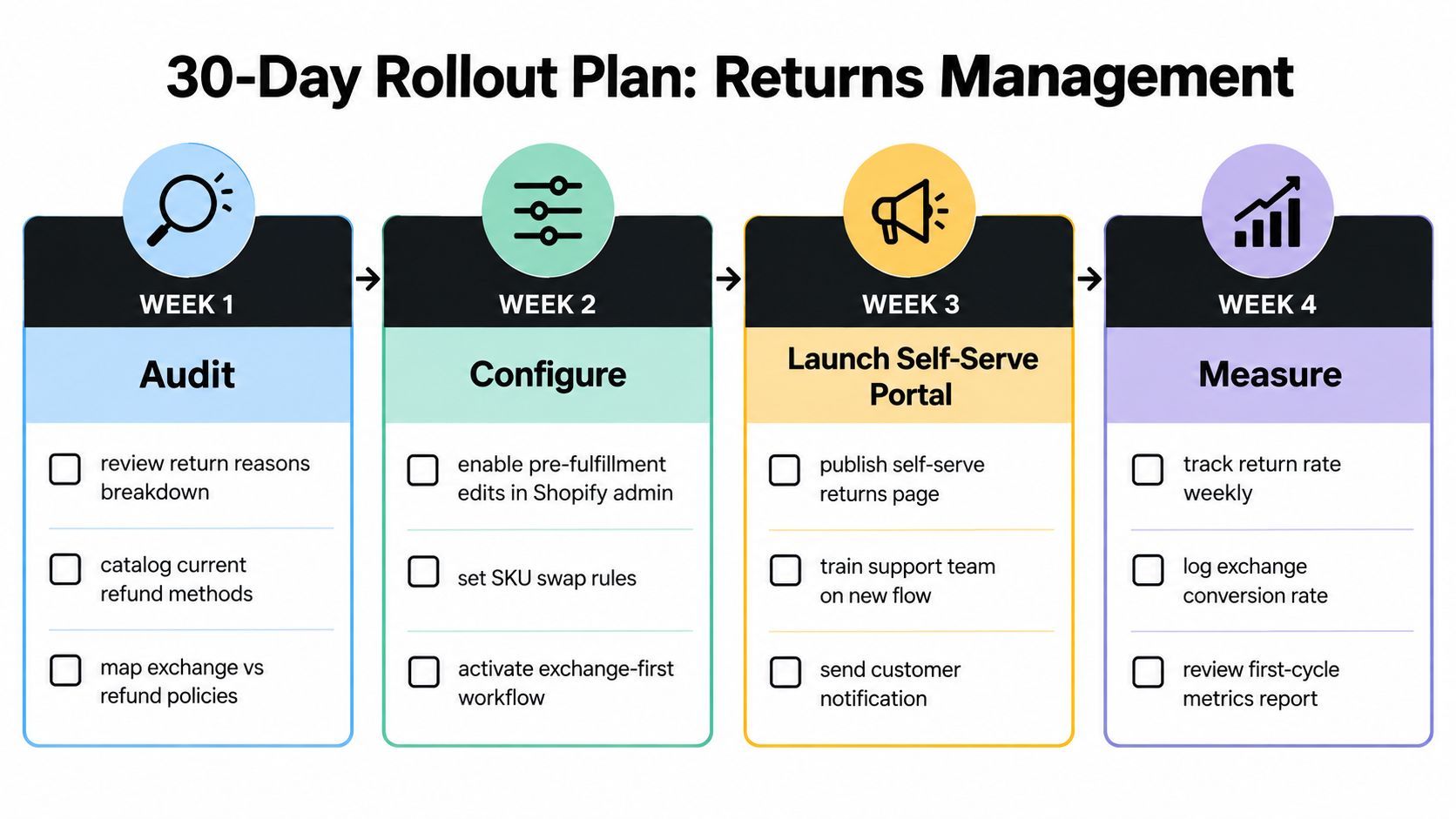
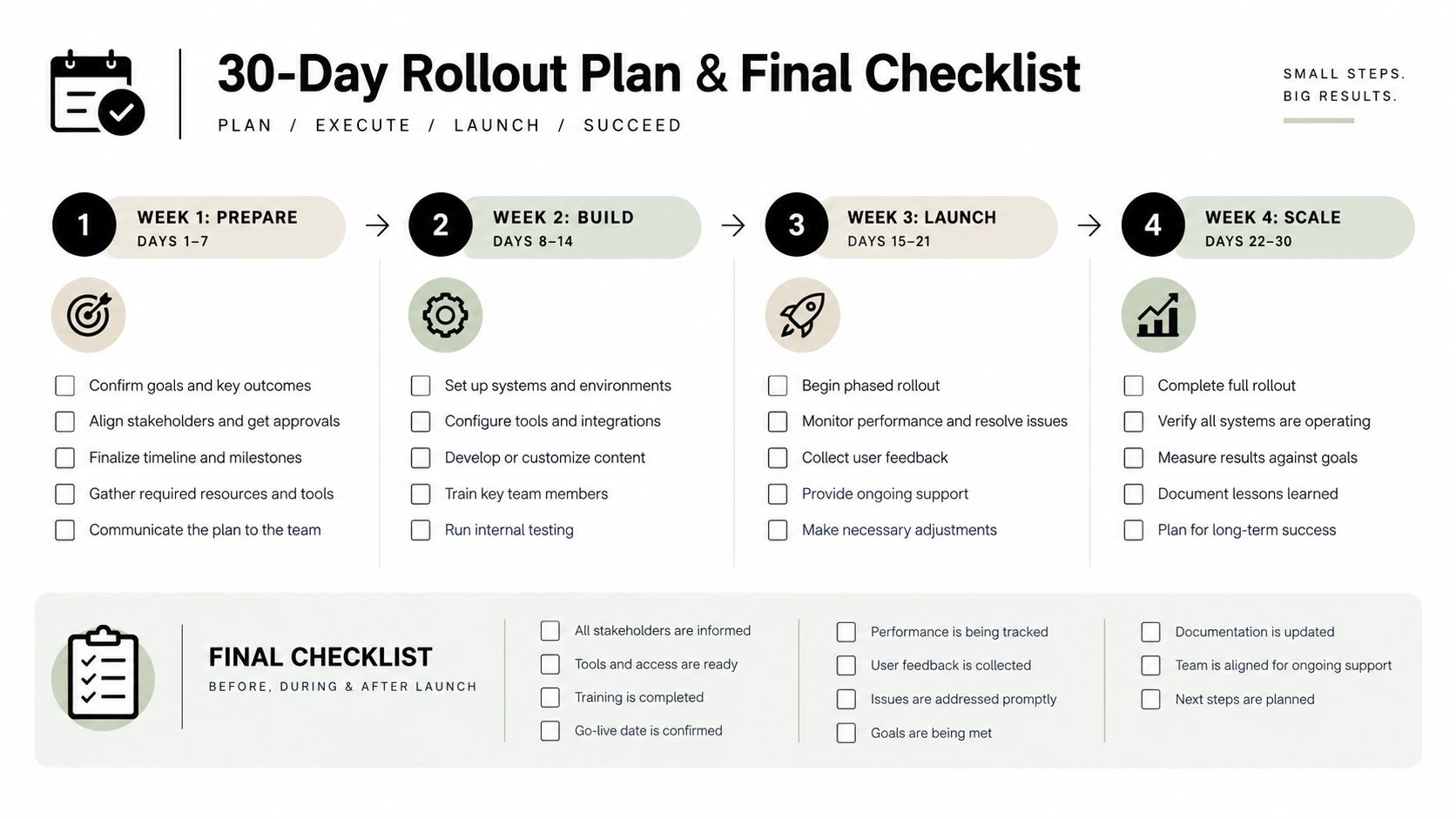
Run the rollout in four controlled stages. Don't launch every incentive before you know which reasons are driving requests or whether the warehouse can honor a fulfillment hold.
Week one is the audit. Export recent return and cancellation reasons, list every refund method, and compare the written policy with the rules staff apply in practice. Identify which products need final-sale treatment, which cases should lead to exchanges, and where store credit is appropriate.
Week two is configuration. Set the native return rules, customer-account settings, order status page actions, approval requirements, fees, and exclusions. Test delivered, unfulfilled, partially fulfilled, bundled, and final-sale orders before publishing the flow.
Week three is prevention. Enable only the order-edit capabilities the operation can support. Define the edit cutoff, variant and quantity permissions, address restrictions, fulfillment-hold behavior, and cancellation sequence. Write save-offer copy that names the customer's benefit and makes the clean cancellation path visible.
Week four is measurement. Connect order, return, cancellation, edit, and support data. Review the first cycle with operations, finance, warehouse, and support, then adjust rules based on exchange behavior, saved orders, ticket avoidance, refund timing, and inventory outcomes.
Final launch checklist
- Policy fields: Window, eligible items, final-sale exclusions, fees, condition rules, exchange path, credit terms, and refund timing are explicit.
- Self-serve surfaces: Customer accounts and the order status page show the correct action for each fulfillment state.
- Edit governance: Cutoff hours, permitted changes, approval thresholds, exclusions, and fulfillment holds are tested.
- Cancel handling: Reason capture, save offers, edit fallback, cancellation, payment settlement, and inventory release are documented.
- Dashboard links: Return, exchange, edit, save, ticket-avoidance, and resolution metrics can be reviewed by the responsible teams.
- Review cadence: One weekly meeting assigns an owner to each trend and records the rule or product change that follows.
Ship the policy, watch the dashboard, and adjust weekly. A returns system becomes reliable when the customer can solve common problems quickly, the warehouse receives an accurate order, and the Shopify admin still tells the complete story.
Mayra Apps helps Shopify merchants manage post-purchase changes inside customer accounts and the order status page, including self-serve edits, fulfillment holds, cancellation deflection, and store-credit offers. Visit Mayra Apps to see whether its order-editing and upsell workflow fits your returns-prevention program.