
A mature Shopify store can average $607 per order, while a typical early-stage store may sit around $85 to $95. That gap changes the advice completely. A merchant selling low-ticket products to first-time buyers shouldn't copy the basket strategy of a mature operator with repeat customers, a wider catalog, and established shipping incentives. The useful question isn't “What's the Shopify average order value?” It's “What's a healthy AOV for this store, this category, and this customer mix?”
Average order value, or AOV, is a directional measure, not a trophy for the dashboard. A larger basket can increase revenue, but only if customers still convert and the additional items generate enough margin to justify fulfillment and promotional costs. The tactics below focus on the mechanics that tend to move the number, the shortcuts that look impressive in reporting but hurt the business, and the measurement discipline needed to tell the difference.
Table of Contents
- What Shopify Average Order Value Measures
- Benchmarks That Matter for Shopify Stores in 2026
- Why Most Shopify AOV Tactics Underperform
- Using Order Edits and One-Click Upsells to Lift AOV
- Matching AOV Tactics to Your Store Profile
- Tracking AOV the Right Way in Shopify Reports
- A Short AOV Plan You Can Ship This Week
What Shopify Average Order Value Measures
Average order value is the average dollar amount per order during a selected period. Shopify's order reports calculate it from gross sales, excluding adjustments, minus discounts, divided by the number of orders. Shopify treats post-purchase edits, exchanges, and returns as adjustments, so the report view you choose affects period-to-period comparisons. Review Shopify's order reports documentation before setting the sales definition your team will use consistently.
The formula is simple:
AOV = eligible order value ÷ number of orders
If a store records 200 orders totaling $14,000, its AOV is $70. That figure shows the average contribution from each completed order in the selected period. It does not identify the cause of the result. Higher conversion, increased prices, more products per basket, or a larger share of returning customers can all produce a different AOV.
Use AOV as a directional lever
AOV reflects several commercial forces at once. Conversion rate determines how many visitors become customers. Basket size shows how many products each customer buys, while pricing mix determines the value of those products. Raising prices or pushing a more expensive offer can increase AOV while reducing completed checkouts.
Review AOV beside conversion rate, revenue per visitor, discount exposure, and contribution margin. An offer that adds items to the basket may still weaken the business if shoppers abandon checkout or if the extra products create fulfillment and promotional costs that exceed their margin.
Shopify presents AOV as a storewide figure by default. That makes it useful for detecting broad movement, but it can conceal differences between first and repeat orders, paid and organic traffic, high-volume and low-volume products, and customers exposed to an upsell versus those who were not.
Practical rule: Treat storewide AOV as an alarm bell, not a diagnosis. Segment the orders before changing the offer.
Keep gross and net views separate
Gross AOV reflects the value used in the selected gross-sales calculation. Net AOV reflects what remains after the adjustments and deductions included in the reporting view. A rising gross AOV can coexist with returns, exchanges, discounts, or fulfillment costs that reduce the commercial result.
| Component | Included in AOV | Effect on calculation |
|---|---|---|
| Gross sales | Included in Shopify's gross-sales calculation | Raises the numerator before applicable deductions |
| Discounts | Deducted in the stated Shopify calculation | Lowers eligible order value |
| Post-purchase adjustments | Accounted for according to the selected report view | Can change the reported order value |
| Number of orders | Used as the denominator | More orders dilute or increase the average depending on their value |
Choose one definition, document it, and use the same report view for every test. Otherwise, a pricing or upsell experiment can change the reporting method instead of changing customer behavior.
Benchmarks That Matter for Shopify Stores in 2026
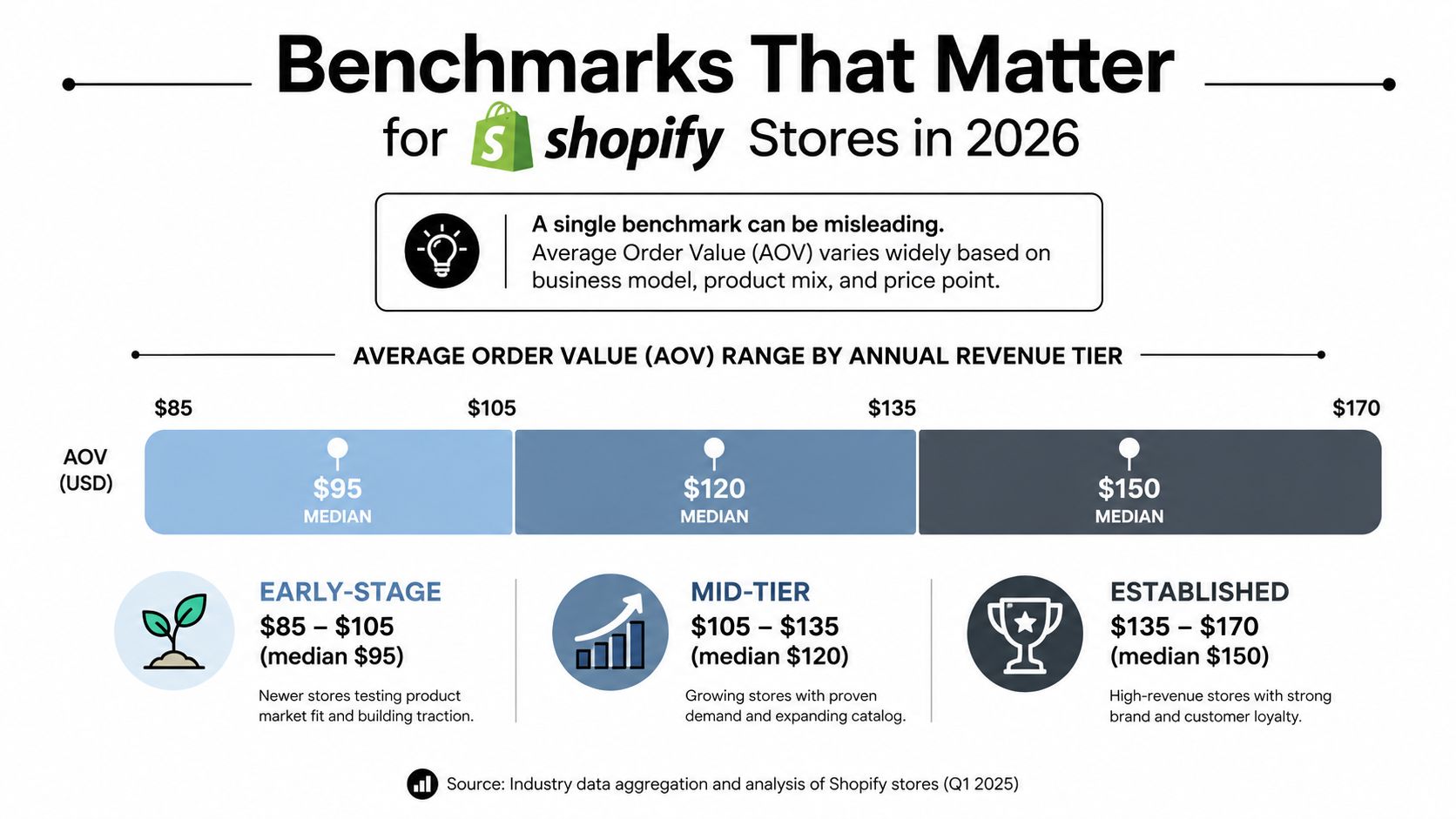
A single benchmark is almost useless without a store profile. Independent benchmark data covering 2,934 active Shopify stores reported a median AOV of $312, a cohort mean of $607, and a middle 50% ranging from $159 to $667. The benchmark was updated through June 2026, and its wide spread shows why the mean can be a poor target for an individual merchant. See the 2026 Shopify ecommerce AOV benchmark for the underlying cohort context.
A separate benchmark frames the early-stage situation differently. It places the typical Shopify store around $85 to $95, with stores recording 1,000 or more monthly orders averaging $95 to $130 or more, while the bottom 20% sit below $50. The source also emphasizes that size, maturity, and category materially change the number, which is why Shopify AOV benchmarks by merchant maturity are more useful than a universal target.
Why the spread is so wide
Mature stores often have broader catalogs, more repeat purchasing, and shipping incentives that make larger baskets easier to justify. Early-stage stores commonly depend on a narrow product range and single-item first purchases. Those are structural differences, not evidence that one operator is merchandising correctly and the other isn't.
The median and mean also answer different questions. A few high-value orders can pull the mean upward, making a store's average appear healthier than the typical customer's basket. That's why the $312 median and $607 cohort mean should be read together rather than treated as competing targets.
Run a quick self-test before installing another upsell app:
- Compare your AOV with your category peers: Use the benchmark as context, not as a target.
- Check the median order: If a small group of large orders drives the average, improve the common basket first.
- Review your catalog depth: If shoppers usually buy one item because there are few logical complements, range and bundling deserve attention.
- Match the tactic to maturity: Early-stage merchants need low-friction basket expansion, while mature stores can support more conditional offers.
If your AOV sits below the relevant category median, start with clear product relationships and a sensible bundle. Fancy personalization won't compensate for an assortment that gives customers no convincing second item to add.
Why Most Shopify AOV Tactics Underperform
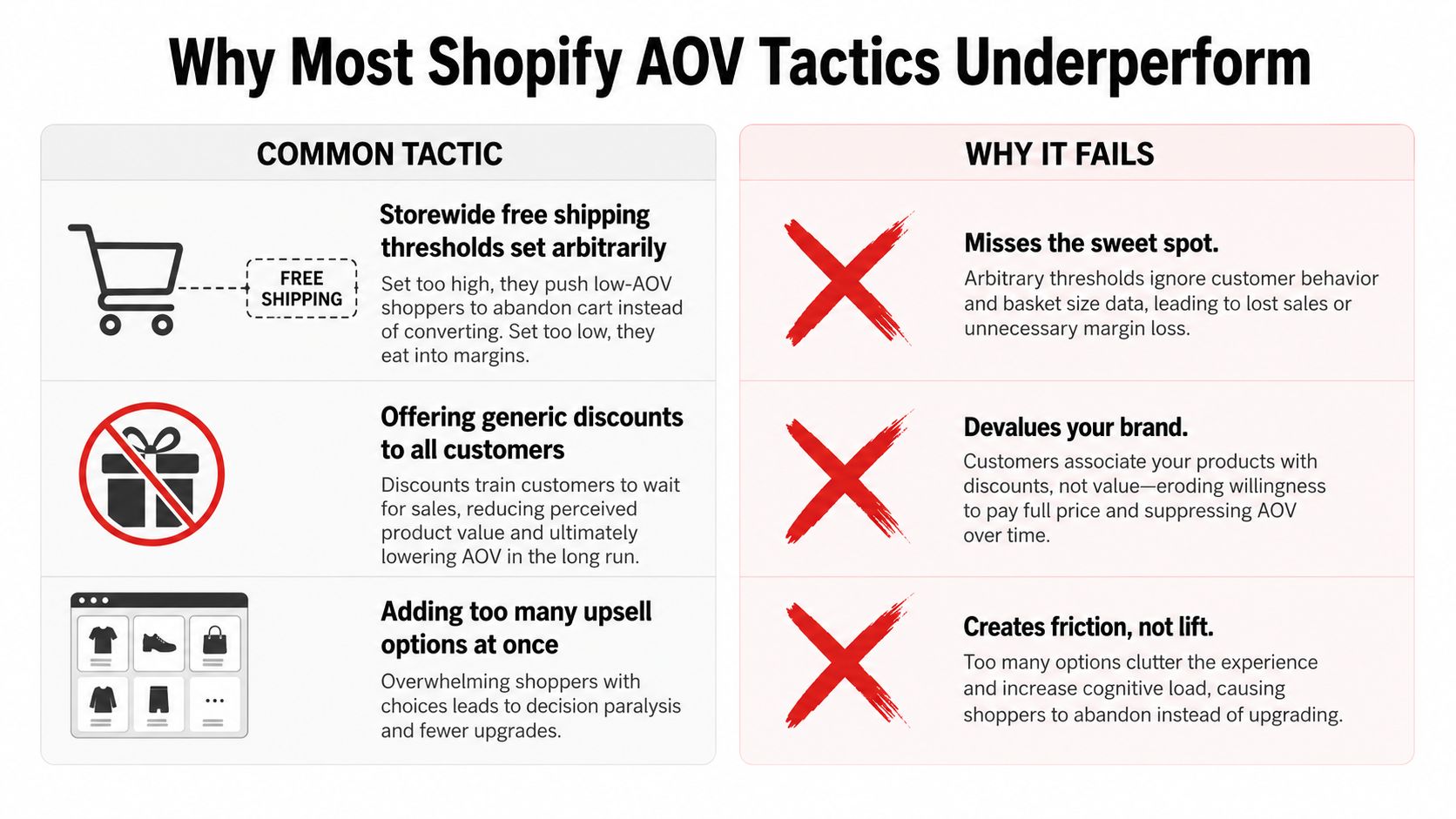
The most common AOV advice is also the easiest to deploy badly. A storewide free-shipping threshold set without regard to the existing basket can push low-AOV shoppers to abandon instead of encouraging them to add a product. The survivors may have a higher AOV, but the store can lose completed orders and total revenue.
Generic bundles create a different problem. They can increase the dollar value of an order while discounting products customers would have purchased anyway. If the bundle's margin falls faster than the basket value rises, contribution per order gets worse. The slide deck shows a larger AOV, but the finance report tells a different story.
Measure the offer, not just the attachment
Post-purchase upsells can also receive too much credit. An attach rate tells you how many customers accepted an offer, but it doesn't tell you whether those customers would have bought the product through another path. Without checkout conversion, exposed versus unexposed groups, and margin data, an upsell can claim revenue that wasn't incremental.
The operational fix is conditional merchandising. Mature operators rarely show every customer the same threshold, bundle, or add-on. They adjust the offer based on what the shopper has already done.
- New versus returning customers: New buyers may need one relevant complement, while returning customers may respond to a replenishment or category expansion offer.
- Traffic source: Email traffic with strong product intent can tolerate a different offer from broad paid social traffic.
- Basket size: A shopper who is close to a shipping threshold needs a different message from someone who has already built a substantial order.
- Product context: Accessories and completion items usually make stronger recommendations than unrelated bestsellers.
Blanket rules are convenient to configure, but conditional rules are easier to defend financially.
Segmenting doesn't mean building a complex personalization system on day one. Start with a few meaningful cohorts and one offer per cohort. Compare completed orders, conversion rate, discount cost, and contribution margin. If a tactic only works for one segment, keep it there rather than forcing a storewide rollout.
The best AOV experiment often looks less ambitious than the worst one. A single relevant add-on shown at the right moment can outperform a busy bundle builder, because shoppers understand the recommendation immediately and don't have to reconstruct the value proposition.
Using Order Edits and One-Click Upsells to Lift AOV
Post-purchase order edits create a useful window after the original conversion. The customer has already completed the main purchase, so an add-on offer doesn't compete with the initial checkout in the same way as an aggressive pre-purchase interruption. The workflow still needs careful controls, because fulfillment, invoicing, and inventory can turn a simple upsell into an operational problem.
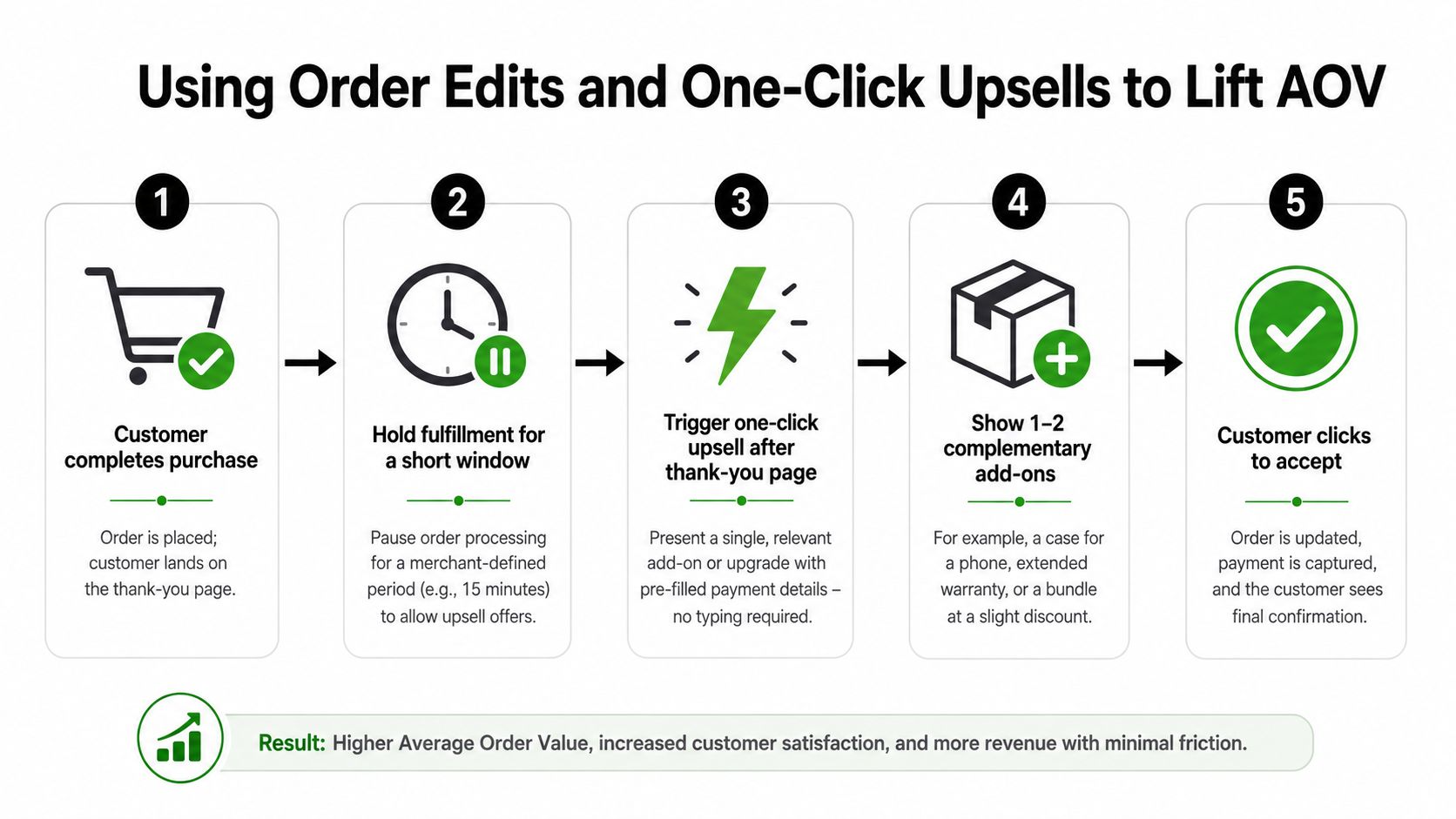
A practical flow looks like this:
- Render the offer after the thank-you page loads. Present one relevant add-on, with a second option only when the product relationship is clear.
- Hold fulfillment for a merchant-defined window. The warehouse shouldn't pick an order while the customer is still changing it.
- Keep the offer proportionate to the original cart. A modest complement is easier to accept than a second major purchase.
- Write the change back to the existing order. The customer shouldn't need to create a new checkout session or re-enter payment details.
- Invoice the difference through Shopify. The additional amount should settle through Shopify's order and payment workflow.
Build guardrails before launch
The offer is only safe when operations can absorb it. Set a cap on total add-on weight if shipping cost or warehouse handling changes materially with extra items. Define a maximum 60-minute fulfillment hold so the warehouse doesn't wait indefinitely. Exclude orders shipping to fulfillment-only zones when the logistics process can't support changes.
Also define what happens if the customer closes the browser midway through the add-on. The safest fallback is to cancel the edit cleanly and leave the original order intact. Don't leave an order in an ambiguous state that support has to repair manually.
Order edits are particularly useful for catalogs with obvious complements, such as accessories, protection products, replenishment items, or size corrections. They're less suitable when inventory is volatile, fulfillment begins immediately, or the add-on requires a new delivery promise. In those cases, a front-end bundle or cart recommendation may be easier to manage.
Learn more about one-click upsell apps for Shopify when comparing tools. Mayra Apps, for example, provides self-serve order edits, one-click upsells, Shopify-based invoicing for additions, fulfillment holds during active edits, and merchant-defined eligibility rules. Treat those capabilities as workflow requirements to evaluate, not as a substitute for testing the offer itself.
The measurement should separate accepted add-ons from incremental revenue. Compare exposed orders with a suitable control, review margin after shipping and handling, and watch whether support tickets or fulfillment exceptions increase. A post-purchase offer wins when it adds profitable value without damaging the original order or the warehouse process.
Matching AOV Tactics to Your Store Profile
A tactic should follow the basket baseline, not the other way around. One-click upsells, bundles, quantity breaks, and post-purchase offers solve different problems, and each introduces a different type of friction.
For a store below $85 AOV, the first opportunity is usually a low-friction path to a second item. A credible shipping threshold or one anchor upsell can give shoppers a clear next step. Don't introduce a large bundle builder if customers haven't shown that they want multiple products together.
Stores between $150 and $400 often have enough basket value for a hero-SKU bundle to make sense. Anchor the bundle around a product customers already understand, then add a complement that improves the use case. The trade-off is discount control. If the bundle merely discounts the hero product, it may shift existing demand rather than create a better order.
Above $600, post-purchase offers can be more attractive for repeat customers than front-end persuasion. The buyer has already committed, and a relevant edit or add-on can extend the order without making the initial decision heavier. That doesn't mean every high-AOV store should use post-purchase offers. Complex fulfillment, high return risk, and limited stock can make the operational cost unacceptable.
Compare the available mechanics
| Store AOV baseline | Best primary tactic | Secondary tactic | Tactic to avoid |
|---|---|---|---|
| Below $85 | Attainable shipping threshold or one anchor upsell | Simple complementary item recommendation | Large forced bundles with unclear value |
| $85 to $150 | Relevant cart add-on | Small starter bundle | Broad discounting across every order |
| $150 to $400 | Hero-SKU bundle | Post-purchase complement | Bundles that discount products buyers already choose |
| Above $600 | Segmented post-purchase offer | Customer-specific order edit | Blanket front-end incentives that add decision friction |
Traffic profile changes the decision. New paid visitors often need clarity and reassurance, while returning visitors may already understand the catalog and accept a more specific add-on. Product breadth matters too. Quantity breaks can work when stock supports repeat units, but they're a poor fit for long-tail SKUs with constrained inventory or products customers rarely buy in multiples.
Gift-heavy catalogs create another failure point. A bundle can contain logically related items, yet the perceived saving may not register when shoppers are choosing individual gifts for different people. In that case, a flexible threshold or post-purchase add-on may be more natural.
Retention should inform the choice. Stores building a repeat customer base can use Shopify customer retention strategies to understand whether a lower first-order AOV is acceptable because later purchases carry the growth. A larger first basket isn't always the right objective if it makes the first purchase harder to complete.
Tracking AOV the Right Way in Shopify Reports
A storewide AOV report can tell you that something changed. It can't reliably tell you what caused the change. To attribute an AOV lift, tag the traffic, customer status, product context, and offer exposure before the experiment starts.
Begin with traffic-source tracking. Use consistent UTM parameters on bundle landing pages, upsell links, campaign links, and other offer-specific entry points. Then create an AOV-by-source view that separates the relevant cohorts instead of blending them into direct, paid, email, and organic totals.
Build useful cuts in Shopify analytics
Use a customer segment for first-time and repeat buyers. Shopify customer tags can help identify returning customers, but the rule must be applied consistently. A customer who accepts an upsell after the first purchase belongs in the exposed cohort for that offer, not in a broad returning-customer comparison that hides the interaction.
Separate post-purchase edits from front-end checkout offers in the sales-by-traffic-referrer report. They convert under different conditions, so combining them can make a successful post-purchase workflow look weak or make a front-end offer appear stronger than it is.
Track each test with a simple event structure:
- Exposure: Record who saw the offer, not just who accepted it.
- Acceptance: Identify whether the customer added the recommended item, changed quantity, or accepted a bundle.
- Order result: Compare total order value, item count, discount, and refund behavior.
- Margin result: Include product margin, shipping, handling, and any offer-specific cost.
- Customer outcome: Watch repeat behavior and support contacts where the offer changes the post-purchase experience.
The two numbers that matter most are incremental AOV per session exposed to the tactic and gross margin per exposed session after the offer. A higher gross order value can still be a poor result if it requires expensive fulfillment or heavy discounting. Don't judge the tactic from accepted orders alone.
Measurement standard: If you can't identify exposure, you can't distinguish an incremental lift from an order that would have happened anyway.
Use the export view to rerun the same cuts weekly. Keep the date range, order-value definition, exclusions, and segment rules stable. A recurring export is more valuable than an elaborate dashboard that nobody revisits.
Shopify analytics reporting and optimization can also help merchants review offer activity alongside order changes. Keep analytics labels clear about what's directly measured and what's estimated. The report should support a decision, such as scaling a bundle for returning customers or removing an upsell that raises AOV but lowers margin.
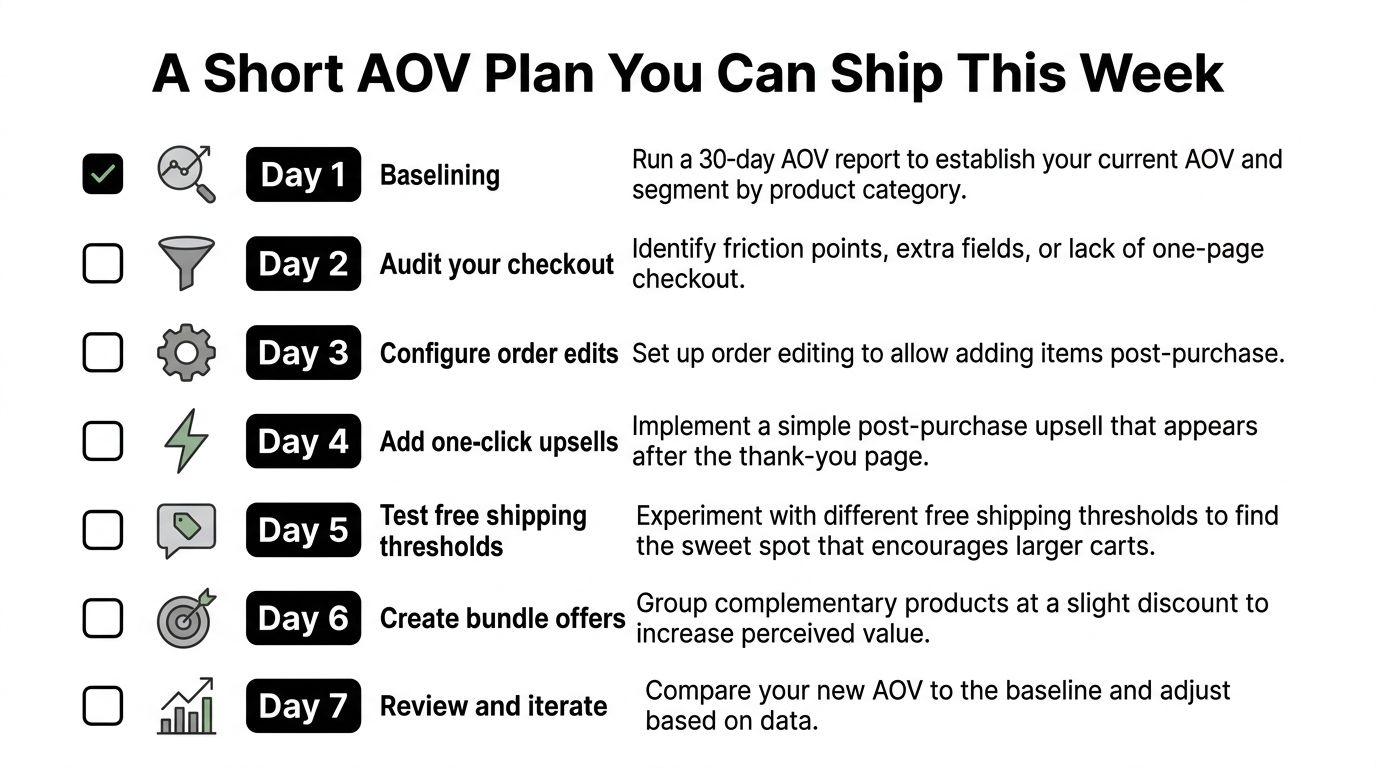
A Short AOV Plan You Can Ship This Week
A useful AOV plan starts with the store's current basket, not a generic benchmark. Pull a 30-day AOV report by traffic source, then separate first-time and returning customers. The baseline should show where the money comes from before you decide whether the next move is a post-purchase offer, a bundle, or a shipping threshold.
Use the baseline to choose the test
For stores under $100 AOV, start with a post-purchase one-click upsell that complements the most common hero product. Stores between $100 and $300 can test order-edit add-ons alongside one best-margin bundle. Stores above $300 can explore segmented shipping thresholds, provided the threshold is attainable and the margin model supports it.
Then ship the work in this sequence:
- Day 1, baseline: Export the 30-day report and segment by source, customer status, and product category.
- Day 2, configure offers: Install or configure the upsell workflow and write three relevant offers. Keep only the strongest candidate live.
- Day 3, build one bundle: Use a hero SKU and one complementary product. Check the discount and fulfillment implications before publishing.
- Day 4, set order edits: Configure the edit rule and a 30-minute fulfillment hold so the warehouse has a clear operating window.
- Day 5, segment shipping: Apply different thresholds where the customer profile and margin structure justify it. Don't default to one storewide rule.
- Day 6, QA tracking: Test the checkout, thank-you page, order status page, invoices, event labels, and fallback behavior.
- Day 7, launch and monitor: Watch conversion rate, exposed-session margin, order exceptions, and support contacts. Schedule a 14-day re-review rather than judging the first spike.
AOV is a secondary guardrail. Revenue per visitor is the north star because it captures the relationship between traffic, conversion, and basket value. If AOV rises while fewer visitors purchase, the experiment needs to be revised or removed.
Mayra Apps gives Shopify merchants tools for self-serve order edits, fulfillment holds, Shopify-based settlement of added items, and one-click upsells on the order status page. Visit Mayra Apps to evaluate whether its post-purchase workflow fits your catalog, fulfillment rules, and Shopify average order value testing plan.