
A customer orders a medium hoodie at 11 pm and emails at breakfast asking for a large instead. Two floors below, someone has already scanned the medium into a tote. Whether that request becomes a two-minute fix or a return, a refund and an open support thread depends on one thing: where the order sits in your fulfillment chain when the email lands.
Every stage in that chain is a boundary where a mistake can still be corrected cheaply, and every stage after it makes the same mistake cost more. Read the process that way and the odd parts start to make sense. Why a validation step holds an order that looks perfectly fine. Why packing stations weigh boxes. Why some merchants stop accepting edits at a specific hour and mean it.
What follows walks one order from checkout to doorstep, stage by stage, with the accuracy numbers that show what each control is worth and the fixes that belong at each boundary.
Table of Contents
- Order Fulfillment Stages at a Glance
- How Orders Enter and Get Validated
- Picking and Packing Without Errors
- Shipping and Delivery to the Customer
- Handling Changes, Holds and Exceptions Before Dispatch
- Measuring Fulfillment Performance Across Stages
- Decide Which Fulfillment Stage to Fix First
Order Fulfillment Stages at a Glance
That hoodie passes through six stages, each with a different owner, a different tool and a different way of catching mistakes before the customer sees them.
The chain was assembled piece by piece. Mail-order catalogs proved demand could be captured without a storefront, parcel conveyors and containerized freight made volume movable, and electronic shopping and secure web transactions moved ordering onto screens, as SC Logistics' history of order fulfillment traces. Every milestone solved the same problem: making demand, inventory and transport agree.
That problem is now mostly an online one. In Supply Chain Management Review's 2025 warehouse and DC operations survey, 44% of surveyed warehouse and distribution-center operators supported e-commerce fulfillment, up from 25% in 2024. Online orders arrive one line at a time instead of by the pallet, which pushes pressure toward the early stages and away from the loading dock.
| Stage | What Happens | Typical Owner | Control Point |
|---|---|---|---|
| Order receipt | Order arrives from storefront, marketplace or phone and is recorded | Order management system | Duplicate check and payment status |
| Validation and allocation | Items, variants, address and stock are checked and reserved | Inventory or order management | Stock reservation and address validation |
| Picking | Items are collected from bins according to the pick list | Warehouse team | Barcode scan at pick |
| Packing | Items are protected, boxed and labeled | Packing station | Item-to-order check and weight check |
| Shipping | Carrier is assigned, label printed and parcel handed over | Shipping team | Carrier cutoff and manifest |
| Delivery and close-out | Carrier delivers, tracking updates and the order closes | Carrier and customer support | Tracking events and exception alerts |
Read the Control Point column as the cheapest repair point for that stage. A bad address is a quick correction while the order is still data. The same address becomes a failed delivery, a returned parcel and a support ticket after close-out.
Where mistakes get expensive
Stages overlap in practice. Allocation for order 412 runs while order 411 is being picked, and an exception can send an order backward a step or two.
Cost does not overlap. An error caught at receipt costs a data update. Caught after picking, it costs a tote pulled from a cart, a re-scan and a reopened slot in the wave. Caught after packing, it costs repacking, a new label, a call to the carrier and, often, a new promised date. After shipping, the fix usually means paying for transport twice.
Carrier handoff has its own boundary: the departure time. A parcel that misses the line-haul does not arrive a little later; it misses the whole schedule it was promised against. Regional operators make that constraint visible in overnight box-truck execution in Minnesota, where the route only works if freight is ready before the truck is.
Find the row in the table where your operation has the most trouble. That is the boundary where corrections are still cheap, and it tells you which stage the rest of this article will matter most for.
How Orders Enter and Get Validated
An order doesn't arrive as a tidy document. It arrives as fields: a customer record, three line items with variant IDs, an address typed into a form, a payment status, and a channel tag that says whether it came from your storefront, a marketplace or a phone call someone keyed in by hand. The quality of those fields decides how the next five stages go.
That's why a sound operation runs a validation pass before anything is picked. The system asks a fixed set of questions, and each one either passes the order or holds it with a reason code, so nothing unusable reaches a pick list.
Four questions the system answers before a pick list exists
- Is the payment authorized or captured? An order that hasn't cleared payment has no business reserving stock. Authorization holds the funds, capture moves them. Orders parked in "pending" for a day block inventory from customers who would have paid.
- Is this a duplicate? Refresh a checkout page at the wrong moment and you can create two identical orders. A check on customer, items and total inside a short window catches most of them before the warehouse picks twice.
- Will the carrier accept the address? Address validation against carrier data catches a missing apartment number, a misspelled street or a ZIP code that doesn't match the city while a human can still fix it.
- Does each SKU match the catalog? Variant IDs go stale when a product is rebuilt or a marketplace mapping drifts. A SKU that no longer maps to a real bin is a pick line that fails on the floor.
Then comes allocation, which is where many picture an order starting. Say the order is for three 8 oz candles. Two sit in bin A-14 and one in B-03. Allocation reserves all three, splits the reservation across two bins and generates two pick lines, one per location. If A-14 turns out to hold only one candle, a short pick is flagged right there, and the order either backorders the remainder or ships partial instead of letting a packer discover the gap with the box already taped.
Intake failures are dull and expensive. A wrong variant reaches the customer as a return. An incomplete address reaches the carrier as a failed delivery attempt. Stock sold after it was already committed to another order reaches the pick list as an empty bin. All three are cheap to fix at intake and costly everywhere else.
Practical rule: an order should never reach the warehouse in a state a picker can't act on. If the address, the variant or the stock is in doubt, hold the order with a reason code and message the customer while it's still separable.
Picking and Packing Without Errors
A picker's job looks simple and isn't. The list says which bin, the bin holds the item, the tote receives it. What makes picking the stage where fulfillment quality is won or lost is arithmetic, because tiny error rates multiply into real volume.
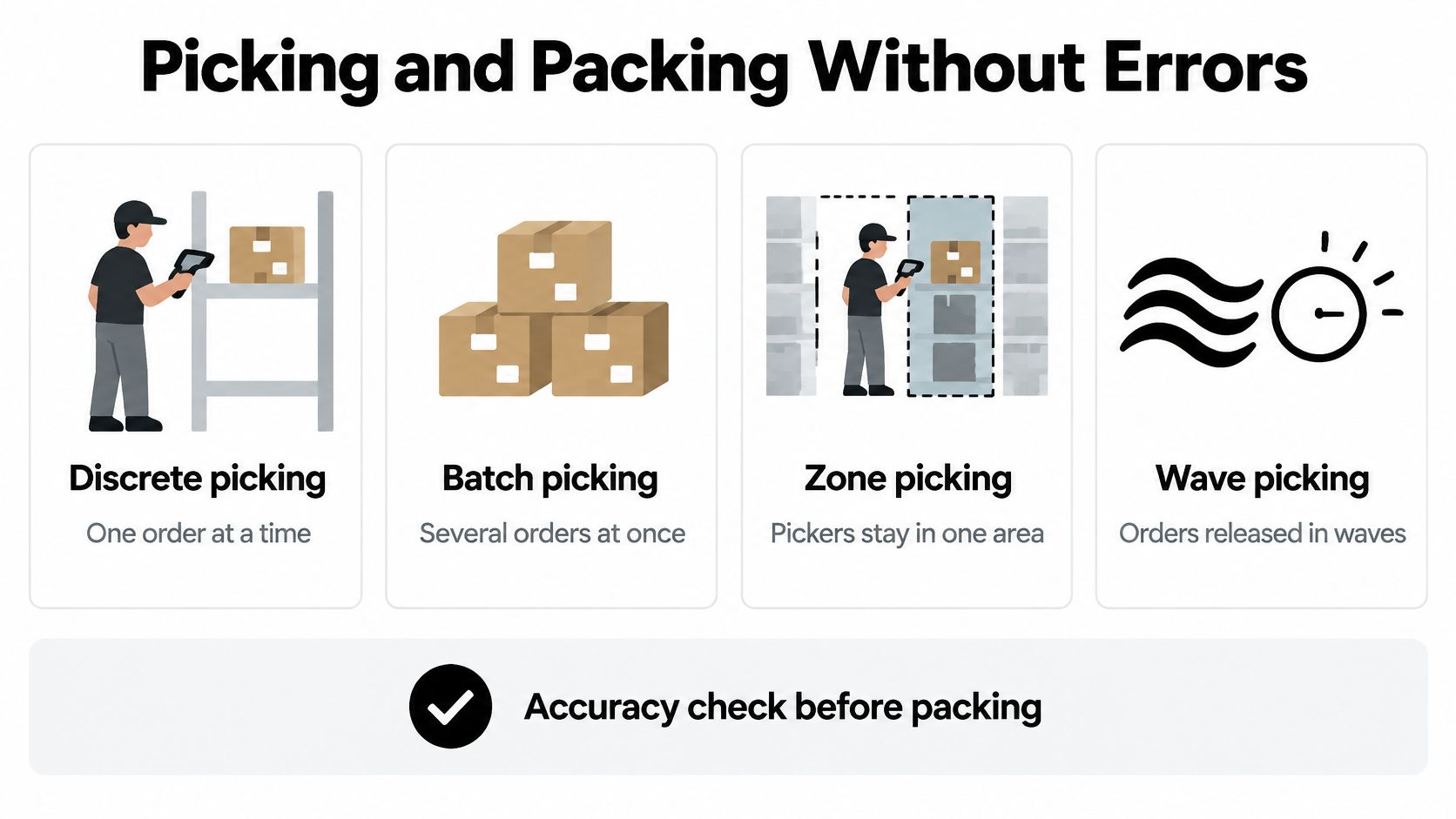
The 2025 Warehousing Education and Research Council DC Measures Report benchmarks put best-in-class order-picking accuracy at 99.68% or higher, with typical performance around 97% to 99%. On 100,000 orders, the best-in-class figure still leaves about 320 orders with a picking error. At 97%, the same volume produces about 3,000. Same building, same people, roughly tenfold the recovery work.
Match the method to your volume
| Method | How It Works | Best Fit |
|---|---|---|
| Discrete picking | One picker collects one order at a time | Low volume and few lines per order |
| Batch picking | One pass collects several orders at once | Many small orders with overlapping SKUs |
| Zone picking | Each picker stays in one area and passes totes along | Large warehouses with wide bin spread |
| Wave picking | Picks are released on a schedule in timed groups | Fixed carrier cutoffs and peak periods |
The method matters less than the discipline around it. Discrete picking is fine for a store shipping 40 orders a day with five lines each, and it collapses when 2,000 small orders arrive, where a single batch pass can replace dozens of laps. Zone picking earns its complexity when the building is long enough that walking eats the shift. Wave picking exists because carriers run on schedules, and it's the method that survives a spike: ShipBob reported a 40% year-over-year increase in orders fulfilled from Thanksgiving through Cyber Monday during the 2024 peak season, per its 2025 State of E-commerce Fulfillment report announcement.
Verification is cheaper than recovery
Every scan and every weight check buys down the error rate. A barcode scan at the pick refuses the wrong item before it enters the tote. Pick-to-light confirms the hand went to the right shelf. A weight check at the packing station compares the sealed box against the expected weight of the order: a 1.4 kg order reading 0.9 kg is missing something, and a 2.2 kg reading has an extra item in it.
Systems matter as much as habits. Operations running a warehouse-management system report roughly 99.5% fulfillment accuracy, against about 92% without one, according to the same WERC benchmarking summary. On 10,000 monthly orders, that's approximately 50 inaccurate orders versus 800, a gap of 750 every month.
Close the loop with one week of your own data. Export the errors, then sort them by type: wrong item, wrong quantity, wrong variant. Each type points at a different fix, so a wrong-item cluster means slotting and scan discipline, while a wrong-quantity cluster means the pick list isn't showing unit counts clearly enough.
Shipping and Delivery to the Customer
Packing ends when the box is sealed. Shipping starts with a choice that locks your delivery promise for the next two days.
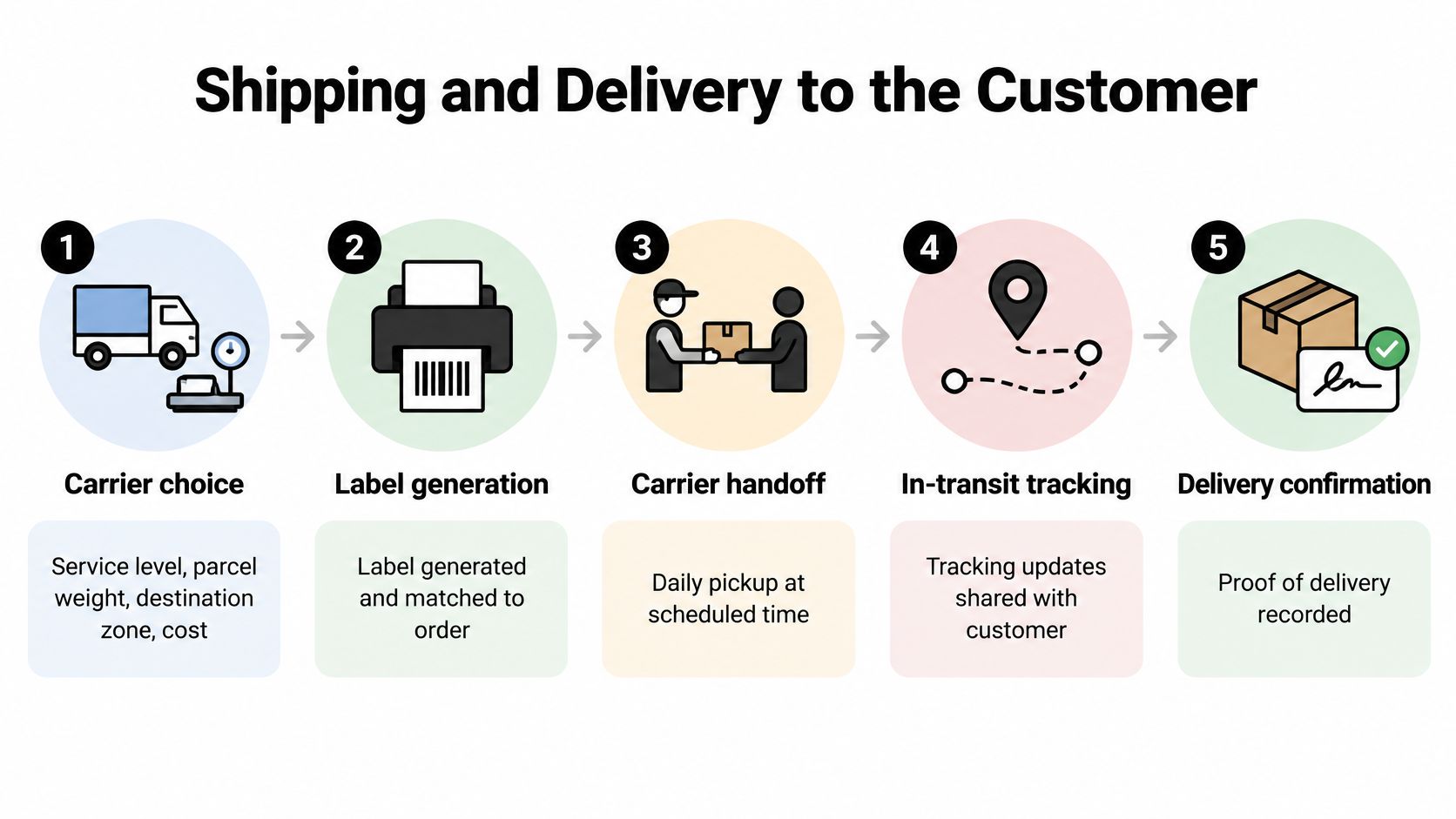
The handoff, step by step
- Carrier choice. Service level, parcel weight, destination zone and cost decide the carrier. A 0.4 kg mailer to a nearby zone and a 12 kg carton to the coast don't belong on the same service.
- Label generation. The label comes from the order record and is matched back to it, so a tracking number attaches to the right customer instead of a lookalike parcel.
- Cutoff and manifest. The carrier's daily cutoff is a hard line. The manifest confirms which parcels were scanned at pickup, and that scan is what starts tracking. A parcel on the dock but not on the manifest is a parcel your customer can't see.
- In-transit tracking. Events flow back to your store and out to the customer. A clear order tracking page showing the same events your support team sees prevents most "where is my order" tickets before they're opened.
- Delivery confirmation. Proof of delivery closes the order and starts the returns clock if something's wrong.
The promise, not the speed
Consumers have been telling merchants for years that the date matters more than the velocity. 90% of U.S. consumers are willing to wait two or three days for a delivery, particularly to avoid shipping fees, and on-time delivery matters more to satisfaction than maximum speed, according to McKinsey's research on what U.S. consumers want from e-commerce deliveries. About half check order status to confirm a shipment is still on schedule, and roughly 85% don't consider a delivery unacceptably late if it arrives within one or two days of the promised date.
Build the promise from the cutoff. Take the carrier's pickup time, add transit for the zone, then add your internal handling time. Best-in-class facilities clear an order internally in under about 3.36 hours, per distribution benchmark figures compiled by WareDock, and that budget has to be absorbed before transit begins. The fastest possible transit is a marketing number, not a promise you can keep in a peak week.
Exceptions belong in the same flow. A failed attempt, a damaged parcel and a refused address all need a rule attached to them, and only two of the three justify a proactive message plus a reshipment decision. Then compare promised dates against actual delivery dates for one month, by carrier and by zone. That single report tells you whether your promises are honest or merely optimistic.
Handling Changes, Holds and Exceptions Before Dispatch
Exception handling is where automation stops and judgment starts, which is why it still looks like a person at a desk with a queue. 52% of companies reported that their order-fulfillment operations were mostly or entirely manual, according to Modern Materials Handling's 2025 automation survey of 139 materials-handling professionals. The standard path can be automated. The exception path still walks through someone.
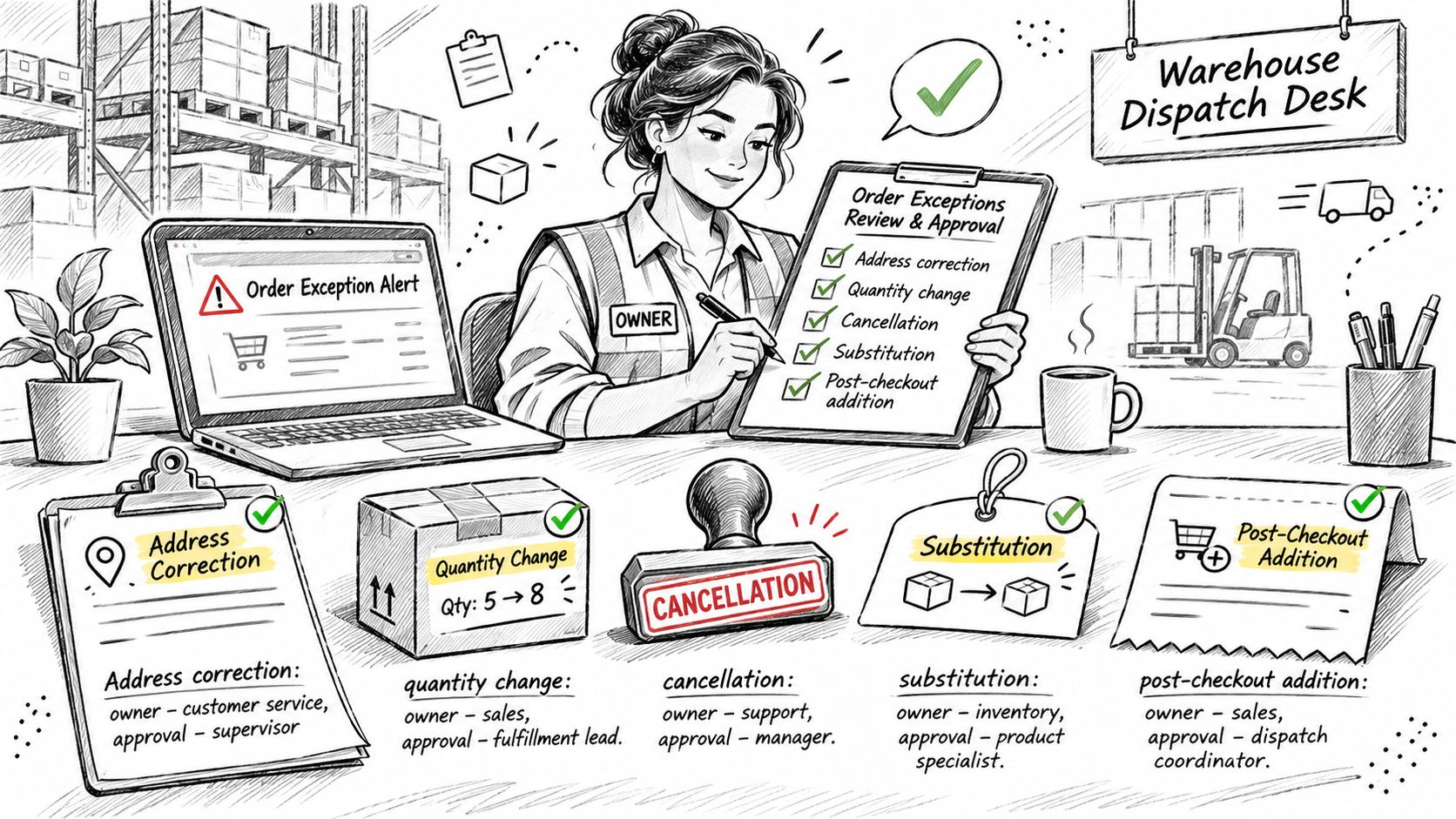
Exceptions that arrive after checkout
- Address corrections. Owner: support. No approval threshold for a normal order, but once the parcel is manifested the fix belongs to the carrier, not the warehouse.
- Quantity changes. Owner: order management. An increase above a set order value needs approval, because it changes what the customer owes.
- Cancellations. Owner: support, with an approval limit. The whole goal is to intercept the order before pick release.
- Substitutions. Owner: merchandising plus support. Offer one only after the original SKU is confirmed unavailable, never as a default.
- Post-checkout additions. Owner: sales or support. Treat it as a change to the existing order, not a second order, so payment and shipping stay attached to one record.
Whatever the type, the mechanism is the same: a fulfillment hold. While a change is being processed the order is frozen, so nothing ships mid-change, and the hold lifts the moment the change is completed or abandoned. Without that pause you get the worst available outcome, half a change and a parcel on a truck.
The edit boundary sits at the pick
WERC distribution-center benchmarking shows that even a strong picking operation generates about 3.2 errors per 1,000 picked orders or lines, per WERC distribution-center benchmarking, depending on how the metric is defined. That number is the reason an edit window has to close somewhere. Every late change consumes part of the error margin the operation has already budgeted.
The practical line runs through picking. An address or SKU change before the pick costs a system transaction. The same change after the pick means retrieving a tote from a cart or a shelf, repacking, relabeling and calling the carrier. Three controls make the boundary enforceable: version the order so a picker works from one instruction set, block simultaneous edits from two devices, and write an immutable timeline event for every change.
Shopify merchants have a native option here. Mayra ‑ Order Edit & Cancel holds fulfillment while a customer edits an eligible order, releases the hold as soon as the edit is completed or abandoned, and doesn't allow edits on fulfilled, cancelled or archived orders. For the rule set behind a workable editing policy, see this guide to order modification on Shopify.
Before your team handles another exception this week, confirm four things for each type on the list above: who owns it, what value needs approval, whether it triggers a hold, and where the audit record lands.
Measuring Fulfillment Performance Across Stages
Measure the handoffs, because each one is a risk boundary. A wrong address caught during validation costs a correction. The same address found after carrier handoff costs a reshipment, a refund conversation and a broken delivery promise.
| Metric | Target | What It Signals |
|---|---|---|
| On-time shipments | Orders leave on the promised date | Cutoff and promised-date math are holding |
| On-time ready-to-ship | Parcels are ready before carrier pickup | Pack completion keeps pace with pickup windows |
| Inventory-location accuracy | Stock sits where the system says it does | Picks start from trustworthy locations |
| Dock-to-stock cycle time | Received goods become sellable before backlog forms | Receiving does not starve future orders |
| Internal order-cycle time | Orders clear the building without queuing | Work flows from release to handoff cleanly |
Trace a late order backward
Record a timestamp at every handoff: order creation, edit initiation, edit confirmation, payment authorization, pick release, pack completion, carrier handoff and delivery. Compare the gaps between them, then watch the slow tail rather than the average. The average hides the orders that create refund requests and support tickets.
One alert earns its setup time immediately: edit-to-release delay approaching your facility's normal internal cycle time. That means customer changes are competing with picking capacity and are close to costing a promised date. While a change is open, reserve stock and revalidate availability before confirmation, and reconcile any extra charge or refund against the original order rather than creating a separate transaction.
Keep the dashboard honest by separating categories: recovered orders, saved cancellations, late edits, fulfillment holds and downstream exceptions. Estimated ticket savings belong away from verified operational results. For a wider reporting set to compare alongside these stage measures, PledgeBox's fulfillment metrics breakdown covers the measurement side in more depth.
Run a narrow monthly review. Pick the metric that moved most, trace it to the stage where it started, and assign one fix with an owner and a date.
Decide Which Fulfillment Stage to Fix First
The stage to fix is the one where problems start, not the one where someone noticed. Wrong items arriving at doorsteps point at pick and pack verification. Parcels leaving the dock after the promised date point at cutoffs and promised-date math. Changes and cancellations that derail dispatch point at edit windows, holds and approval thresholds.
- Export 30 days of orders with their exception notes, dispute reasons and refunds.
- Tag each problem with its origin stage, not the stage that reported it.
- Rank the stages by number of problems multiplied by cost per problem.
- Fix the top stage, then recheck the matching benchmark metric after two weeks.
Keep the record attached to the order itself, because that's what makes step one possible. Every change a customer makes through our order editing app is written to the original Shopify order, and the price difference is shown before the customer confirms, so the Shopify admin stays the source of truth and the export already contains the audit trail.
If you're deciding how much of the exception flow to automate, e-commerce fulfillment automation covers where the boundary between self-service and manual approval belongs.
This week's action is small and specific: pull the 30-day export, tag the top three exception types by origin stage, and fix the one with the highest count multiplied by cost. That beats fixing whatever the last complaint was about.
Order changes are exactly the kind of exception that gets expensive when it's handled late, and Mayra ‑ Order Edit & Cancel exists to keep it cheap. Customers change quantities, swap variants, correct an address, add an item or cancel before fulfillment, and the order is held while they do it so nothing ships mid-change. Every change lands on the original Shopify order with the price difference shown before confirmation. Visit Mayra ‑ Order Edit & Cancel to turn customer-managed edits into a controlled stage of your fulfillment process rather than a support queue.